
1. Nhanganyaya
Ndatenda nekutengaasing the JVC XVN330B DVD Video Player. This player is designed to provide high-quality video and audio playback from various disc formats. Key features include Digital Direct Progressive Scan output, 192kHz/24-bit audio D/A converter, 10-bit/54MHz video D/A converter, and multi-format compatibility (DVD-R/RW, DVD+R/RW, CD-R/RW, VCD/SVCD, MP3, and JPEG). This manual provides essential information for the safe and efficient operation of your device.
2. Safety Information
- Kunobva Simba: Connect the player only to the specified power supply voltage.
- Kufefetedza Iva nechokwadi chekuti mhepo inofema yakakwana yakatenderedza mudziyo. Usavhare maburi emhepo.
- Mvura uye Unyoro: Usafumure chikwata kune mvura kana hunyoro. Usaise zvinhu zvakazadzwa nezvinwiwa payuniti.
- Kupisa: Chengeta mudziyo uyu kure nezvinhu zvinopisa zvakaita sema radiator, ma heat registers, mastove, kana zvimwe zvinhu (kusanganisira amplifiers) zvinoburitsa kupisa.
- Sevhisi: Usaedze kushandira chigadzirwa ichi iwe pachako. Tumira masevhisi ese kuvashandi vanokwanisa.
- Kubata Disc: Handle discs by their edges. Avoid touching the playback surface.
3. Package Zviri mukati
Tarisa kuti zvinhu zvese zvakanyorwa pazasi zvinosanganisirwa mupakeji:
- JVC XVN330B DVD Video Player
- Remote Control (nemabhatiri)
- A/V Cable (Composite)
- Operating Instructions (iri bhuku)
4. Chigadzirwa Pamusoroview
The JVC XVN330B DVD Video Player features a slim design and a black finish.
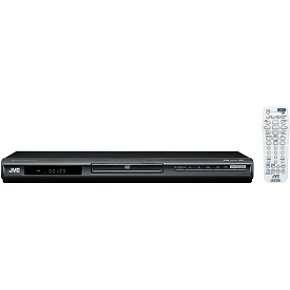
Mufananidzo 4.1: Mberi view of the JVC XVN330B DVD Video Player. This image shows the compact, black chassis with the disc tray, power button, and basic playback controls on the front panel.
4.1 Front Panel Controls
- Bhatani reSimba: Inobatidza kana kudzima mutambi.
- Disc Tray: For inserting DVDs and CDs.
- Bhatani reKuvhura/Kuvhara: Inovhura nekuvhara disc tray.
- Bhatani reTamba/Kumbomira: Inotanga kana kumbomira kutamba.
- Mira Bhatani: Inomira kutamba.
- Skip Buttons (Forward/Backward): Skips tracks or chapters.
- Ratidza: Shows playback information.
4.2 Rear Panel Connections
- Component Video Output (Y, Pb, Pr): For high-quality video connection to compatible TVs.
- Kuburitswa kweVhidhiyo yeS: For improved video quality over composite.
- Kuburitswa kweVhidhiyo Yakasanganiswa (Yellow RCA): Standard video connection.
- Analog Audio Output (Red/White RCA): For stereo audio connection.
- Coaxial Digital Audio Output: For digital audio connection to a receiver or amplifier.
- AC Simba Inzwa Zvinotaurwa: Connects to the power cord.
4.3 Remote Kudzora
The included remote control provides full functionality for operating the DVD player from a distance. It includes buttons for power, disc tray open/close, playback controls (play, pause, stop, fast forward, rewind, skip), menu navigation, volume, and special features. Ensure batteries are correctly inserted.
5. Setup
5.1 Kubatanidza neTerevhizheni
Choose one of the following connection methods based on your television's available inputs for the best possible picture quality.
- Component Video Connection (Best Quality):
Connect the Component Video Output (Y, Pb, Pr) jacks on the DVD player to the corresponding Component Video Input jacks on your TV using a component video cable (not included). Ensure colors (green, blue, red) match.
- S-Video Connection (Better Quality):
Connect the S-Video Output jack on the DVD player to the S-Video Input jack on your TV using an S-Video cable (not included).
- Composite Video Connection (Standard Quality):
Connect the Composite Video Output (yellow RCA) jack on the DVD player to the Video Input (yellow RCA) jack on your TV using the supplied A/V cable.
5.2 Kubatanidza Audio
Connect the audio outputs from the DVD player to your TV or an audio receiver/amplifier.
- Analog Audio Connection:
Connect the Analog Audio Output (red and white RCA) jacks on the DVD player to the corresponding Audio Input jacks on your TV or audio receiver using the supplied A/V cable (for stereo sound).
- Coaxial Digital Audio Connection:
For multi-channel surround sound, connect the Coaxial Digital Audio Output jack on the DVD player to a Coaxial Digital Audio Input on your compatible audio receiver/amplifier using a coaxial digital audio cable (not included).
5.3 Simba Connection
After all video and audio connections are made, plug the AC power cord into the AC power input on the rear of the DVD player, then plug the other end into a wall outlet.
6. Operating Instructions
6.1 Basic Disc Playback
- Press the SIMBA bhatani rekubatidza mutambi.
- Press the Vhura/VHARA bhatani kuvhura iyo disc tray.
- Place a DVD or CD disc onto the disc tray with the label side facing up.
- Press the Vhura/VHARA button again to close the disc tray. The player will automatically begin playback or display the disc menu.
- Shandisa mabhatani ekufambisa eremote control uye PINDA to select options from the disc menu.
- Panguva yekutamba, shandisa TAMBA/KUMIRA, MIRA, KUSIRIRA MBERI, REWIND,uye SKIP mabhatani sezvinodiwa.
6.2 Playing MP3/JPEG Discs
When an MP3 or JPEG disc is inserted, a menu displaying the files and folders will appear.
- Use the navigation buttons on the remote to select the desired file kana folda.
- Press PINDA to open a folder or start playback of a selected file.
- For JPEG slideshows, you can select from 11 visual effects and save an image as a custom startup screen.
6.3 Hunhu Hunokosha
- Progressive Scan: Provides a smoother, flicker-free picture when connected via component video to a compatible display. Ensure your TV is set to progressive scan mode if applicable.
- PAL Playback on NTSC TV: This player supports playback of PAL-formatted DVDs on NTSC televisions.
- Video Fine Processor: Offers 7 parameters, 2 presets, and 2 manual settings to adjust video output for personalized viewing. Access this feature through the player's setup menu.
- 10-Disc Memory: Allows you to bookmark a specific scene on up to 10 different discs, enabling easy return to that point later.
- Express Play Start: Reduces the time it takes for a disc to begin playing after insertion.
- Track Adjust: Helps ensure noise-free playback of burned discs.
7. Kuchengeta
7.1 Kuchenesa Chikamu
- Pukuta kunze kwechikwata nemucheka wakapfava, wakaoma.
- Usashandise abrasive cleaners, wax, kana zvinonyungudutsa sezvo zvinogona kukanganisa kupera.
- Ita shuwa kuti unit haina plug isati yachenesa.
7.2 Disc Care
- Hold discs by their edges to avoid fingerprints on the playing surface.
- Clean discs with a soft, lint-free cloth, wiping gently from the center outwards.
- Usashandise zvinonyungudutsa kana abrasive cleaners pamadisiki.
- Chengetedza madhisiki mumakesi avo kuti uvadzivirire kubva kuguruva nekukwenya.
8. Kugadzirisa matambudziko
If you experience problems with your DVD player, refer to the following table for possible solutions.
| Dambudziko | Zvinogona Kukonzera | Solution |
|---|---|---|
| Hapana simba | Tambo yemagetsi haina kubatana zvakachengeteka. | Iva nechokwadi chekuti tambo yemagetsi yakabatanidzwa zvakasimba mu player uye pamadziro. |
| Hapana mufananidzo | Incorrect video connection or TV input. | Check video cables are securely connected. Select the correct input source on your TV. |
| Hapana ruzha | Incorrect audio connection or TV/receiver volume. | Check audio cables. Increase volume on TV/receiver. Ensure correct audio input is selected. |
| Disc does not play / Freezes | Diski rakasviba, rakakweshwa, kana chimiro chisingaenderane. | Clean the disc. Try a different disc. Ensure the disc format is supported (DVD, CD, MP3, JPEG). |
| Remote control haisi kushanda | Batteries are dead or incorrectly inserted. Obstruction between remote and player. | Replace batteries. Ensure line of sight to the player's remote sensor. |
| Disc tray vibrates | Normal operation for some units, or disc not seated properly. | Ensure the disc is centered in the tray. This can sometimes be a characteristic of the unit's build. |
9. Zvinotsanangurwa
| Feature | Tsanangudzo |
|---|---|
| Model Name | XVN330B |
| Brand | JVC |
| Media Type | DVD, CD, DVD-R/RW, DVD+R/RW, CD-R/RW, VCD/SVCD, MP3, JPEG |
| Special Features | Progressive Scan, Digital Still (JPEG) Slideshow with Music, PAL playback on NTSC TV, Video Fine Processor, 10-Disc Memory, Express Play Start, Track Adjust |
| Video D/A Converter | 10-bit/54MHz |
| Audio D/A Converter | 192kHz/24-bit |
| Video Output | Component Video (Y, Pb, Pr), S-Video, Composite Video (RCA) |
| Audio Output | Analog Stereo (RCA), Coaxial Digital Audio |
| Inotsigirwa Audio Format | Dolby Digital (AC-3) |
| Color | Nhema |
| Item Weight | 5 Pounds (approx. 2.27 kg) |
| UPC | 046838026287 |
10. Warranty uye Tsigiro
JVC products are manufactured to high-quality standards and are backed by a limited warranty. For specific warranty terms and conditions, please refer to the warranty card included with your product or visit the official JVC website.
For technical assistance, customer service, or to inquire about repairs, please contact JVC customer support through their official channels. Contact information can typically be found on the JVC websaiti kana mune zvinyorwa zvakapihwa nekutenga kwako.
Rutsigiro rwepamhepo: www.jvc.com/support (This is a placeholder link, please refer to actual JVC support page)