
Product Overview
The NOCO Genius GEN3 On-Board Battery Charger is engineered for marine environments, featuring a fully-sealed, waterproof housing. It is designed for permanent installation and can be mounted directly onto various applications. Rated IP68 and NEMA 6P, this charger is capable of submersion up to 3 meters, ensuring continuous operation in extreme conditions.
The GEN3 incorporates advanced charging technology to detect, diagnose, recover, charge, and maintain all types of 12V lead-acid batteries, including Wet Cell (Flooded), Gel Cell, AGM, and Deep-Cycle batteries, without the risk of overcharging. It includes comprehensive safety protections against reverse polarity, sparks, short circuits, open circuits, and thermal runaway. The charger operates automatically, continuously monitoring battery status, shutting off when fully charged, and then maintaining the battery for optimal health. It is certified to UL1236, ISO 8846 Marine Standards, and US Coast Guard 33 CFR 183.410 for ignition protection.
Setup uye Installation
Kuisa Charger
Mount the GEN3 charger securely in a suitable location within your vessel. Ensure the mounting surface is stable and allows for proper cable routing. Although the unit is waterproof, selecting a location that minimizes direct exposure to harsh impacts or constant submersion is recommended for longevity. Use appropriate fasteners for marine environments.

Mufananidzo: Pamusoro-pasi view of the NOCO Genius GEN3 charger, highlighting the three charging banks and AC input port.
Wiring Connections
The GEN3 features three independent 10-amp charging banks. Connect each bank to a separate 12V battery. Carefully observe polarity: connect the positive (+) lead from a charger bank to the positive terminal of a battery, and the negative (-) lead to the negative terminal of the same battery. The charger's outputs are isolated, allowing each bank to charge its respective battery independently, even if batteries are part of a larger series or parallel system (e.g., for a 24V trolling motor, connect one bank to each 12V battery in the series). The charger leads are typically long enough for various installations, but extensions may be required for batteries located far from the main unit.
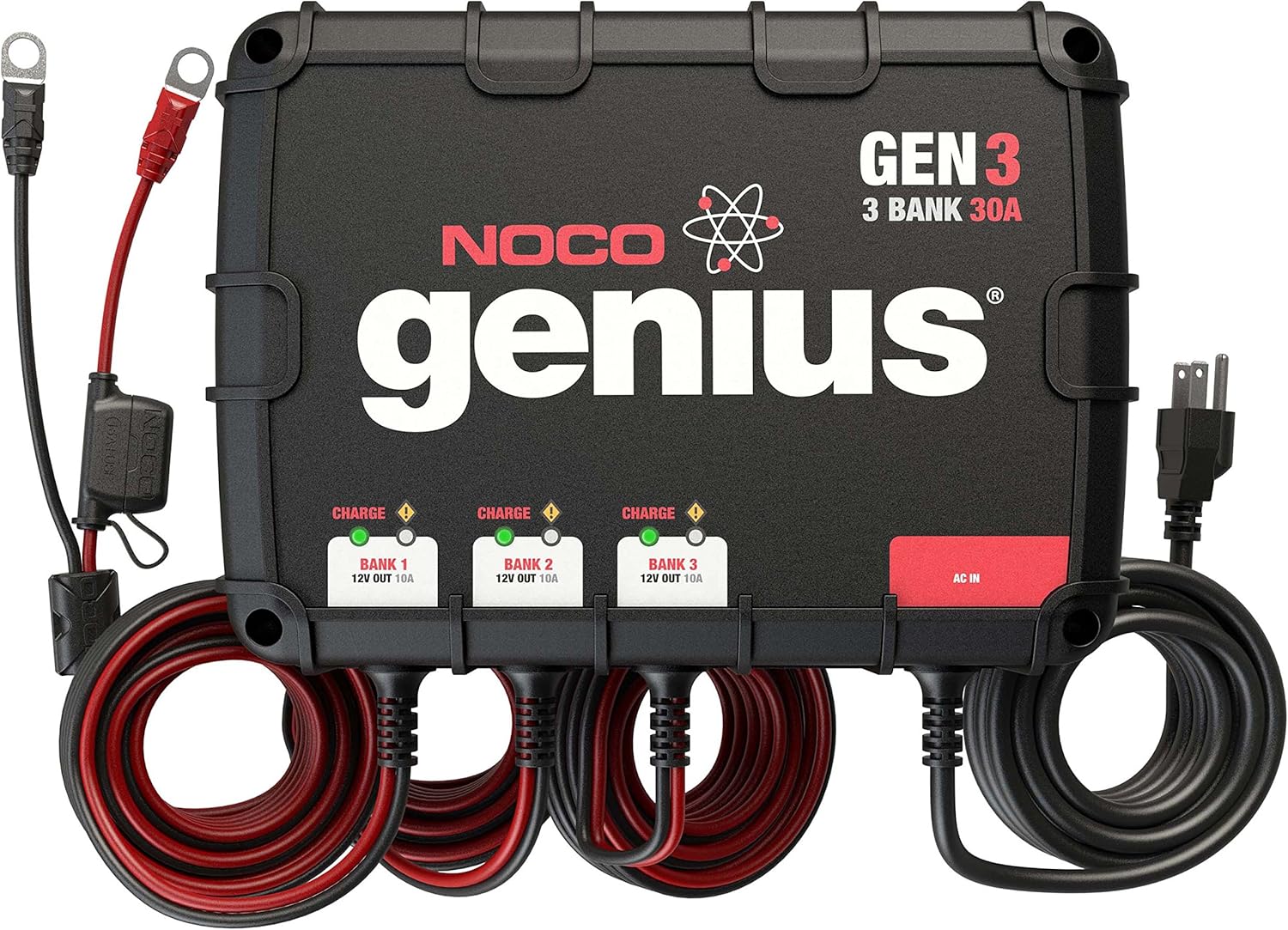
Image: The NOCO Genius GEN3 charger with all battery cables and the AC power cord fully extended, illustrating the complete wiring setup.
AC Simba Kubatana
Once all battery connections are secure, plug the AC input cord into a standard 120V AC electrical outlet. Ensure the outlet is functional and properly grounded.
Operating Instruction
Automatic Operation
The GEN3 charger is designed for fully automatic operation. Once connected to both batteries and AC power, it will automatically begin the charging process. There are no buttons or settings to adjust for standard charging.
Kuchaja Maitiro
The charger's internal processor detects the connected battery type and condition, then applies the most suitable charging algorithm. It includes a built-in battery desulfator function to recover worn-out batteries. The charging process is optimized for efficiency and battery longevity.
Indicator Mwenje
Each of the three charging banks has a dedicated indicator light to display its status:
- Solid Red Light: Indicates that the battery connected to that bank is currently charging.
- Solid Green Light: Indicates that the battery is fully charged and the unit has transitioned into maintenance mode, providing optimal battery care without overcharging.
- Flashing Light/No Light: May indicate an error condition, such as an open circuit, reverse polarity, or a battery that is too deeply discharged to initiate charging. Refer to the troubleshooting section.

Image: Close-up of the NOCO Genius GEN3 charger's indicator lights, showing the status for each bank.
Overcharge Protection
The GEN3 charger is equipped with advanced overcharge protection. It automatically stops charging when a battery reaches full capacity and then enters a safe, long-term maintenance mode to prevent damage from overcharging.
Maintenance
The NOCO Genius GEN3 charger requires minimal maintenance due to its rugged, sealed design. However, regular checks can ensure optimal performance and longevity:
- Cable Inspection: Periodically inspect all charging cables and the AC power cord for any signs of wear, cuts, or damage. Ensure all connections are clean and secure.
- Battery Terminals: Keep battery terminals clean and free of corrosion. Corroded terminals can impede charging efficiency.
- Hutsanana: Wipe down the exterior of the charger with a damp cloth to remove any dirt or debris. Do not use harsh chemicals or abrasive cleaners.
- Kufefetedza Ensure the charger's mounting location allows for adequate airflow, although the sealed design reduces reliance on external ventilation.
Kugadzirisa matambudziko
If you encounter issues with your NOCO Genius GEN3 charger, refer to the following common troubleshooting steps:
- Charger isiri kubatika:
- Ensure the AC power cord is fully and securely plugged into a live electrical outlet.
- Check your vessel's circuit breakers or shore power connection to ensure power is supplied to the outlet.
- Battery Not Charging (Red Light Not On):
- Verify that the positive (+) and negative (-) battery connections for that specific bank are secure and correctly connected to the battery terminals.
- Confirm that the battery is not completely dead (below 2V) or has an open circuit. Some deeply discharged batteries may require a minimal charge from another source to activate the GEN3's charging cycle.
- Charger Trips Circuit Breaker:
- If the charger consistently trips a circuit breaker, it may indicate an internal fault or short circuit. Disconnect the unit immediately and contact NOCO customer support for assistance.
- Only One or Two Banks Charging:
- Check the battery connections for the non-charging bank(s).
- Inspect the battery itself for the non-charging bank; the battery may be faulty or too deeply discharged.
If these steps do not resolve the issue, please contact NOCO customer support.
Zvinotsanangurwa
| Feature | Tsanangudzo |
|---|---|
| Model | GEN3 |
| Nhamba yeMabhangi | 3 |
| Total Ampage | 30 Amps (10 Amps pabhangi) |
| Kubuditsa Voltage | 12V DC (14.4 Volts peak) |
| Inoenderana Battery Types | Wet Cell (Flooded), Gel Cell, AGM, Deep-Cycle |
| Battery Capacity | 25-230 Ampmaawa (Ah) |
| Waterproof Rating | IP68, NEMA 6P (submersible up to 3 meters) |
| Safety Features | Spark-proof, Reverse Polarity, Thermal, Ignition, Overcharge Protection, Short Circuit, Open Circuit, Thermal Runaway |
| Certifications | UL1236, ISO 8846 Marine Standards, US Coast Guard 33 CFR 183.410 (Ignition Protection) |
| Dimensions (L x W x H) | 11.22" x 13.98" x 6.3" |
| Kurema | 16 pounds (256 ounces) |
Warranty Information
The NOCO Genius GEN3 On-Board Battery Charger is backed by a 5-year limited warranty. This warranty covers defects in material and workmanship under normal use. For specific terms, conditions, and to initiate a warranty claim, please refer to the official NOCO website or contact their customer support directly. Proof of purchase may be required.
Mutengi Support
For technical assistance, further troubleshooting, or any inquiries regarding your NOCO Genius GEN3 charger, please visit the official NOCO websaiti kana kubata timu yavo yekutsigira vatengi.
Official NOCO Store: NOCO Store on Amazon