
1. Nhanganyaya
This manual provides detailed instructions for the installation, operation, and maintenance of your Soundstream VL-11A Single DIN Digital Media Receiver. Please read this manual thoroughly before using the product to ensure proper operation and to prevent damage.
The Soundstream VL-11A is designed to provide high-quality audio playback from various digital sources, including USB drives, SD cards, and auxiliary input devices. It features a compact single DIN chassis for easy integration into most vehicle dashboards.
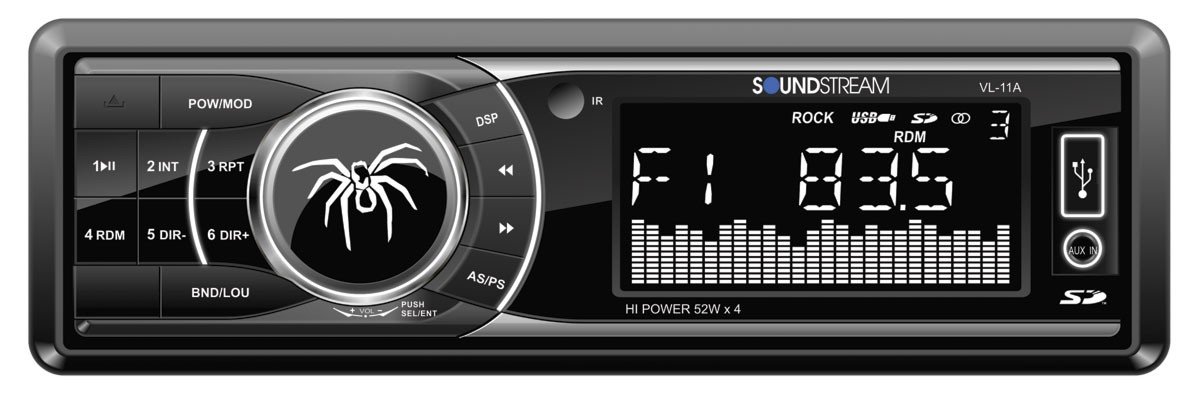
Mufananidzo 1.1: Mberi view of the Soundstream VL-11A Digital Media Receiver. This image displays the main unit with its control buttons and display panel.
2. Safety Information
Chengetedza anotevera ekuchengetedza ekudzivirira kudzivirira kukuvara kana kukuvadzwa kuyuniti:
- Usashandise chikwata nenzira inokutadzisa kutyaira. Nguva dzose koshesa kuchengetedzwa kwemigwagwa.
- Ensure proper wiring connections. Incorrect wiring can cause fire or damage to the vehicle's electrical system.
- Dzivisa kuisa chikamu kune unyoro kana kupisa kwakanyanya.
- Usaedze kuparadzanisa kana kugadzirisa iyo unit. Tumira masevhisi ese kuvashandi vanokwanisa.
- Chengeta vhoriyamu iri pamwero unokubvumira kunzwa ruzha rwemotokari dziri kunze.
3. Package Zviri mukati
Tarisa uone kuti zvinhu zvese zviripo mupakeji:
- Soundstream VL-11A Digital Media Receiver
- Wiring Sunga
- Zvishandiso zvekuisa (Sikuruu, Sleeve yekuisa)
- Remote Control
- Mushandisi Chinyorwa (gwaro iri)
4. Chigadzirwa Pamusoroview
4.1 Front Panel Controls
The front panel provides access to primary functions and media inputs.
Mufananidzo 4.1: Illustrative diagram of the VL-11A front panel. This image highlights the display, volume knob, mode button, track controls, USB port, SD card slot, and auxiliary input.
- Simba / Mode Bhatani: Press to turn on/off. Short press to cycle through audio sources (Radio, USB, SD, AUX).
- Vhoriyamu Knob: Rotate to adjust volume. Press to access audio settings (Bass, Treble, Balance, Fader, EQ).
- Ratidza: Shows current status, track information, and settings.
- USB Port: Batanidza USB midziyo yekuchengetera yekutamba midhiya.
- SD Card Slot: Isa makadhi eSD kuti utarise midhiya.
- AUX Input: Batanidza ekunze edhiyo zvishandiso kuburikidza ne3.5mm jack.
- Track/Tune Buttons: Navigate tracks or tune radio frequencies.
4.2 Kubatana Kwemashure
The rear of the unit contains the main wiring harness and preamp outputs.
Mufananidzo 4.2: Illustrative diagram of the VL-11A rear connections. This image shows the main wiring harness connector and the RCA preamp outputs.
- Main Wiring Harness: Connects to vehicle power, ground, accessory, and speaker wires.
- RCA Preamp Zvinobuda: Two sets of 2V outputs for connecting external amplifiers.
5. Setup
5.1 Kuiswa
Professional installation is recommended. If installing yourself, ensure the vehicle's battery is disconnected before beginning.
- Kukwidza: Insert the metal mounting sleeve into the vehicle's dashboard opening. Bend the tabs to secure it.
- Wiring: Connect the supplied wiring harness to the vehicle's wiring. Match wire colors and functions carefully.
- Kubatanidza Mutauri: Connect the speaker wires from the harness to your vehicle's speakers. Ensure correct polarity.
- Simba Kubatana: Connect the yellow wire (constant 12V), red wire (switched 12V), and black wire (ground) to the appropriate vehicle circuits.
- Antenna: Connect the vehicle's antenna cable to the unit's antenna input.
- Secure Unit: Slide the VL-11A into the mounting sleeve until it clicks into place.
Warning: Incorrect wiring can cause severe damage to the unit or vehicle. Consult a professional if unsure.
5.2 Yekutanga Simba-Kukwira
After installation, reconnect the vehicle's battery. Press the power button on the unit or remote control to turn it on. The display should illuminate.
6. Operating Instructions
6.1 Basic Controls
- Batidza/Kudzima: Press the PWR/MODE bhatani.
- Kugadziridza Vhoriyamu: Rotate the VOLUME knob.
- Kwakabva Sarudzo Short Press the PWR/MODE button to cycle through Radio, USB, SD, and AUX.
6.2 Audio Settings
Press the VOLUME knob to enter the audio menu. Rotate the knob to navigate options and press to select.
- BASS/TREBLE: Gadzirisa mazinga ebhesi netreble.
- BALANCE: Adjust audio balance between left and right speakers.
- FADER: Adjust audio balance between front and rear speakers.
- EQ (Equalizer): Select from preset EQ curves (e.g., Pop, Rock, Classic) or a custom setting.
6.3 USB/SD Kutamba
Insert a USB drive into the USB port or an SD card into the SD card slot. The unit will automatically switch to the respective source and begin playback.
- Tamba/Kumbomira: Press the TAMBA/KUMIRA bhatani.
- Inotevera / Yakapfuura Rondedzero: Press the NEXT / PREV mabhatani.
- Folder Navigation: Shandisa iyo FOLDER UP/DOWN buttons (if available on remote or unit).
6.4 Kubatsira Kupinza (AUX)
Connect an external audio device (e.g., smartphone, MP3 player) to the 3.5mm AUX input on the front panel using an audio cable. Select AUX as the source using the MODE bhatani.
6.5 Muchina weRedhiyo
Select Radio as the source. The unit supports AM/FM bands.
- Band Selection: Press the BAND button to switch between FM1, FM2, FM3, and AM.
- Chinyorwa Kugadziridza: Short Press the TUNE UP/DOWN buttons to adjust frequency step-by-step.
- Tsvaga Tuning: Long press the TUNE UP/DOWN mabhatani ekutsvaga otomatiki chiteshi chakasimba chinotevera.
- Preset Stations: Press and hold a numbered preset button (1-6) to save the current station. Short press to recall a saved station.
6.6 Remote Kudzora
The included remote control provides convenient access to most functions. Point the remote control towards the unit's front panel sensor.
Mufananidzo 6.1: Illustrative diagram of the VL-11A remote control. This image shows the various buttons for power, mode, volume, track control, and numeric presets.
7. Kuchengeta
7.1 Kuchenesa Chikamu
- Shandisa jira rakapfava, rakaoma kupukuta jira repamberi nerokuonesa.
- Usashandise abrasive cleaners, wax, kana solvents.
- Avoid spraying cleaning solutions directly onto the unit.
7.2 Kutarisira Kwese
- Ita shuwa kufefetera kwakaringana kutenderedza unit kudzivirira kupisa.
- Dzivisa kuisa zvinhu zvinorema pachikwata.
- If the unit is exposed to extreme cold, allow it to warm up before operation to prevent condensation.
8. Kugadzirisa matambudziko
If you encounter issues, refer to the following table before contacting support:
| Dambudziko | Zvinogona Kukonzera | Solution |
|---|---|---|
| Hapana simba | Blown fuse; Incorrect wiring; Disconnected battery. | Check vehicle fuses and unit fuse. Verify wiring connections. Ensure battery is connected. |
| Hapana ruzha | Vhoriyamu yakadzikira zvakanyanya; Dzima; Waya dzespika dzisina kururama; Hakuna kusarudzwa kwakabva. | Increase volume. Deactivate mute. Check speaker connections and polarity. Select correct audio source. |
| USB/SD haisi kutamba | Haisi kutsigirwa file format; Corrupt media; Incorrectly inserted device. | Iva nechokwadi chekuti midhiya ine odhiyo inotsigirwa files (e.g., WMA). Try a different USB/SD. Reinsert device. |
| Radio reception poor | Antena haina kubatana; Nzvimbo yechiratidzo isina kusimba. | Tarisa kubatana kweantenna. Edza kugadzirisa chiteshi chakasimba. |
| Remote control haisi kushanda | Dead battery; Obstruction; Not pointing at sensor. | Replace remote battery. Remove obstructions. Ensure direct line of sight to unit's IR sensor. |
9. Zvinotsanangurwa
Technical specifications for the Soundstream VL-11A Digital Media Receiver:
- Muenzaniso: VL-11A
- Brand: Soundstream
- Mugadziri: Soundstream
- Zviyero zvechigadzirwa: 22.35 x 20.32 x 9.65 cm
- Chinhu Weight: 771.11 g (1.7 Pondo)
- Sravana Sameeralu Serial XNUMXth Audio Wattage: 52 Watts (Max)
- Nhamba Yemachiteshi: 4
- Preamp Zvinobuda: 2 Sets of 2V
- Media Format: WMA (and other common digital audio formats)
- Special Features: SD Card Input, USB Input, Auxiliary Input
- Type yekubatanidza: Auxiliary, USB, 3.5mm Jack
- Zvishandiso Zvinoenderana: Mutauri
- Kudzora nzira: Remote
10. Warranty & Tsigiro
Soundstream products are designed and manufactured to the highest quality standards. For specific warranty information, please refer to the warranty card included with your product or visit the official Soundstream website.
For technical support or service inquiries, please contact Soundstream customer service through their official channels. Keep your purchase receipt and product model number (VL-11A) handy when contacting support.