
Nhanganyaya
Thank you for choosing the Beetel M53 CLI Corded Phone. This manual provides detailed instructions for setting up, operating, and maintaining your new telephone. Please read this manual carefully before use to ensure proper functionality and to maximize your experience with the product.
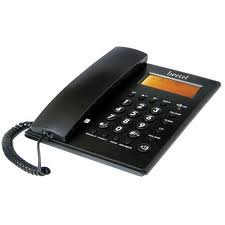
Figure 1: Beetel M53 CLI Corded Phone. This image displays the main unit of the Beetel M53 corded phone, showcasing dhizaini yayo diki uye keypad.
Gadzirira
Follow these steps to set up your Beetel M53 CLI Corded Phone:
- Batanidza Handset: Plug one end of the coiled cord into the handset and the other end into the jack labeled HANDISI on the side of the phone base.
- Batanidza Tambo Yemutsetse: Plug one end of the telephone line cord into the jack labeled LINE on the back of the phone base. Plug the other end into your telephone wall jack.
- Power Connection: The phone is powered via the telephone line. No external power adapter is required for basic operation.
- Kuratidzwa Kwekutanga: Upon successful connection, the 12-digit green/orange backlit LCD will display the current time and date.

Figure 2: Connection Diagram. This diagram illustrates how to connect the handset and the telephone line cord to the Beetel M53 phone base.
Operating Instruction
Kuita uye kugamuchira mafoni
- Kufona: Simudza handset kana kudzvanya iyo MUTAURIRI button. Dial the desired telephone number.
- Kugamuchira Call: Kana foni yarira, simudza foni kana kuti dzvanya bhatani rekuti MUTAURIRI bhatani.
- Kupedza Kufona: Isa handset kumashure pamubhedha kana kudzvanya iyo MUTAURIRI bhatani zvakare kana uchishandisa speakerphone.
Caller ID (CLI) Features
The Beetel M53 supports FSK/DTMF compatible caller ID and Centrex enabled CLIP (Calling Line Identification Presentation).
- Incoming Call Display: The 12-digit LCD will display the incoming number, new call indicator, total calls, and repeat calls.
- Incoming Memory: The phone stores up to 80 incoming call records.
- Outgoing Memory: The phone stores up to 24 outgoing call records.
- Checking Calls: Shandisa iyo UP/PASI navigation buttons to scroll through incoming and outgoing call records.
- Erasing Calls: Nepo viewuchinyora rekodhi yekufona, tinya DELETE bhatani rekudzima.
- Call Back: Nepo viewing an incoming call record, press the DANAI DZOKA button to dial the number.
LCD Display and Clock
- The 12-digit green/orange backlit LCD provides clear visibility of numbers, time, and date.
- The real-time clock displays the year, date, and month.
- To set the time and date, refer to the specific instructions in the full manual (if available, otherwise this feature is typically automatic or set via network).
Speakerphone Facility
Kuti ushandise speakerphone, tinya bhatani rekuti MUTAURIRI button during a call or before dialing. Press it again to end the call or switch back to the handset.
Basic Calculator
The phone includes a basic calculator function. To access it, press the CALC button (if present, or refer to specific key mapping). Use the numeric keypad for input and the designated function keys for operations.

Figure 3: LCD Display. This image shows the 12-digit LCD of the Beetel M53, illustrating how caller ID information and the real-time clock are displayed.
Maintenance
- Kuchenesa: Pukuta foni nenyoro, damp jira. Usashandise abrasive cleaners kana solvents.
- Dzivisa Zvinwiwa: Chengetedza foni kure nemvura uye zvimwe zvinwiwa.
- Tembiricha: Avoid exposing the phone to extreme temperatures or direct sunlight.
- Kuchengeta: If storing the phone for an extended period, disconnect it from the telephone line.
Kugadzirisa matambudziko
| Dambudziko | Possible Solution |
|---|---|
| Hapana dial toni | Check if the telephone line cord is securely connected to both the phone and the wall jack. Test with another phone if available. |
| Chitupa chekufona haisi kuoneka | Ensure you have subscribed to Caller ID service from your telephone service provider. Verify the phone is connected correctly. |
| Kuratidza hakuna chinhu kana kudzima | Check line connection. The display is line-powered. If the issue persists, contact customer support. |
| Handikwanise kunzwa munhu ari kufona / Munhu ari kufona haakwanise kundinzwa | Adjust volume. Check handset cord connection. If using speakerphone, ensure microphone is not obstructed. |
Zvinotsanangurwa
| Feature | Tsanangudzo |
|---|---|
| Brand | Beetel |
| Model | M53 |
| Rudzi Runhare | Corded |
| Material | Plastiki |
| Simba Source | Corded Electric (Mutsetse Wemagetsi) |
| Kupindura System Type | Digital |
| Caller ID | Yes (FSK/DTMF compatible, Centrex enabled CLIP) |
| Memory Yekufona Inouya | 80 zvinyorwa |
| Ndangariro Yekufona Inobuda | 24 zvinyorwa |
| Chiratidziro cheLCD | 12-digit, Green/Orange Backlit |
| Clock | Real time clock with year, date, and month display |
| Zvimwe Zvimiro | Speakerphone, Basic Calculator |
Warranty uye Support
Your Beetel M53 CLI Corded Phone comes with a standard manufacturer's warranty. Please retain your purchase receipt for warranty claims. For technical support, service, or warranty inquiries, please contact Beetel customer service through their official websaiti kana ruzivo rwekuonana rwakapihwa nemagwaro ekutenga kwako.
Kuti uwane rumwe rubatsiro, ndapota shanyira iyo Beetel Store on Amazon.