
Sungale PF1501
Bhuku rekushandisa reSungale PF1501 rine furemu yemifananidzo yedhijitari ye 14-Inch
Muenzaniso: PF1501
1. Nhanganyaya
This manual provides detailed instructions for the setup, operation, and maintenance of your Sungale PF1501 14-Inch Digital Photo Frame. This device is designed to display digital photos, play videos, and play music, offering a versatile way to enjoy your media.
Ndapota verenga bhuku rino zvizere usati washandisa chigadzirwa ichi kuti uve nechokwadi chekuti chinoshanda zvakanaka uye kuti uwane ruzivo rwakawanda pamusoro pemushandisi.
2. Package Zviri mukati
Tarisa kuti zvinhu zvese zvakanyorwa pazasi zvinosanganisirwa mupakeji yako:
- Sungale PF1501 14-Inch Digital Photo Frame
- AC Simba Adapter
- Remote Control
- Quick Start Guide
- Limited Warranty Card
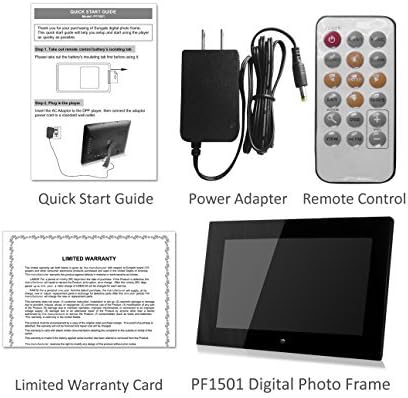
Image 2.1: Included accessories and the digital photo frame.
3. Chigadzirwa Pamusoroview
3.1 Kumberi View

Mufananidzo 3.1: Mberi view of the digital photo frame.
3.2 Kumashure View uye Ports

Mufananidzo 3.2: Kumashure view with labeled ports and controls.
The rear of the frame features various ports and controls for connectivity and operation:
- Makiyi ebasa: Buttons for navigation and control (Enter, Left, Right, Up, Down, Exit).
- Wall-mountable: Mounting points for wall installation.
- Mutauri Akavakirwa-mukati: Zvekutamba zvekuteerera.
- DC 12V Power Port: Unganidza AC yemagetsi adapter pano.
- Removable Bracket: Stand for desktop placement.
- Bhatani reSimba: To turn the frame on or off.
- USB Host Port: Yekubatanidza USB flash drives.
- SD/SDHC Card Slot: For inserting SD or SDHC memory cards.
- USB Device Port: Zvekubatanidza pakombuta.
4. Setup
4.1 Yekutanga Simba-Kukwira
- Batanidza Simba: Insert the AC power adapter into the DC 12V Power Port on the back of the frame. Plug the other end into a standard electrical outlet.
- Power On: Press the Power button located on the back of the frame. The frame will power on and display the initial setup screen or default content.
4.2 Inserting Memory Cards or USB Drives
The frame supports SD/SDHC cards and USB flash drives (up to 32GB). It also has 4GB of internal memory.
- For SD/SDHC Card: Gently insert an SD or SDHC card into the SD/SDHC Card Slot until it clicks into place. Ensure the card is inserted in the correct orientation.
- For USB Flash Drive: Insert a USB flash drive into the USB Host Port.
The frame should automatically detect the inserted media and begin displaying content or prompt you to select a source.
4.3 Kukwirisa madziro (Sarudzo)
The frame can be wall-mounted using the designated mounting points on the rear. Ensure appropriate wall anchors and screws are used for secure installation.
5. Operating Instructions
The digital photo frame can be operated using the function keys on the back or the included remote control.
5.1 Remote Control Mabasa
The remote control provides convenient access to all features. Point the remote control directly at the frame's sensor.
5.2 Kufambisa Menyu
Use the directional buttons (Up, Down, Left, Right) to navigate through menu options. Press the "Enter" button to confirm a selection. The "Exit" button typically returns to the previous screen or the main menu.
5.3 Displaying Photos
The frame supports JPG and BMP photo file formats.
- Sarudza Kwakabva: From the main menu, select the desired media source (Internal Memory, SD Card, or USB Drive).
- Choose Photo Mode: Select "Photo" to enter photo display mode.
- Slideshow: The frame can automatically start a slideshow of all photos on the selected source. You can adjust transition effects and interval times in the settings.
- Single Photo Display: Navigate to a specific photo and press "Enter" to display it individually.
- Zoom and Rotate: Use the remote control or function keys to zoom in/out or rotate displayed photos.
5.4 Kuridza Mavhidhiyo
The frame supports video playback. Note that some users have reported compatibility primarily with .AVI video files.
- Sarudza Kwakabva: From the main menu, select the desired media source.
- Choose Video Mode: Select "Video" to enter video playback mode.
- Select Video: Enda kune vhidhiyo yaunoda file and press "Enter" to begin playback.
5.5 Kuridza Mumhanzi
The frame can play background music during photo slideshows or as standalone audio.
- Sarudza Kwakabva: From the main menu, select the desired media source.
- Choose Music Mode: Select "Music" to enter music playback mode.
- Sarudza Audio File: Navigate to the desired audio file and press "Enter" to begin playback.
- Background Music: In photo settings, you can enable background music to play during slideshows.
5.6 Calendar and Alarm Clock
Access the calendar and alarm clock functions through the main menu. Follow on-screen prompts to set the date, time, and alarm preferences.
6. Kuchengeta
6.1 Kuchenesa Screen
- Turn off and unplug the frame before cleaning.
- Use a soft, lint-free cloth, such as a microfiber cloth, to gently wipe the screen.
- Kune matope akaomarara, zvishoma dampsn jira rine mvura kana chidzitiro chekuchenesa-soso chakanyatsogadzirirwa zvemagetsi. Usafire mvura yakananga pachiratidziri.
- Avoid using abrasive cleaners, solvents, or alcohol-based solutions, as these can damage the screen surface.
6.2 Kutarisira Kwese
- Keep the frame away from direct sunlight, heat sources, and excessive moisture.
- Avoid dropping or subjecting the frame to strong impacts.
- Do not block the ventilation openings on the back of the frame.
- Unplug the frame during lightning storms or when unused for extended periods.
7. Kugadzirisa matambudziko
Kana mukasangana nematambudziko nefuremu yenyu yemifananidzo yedhijitari, tarisai matambudziko nemhinduro dzinotevera:
| Dambudziko | Zvinogoneka Chikonzero / Mhinduro |
|---|---|
| Furemu haibatidzi. |
|
| "File not supported" error or media not displaying. |
|
| Remote control haisi kushanda. |
|
| Photos are stretched or distorted. |
|
| Slideshow not playing randomly. |
|
8. Zvinotsanangurwa
| Feature | Detail |
|---|---|
| Model Number | PF1501 |
| Screen Size | 14 inches |
| Resolution | 1366x768 pixels |
| Internal Memory | 4GB |
| External Memory Support | SD/SDHC Card (up to 32GB), USB Flash Drive (up to 32GB) |
| Akatsigira Photo Mafomati | JPG, BMP |
| Inotsigirwa Vhidhiyo Mafomati | Primarily AVI (as reported by users) |
| Audio Output | 2 Channel Stereo Speakers |
| Product Dimensions | 13.8 x 1 x 9.5 inches |
| Item Weight | 2 makirogiramu |
| Color | Nhema |
| Mugadziri | Sungale |
9. Warranty uye Tsigiro
9.1 Yakakwana Warranty
This product comes with a Limited Warranty. Please refer to the "Limited Warranty Card" included in your package for detailed terms and conditions, including coverage period and claim procedures. Keep your proof of purchase for warranty claims.
9.2 Mutengi Tsigiro
For technical assistance, troubleshooting beyond this manual, or warranty inquiries, please contact Sungale customer support.
- Mugadziri: Sungale
- Websaiti: Visit the Sungale Store on Amazon (kuti uwane rumwe ruzivo nezve brand)
- Specific contact information (phone, email) may be found on the warranty card or the official Sungale website.