
Jam Audio HX-P430BL
JAM XT Extreme Wireless Speaker Instruction Manual
Model: HX-P430BL | Brand: Jam Audio
Nhanganyaya
The JAM XT Extreme Wireless Speaker is designed for robust performance in various environments. Featuring an IP64 rating, it is splash-proof, drop-proof, and dirt-proof, making it suitable for outdoor adventures and demanding work sites. This portable Bluetooth speaker offers high-quality sound and hands-free calling, connecting wirelessly to most Bluetooth-enabled devices up to 30 feet away. Its integrated carabiner clip provides convenient transport and versatile mounting options.
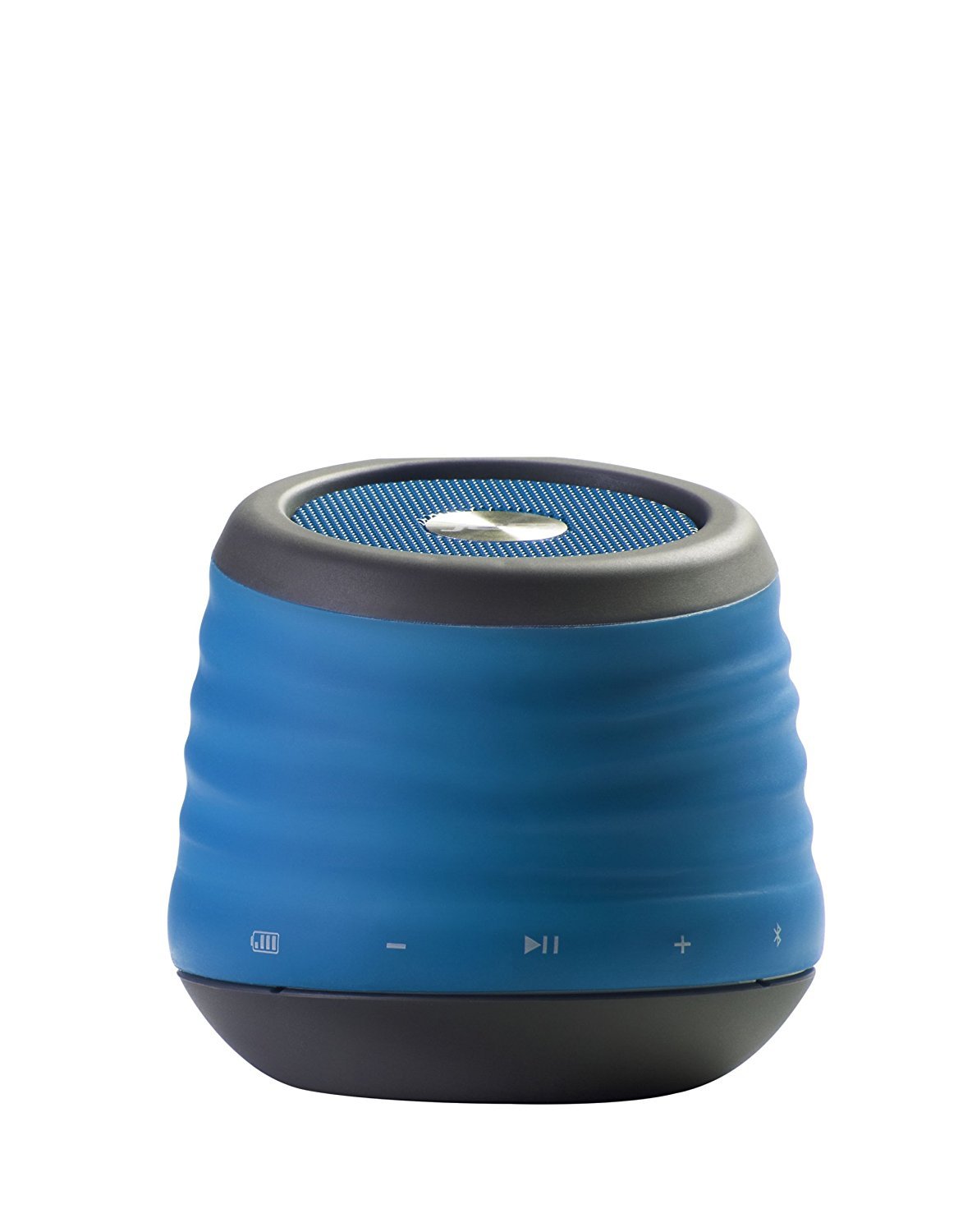
Image: The JAM XT Extreme Wireless Speaker in blue, featuring its durable design and integrated carabiner clip for portability.
Chii chiri muBhokisi
- JAM XT Extreme Wireless Speaker (Model: HX-P430BL)
- USB Kuchaja Cable
- Bhuku reMirayiridzo
Gadzirira
1. Kubhadharisa Mutauri
Before initial use, fully charge your JAM XT Extreme speaker. Connect the included USB charging cable to the speaker's charging port and a compatible USB power source (e.g., computer, wall adapter). The LED indicator will show charging status. A full charge provides up to 8 hours of wireless play.

Image: Visual representation of the speaker's rechargeable battery, indicating its capacity for up to 8 hours of wireless playback.
2. Powering On / Off
Locate the power button on the bottom of the unit. Press and hold the power button for a few seconds to turn the speaker ON or OFF. A sound prompt will indicate the power status.

Mufananidzo: Kuvhara view of the JAM XT Extreme speaker's base, highlighting the power button for easy access.
3. Bluetooth Kubatanidza
- Ensure the speaker is powered ON and in pairing mode (indicated by a flashing LED).
- Pamudziyo wako (smartphone, piritsi, laptop), shandisa Bluetooth uye tsvaga zvishandiso zviripo.
- Select "JAM XT Extreme" from the list of devices.
- Once paired, the speaker will emit a confirmation tone, and the LED will turn solid.
The speaker has a Bluetooth wireless range of up to 30 feet and is compatible with most Bluetooth-enabled devices, including iPhone, Android, iPad, and iPod.

Image: A visual representation of the speaker connecting wirelessly to a device via Bluetooth.
4. Line-In Connection
For devices without Bluetooth capability, use the line-in port on the speaker with a standard 3.5mm audio cable (not included) to connect your audio source.
Kushandisa Mutauriri
1. Basic Controls
- Tamba/Kumbomira: Press the Play/Pause button to start or stop audio playback.
- Vhoriyamu kumusoro/Kudzika: Shandisa mabhatani ekuti '+' uye '-' kugadzirisa vhoriyamu.
- Darika Track: Press and hold the '+' button to skip to the next track. Press and hold the '-' button to go to the previous track.
2. Basa reSpeakerphone
When connected via Bluetooth, the JAM XT Extreme speaker can be used as a speakerphone. Answering and ending calls can typically be done directly from your connected device.
3. Using the Carabiner Clip
The integrated fold-out carabiner clip allows for easy attachment to backpacks, bags, belt loops, or even hanging from a tree branch or tent for optimal sound projection and portability.

Image: The blue JAM XT Extreme speaker securely clipped to a backpack, showcasing its design for convenient outdoor use.

Image: The JAM XT Extreme speaker hanging from a tree branch, illustrating its adaptability for various outdoor settings.
Maintenance
1. Kuchenesa
The speaker is IP64 rated for splash, drop, and dirt resistance. To clean, gently wipe the exterior with a soft, damp cloth. Do not use harsh chemicals or abrasive cleaners. Ensure all port covers are securely closed before exposing the speaker to water or dirt.
2. Battery Care
To prolong the life of the rechargeable lithium-ion battery, avoid fully discharging it frequently. Recharge the speaker regularly, especially if it will not be used for an extended period. Store in a cool, dry place.
3. Kuchengeta
When not in use, store the speaker in a dry environment away from extreme temperatures and direct sunlight. Ensure the carabiner clip is folded in or secured to prevent damage.
Kugadzirisa matambudziko
- Hapana Simba: Ensure the speaker is fully charged. Connect to a power source and try turning it on again.
- Haikwanise Kubatanidza kuburikidza neBluetooth:
- Ensure Bluetooth is enabled on your device and the speaker is in pairing mode.
- Svedzera mutauri pedyo nemudziyo wako (mukati memamita makumi matanhatu).
- Dzima uye vhura Bluetooth yespika nefoni yako.
- If previously paired, try 'forgetting' the device on your phone's Bluetooth settings and re-pairing.
- Hapana Inzwi:
- Tarisa huwandu hwevhoriyamu paspika nepamudziyo wako wakabatana.
- Ensure the speaker is correctly paired or connected via line-in.
- If using line-in, ensure the cable is fully inserted into both devices.
- Hunhu Husina kunaka:
- Tambanudza sipika pedyo nemudziyo wako kuti uvandudze simba remasaini eBluetooth.
- Iva nechokwadi chekuti hapana zvipingamupinyi pakati pespika nemudziyo wako.
- Tarisa kwaunobva ruzha kuti uone kana paine matambudziko emhando yepamusoro.
Zvinotsanangurwa
| Feature | Tsanangudzo |
|---|---|
| Brand | Vadivelu Comedy Jam Audio |
| Model Number | HX-P430BL |
| Model Name | XT Extreme |
| Kubatana Technology | Bluetooth, USB |
| Wireless Technology | Bluetooth |
| Bluetooth Range | 30 Tsoka |
| Mutauri Mukuru Wekubuda Simba | 3 Watts |
| Audio Output Mode | Stereo |
| Hupenyu hwebhatiri | Up to 8 hours of wireless play |
| Simba Source | Battery Powered (1 Lithium Ion bhatiri inosanganisirwa) |
| Durability Rating | IP64 (Splash proof, Drop proof, Dirt proof) |
| Kudzora Nzira | Bata |
| Item Weight | 8.8 ounces |
| Color | Bhuruu |
| Special Features | Carabiner Clip, Built-in Speakerphone, Portable |
Warranty uye Support
The JAM XT Extreme Wireless Speaker comes with a Limited Warranty. For detailed warranty information, product support, or to register your product, please visit the official Jam Audio Store or refer to the warranty card included with your purchase.