
Product Overview
The Mount-It! MI-35114S is a robust and versatile wall-mounted monitor arm designed to enhance your workspace ergonomics and organization. Constructed from high-gloss aluminum, this mount provides a stable and aesthetically pleasing solution for displays up to 27 inches and weighing between 4.4 to 19.8 lbs (2 to 9 kg). Its articulating design allows for extensive adjustability, including height, tilt, swivel, and rotation, ensuring optimal viewing comfort and flexibility.
Zvinhu zvakakosha zvinosanganisira:
- Kureba Kugadziriswa: Offers 11.5 inches of vertical adjustment.
- Articulating Arms: Provides 180-degree swivel and extends up to 27.5 inches from the wall.
- Tilting and Rotating: Screen can tilt 105 degrees and rotate 360 degrees for portrait or landscape orientation.
- Yakabatanidzwa Cable Management: Keeps cables organized and out of sight.
- Quick Release Design: Facilitates easy installation and adjustments at connecting points.
- VESA Inoenderana: Supports 75x75mm and 100x100mm mounting patterns.

Figure 1: The Mount-It! MI-35114S monitor wall mount, showcasing its articulating arm and sleek design.
Setup uye Installation
Proper installation is crucial for the stability and safety of your monitor and the mount. It is highly recommended to mount the unit directly into a wall stud for maximum security. All necessary hardware and instructions are included with your purchase.
Usati Watanga:
- Verify your monitor's weight and VESA mounting pattern are compatible with the MI-35114S. This mount supports VESA 75x75mm and 100x100mm.
- Gather tools: Phillips head screwdriver, drill, stud finder, level, pencil.
- Ensure the wall location is free of electrical wires or plumbing.

Figure 2: VESA mounting compatibility for the MI-35114S, supporting 75x75mm and 100x100mm patterns.
Kuisa Matanho:
- Batanidza Purati Yemadziro: Locate a wall stud using a stud finder. Mark the desired height for the mount. Secure the wall plate to the stud using appropriate screws. Use a level to ensure it is straight.
- Assemble Arm Components: The MI-35114S features quick-connect designs. Attach the main arm assembly to the wall plate. Ensure all connections click securely into place.
- Natanidza VESA Plate kuti uone: Carefully place your monitor face down on a soft, clean surface. Align the VESA plate (the part that connects to the monitor) with the mounting holes on the back of your monitor. Secure it with the provided screws.
- Mount Monitor to Arm: With the VESA plate attached to your monitor, carefully lift the monitor and slide the VESA plate onto the monitor end of the arm until it locks into place.
- Cable Management: Route your monitor cables through the integrated cable management clips along the arm for a clean and organized setup.

Figure 3: Technical diagram highlighting the quick connect points and articulation capabilities of the MI-35114S.

Figure 4: A monitor securely mounted on the MI-35114S, demonstrating the rear attachment and cable management.
Kushanda kweMonitor Mount
The MI-35114S offers a wide range of motion to customize your viewing experience. Adjustments should be smooth and require minimal effort once the gas spring tension is properly set.
Adjusting Position:
- Kugadzirisa Hurefu: Gently push or pull the monitor up or down to achieve the desired height. The gas spring mechanism will hold it in place.
- Kuwedzerwa/Kudzoreredza: Extend or retract the arm by pulling or pushing the monitor towards or away from the wall. The arm can extend up to 27.5 inches.
- Swivel: The arm and monitor plate can swivel up to 360 degrees, allowing you to easily share your screen or change viewing angles.
- Tilt: Grasp the top and bottom edges of your monitor and gently tilt it forward or backward to achieve the optimal viewing angle. The mount allows for 105 degrees of tilt.
- Kutenderera: Rotate the monitor 360 degrees to switch between landscape and portrait orientations. This is ideal for reading long documents or viewing specific content.

Figure 5: Demonstrating the tilting capability of the MI-35114S for ergonomic viewing.

Figure 6: The 360-degree rotation feature allows for easy switching between landscape and portrait monitor orientations.
Adjusting Gas Spring Tension:
The gas spring tension may need adjustment to properly support your monitor's weight. If the monitor sags or springs up too easily, adjust the tension screw located on the arm. Typically, you will need to raise the arm to a vertical position to access and adjust the tension. Turn clockwise to increase tension for heavier monitors, and counter-clockwise to decrease tension for lighter monitors.
Maintenance
Regular maintenance ensures the longevity and optimal performance of your Mount-It! MI-35114S monitor mount.
- Kuchenesa: Pukuta nzvimbo dzakasungirirwa nekanyoro, damp jira. Dzivisa abrasive cleaners kana zvinonyungudutsa zvinogona kukanganisa kupera.
- Tarisa Makabatana: Periodically inspect all screws and connections to ensure they remain tight and secure, especially the wall mounting screws and the VESA plate screws.
- Gas Spring Adjustment: Re-adjust the gas spring tension if you change monitors or notice the arm is no longer holding its position correctly.
Kugadzirisa matambudziko
Kana iwe ukasangana nematambudziko neako gomo rekutarisa, tarisa kune anotevera akajairika matambudziko uye mhinduro:
| Dambudziko | Zvinogona Kukonzera | Solution |
|---|---|---|
| Monitor inodonha kana kuti haigari panzvimbo yayo. | Incorrect gas spring tension for monitor weight. | Adjust the gas spring tension screw. Increase tension for heavier monitors, decrease for lighter ones. Ensure monitor weight is within 4.4 - 19.8 lbs range. |
| Mount feels unstable or loose on the wall. | Improper wall installation; not mounted into a stud or loose anchors. | Ensure the wall plate is securely fastened into a wall stud. If using drywall anchors, ensure they are appropriate for the weight and properly installed. Re-tighten all wall mounting screws. |
| Difficulty moving the arm or monitor. | Gas spring tension too high or connections too tight. | Decrease gas spring tension. Check for any overtightened screws at the joints and loosen slightly if necessary. |
| Monitor does not rotate 360 degrees. | Obstruction or limited range of motion. | Ensure no cables or objects are obstructing the rotation. Verify the monitor is centered on the VESA plate. |
Zvinotsanangurwa
Detailed technical specifications for the Mount-It! MI-35114S monitor wall mount:
| Feature | Tsanangudzo |
|---|---|
| Model Number | MI-35114S (also MI-35114) |
| Weight Capacity | 4.4 - 19.8 lbs (2 - 9 kgs) |
| VESA Mounting Patterns | 75x75mm, 100x100mm |
| Tilt Range | 105 madhigirii |
| Kutenderera | 360 degrees (screen) |
| Swivel Range | Max 360 degrees (arm joints) |
| Maximum Extension | 27.5 inches (from wall) |
| Height Adjustment | 11.5 inches |
| Material | High-gloss Aluminum |
| Product Dimensions | 16 x 8 x 8 inches (yakarongedzwa) |
| Item Weight | 4 makirogiramu |
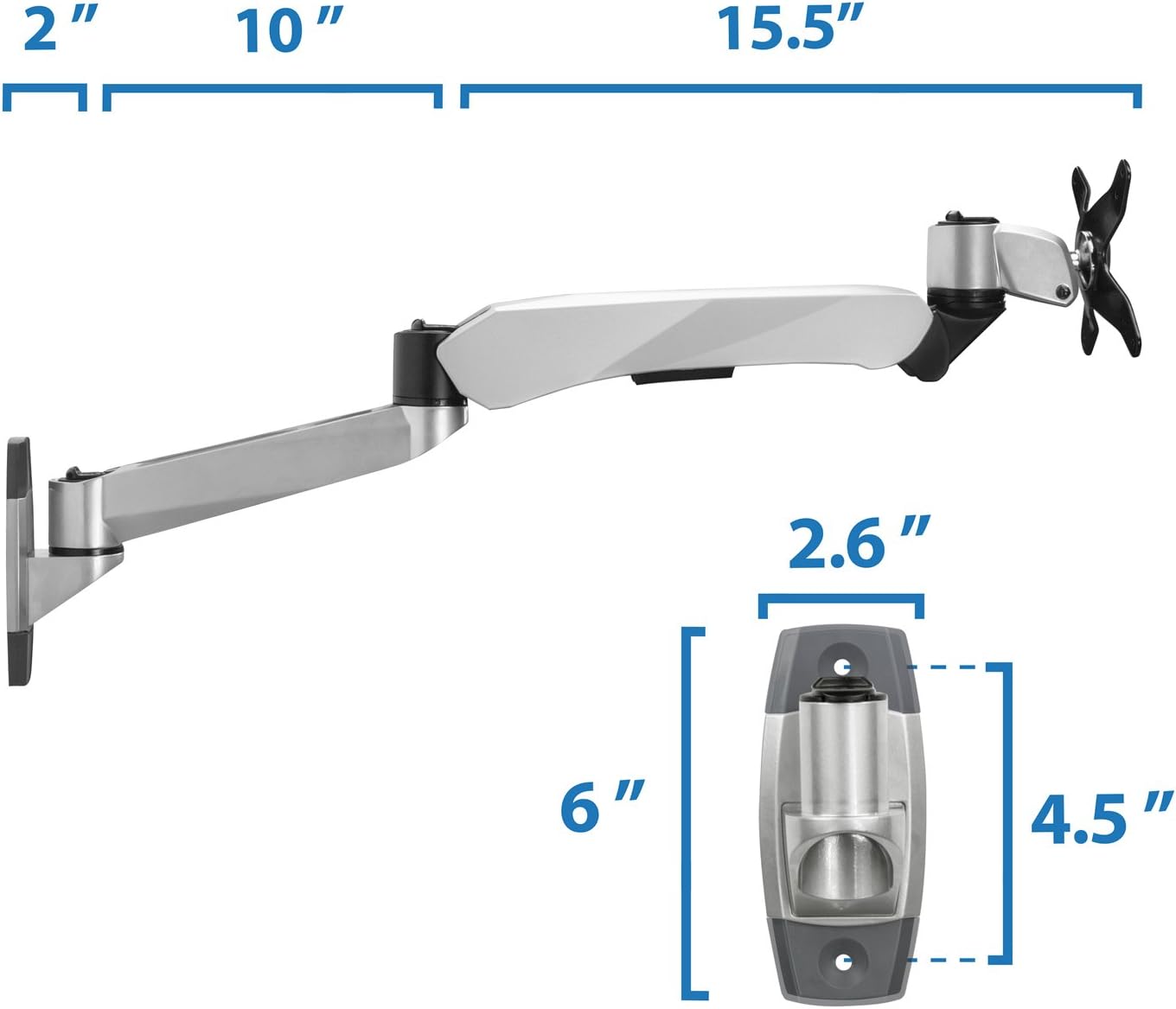
Mufananidzo 7: Dimensional pamusoroview of the MI-35114S mount.
Warranty uye Support
For warranty information, product support, or to purchase replacement parts, please refer to the documentation included with your product or visit the official Mount-It! website. You can also contact Mount-It! customer service directly for assistance.
Visit the official Mount-It! Store: Mount-It! Store on Amazon