Nhanganyaya
This manual provides essential instructions for the safe and efficient operation of your Fever GA-10 10-Watt Guitar Combo Amplifier. Ndapota verenga bhuku rino zvizere usati washandisa amplifier kuti uve nechokwadi chekuti yagadziriswa, yashandiswa, uye inogadziriswa zvakanaka. Chengeta bhuku iri kuti uzorishandisa mune ramangwana.

Mufananidzo 1: Mberi view of the Fever GA-10 amplifier, showcasing yayo compact dhizaini uye control panel.
Yakakosha Mirayiridzo Yekuchengetedza
- Verenga mirairo iyi.
- Chengeta mirairo iyi.
- Teerera nyevero dzose.
- Tevera mirairo yose.
- Usashandise mudziyo uyu pedyo nemvura.
- Chenesa chete nemucheka wakaoma.
- Usavhare chero mazaru emhepo. Isa maererano nemirairo yemugadziri.
- Usaise padhuze nechero zvitubu zvekupisa zvakaita semaradiator, marejita ekupisa, zvitofu, kana zvimwe midziyo (kusanganisira amplifiers) zvinoburitsa kupisa.
- Chengetedza tambo yemagetsi kubva pakufambiswa kana kudzvanywa, kunyanya pamapulagi, midziyo yekurerutsira, nenzvimbo yavanobuda kubva mumidziyo.
- Shandisa zvinonamirwa/zvishandiso zvinotsanangurwa nemugadziri chete.
- Bvisa mudziyo uyu panguva yemadutu emheni kana kuti usina kushandiswa kwenguva yakareba.
- Tumira masevhisi ese kuvashandi vanokwanisa. Kushumira kunodiwa kana mudziyo wakuvadzwa neimwe nzira, senge tambo yemagetsi-yekugovera kana plug yakuvadzwa, mvura yadeuka kana zvinhu zvawira mumidziyo, iyo midziyo yave ichinaya mvura kana hunyoro, haishande zvakajairika. , kana kuti yadonha.
Gadzirira
1. Kusunungura
Ngwarira kubvisa iyo amplifier from its packaging. Inspect the unit for any signs of damage that may have occurred during shipping. If damage is found, contact your retailer immediately.
2. Simba Connection
Iva nechokwadi chekuti amplifier's power switch is in the "OFF" position. Connect the included power cord to the power input on the rear of the amplifier and then to a suitable electrical outlet. The amplifier operates on standard AC power.
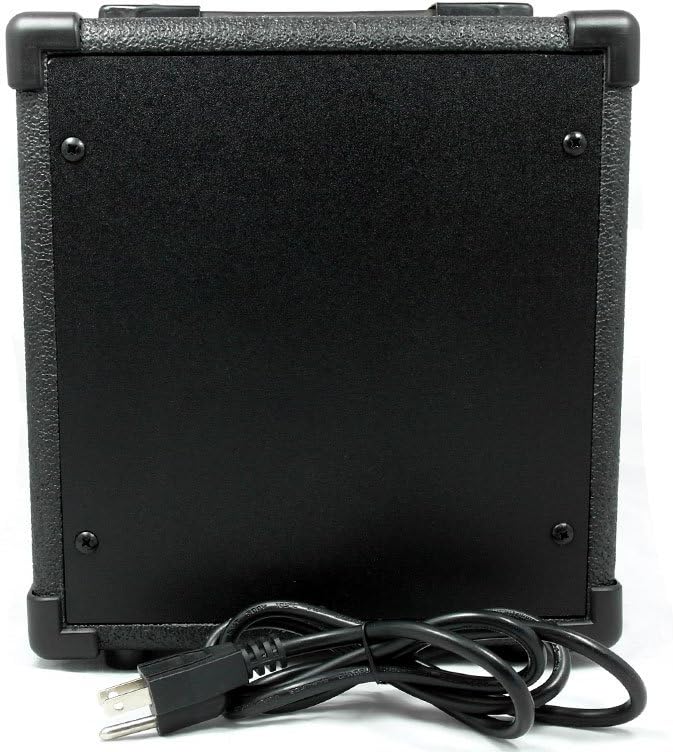
Mufananidzo 2: Rear view of the Fever GA-10 amplifier, showing the power cord connection point.
3. Instrument Connection
Batanidza gitare rako kana chimwe chiridzwa ku INPUT vharira jira repamberi uchishandisa tambo yechinhu che 1/4-inch.
Operating Instruction
Familiarize yourself with the controls on the front panel before powering on the amplifier.

Mufananidzo 3: Detailed view of the Fever GA-10 amppanel yekudzora yeLifier.
Control Panel Mabasa:
- INPUT: 1/4-inch jack for connecting your instrument.
- WANA: Inodzora huwandu hwe pre-amplification and distortion. Higher settings increase saturation.
- OVERDRIVE DISTORTION SWITCH: Toggles between clean and overdriven/distorted tones. Engage for a heavier sound.
- VOLUME: Inogadzirisa huwandu hwese hwezvinobuda amplifier.
- TONE: Shapes the amplifier's frequency response, from darker (lower settings) to brighter (higher settings).
- FONI: 1/4-inch stereo jack for connecting headphones for silent practice. Connecting headphones will mute the ampmutauri weLifier.
- SIMBA Chinja: Inotendeuka amplifier ON or OFF. The indicator light illuminates when the amplifier iripo.
Basic Operation:
- Ensure all volume and gain controls are set to their minimum positions before powering on.
- Batanidza chiridzwa chako kune INPUT jack.
- Flip the SIMBA switch to the "ON" position. The power indicator light will illuminate.
- Zvishoma nezvishoma wedzera iyo VOLUME control to your desired listening level.
- Gadzirisa iyo GAIN control to achieve the desired amount of pre-amplification. For clean tones, keep gain lower.
- Shandisa iyo OVERDRIVE DISTORTION SWITCH to engage or disengage the distortion effect.
- Fine-tune your sound using the TONE control.
- Kana muchida kudzidzira mega, batanidzai mahedhifoni ku MOFONI jack.
- When finished, turn the VOLUME down, then switch the SIMBA switch to "OFF".
Maintenance
Kuchenesa:
Kuchenesa the amplifier, use a soft, dry cloth. Do not use liquid cleaners or abrasive materials, as these can damage the finish and internal components. Ensure the amplifier is unplugged before cleaning.
Kuchengeta:
Store the amplifier in a cool, dry place away from direct sunlight, extreme temperatures, and high humidity. Avoid placing heavy objects on top of the amplifier.
Kugadzirisa matambudziko
- Hapana Inzwi:
- Iva nechokwadi chekuti amplifier inobatidzwa uye mwenje wechiratidzo chesimba unovhenekerwa.
- Check that the instrument cable is securely connected to both the guitar and the ampjeki reINPUT raLifier.
- Verify that the VOLUME control is not set to minimum.
- If headphones are connected, disconnect them to enable the speaker output.
- Test with a different instrument cable or guitar to rule out faulty equipment.
- Distorted/Unwanted Noise:
- Check the GAIN control; if set too high, it can cause excessive distortion.
- Ensure the OVERDRIVE DISTORTION SWITCH is in the desired position (ON for distortion, OFF for clean).
- Reduce the VOLUME control.
- Ita shuwa kuti zvese zvinongedzo zvakachengeteka uye hazvina kukanganisa.
- Scratchy Sound when Adjusting Controls:
- This can sometimes occur with potentiometers (knobs) over time. Repeatedly rotating the affected knob from minimum to maximum several times may help clear any dust or debris. If the issue persists, professional servicing may be required.
Zvinotsanangurwa
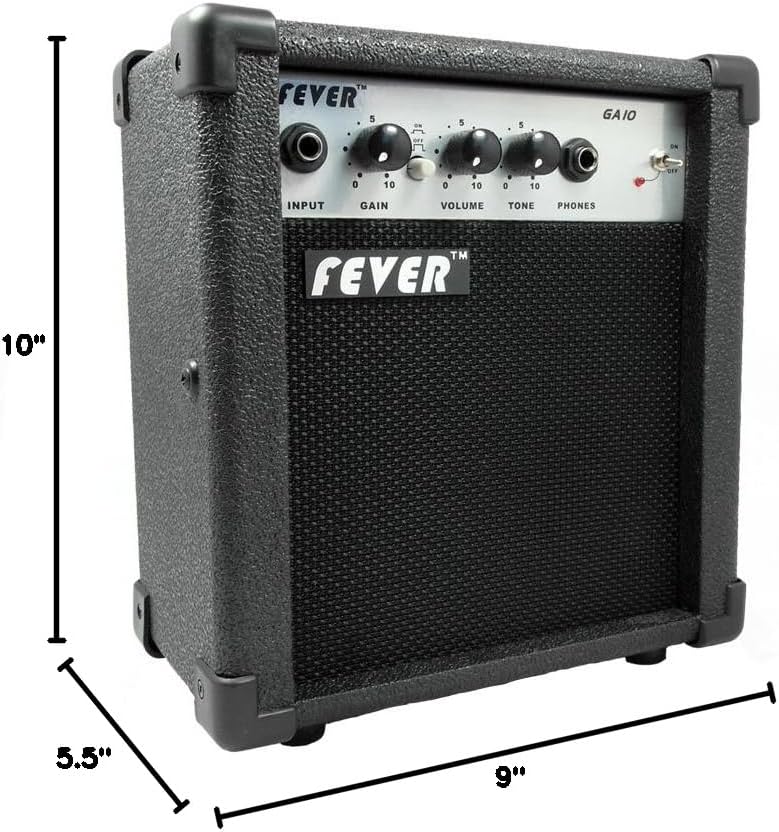
Mufananidzo 4: Dimensions of the Fever GA-10 amplifier.
| Feature | Detail |
|---|---|
| Output Wattage | 10 Watts |
| Controls | Gain, Volume, Tone |
| Swichi | Overdrive Distortion Switch (On/Off) |
| Inputs | 1/4-inch Instrument Input |
| Outputs | 1/4-inch Headphone Output |
| Simba Source | Corded Electric |
| Item Weight | 5.55 makirogiramu (2.52 kg) |
| Zviyero zveChigadzirwa (L x W x H) | 10 x 11.5 x 6.5 inches (25.4 x 29.2 x 16.5 cm) |
| Material | Plastiki |
| Color | Nhema |
Warranty Information
Fever products are manufactured to high-quality standards. This product is covered by a limited warranty against defects in materials and workmanship. Specific warranty terms and conditions may vary by region and retailer. Please retain your proof of purchase for warranty claims. For detailed warranty information, please refer to the documentation provided at the time of purchase or contact your retailer.
Mutengi Support
If you encounter any issues not covered in this manual or require further assistance, please contact your retailer or the manufacturer's customer support. Have your product model number (GA-10) and proof of purchase ready when contacting support.