
1. Chigadzirwa Pamusoroview
The ECOVACS WINBOT W930 is an automatic window cleaning robot designed to clean glass surfaces of various thicknesses, including thermopane windows, whether framed or frameless. It employs a 4-stage cleaning process for efficient and thorough results.
Zvinhu zvakakosha zvinosanganisira:
- 4-Stage Cleaning: The cleaning pad moistens, loosens, and absorbs dirt. A squeegee clears dirt, followed by a second swipe to remove waterborne dirt, and a final wipe for a dry, spotless finish.
- Smart Drive Technology: Enables fast and thorough cleaning.
- Pathfinder Navigation: Calculates a custom cleaning path, intelligently avoiding edges and obstacles.
- Kuchenesa kwakasiyana-siyana: Suitable for framed and unframed glass of any thickness.
2. Chii chiri muBhokisi
The ECOVACS WINBOT W930 package includes the following components:
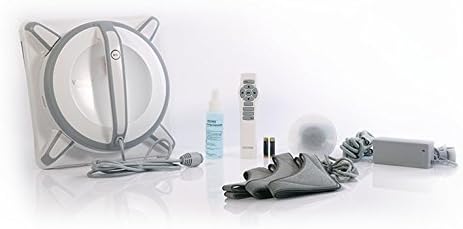
Image: ECOVACS WINBOT W930 components including the robot unit, remote control, cleaning solution, and multiple cleaning pads.
- WINBOT W930 Robot Unit
- Kudzora Kure (inoda mabhatiri maviri eAAA, anosanganisira)
- Kuchenesa Solution
- Kuchenesa Mapedhi
- Power Adapter and Safety Pod
- Kupedza Mucheka
3. Setup
- Chaja iyo Robot: Ensure the WINBOT W930 is fully charged before first use.
- Batanidza Pad Yekuchenesa: Securely attach a clean cleaning pad to the bottom of the robot.
- Shandisa Cleaning Solution: Lightly spray the cleaning pad with the provided WINBOT cleaning solution. Do not oversaturate.
- Connect Power and Safety Pod: Plug the power adapter into an outlet and connect it to the robot. Attach the safety pod to the window on the opposite side of where the robot will be placed, ensuring it is secure.
- Place Robot on Window: Press the power button on the robot and firmly place it onto the window surface. The robot will create suction and adhere to the glass.

Image: The ECOVACS WINBOT W930 attached to a large window, ready for operation.
4. Operating Instructions
Once the WINBOT W930 is securely attached to the window and powered on, you can initiate the cleaning process.
- Tanga Kuchenesa: Press the 'Start' button on the robot or the remote control to begin the automatic cleaning cycle. The robot will detect the window size and shape, then determine an optimal cleaning path.
- Tarisa mafambiro The robot will move across the window, cleaning in its programmed pattern.
- Kumbomira/Mira: To pause cleaning, press the 'Pause' button on the remote or the robot. To stop cleaning and return the robot to its starting position, press the 'Stop' button.
- Manual Control: Use the directional buttons on the remote control for manual navigation if specific areas require additional cleaning.
- Kupedzisa: The robot will return to its starting point and emit an alert sound when the cleaning cycle is complete. Carefully remove the robot from the window by pressing the release button and detaching it.
Video: Official video demonstrating the features and operation of the ECOVACS WINBOT W930, including its cleaning patterns and application on various glass surfaces.
5. Cleaning Process Details
The WINBOT W930 utilizes a comprehensive 4-stage cleaning process to ensure optimal results:
- The cleaning pad, pre-sprayed with WINBOT cleaning solution, moistens, loosens, and absorbs dirt from the glass surface.
- The first squeegee passes over the area, clearing away the loosened dirt and solution.
- A second squeegee follows, removing any remaining waterborne dirt or residue.
- The final section of the cleaning pad wipes the window to a dry, spotless shine.

Image: Visual representation of the WINBOT W930's four-stage cleaning sequence.
The robot's Smart Drive Technology allows it to rotate independently of its cleaning pads, ensuring thorough coverage and efficient cleaning patterns, even in corners.

Image: Illustration of the WINBOT W930's Smart Drive Technology for dynamic cleaning.
Pathfinder Navigation ensures the robot maps the window and follows an optimized route for complete coverage, avoiding repeated passes over already clean areas and efficiently navigating around obstacles.
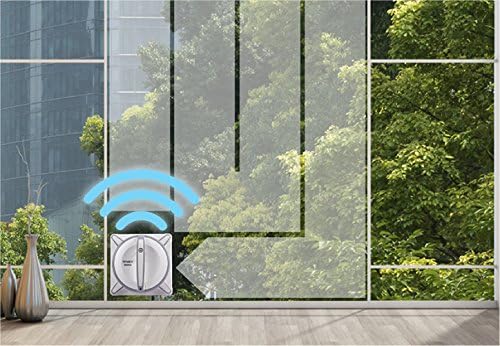
Image: The WINBOT W930 demonstrating its Pathfinder Navigation system on a large window.
6. Kuchengeta
Regular maintenance ensures the longevity and optimal performance of your WINBOT W930.
- Kuchenesa Mapedhi: After each use, remove and wash the cleaning pads. They are reusable and can be hand-washed or machine-washed according to care instructions. Ensure they are completely dry before reattaching.
- Clean Cupule and Driving Treads: Periodically clean the surface of the cupule (suction area) and the driving treads with the provided finishing cloth to remove any dirt or residue that could affect traction.
- Tarisa kune Debris: Inspect the robot for any trapped debris or foreign objects, especially around the squeegees and driving mechanisms.
- Chengeta Nemazvo: When not in use, store the WINBOT W930 in a clean, dry place away from direct sunlight.

Image: Steps for maintaining the WINBOT W930, including applying solution, releasing, and attaching.
7. Kugadzirisa matambudziko
Kana ukasangana nenyaya neWINBOT W930 yako, tarisa kune anotevera matambudziko akajairika uye mhinduro:
| Dambudziko | Zvinogona Kukonzera | Solution |
|---|---|---|
| Robot does not follow normal cleaning pattern or gets stuck. | Dirty cleaning pad, dirty cupule/driving treads, or navigation sensor obstruction. | Reattach a clean cleaning pad. Clean the cupule and driving treads with the finishing cloth. Ensure no obstructions are blocking the robot's path or sensors. |
| Leaves streaks or dirty spots. | Cleaning pad is dirty or oversaturated, insufficient cleaning solution, or window is excessively dirty. | Replace with a clean, lightly sprayed cleaning pad. Ensure the window is not excessively dirty; pre-clean if necessary. Avoid using too much cleaning solution. |
| Robot loses traction or falls. | Too much liquid on the window/pad, dirty driving treads, or uneven surface. | Ensure cleaning pad is only lightly damp. Clean driving treads. Verify the window surface is suitable for robotic cleaning. Always use the safety pod. |
| Robhoti haribatidzi. | Not plugged in, power outlet issue, or internal battery low. | Check power connections. Try a different outlet. Allow the robot to charge for a period before attempting to power on. |
8. Zvinotsanangurwa
| Feature | Detail |
|---|---|
| Product Dimensions | 12 x 12 x 5 inches |
| Item Weight | 4.8 makirogiramu |
| Item Model Number | WINBOT W930 |
| Mabhatiri Anodiwa | Mabhatiri maviri eAAA (anowanikwa pakushandisa remote) |
| Fomu Factor | Robhoti |
| Mirayiridzo Yakananga Yekushandisa | Dual chiito |
| Gungano Rinodiwa | Aihwa |
| Mugadziri | Ecovacs Robotics, Inc |
9. Warranty uye Tsigiro
The ECOVACS WINBOT W930 comes with a 1-makore waranti kubva pazuva rekutenga. Iyi waranti inovhara kukanganisa kwekugadzira uye kusashanda pasi pekushandiswa kwakajairwa. Ndapota chengetedza humbowo hwako hwekutenga kwezvichemo zvewaranti.
For technical support, troubleshooting assistance, or warranty service, please contact ECOVACS customer support through their official website or the contact information provided in your product packaging. Ensure you have your model number (WINBOT W930) and purchase details ready when contacting support.