
1. Nhanganyaya
The Sony SBH54 is a versatile Stereo Bluetooth Headset designed for wireless communication and audio playback. It offers both handset and headset functionalities, allowing you to take and make calls, view messages, listen to music, and tune into FM radio directly from its display. Crafted from premium metal with a splash-proof design, it combines elegance with durability.
Key features include Bluetooth Wireless 3.0, NFC technology for easy pairing, an OLED display, and built-in noise cancellation for clear audio during calls. The headset supports A2DP profile and can connect to two devices simultaneously.
2. Chigadzirwa Pamusoroview
The SBH54 features a compact design that fits comfortably in your hand. It includes an OLED display for information at a glance and physical controls for media and call management.
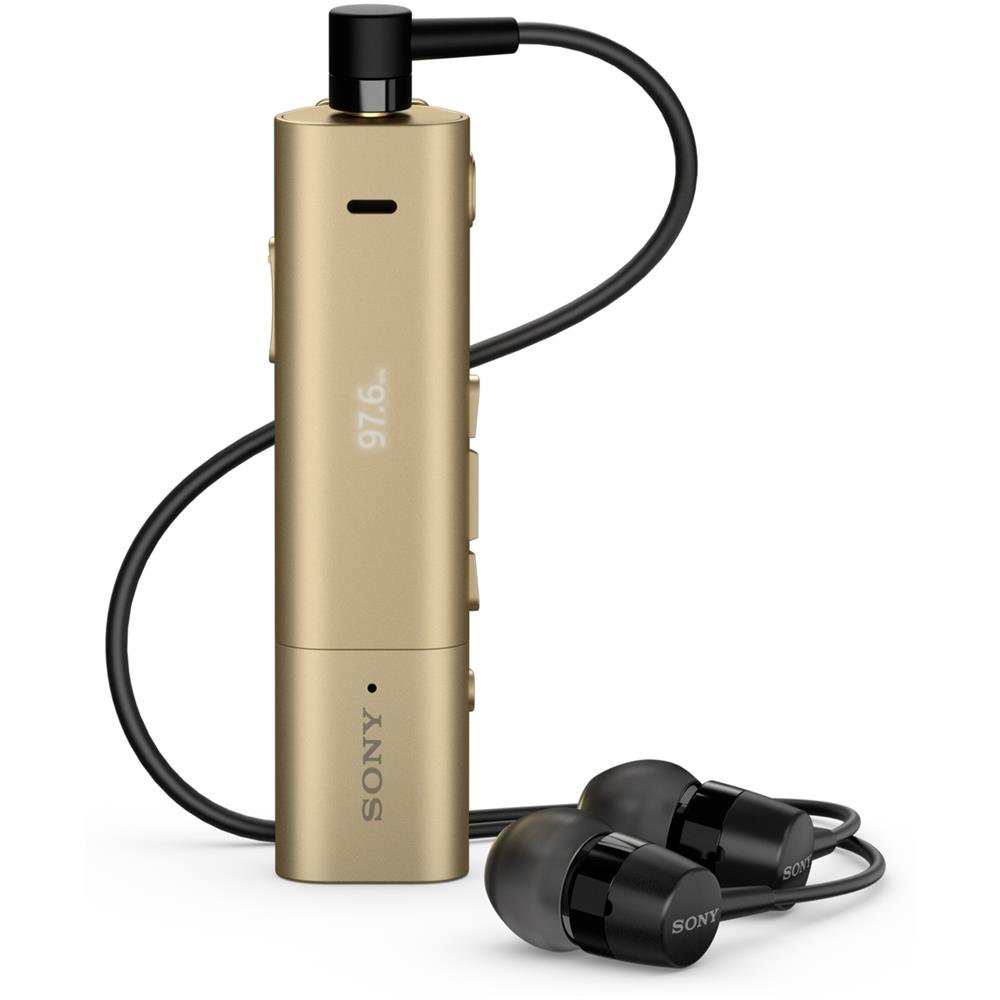
Image: Sony SBH54 Gold Stereo Bluetooth Headset. This image displays the compact, gold-colored headset with its integrated clip and display screen.
Zvidzore uye zviratidzo:
- OLED Kuratidzwa: Shows caller ID, messages, music track information, and FM radio frequency.
- Multi-function Bhatani: For call answering/ending, play/pause music.
- Mabhatani eVolume: Rongedza vhoriyamu yekuteerera.
- Navigation Mabhatani: For menu navigation and track skipping.
- Maikorofoni: Integrated for voice calls.
- Headphone Jack: 3.5mm port for connecting the included premium headphones.
- Kuchaja Port: Micro USB port yekuchaja mudziyo.
3. Setup
3.1 Kuchaja mahedhifoni
- Connect the supplied USB cable to the headset's charging port and to a USB power adapter or a computer's USB port.
- Chiratidzo chebhatiri chiri pachiratidziro chicharatidza mamiriro ekuchaja.
- Chaja mahedhifoni zvizere usati watanga kushandisa.
3.2 Pairing with a Device (Bluetooth)
- Iva nechokwadi chekuti headset yakachajwa uye yadzimwa.
- Press and hold the power button until the headset enters pairing mode (indicated by a specific light pattern or message on the display).
- On your smartphone or other Bluetooth-enabled device, enable Bluetooth and search for available devices.
- Select "SBH54" from the list of found devices.
- If prompted, enter the passcode "0000" (four zeros).
- Once paired, the headset will indicate a successful connection.
3.3 Pairing with a Device (NFC)
For devices with NFC (Near Field Communication):
- Ensure NFC is enabled on your smartphone and the screen is unlocked.
- Touch the NFC detection area of your smartphone to the NFC detection area on the SBH54 headset.
- Tevedzera chero pa-skrini yekurudziro kuti upedze iyo pairing maitiro.
4. Kushandisa Headset
4.1 Simba On/Kudzima
- Kubatidza: Dzvanya uye bata bhatani remagetsi kusvika chiratidziro chavheneka.
- Kudzima: Dzvanya uye bata bhatani remagetsi kusvika chiratidziro chadzima.
4.2 Kuita uye kugamuchira mafoni
- Kupindura Kudanwa: When a call comes in, press the multi-function button.
- Kupedza Kufona: During a call, press the multi-function button.
- Kuramba Kudanwa: Press and hold the multi-function button when a call comes in.
- Kufona: Dial the number on your phone. The call will automatically route to the headset. You can also use voice commands if supported by your phone.
- Handset Function: The compact SBH54 can be used as an unobtrusive handset for calls.
- Kuchenesa Ruzha: The headset features echo, wind, and noise cancellation for clear voice transmission.
- HD Voice: Enhances voice clarity for both parties during a call.
4.3 Kuridza Mumhanzi
- Tamba/Kumbomira: Press the multi-function button.
- Next Track: Press the forward navigation button.
- Previous Track: Press the backward navigation button.
- Kudzora inzwi: Shandisa mabhatani evhoriyamu kumusoro/pasi.
4.4 FM Radio
- Shandisa FM Radio: Navigate through the headset menu to select the FM Radio function.
- Zviteshi zveTune: Use the navigation buttons to scan or manually tune to FM frequencies.
- Sevha Presets: The headset may allow saving favorite stations (refer to on-screen prompts).
5. Kuchengeta
- Kuchenesa: Pukuta headset nemucheka wakapfava, wakaoma. Dzivisa kushandisa makemikari ane hasha kana abrasive zvinhu.
- Kuramba Mvura: The SBH54 has a splash-proof design. This means it can withstand light splashes of water but should not be submerged or exposed to heavy rain. Ensure the charging port cover is securely closed.
- Kuchengeta: Chengetedza mahedhifoni munzvimbo inotonhorera, yakaoma kure nechiedza chezuva uye tembiricha yakanyanyisa.
- Battery Care: Kurebesa bhatiri, dzivisa kuburitsa bhatiri zvakazara nguva zhinji. Chaja nguva dzose.
6. Kugadzirisa matambudziko
Matambudziko Anowanikwa uye Mhinduro:
- Mahedhifoni haabatidze: Ita shuwa kuti bhatiri rachajwa. Batanidza kune sosi yemagetsi uye edza zvakare.
- Haikwanise kubatanidzwa nemudziyo:
- Iva nechokwadi chekuti headset iri mu pairing mode.
- Ita shuwa kuti Bluetooth yakabatidzwa pane chako kifaa.
- Fambisa mahedhifoni padhuze nemudziyo wako.
- Tangazve zvese headset uye mudziyo wako.
- Bvisa kubatanidza neBluetooth pamudziyo wako uye edza kubatanidza zvakare.
- Hapana odhiyo kana yakashata mhando yekuteerera:
- Tarisa huwandu hwevhoriyamu pane ese mahedhifoni uye mudziyo wako wakabatana.
- Iva nechokwadi chekuti mahedhifoni ari pedyo nemudziyo wako.
- Bvisa uye batanidza zvakare kubatana kweBluetooth.
- Ensure the headphones are properly plugged into the 3.5mm jack.
- Redhiyo yeFM haisi kushanda: Ensure you are in an area with good FM signal reception.
7. Zvinotsanangurwa
| Feature | Detail |
|---|---|
| Brand | Sony |
| Model Number | SBH54GD |
| Color | Ndarama |
| Kuiswa Nzeve | Munzeve |
| Fomu Factor | Munzeve |
| Noise Control | Active Noise Cancellation |
| Item Weight | 0.1 makirogiramu |
| Audio Driver Type | Dynamic Driver |
| Frequency Range | 20 Hz - 20,000 Hz |
| Enclosure Material | Metal |
| Inowirirana Devices | Smartphones, Laptops, Tablets, Bluetooth-enabled Devices |
| Mvura Resistance Level | Inodzivirira Mvura (Inodzivirira Kupwanyika) |
| Kubatana Technology | Bluetooth, NFC |
| Wireless Technology | Bluetooth, NFC |
| Bluetooth Version | 3.0 |
| Control Type | Midhiya Kudzora |
| Kudzora Nzira | Remote |
8. Warranty uye Tsigiro
For warranty information and customer support, please refer to the documentation included with your purchase or visit the official Sony support website. Matemu chaiwo ewaranti anogona kusiyana nedunhu nemutengesi.
Rutsigiro rwepamhepo: www.sony.com/electronics/support