
Nhanganyaya
This manual provides detailed instructions for the setup, operation, maintenance, and troubleshooting of your EZCAP284 HD 1080P Capture HDMI YPbPr Recorder. Please read this manual thoroughly before using the device to ensure proper functionality and to prevent damage.
Safety Information
- Usaise mudziyo pahunyoro, mvura, kana tembiricha yakanyanya.
- Dzivisa kudonhedza kana kuisa mudziyo kune zvinokanganisa zvakasimba.
- Shandisa chete iyo yakatsanangurwa magetsi adapta.
- Usaedze kuparadzanisa kana kugadzirisa mudziyo. Izvi zvinobvisa waranti.
- Chengetedza mudziyo kure nevana.
Package Zviri mukati
Ona kuti zvinhu zvese zviripo mupasuru yako:
- EZCAP284 HD 1080P Capture Device
- Remote Control
- Adapta yemagetsi (haina kunyorwa zvakajeka asi yakarongedzerwa kushanda)
- Mushandisi Chinyorwa (gwaro iri)
Product Overview
The EZCAP284 is a standalone HD video capture device designed for recording gameplay and other HDMI/YPbPr sources directly to a USB storage device without the need for a PC. It features HDMI pass-through for real-time viewing.

Mufananidzo 1: Pamusoro view of the EZCAP284 device, featuring a prominent record button.

Mufananidzo 2: Detailed view of the input and output ports on the EZCAP284.
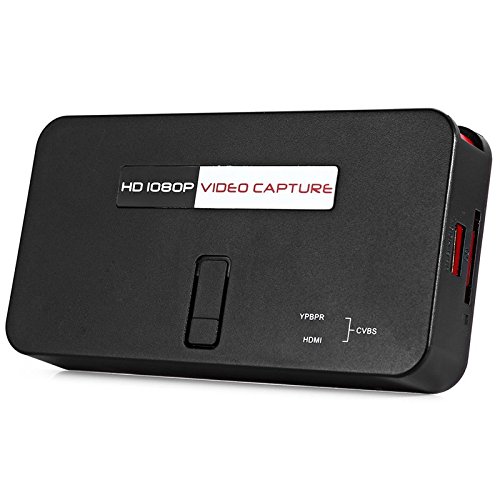
Mufananidzo 3: Pazasi view of the EZCAP284 device, indicating model and certification information.
Gadzirira
- Batanidza Vhidhiyo Source: Connect your game console (e.g., PS3) or other video source to the HDMI-IN or YPbPr IN port on the EZCAP284 using the appropriate cables.
- Batanidza Chiratidziro: Connect your TV or monitor to the HDMI OUT port on the EZCAP284. This allows you to view your gameplay in real-time while recording.
- Connect USB Storage: Insert a USB flash drive or external hard drive (formatted as FAT32 or NTFS) into the USB 2.0 port on the EZCAP284. This is where your recordings will be saved.
- Batanidza Simba: Connect the power adapter to the DC IN port on the EZCAP284 and then plug it into a power outlet. The device will power on.
- Optional Audio Input: If you wish to record live commentary, connect a microphone to the 3.5mm Audio In port.
Operating Instruction
Recording Gameplay
- Ensure all connections are secure as described in the Setup section.
- Turn on your video source (e.g., game console) and your display.
- Press the REC button on the EZCAP284 device or the remote control to start recording. The indicator light will change to show recording is in progress.
- Press the REC button again to stop recording. The indicator light will revert to its standby state.
- Your recorded video file will be saved to the connected USB storage device.
Adding Live Commentary
To record your voice along with the gameplay:
- Batanidza maikorofoni kune 3.5mm Audio In port before starting your recording.
- The device will automatically mix the microphone audio with the video source audio during recording.
Playback
To view your recorded videos, safely remove the USB storage device from the EZCAP284 and connect it to a computer or a media player that supports the recorded video format.
Maintenance
- Kuchenesa: Shandisa jira rakapfava, rakaoma kuchenesa kunze kwechishandiso. Usashandise zvinochenesa mvura kana zvinonyungudutsa.
- Kuchengeta: Chengeta mudziyo uyu munzvimbo inotonhorera, yakaoma kure nezuva rakananga uye tembiricha dzakanyanya kana usiri kuushandisa.
- Firmware: Tarisa mugadziri wacho website periodically for any firmware updates that may improve performance or add features.
Kugadzirisa matambudziko
| Dambudziko | Zvinogona Kukonzera | Solution |
|---|---|---|
| Hapana vhidhiyo inobuda pakuratidzira. | Incorrect cable connection; input source not active; display input not selected. | Check HDMI/YPbPr connections. Ensure video source is on. Select correct input on your TV/monitor. |
| Recording fails or stops unexpectedly. | USB storage full; USB drive not compatible; power interruption. | Ensure USB drive has sufficient space. Try a different USB drive (FAT32/NTFS). Check power connection. |
| No audio in recording. | Audio cables not connected; source audio muted; microphone not connected or faulty. | Verify audio connections from source. Ensure source audio is not muted. Check microphone connection and functionality. |
| Remote control haisi kushanda. | Batteries low or inserted incorrectly; IR sensor blocked. | Replace batteries. Ensure line of sight to the device's IR sensor. |
Zvinotsanangurwa
| Feature | Tsanangudzo |
|---|---|
| Model | EZCAP284 |
| Type | Adapter / Video Capture Device |
| Material | Mhangura (zvinhu zvemukati) |
| Interfaces | 3.5mm Audio In, HDMI In, HDMI Out, YPbPr In, USB 2.0 |
| Vhidhiyo Capture Resolution | Kusvika ku1080p |
| Platform Compatibility | PlayStation (and other HDMI/YPbPr sources) |
| Inosanganisirwa Zvikamu | Remote Control |
| Color | Nhema |
| Dimensions (L x W x H) | 14.00 x 7.40 x 2.00 masendimita (anenge) |
| Kurema | 0.463 kg (inenge pasuru uremu) |
Warranty uye Support
Kuti uwane ruzivo nezvewarandi uye rutsigiro rwehunyanzvi, ndapota tarisa magwaro akapihwa nekutenga kwako kana kuti bata mutengesi/mugadziri zvakananga. Chengeta humbowo hwekutenga kwako kuti uwane zvikumbiro zvewarandi.