MOOER UK Gold 900 Micro Preamp (M002) Bhuku reMirayiridzo
Muenzaniso: M002
Nhanganyaya
The MOOER UK Gold 900 Micro Preamp (M002) is a compact digital recreation of the preamp section of a classic British tube amplifier. It is designed to capture the sound, dynamics, and response of the original amplifier. This micro preamp features dual channels, integrated speaker cabinet simulation, and dual operating modes to provide versatile tonal options for guitarists.
Key Features
High-quality dual-channel preamp.
Independent 3-band EQ (Treble, Mid, Bass) for each channel.
Independent Gain and Volume controls for each channel.
Switchable speaker cabinet simulation.
Two footswitch operating modes: On/Off or Channel A/B switching.
Compact and durable metal housing.
Zvidzoro uye Mabatanidza
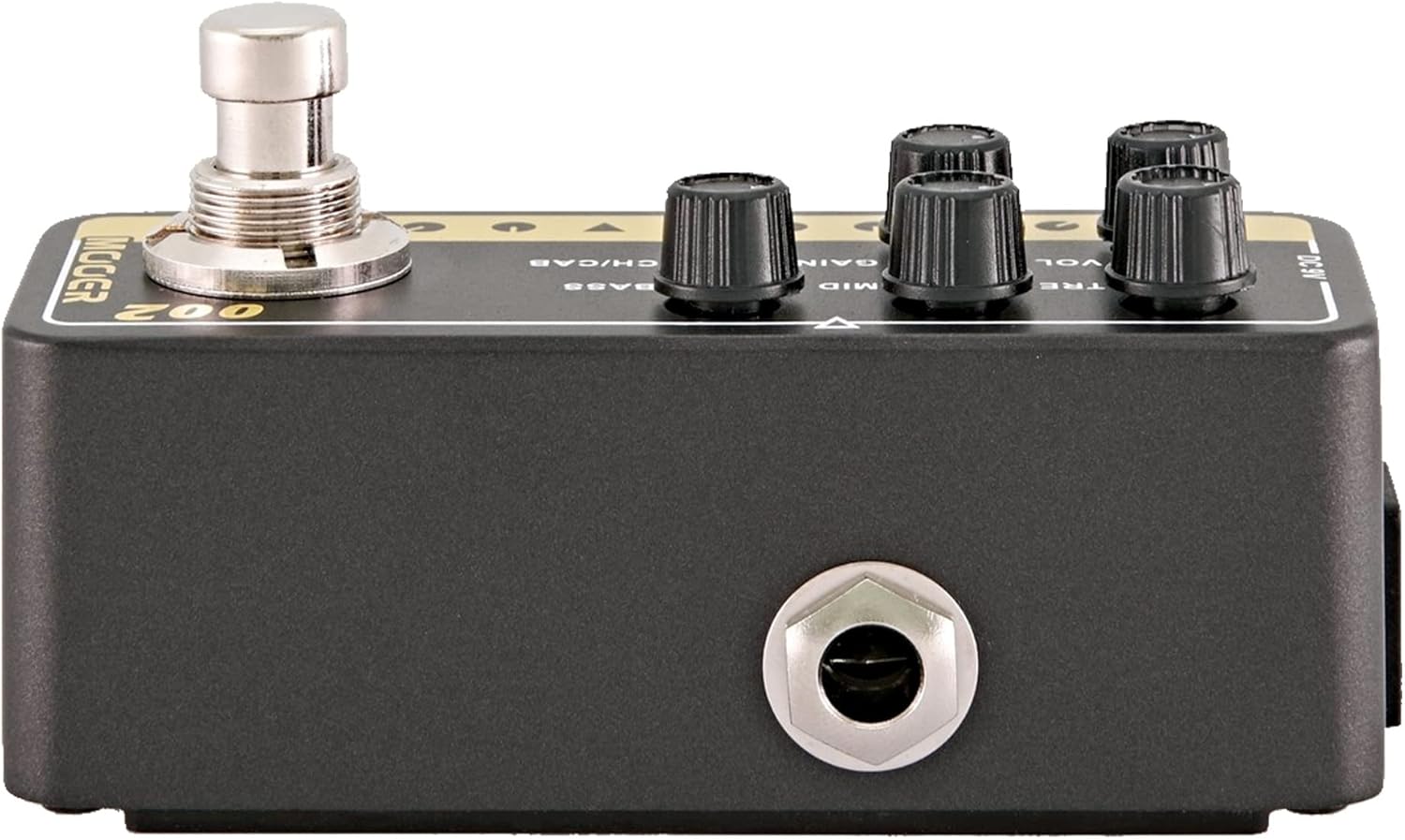
Mufananidzo: Mberi view of the MOOER UK Gold 900 Micro Preamp, showing the control knobs and footswitch.
TRE (Treble) Knob: Inogadzirisa mhinduro ye "high-frequency".
MID (Middle) Knob: Adjusts the mid-range frequency response.
BASS Knob: Inogadzirisa mhinduro ye low-frequency.
GAIN Knob: Inodzora huwandu hwekutyaira zvakanyanya/kukanganiswa.
Press and hold to toggle the speaker cabinet simulation on or off.
Footswitch: Activates or bypasses the preamp, or switches between channels depending on the selected mode.
Inzwa Zvinotaurwa Jack: Batanidza gitare rako kana chimwe chiridzwa.
Kubuda Jack: Batanidza kune an amplifier, musanganiswa, kana audio interface.
DC 9V Simba Kupinza: Connect a 9V DC power adapter (center negative, 300mA minimum).
Mufananidzo: Rear view of the MOOER UK Gold 900 Micro Preamp, showing the 9V DC power input.
Mufananidzo: Side view of the MOOER UK Gold 900 Micro Preamp, illustrating the input and output jacks.
Gadzirira
Power Connection: Connect a 9V DC power adapter (center negative, 300mA minimum) to the DC 9V input jack on the rear of the unit. Ensure the power supply meets these specifications to prevent damage.
Instrument Connection: Connect your guitar or other instrument to the INPUT jack on the right side of the preamp using a standard 1/4-inch instrument cable.
Output Connection: Connect the OUTPUT jack on the left side of the preamp kwauri amplifier's input, effects loop return, or an audio interface/mixer.
Pakutanga Zvirongwa: Before powering on, set all control knobs (TRE, MID, BASS, GAIN, VOL) to their minimum positions to avoid sudden loud sounds.
Power On: Once all connections are secure, apply power to the unit. The LED indicator will illuminate.
Operating Instruction
Channel Selection
The UK Gold 900 features two channels, A and B, each with independent EQ, Gain, and Volume settings.
To switch channels: Briefly press the CH/CAB button. The LED color will change to indicate the active channel (e.g., green for Channel A, red for Channel B).
Speaker Cabinet Simulation
Iyo yekutangaamp includes an integrated speaker cabinet simulation, which is useful for direct recording or connecting to a PA system.
To toggle cabinet simulation: Press and hold the CH/CAB button for approximately 2 seconds. The LED will flash to indicate the change.
Maitiro eFootswitch
The footswitch can operate in two different modes:
On/Off Mode: In this mode, the footswitch acts as a bypass, turning the preamp kushanda kana kudzima.
Channel A/B Mode: In this mode, the footswitch switches between Channel A and Channel B.
Refer to the product's full manual or manufacturer's website for instructions on how to switch between these footswitch modes, as this functionality is typically configured via a hidden switch or specific power-up sequence.
Kugadzirisa Manzwi
Adjust the following controls to shape your sound:
WANA: Increase for more overdrive and distortion. Decrease for cleaner tones.
VOL: Gadzirisa huwandu hwehuwandu hwekubuda.
TRE, MID, BASS: Use these three knobs to fine-tune the equalization for your desired tone.
Maintenance
Kuchenesa: Use a soft, dry cloth to clean the unit. Do not use liquid cleaners or solvents.
Kuchengeta: Store the preamp in a dry environment, away from extreme temperatures and direct sunlight.
Magetsi: Always use the specified 9V DC (center negative) power supply. Incorrect power can damage the unit.
Connections: Ensure all cables are securely connected but do not overtighten. Disconnect cables when the unit is not in use for extended periods.
Kugadzirisa matambudziko
Hapana Inzwi:
Check all cable connections (input, output, power).
If the footswitch mode is set to Channel A/B, it will not bypass the effect.
Zvinotsanangurwa
Model Name
UK Gold 900
Item Model Number
M002
Material
Metal
Dimensions
4.1 x 1.9 x 2.3 inches
Item Weight
6.4 ounces
Simba Source
Corded Electric
Voltage
9 Volts DC (Center Negative)
Current Draw
300mA (minimum)
Hardware inowanikwa
USB (Note: USB functionality typically for firmware updates or advanced control, refer to manufacturer for details)
Signal Format
Digital
Warranty uye Support
For warranty information and technical support, please refer to the official MOOER website or contact your authorized MOOER dealer. Keep your purchase receipt as proof of purchase for warranty claims.