
1. Chigadzirwa Pamusoroview
The ADATA XPG EX500 is a tool-free external enclosure designed to convert any 2.5-inch SATA III hard disk drive (HDD) or solid state drive (SSD) into a portable storage solution. It supports USB 3.1 connectivity, offering fast data transfer speeds, and is backward compatible with USB 2.0 and USB 3.0. Its robust, shock-resistant design provides protection for your valuable data.
Zvinokosha:
- Suitable for 2.5-inch SSD and 2.5-inch Hard Disk Drive
- Tool-less design for quick installation process
- Plug and Play functionality
- Shock resistant construction
- USB 3.1 connectivity (backward compatible with USB 3.0 and USB 2.0)
2. Package Zviri mukati
Ndokumbira utarise kuti zvinhu zvese zvirimo mupasuru yako:
- XPG EX500 External Enclosure
- USB 3.1 Cable
- Mushandisi Chinyorwa (gwaro iri)
3. Setup Instructions
Installing a 2.5-inch Drive:
The XPG EX500 features a tool-free design for easy installation of your 2.5-inch SATA HDD or SSD.
- Vhura Enclosure: Gently slide the top cover of the XPG EX500 enclosure in the direction indicated by the arrows until it detaches.
- Isa Drive: Align your 2.5-inch SATA HDD or SSD with the SATA connector inside the enclosure. Carefully push the drive into the connector until it is firmly seated. Ensure the drive is oriented correctly.
- Vhara Enclosure: Place the top cover back onto the enclosure, aligning the tabs. Slide the cover until it clicks securely into place.
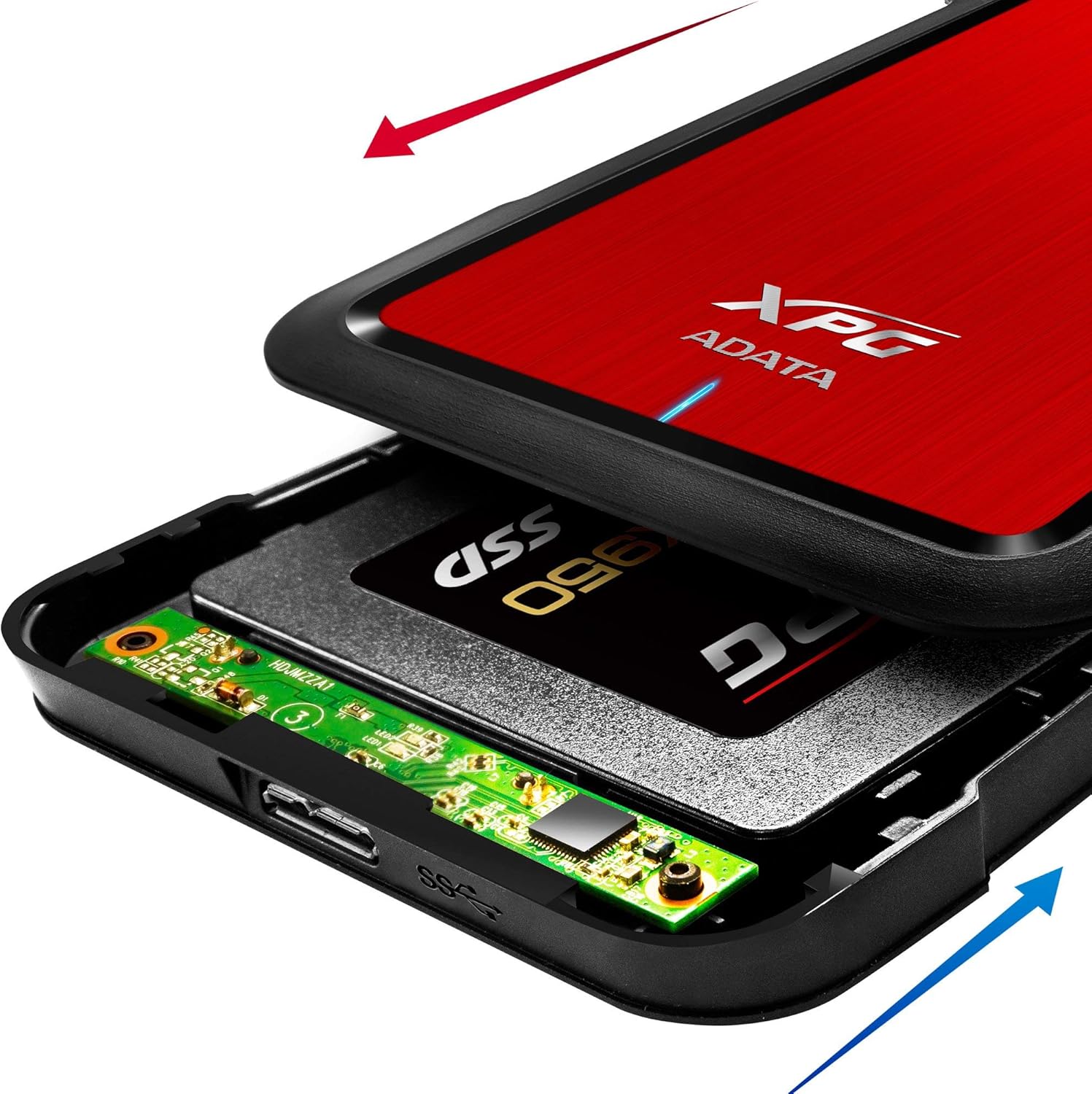
Image: The XPG EX500 enclosure shown open, with a solid state drive (SSD) being inserted into the internal SATA connector. Red and blue arrows indicate the sliding motion for opening and closing the cover.
4. Operating Instructions
Kubatanidza kune Chishandiso:
Once your drive is installed, connect the XPG EX500 to your computer or gaming console.
- Batanidza USB Cable: Plug one end of the provided USB 3.1 cable into the USB port on the XPG EX500 enclosure.
- Batanidza kune Host Device: Plug the other end of the USB cable into an available USB port on your PC, notebook, Mac, PlayStation 4, Xbox 360, or Xbox One. For optimal performance, use a USB 3.1 (or USB 3.0) port.
- Plug uye Tamba: The enclosure is plug-and-play. Your operating system should automatically detect the drive. If it's a new drive, you may need to initialize and format it through your operating system's disk management tools before use.
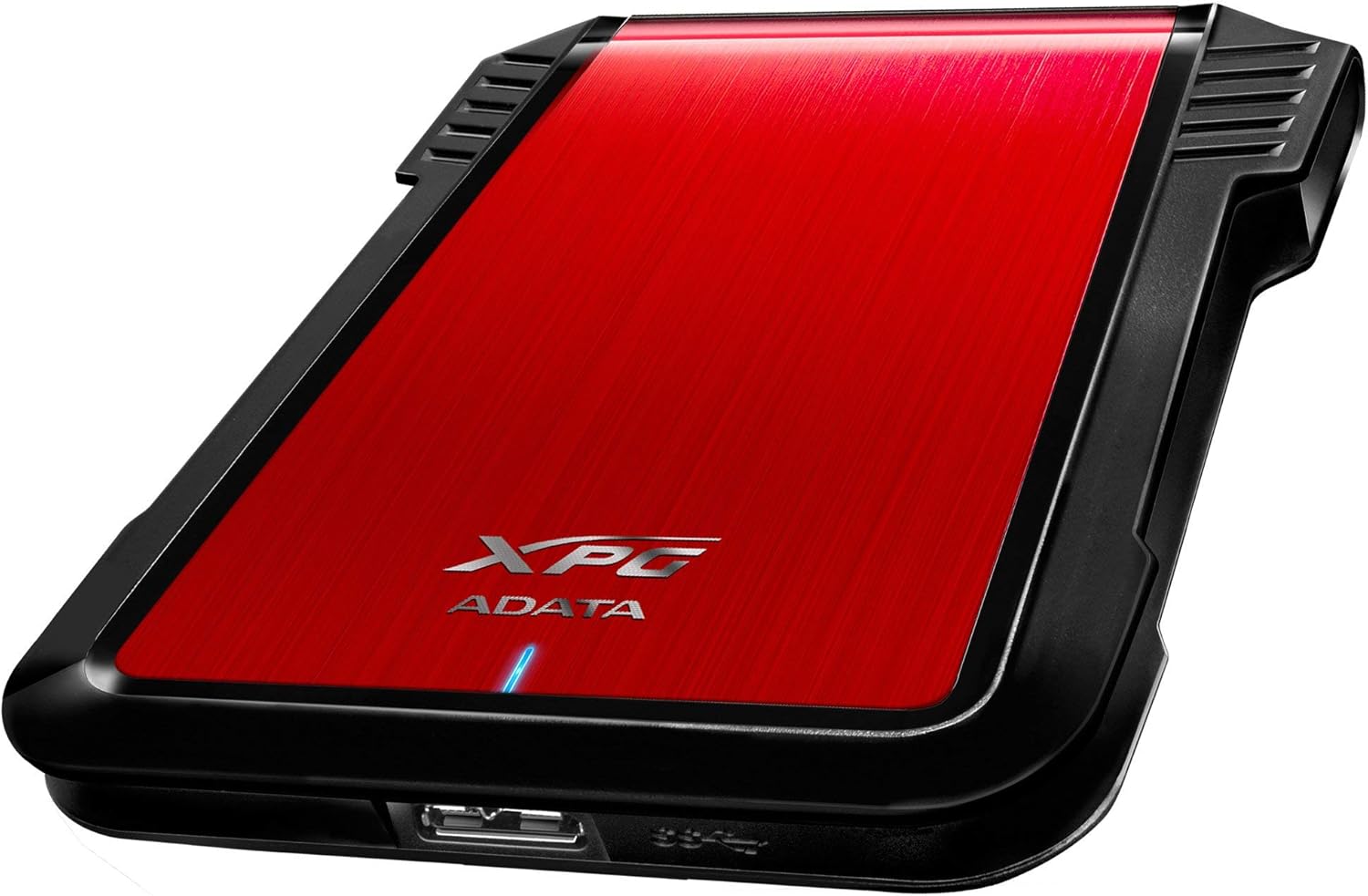
Mufananidzo: A divi view of the XPG EX500 external enclosure, highlighting the USB 3.1 port for connecting to a host device.
Kuendesa Data:
The XPG EX500 supports USB 3.1, providing high-speed data transfer. Actual speeds may vary depending on the connected device, the drive installed, and the type of data being transferred.
5. Kuchengeta
To ensure the longevity and optimal performance of your XPG EX500 enclosure:
- Kuchenesa: Shandisa jira rakapfava, rakaoma kuchenesa kunze kwenzvimbo yakavharirwa. Dzivisa kushandisa mishonga yekuchenesa kana zvinonyungudutsa mvura.
- Kubata: While the enclosure is shock-resistant, avoid dropping it or subjecting it to severe impacts, as this can still damage the internal drive.
- Environment: Store and operate the enclosure in a dry environment, away from extreme temperatures, direct sunlight, and humidity.
- Disconnection: Gara uchibvisa dhiraivha kubva mu operating system yako usati wabvisa tambo ye USB kudzivirira kuora kwedata.
6. Kugadzirisa matambudziko
If you encounter issues with your XPG EX500, please refer to the following common solutions:
- Dhiraivha Haina Kuonekwa:
- Ensure the USB cable is securely connected to both the enclosure and the host device.
- Edza kubatanidza kune rakasiyana USB chiteshi pakombuta yako.
- Verify that the 2.5-inch drive is properly seated within the enclosure's SATA connector.
- If it's a new drive, check your operating system's Disk Management (Windows) or Disk Utility (macOS) to see if the drive needs to be initialized and formatted.
- Mamhanyiro ekufambisa data anononoka:
- Ensure you are connected to a USB 3.1 or USB 3.0 port on your host device. USB 2.0 ports will result in significantly slower speeds.
- Check the condition of the USB cable. Try using a different USB 3.1 compatible cable if available.
- The performance of the internal drive itself can affect transfer speeds.
- Enclosure Feels Warm:
- It is normal for the enclosure to feel warm during extended use, especially during heavy data transfers. Ensure adequate airflow around the device.
7. Zvinotsanangurwa
| Feature | Tsanangudzo |
|---|---|
| Model Number | AEX500U3-CRD |
| Madhiraivha Anoenderana | 2.5-inch SATA HDD/SSD |
| Interface | USB 3.1 (backward compatible with USB 3.0, USB 2.0) |
| Data Transfer Rate | Up to 1 Gigabits Per Second (USB 3.1 theoretical max) |
| Inowirirana Devices | PC, Notebook, Mac, PlayStation 4, Xbox 360, Xbox One |
| Material | Plastiki |
| Product Dimensions | 4.92 x 3.54 x 0.67 inches (125 x 90 x 17 mm) |
| Item Weight | 2.43 ounces (0.07 Makirogiramu) |
8. Ruzivo rweWaranti
The ADATA XPG EX500 External Enclosure comes with a 1-makore mashoma waranti kubva pazuva rawakatenga. Waranti iyi inovhara zvikanganiso zvekugadzira uye hunyanzvi hwekugadzira pasi pekushandiswa kwakajairika. Haivhari kukuvara kunokonzerwa nekushandiswa zvisizvo, tsaona, shanduko isina mvumo, kana zvikonzero zvekunze.
Please retain your proof of purchase for warranty claims. For detailed warranty terms and conditions, refer to the official ADATA websaiti kana kubata rutsigiro rwevatengi.
9. Tsigiro
For further assistance, technical support, or to download the latest drivers and firmware (if applicable), please visit the official ADATA websaiti:
You may also contact ADATA customer service directly through the contact information provided on their website.