
Unknown Yu- TLXgo-2201
Wireless Bluetooth Headset User Manual
Model: Yu- TLXgo-2201 | Brand: Unknown
Nhanganyaya
Ndatenda nekutengaasing the Wireless Bluetooth Headset. This manual provides essential information for the proper use, setup, and maintenance of your new headset. Please read it thoroughly before use to ensure optimal performance and longevity of the product.
Package Zviri mukati
Ndokumbira utarise kuti zvinhu zvese zvakanyorwa pazasi zvinosanganisirwa mupakeji yako:
- Wireless Bluetooth Headset (2 units)
- USB Charging Cable (2 units)
- User Manual

Image: Contents of the headset package, showing one black headset and a white USB charging cable.
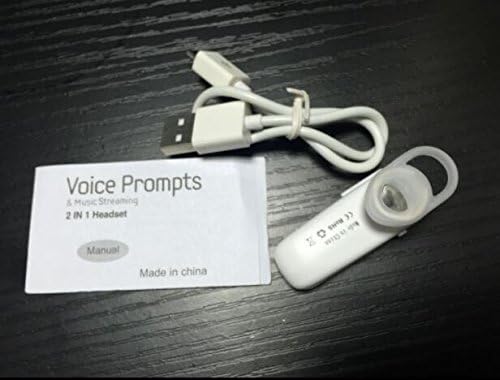
Image: Contents of the headset package, showing one white headset, a white USB charging cable, and the printed user manual.
Product Overview
The Wireless Bluetooth Headset is designed for convenience and portability, ideal for sports, driving, and daily use. It features a super mini design and supports voice prompts and music streaming.

Mufananidzo: Mberi view of the product packaging, displaying the black wireless Bluetooth headset inside its clear plastic casing.
Zvinotsanangurwa
| Feature | Tsanangudzo |
|---|---|
| Bluetooth Version | V3.0 + EDR |
| Tsigira Profiles | Headset, Handsfree, A2DP |
| Talk Time/Playing Time | Kusvikira kumaawa makumi maviri nemashanu |
| Standby Time | Kusvikira kumaawa makumi maviri nemashanu |
| Simba Source | Yakavakwa-mukati Rechargeable Li-ion Battery |
| Kubatana Technology | Wireless |
| Fomu Factor | Munzeve |
| Item Weight | 15.8 ounces (for 2 units) |
| Package Dimensions | 1.97 x 1.57 x 1.18 inches |
| Model Number | Yu- TLXgo-2201 |

Image: Back of the product packaging, displaying a list of product specifications including Bluetooth version, talk time, and power source.
Gadzirira
Kuchaja mahedhifoni
- Batanidza iyo diki yekupedzisira ye USB yekuchaja tambo kune yekuchaja port pane headset.
- Batanidza magumo makuru etambo yekuchaja yeUSB kune sosi yemagetsi yeUSB (semuenzaniso, doko reUSB rekombuta, adapta yemadziro eUSB).
- The indicator light on the headset will illuminate during charging. It will change color or turn off once fully charged.
- Kuchaja kwakazara kunowanzo kunotora maawa angangoita 1-2.
Kubatanidza neBluetooth Device
- Ensure the headset is fully charged before initial pairing.
- With the headset turned off, press and hold the Multi-function Button (MFB) for approximately 5-7 seconds until the indicator light flashes red and blue alternately. This indicates the headset is in pairing mode.
- Pamudziyo wako une Bluetooth (smartphone, tablet, nezvimwewo), enda kuBluetooth settings wobva waona kuti Bluetooth yavhurwa.
- Tsvaga available devices. The headset should appear in the list, typically named "MBT2013" or similar.
- Select the headset from the list to connect. If prompted for a password, enter "0000" (four zeros).
- Once successfully paired, the indicator light will stop flashing and may show a steady blue light, and you may hear a voice prompt confirming the connection.
- The headset will automatically connect to the last paired device when turned on, if the device's Bluetooth is active and within range.
Operating Instruction
Simba On/Kudzima
- Power On: Press and hold the Multi-function Button (MFB) for about 3 seconds until the blue indicator light flashes and you hear a voice prompt.
- Power Off: Press and hold the MFB for about 3-4 seconds until the red indicator light flashes and you hear a voice prompt.
Fonera Management
- Pindura Call: Dzvanya iyo MFB kamwe chete.
- Pedzisa Kufona: Dzvanya MFB kamwe chete panguva yekufona.
- Ramba Kufona: Press and hold the MFB for about 2 seconds during an incoming call.
- Dhonzazve Nhamba Yekupedzisira: Double-press the MFB when not on a call.
Music Playback
- Tamba/Kumbomira: Press the MFB once during music playback.
Note: Volume control may be managed directly from your connected device.
Maintenance
- Kuchenesa: Shandisa jira rakapfava, rakaoma kuchenesa headset. Usashandise makemikari akaomarara kana zvinhu zvinogumbura.
- Kuchengeta: Chengetedza mahedhifoni munzvimbo inotonhorera, yakaoma kure nechiedza chezuva uye tembiricha yakanyanyisa.
- Battery Care: To prolong battery life, charge the headset regularly, even if not in frequent use. Avoid fully discharging the battery for extended periods.
- Kuramba Mvura: Iyi headset haipindi mvura. Dzivisa kusviba nemvura kana hunyoro hwakawandisa.
Kugadzirisa matambudziko
- Mahedhifoni haabatidze:
- Iva nechokwadi chekuti mahedhifoni akazara. Batanidza kune simba remagetsi woedza zvakare.
- Haikwanise kubatanidzwa nemudziyo:
- Ensure the headset is in pairing mode (red and blue lights flashing alternately). Make sure Bluetooth is enabled on your device and it is within range (typically 10 meters). Try restarting both the headset and your device.
- Hapana ruzha kana kusanaka kweruzha:
- Check the volume levels on both the headset and your connected device. Ensure the headset is properly connected to your device. Move closer to your device to avoid interference.
- Headset disconnects frequently:
- Ensure the headset is within range of your device. Check for potential interference from other wireless devices. Try re-pairing the headset.
Safety Information
- Do not disassemble, repair, or modify the headset. This may cause fire, electronic breakdown, or complete damage to the product.
- Keep the headset away from extreme temperatures, humidity, and corrosive substances.
- Dzivisa kudonhedza kana kuisa mahedhifoni kune simba rinokanganisa.
- Do not expose the headset to open flames or dispose of it in fire.
- Rasa chigadzirwa uye bhatiri rayo zvine hungwaru maererano nemitemo yenzvimbo.
Warranty uye Support
For warranty information or technical support, please refer to the contact details provided by your retailer or the manufacturer's official website. Ndapota chengetedza humbowo hwako hwekutenga kwezvichemo zvewaranti.
Ask a question about this manual
Ask about setup, troubleshooting, compatibility, parts, safety, or missing instructions. Manuals+ will review the question and use this page’s manual context to help answer it.