
BV Megabit-2 Uplinks
BV-Tech 6 Port PoE+ Switch User Manual
Model: Megabit-2 Uplinks
Nhanganyaya
The BV-Tech 6 Port PoE+ Switch (Model: Megabit-2 Uplinks) is an unmanaged network switch designed to simplify your network setups. It features 4 Power over Ethernet Plus (PoE+) ports and 2 Ethernet uplink ports, providing flexible connectivity for various devices. This manual provides essential information for setting up, operating, and maintaining your PoE+ switch.
Chii chiri muBhokisi
Upon unboxing your BV-Tech 6 Port PoE+ Switch, you should find the following components:
- BV-Tech 6 Port PoE+ Switch (Model: Megabit-2 Uplinks)
- Power Adapter (UL and CE listed)
- Power Cord
- Bhuku reMushandisi (gwaro iri)

Figure 1: Included components of the BV-Tech 6 Port PoE+ Switch.
Product Overview uye Features
The BV-Tech 6 Port PoE+ Switch is designed for robust and efficient network power and data transmission. Key features include:
- Compact uye Yakasimba Dhizaini: Housed in a sturdy metal casing, the switch is compact and fanless, suitable for desktop use or wall mounting.
- PoE+ Ports: Four 10/100Mbps PoE+ ports (Ports 1-4) provide power and data. Port 1 supports Hi-PoE up to 60W, while Ports 2-4 support PoE+ up to 30W each. The total PoE power budget is 60W.
- Ethernet Uplink Ports: Two 10/100Mbps Ethernet uplink ports (Ports 5-6) allow for connection to your main network without consuming PoE ports.
- Wedzera Basa: A dedicated switch enables "Extend" mode, increasing the PoE transmission distance up to 820 feet (250 meters). In this mode, data transmission speed on the PoE ports is reduced to 10Mbps.
- Plug & Tamba: The switch is unmanaged, requiring no complex configuration for basic operation.
- PD Detection: Automatically detects and provides the required power for your PoE devices. Note: This switch does not support passive PoE devices.

Mufananidzo 2: Mberi view of the BV-Tech 6 Port PoE+ Switch.
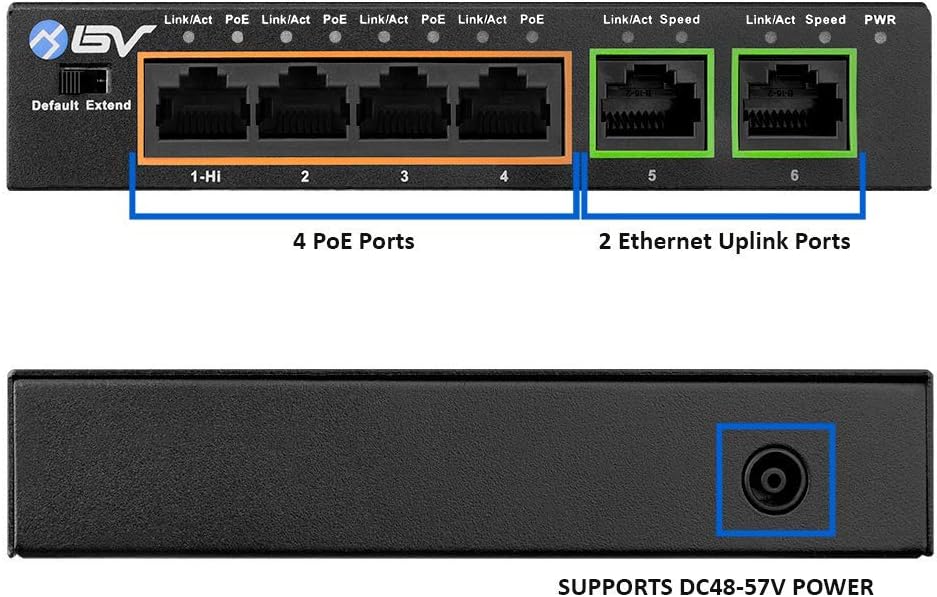
Figure 3: Port layout of the BV-Tech 6 Port PoE+ Switch, showing 4 PoE ports (orange outline) and 2 Ethernet Uplink ports (green outline).

Mufananidzo 4: Kumashure view of the switch, indicating the DC power input and mounting points.

Figure 5: Physical dimensions of the compact metal housing.
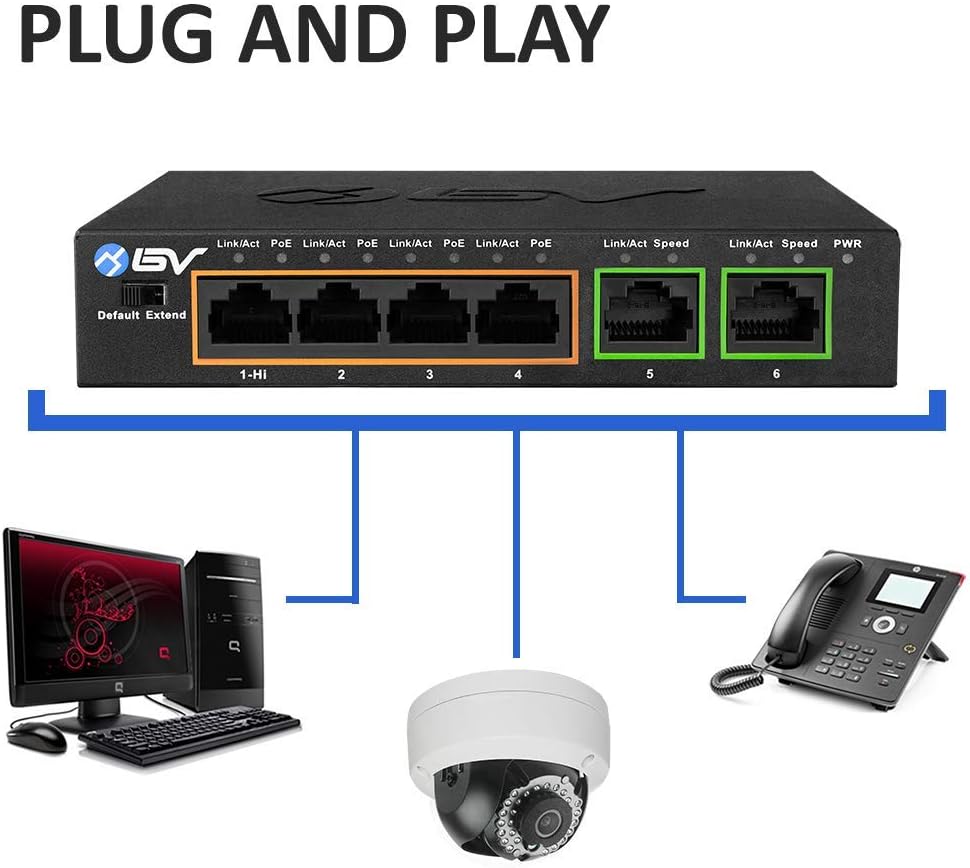
Figure 6: High Power capability of Port 1 (up to 60W).
Setup uye Installation
Follow these steps to set up your BV-Tech 6 Port PoE+ Switch:
- Bvisa Switch: Carefully remove all components from the packaging. Ensure the switch, power adapter, and power cord are present.
- Batanidza Simba: Connect the power cord to the power adapter, then plug the power adapter into the DC48-57V input port on the back of the switch. Plug the power cord into a standard wall outlet. The PWR LED on the front panel should illuminate, indicating power.
- Batanidza Zvishandiso zveNetwork:
- For PoE-powered devices (e.g., IP cameras, VoIP phones, wireless access points), connect them to any of the 4 PoE ports (Ports 1-4) using Ethernet cables. Port 1 is ideal for high-power devices requiring up to 60W.
- For non-PoE network devices or to connect to your main network router/NVR, use the 2 Ethernet Uplink ports (Ports 5-6).
- Verify Connections: Once devices are connected, observe the Link/Act and PoE indicator lights on the front panel. A solid Link/Act light indicates a stable connection, and a flashing light indicates data activity. A solid PoE light indicates power is being supplied to the connected device.
- Kuisa (Zvichida): The switch features two attachment points on the bottom for wall or rack mounting using screws (not included).

Mufananidzo 7: Example setup demonstrating plug-and-play connectivity.
Video 1: Unboxing and setup demonstration of the BV-Tech 6 Port PoE+ Switch, including connecting a high-power PTZ camera and verifying operation.
Operating Instruction
The BV-Tech 6 Port PoE+ Switch is an unmanaged device, meaning it operates automatically once connected. However, it features an "Extend" switch for specific use cases:
- Default Mode: (Switch in "Default" position) In this mode, the switch operates at 10/100Mbps for all ports, with a maximum PoE transmission distance of 100 meters (328 feet). This is the standard operating mode for most installations.
- Extend Mode: (Switch in "Extend" position) When enabled, this mode extends the PoE transmission distance up to 250 meters (820 feet). To achieve this extended range, the data transmission speed on the PoE ports (Ports 1-4) is reduced to 10Mbps. This mode is ideal for long-distance camera installations where high bandwidth is not critical.
Ensure the "Default/Extend" switch is set appropriately for your network's cabling distance requirements.
Maintenance
To ensure optimal performance and longevity of your BV-Tech 6 Port PoE+ Switch, consider the following maintenance tips:
- Kuiswa: Place the switch in a well-ventilated area to prevent overheating. Avoid direct sunlight or areas with high humidity.
- Kuchenesa: Gara uchichenesa kunze kwechishandiso nejira rakapfava, rakaoma. Usashandise mishonga yekuchenesa yemvura kana yeaerosol.
- Cable Management: Ensure all Ethernet cables are securely connected and neatly organized to prevent accidental disconnections or damage.
- Firmware Dzokorora: As an unmanaged switch, firmware updates are typically not required. If a specific issue arises that requires a firmware update, consult BV-Tech support.
Kugadzirisa matambudziko
If you encounter issues with your BV-Tech 6 Port PoE+ Switch, try the following troubleshooting steps:
- Hapana Simba (PWR LED Yadzimwa):
- Ensure the power adapter is securely connected to the switch and the wall outlet.
- Verify the wall outlet is functioning correctly by plugging in another device.
- Tarisa iyo adapta yemagetsi kune chero kukuvara kunoonekwa.
- No Link/Activity (Link/Act LED Off):
- Ensure the Ethernet cable is securely connected to both the switch port and the connected device.
- Try a different Ethernet cable to rule out cable defects.
- Tarisa kuti mudziyo wakabatana wakabatidzwa uye unoshanda nemazvo.
- If using "Extend" mode, ensure the connected device supports 10Mbps data rates.
- No PoE Power (PoE LED Off):
- Ensure the connected device is a PoE-compatible device (IEEE 802.3af/at standard). This switch does not support passive PoE.
- Check the power requirements of your PoE device. The switch has a total power budget of 60W. If multiple high-power devices are connected, the total power draw might exceed the budget.
- Edza kubatanidza mudziyo kune imwe PoE port.
- Kumhanya Kwedata Kunonoka:
- If the "Extend" switch is enabled, the speed on PoE ports is intentionally reduced to 10Mbps. Switch to "Default" mode if higher speeds are required and the cable length is within 100 meters.
- Check the quality and category of your Ethernet cables (Cat5e or Cat6 recommended for optimal performance).
Zvinotsanangurwa
| Feature | Tsanangudzo |
|---|---|
| Chinja Type | Metal |
| Chigadzirwa Zviyero (W x D x H) | 5.12"L x 3.35"W x 1.02"H (130mm x 85mm x 26mm) |
| Item Weight | 10.6 ounces (300g) |
| Voltage | DC48-57V |
| Maximum Power (PoE) | Port 1: 60W; Ports 2-4: 30W each; Total: 60W |
| Nhamba yePorts | 6 (4 PoE+, 2 Uplink) |
| Data Transfer Rate | 100 Megabits Per Second (10Mbps in Extend Mode) |
| PoE Protocol | IEEE802.3af (PoE), IEEE802.3at (PoE+), Hi-PoE |
| Kuchinja Kugona | 1.8G |
| Packet Forwarding Rate | 890kpps |
| MAC Tafura Saizi | 2K |
| Operating Temperature | 14 ° F - 131 ° F (-10 ° C - 55 ° C) |
| Humidity | 10 - 90% (isina-condensing) |
| Mheni Dziviriro | Common Mode 2KV; Differential Mode 0.5KV |
| Model Number | Megabit-2 Uplinks |
| UPC | 813076028560 |
Warranty uye Support
All products sold by PoE Depot (BV-Tech) come with a 100% Satisfaction Guarantee. This includes:
- 30-Day Mari-Kudzoserwa Guarantee: If you are not completely satisfied, you can return the product within 30 days for a full refund.
- 1-Yemakore Warranty: Covers replacement for free within one year of purchase.
- Hupenyu hwese Tsigiro yehunyanzvi: BV-Tech provides lifetime technical support for their products. For assistance, please visit the BV-Tech Store on Amazon or contact their support channels directly.