
Nhanganyaya
This manual provides detailed instructions for the assembly, operation, and maintenance of your FLEXISPOT E2B-B Height Adjustable Desk Frame. This electric sit-stand desk frame is designed to offer a flexible and ergonomic workspace, allowing seamless transitions between sitting and standing positions. Please read this manual thoroughly before assembly and use to ensure proper function and safety.

Image: The FLEXISPOT E2B-B Height Adjustable Desk Frame in black, shown with a black desktop and two monitors, illustrating a typical setup.
Safety Information
Kuti uve nechokwadi chekushanda kwakachengeteka uye kudzivirira kukuvadzwa, ndapota chengeta zvinotevera kuchengetedza nhungamiro:
- Ensure all cables are properly connected and not pinched during movement.
- Keep hands and fingers clear of moving parts, especially during height adjustments.
- Usaremedza dhesiki zvakanyanya. Huremu hwepamusoro hunosvika 220 lbs (100 kg).
- Usagare kana kumira padhesiki tafura.
- Only use the desk frame indoors in a dry environment.
- Bvisa tambo yemagetsi usati waichenesa kana kuita chero kugadzirisa.
- Children should not operate the desk without adult supervision.
Package Zviri mukati
Before beginning assembly, please verify that all components are present:
- 1 x Height Adjustable Desk Frame (Black)
- 1 x Desktop (Black, 55"x 27.5")
- Zvese zvinodiwa hardware pakusangana
- 1 x Digital Display Handset
Setup uye Assembly
Assembly of the FLEXISPOT E2B-B desk frame is required. Please follow the instructions provided in the separate assembly guide included with your package. Ensure you have adequate space and the necessary tools before starting.
Key assembly considerations:
- The frame width is adjustable from 42" to 63" to accommodate various desktop sizes.
- The desk frame supports desktops ranging from 47.25" to 70.9" in width and 23.6" to 31.5" in depth.
- Ensure all screws are tightened securely after assembly.

Image: An illustration showing various components of the desk frame, including the legs, crossbar, and feet, indicating the assembly process.
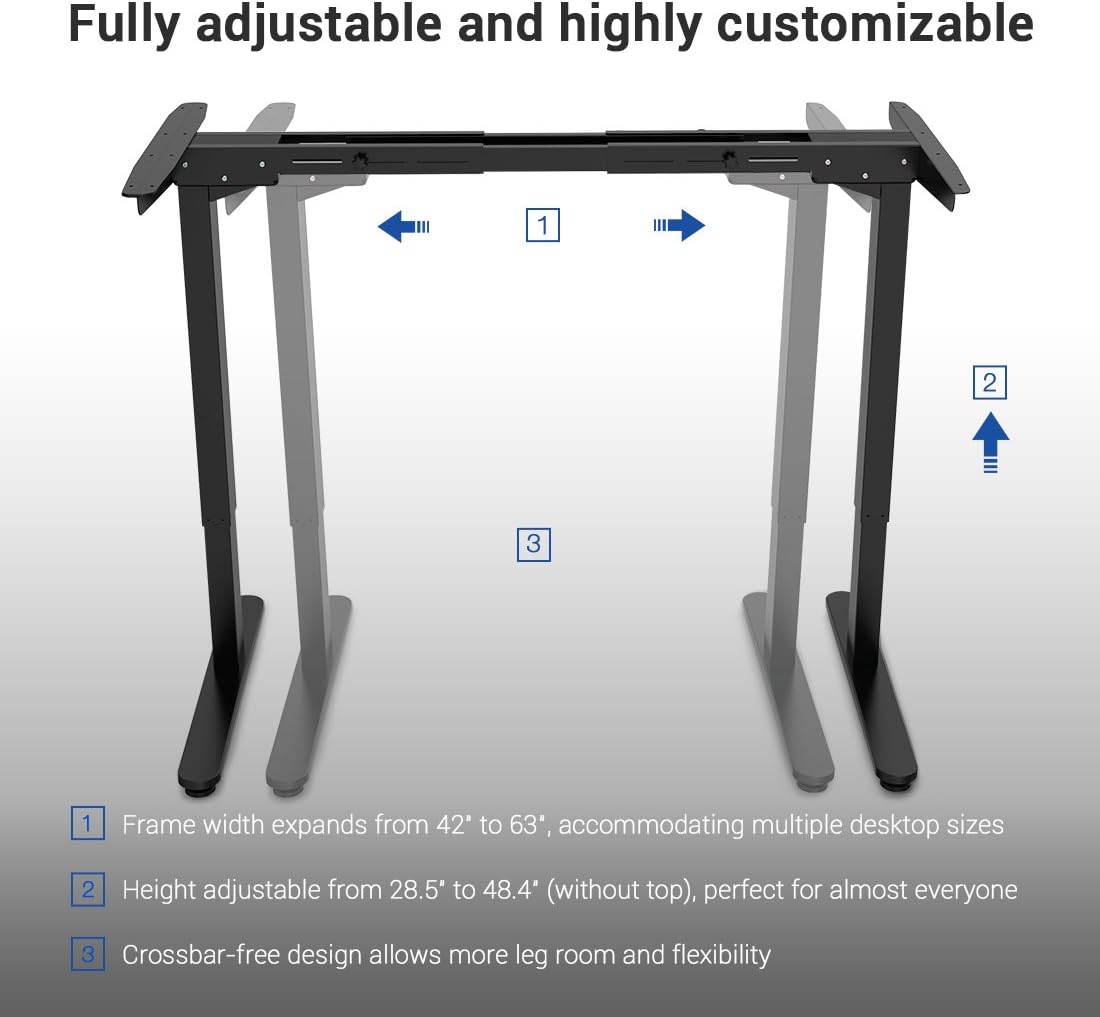
Image: A diagram illustrating the adjustable frame width (42" to 63") and height (28.5" to 48.4") of the FLEXISPOT desk frame, highlighting its customizable nature.
Operating Instruction
The FLEXISPOT E2B-B desk frame features a 7-button digital display handset for easy height adjustment and memory presets.
- Kugadzirisa Hurefu: Use the up and down arrows on the handset to smoothly adjust the desk height. The desk moves at approximately 0.87 inches per second.
- Memory Presets: The handset includes 3 customizable height preset options (buttons 1, 2, 3). To save a height, adjust the desk to your desired position, then press and hold one of the preset buttons until the display confirms the setting.
- Sit/Stand Reminder: A dedicated button allows you to set a reminder to switch between sitting and standing positions, promoting healthier work habits.
- Dhijitari Display: The display shows the current height of the desk in inches.

Mufananidzo: Kuvhara view of the FLEXISPOT digital control panel, showing the up/down arrows, memory preset buttons (1, 2, 3), and other function buttons.
Maintenance
Regular maintenance helps ensure the longevity and smooth operation of your desk frame.
- Kuchenesa: Wipe the desk frame and desktop with a soft, damp jira. Dzivisa abrasive cleaners kana solvents.
- Cable Management: Periodically check that all cables are securely connected and not tangled or pinched.
- Fastener Check: Every few months, inspect all screws and bolts to ensure they remain tight. Retighten if necessary.
Kugadzirisa matambudziko
If you encounter issues with your desk frame, refer to the following common troubleshooting steps:
| Dambudziko | Zvinogona Kukonzera | Solution |
|---|---|---|
| Desiki harifambi. | Power cable disconnected; Overload; Motor error. | Check power connection; Reduce weight on desk; Unplug for 10 seconds and plug back in to reset. |
| Uneven movement. | Unbalanced load; Loose fasteners. | Distribute weight evenly; Check and tighten all assembly fasteners. |
| Kodhi yezvikanganiso inoratidzwa. | Chaiyo system kukanganisa. | Refer to the full troubleshooting guide in your assembly manual or contact customer support. |
Zvinotsanangurwa
Detailed specifications for the FLEXISPOT E2B-B Height Adjustable Desk Frame:
| Feature | Detail |
|---|---|
| Brand | FLEXISPOT |
| Model | E2B-B |
| Height Adjustment Range (without top) | 28.5" kusvika 47.4" |
| Frame Width Expansion | 42" kusvika 63" |
| Compatible Desktop Sizes | 47.25" to 70.9" (width), 23.6" to 31.5" (depth) |
| Weight Capacity | Kusvikira ku220 lbs (100 kg) |
| Motor Type | Dual Motor Lift Mechanism |
| Noise Level | Under 50 dBs |
| Desktop Material | MDF (Medium Density Fiberboard) with scratch-resistant high-pressure laminate |
| Desktop Dimensions (Included) | 55" (W) x 27.5" (D) x 1" (Thickness) |
| Control Panel | 7-button digital display handset with 3 memory presets and sit/stand reminder |
| Gungano Rinodiwa | Ehe |
| Color | Black Frame + Black Top |
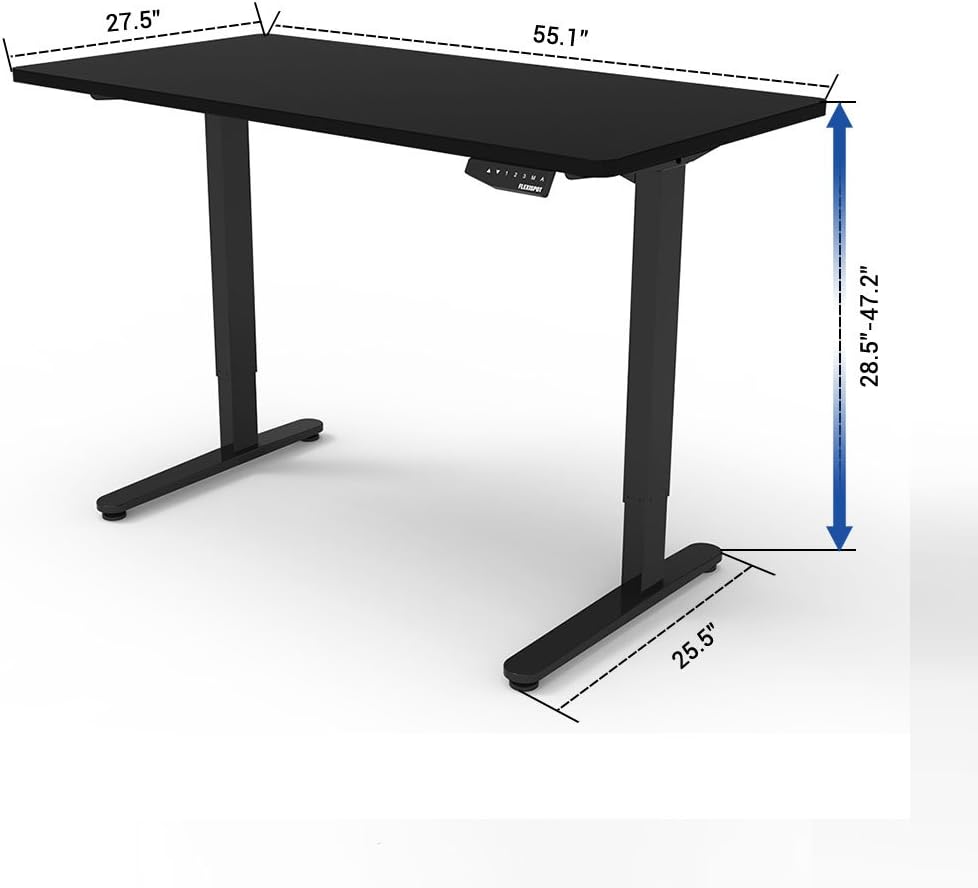
Image: A diagram illustrating the key dimensions of the FLEXISPOT desk, including desktop width (55.1"), depth (27.5"), and height adjustment range (28.5" to 47.2").
Warranty uye Support
The FLEXISPOT E2B-B Height Adjustable Desk Frame comes with a comprehensive warranty:
- Desk Frame: 5-makore waranti
- Motokari: 3-makore waranti
For technical support, warranty claims, or any inquiries, please contact FLEXISPOT customer service. Refer to the contact information provided on the product packaging or the official FLEXISPOT website.
Certifications
The FLEXISPOT E2B-B desk frame meets various industry standards for quality and safety.
Image: Logos for FCC, UL, and BIFMA International certifications, indicating compliance with relevant standards for electronic devices, safety, and office furniture.