
Nhanganyaya
This manual provides essential instructions for the Jam Audio Out There Active Noise Cancelling On-Ear Bluetooth Headphones. Please read this guide thoroughly to ensure proper use, maintenance, and to maximize your listening experience. These headphones offer active noise cancellation, Bluetooth connectivity, hands-free calling, and a comfortable on-ear design.
Chii chiri muBhokisi
Iva nechokwadi chekuti zvinhu zvese zviripo mupakeji:
- Out There Headphones
- Waya yeAUX (3.5mm)
- USB Kuchaja Cable
- Quick Start Guide (ona bhuku rino kuti uwane mirairo yakadzama)

Image: Contents of the Jam Audio Out There headphone package, including the headphones, AUX cable, and USB charging cable.
Product Overview uye Zvinodzora
Familiarize yourself with the headphone's layout and controls for optimal use.
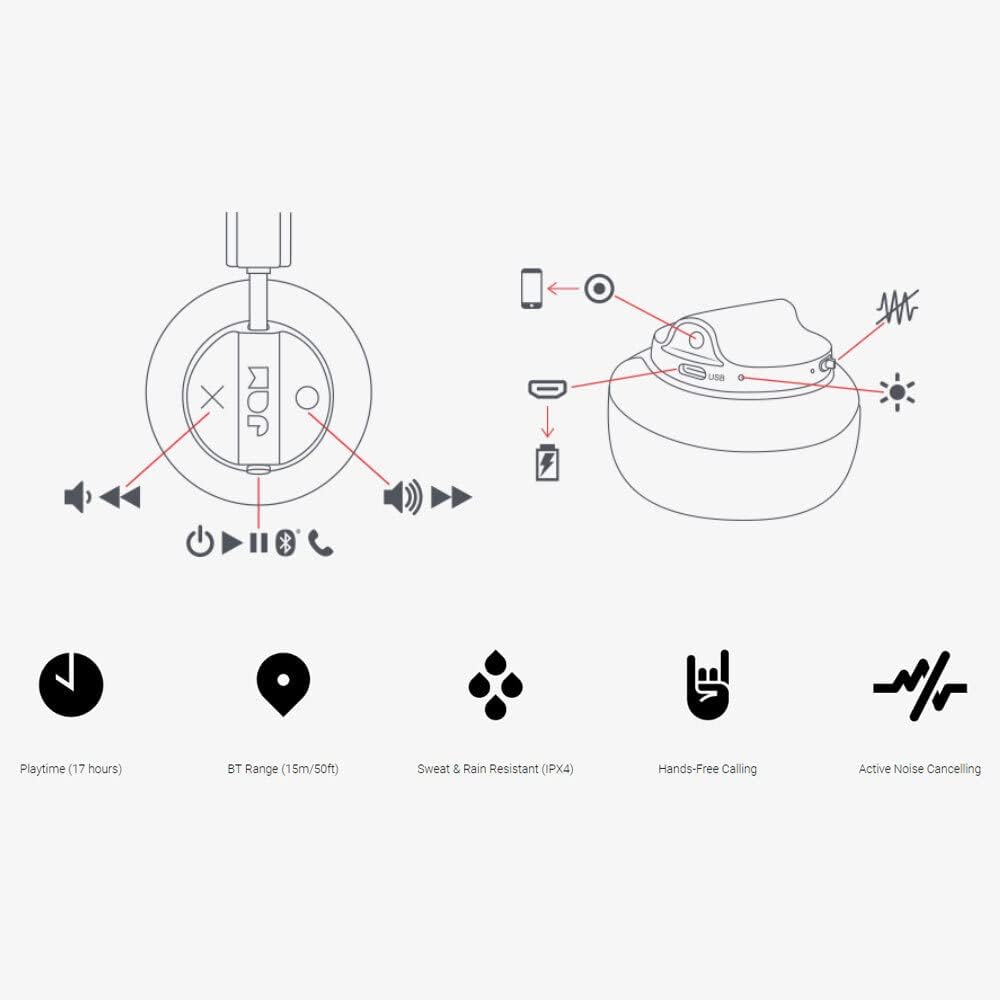
Image: Detailed diagram illustrating the control buttons and ports on the Jam Audio Out There headphones, including power, volume, track navigation, call management, and the charging port.
- Bhatani reSimba: Dzvanya uye ubate kuti ubatisise/kudzima.
- Vhoriyamu Kumusoro / Inotevera Track: Kudzvanya kupfupi kukwidza vhoriyamu, dzvanya kwenguva refu kune inotevera track.
- Vhoriyamu Pasi / Yakapfuura Rondedzero: Dzvanya kwenguva pfupi kuti vhoriyamu ideredzwe, tinya kwenguva refu kuti uone rwiyo rwekare.
- Tamba/Misa/Pindura Kufona: Single press to play/pause music or answer/end a call.
- Active Noise Cancelling (ANC) Switch: Toggle to activate or deactivate noise cancellation.
- Kuchaja Port: Chiteshi cheMicro USB chekuchaja.
- AUX-in Port: Jeki ye3.5mm yekubatanidza ruzha newaya.
Gadzirira
1. Kuchaja mahedhifoni
Before first use, fully charge your headphones. Connect the provided USB charging cable to the charging port on the headphones and the other end to a USB power source. The LED indicator will show charging status and turn off when fully charged. A full charge takes approximately 2 hours and provides up to 17 hours of playtime.

Image: The Jam Audio Out There headphones provide up to 17 hours of playtime on a single charge.
2. Powering On / Off
- To power on: Press and hold the Power button for 3 seconds. The LED indicator will flash.
- Kudzima: Dzvanya wobata bhatani rePower kwemasekondi maviri. Chiratidzo che LED chinodzima.
3. Bluetooth Kubatanidza
- Ita shuwa kuti mahedhifoni akadzimwa.
- Press and hold the Power button for 5 seconds until the LED indicator flashes red and blue, indicating pairing mode.
- Pamudziyo wako (smartphone, piritsi, komputa), gonesa Bluetooth uye tsvaga zvishandiso zviripo.
- Select "JAM Out There" from the list of devices.
- Once paired, the LED indicator on the headphones will turn solid blue.
- The headphones have a Bluetooth range of up to 15 meters (50 feet).

Image: The Jam Audio Out There headphones offer Bluetooth compatibility, allowing a range of up to 15 meters or 50 feet from your connected device.
Operating Instruction
Music Playback
- Tamba/Kumbomira: Dzvanya bhatani rePlay/Pause kamwe chete.
- Next Track: Dzvanya kwenguva refu bhatani reVolume Up.
- Previous Track: Dzvanya kwenguva refu bhatani reVolume Down.
- Kugadziridza Vhoriyamu: Short press the Volume Up or Volume Down buttons.
Kufona Kwemaoko Kwemahara
- Pindura/Pedzisa Kufona: Dzvanya bhatani rePlay/Pause kamwe chete.
- Ramba Kufona: Dzvanya uye bata bhatani rePlay/Pause kwemasekonzi maviri.
- Fona: Initiate the call from your connected device. The audio will automatically transfer to the headphones.
- Music will automatically pause during a call and resume after the call ends.
Active Noise Canceling (ANC)
- To activate ANC: Slide the ANC switch to the ON position. The ANC indicator light will illuminate.
- To deactivate ANC: Slide the ANC switch to the OFF position. The ANC indicator light will turn off.
- Using ANC can reduce ambient noise, enhancing your listening experience. Note that ANC can be used independently or with Bluetooth audio.
Wired Connection (AUX-in)
For a wired connection, use the provided 3.5mm AUX cable. Plug one end into the headphone's AUX-in port and the other into your audio device. This allows you to continue listening even if the headphone battery is depleted or if Bluetooth is not available.
Maintenance
- Kuchenesa: Pukuta mahedhifoni nejira rakapfava, rakaoma. Usashandise makemikari akaomarara kana zvinhu zvinokwesha.
- Kuchengeta: Chengeta mahedhifoni munzvimbo inotonhorera, yakaoma kure nekupisa kwakanyanya.
- Kuramba Mvura: These headphones are IPX4 rated, meaning they are resistant to sweat and light splashes of water. Do not submerge them in water or expose them to heavy rain. Ensure the charging port cover is securely closed when not charging to maintain water resistance.
- Battery Care: Kuti bhatiri rirambe richishanda kwenguva refu, dzivisa kuburitsa mahedhifoni ese nguva nenguva. Achaje nguva dzose, kunyangwe asingashandiswe kwenguva yakareba.
Kugadzirisa matambudziko
| Dambudziko | Solution |
|---|---|
| Mahedhifoni haasi kushanda | Iva nechokwadi chekuti mahedhifoni achajwa. Batanidza kune simba remagetsi uchishandisa tambo yeUSB. |
| Hatikwanisi kuibatanidza neBluetooth |
|
| Hapana ruzha kana yakaderera vhoriyamu |
|
| Active Noise Cancelling not working | Ensure the ANC switch is in the ON position and the ANC indicator light is illuminated. |
| Headphones falling apart or breaking | While the product is designed for durability, excessive force or improper handling can cause damage. Handle with care. If issues persist, refer to warranty information. |
Zvinotsanangurwa
- Zita remuenzanisi: Kunze uko
- Model Number: HX-HP303BK
- Kubatana: Bluetooth, 3.5 mm Jack (AUX-in)
- Wireless Range: Kusvika kumamita gumi (15 tsoka)
- Hupenyu hwebhatiri: Kusvikira kumaawa makumi maviri nemashanu
- Noise Control: Active Noise Cancellation
- Kuramba Mvura: IPX4 Rated (Sweat and Rain Resistant)
- Kuiswa Nzeve: On Ear
- Material: Rubber, Silicone
- Chinhu Weight: 5.1 ounces (0.32 pounds)
- Zviyero zvechigadzirwa: 8.58 x 3.19 x 8.66 inches
- Zvinosanganisirwa Zvikamu: Headphones, Charging Cord, AUX Cable
Chigadzirwa Vhidhiyo Pamusoroview
Tarisa vhidhiyo yepamutemo yechigadzirwa ichi kuti uone zviri kuitikaview of the Jam Audio product line, including the Out There headphones.
Video: An official Jam Audio sizzle video showcasing various products, including the Out There headphones, highlighting their design and features.
Warranty uye Support
For warranty information, product registration, or technical support, please refer to the official Jam Audio websaiti kana kubata basa ravo revatengi. Chengetedza humbowo hwako hwekutenga kune warranty claim.