
Nhanganyaya
The MUSKY DY28 is a versatile device combining a Bluetooth speaker, smart touch lamp, alarm clock, and MP3 player into a single unit. This manual provides instructions for its setup, operation, and maintenance to ensure optimal performance.
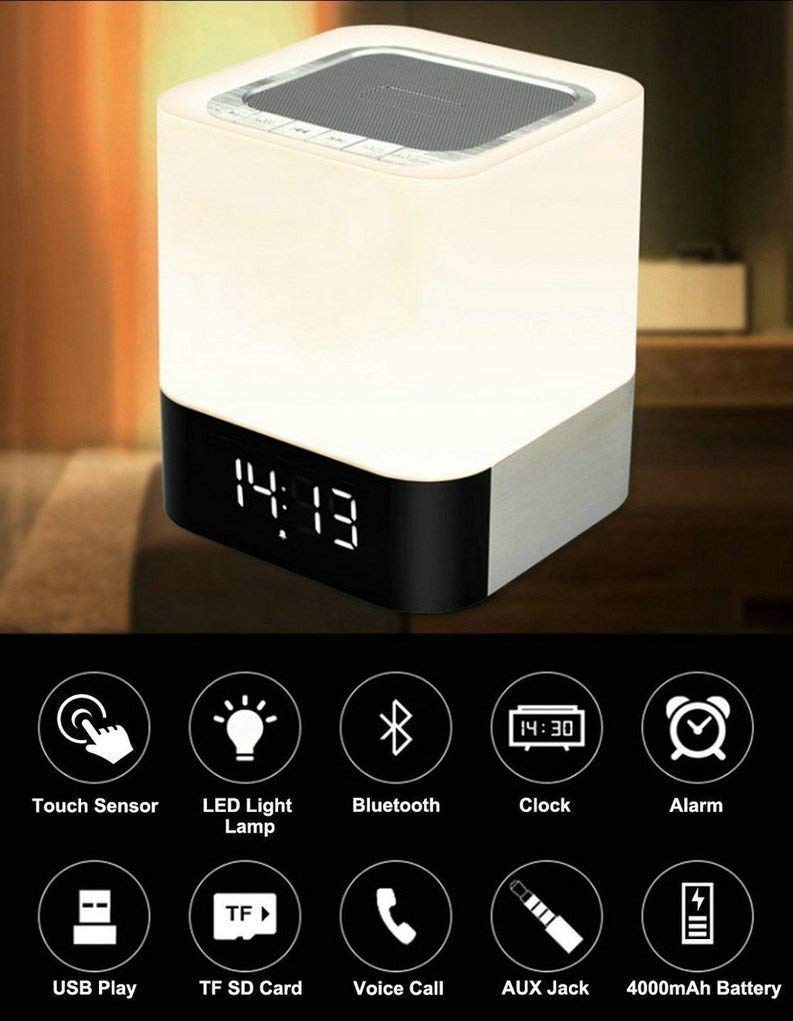
Image: The MUSKY DY28 device, showcasing its integrated clock display and touch-sensitive light panel.
Bhokisi Zviri Mukati
- MUSKY DY28 Bluetooth Speaker
- User Manual
- Chaja Cable
Product Features
- Multi-functional: Bluetooth speaker, smart touch lamp, alarm clock, and MP3 player.
- Makaralı 4.0: Easy and stable connection with Bluetooth-enabled devices.
- Inogadziriswa Chiedza che LED: Warm LED light with adjustable brightness (Max 20 Lumen) via touch sensor.
- Digital Clock & Alarm: Big digit 12/24H alarm clock with calendar, alarm, and sleep mode functions.
- Multiple Playback Modes: Supports MP3 playback via USB, micro TF/SD Card, and 3.5mm AUX input.
- Hunhu hweModhiyo: 5W single acoustic driver with enhanced passive low-frequency radiator for clear sound and solid bass.
- Hupenyu Hurefu Hwebhatiri: Built-in 4000mAh battery provides up to 15 hours of lighting or 9 hours of music playback (depending on usage).
- Hands-free Calling: Integrated microphone for answering calls.
Gadzirira
1. Kuchaja Chishandiso
Before first use, fully charge the speaker. Connect the provided USB charging cable to the charging port on the device and to a standard USB power adapter (not included) or a computer's USB port. The charging indicator will show the charging status.
2. Simba On / Off
Locate the Power On/Off switch on the device. Slide the switch to the 'ON' position to power on the speaker. Slide it to 'OFF' to power off.
3. Bluetooth Kubatanidza
- Ensure the speaker is powered on and in Bluetooth mode (indicated by a flashing blue light or voice prompt).
- Panharembozha yako, shandisa Bluetooth uye tsvaga zvishandiso zviripo.
- Select 'MUSKY DY28' from the list of devices.
- Once paired, the speaker will indicate a successful connection (e.g., solid blue light or voice prompt).
4. Kuisa Nguva uye Alarm
Refer to the detailed control diagram for button locations. Use the 'Mode' button to cycle through functions until the clock setting is displayed. Use the 'Previous' and 'Next' buttons to adjust hours and minutes, and the 'Play/Pause' button to confirm. For alarm settings, follow a similar procedure, activating the alarm function and setting the desired time.

Mufananidzo: Zvakadzama view of the MUSKY DY28's control panel, highlighting buttons for power, charging, audio inputs, playback, volume, and the touch sensor.
Operating Instruction
1. Mumhanzi Playback
The DY28 supports multiple music sources:
- Makaralı Mode: After successful pairing, play music from your connected device. Use the speaker's 'Play/Pause', 'Previous', and 'Next' buttons to control playback.
- USB Inzwa Zvinotaurwa: Isa USB flash drive ine MP3 files mu USB port. Sipika inozochinja yega kuenda ku USB mode yotanga kutamba.
- Micro TF/SD Card: Insert a micro TF/SD card with MP3 files into the Micro SD Slot. The speaker will automatically switch to TF/SD card mode and play music.
- AUX Input: Connect an external audio device using a 3.5mm AUX cable to the AUX port. The speaker will switch to AUX mode. Control playback from your external device.

Image: Visual guide demonstrating the three primary ways to play music on the DY28: via Bluetooth, Micro SD card, and USB drive.
2. Light Operation
The top panel of the speaker features a touch sensor for controlling the LED light. Tap the touch sensor to turn the light on/off and cycle through different brightness levels. The light offers a warm glow suitable for various environments.

Image: The MUSKY DY28 speaker illuminated, serving as a night light with its digital clock display visible in a low-light environment.
3. Mabasa eAlarm Clock
Once the alarm is set, it will sound at the designated time. To snooze, tap the touch sensor. To turn off the alarm, press the 'Mode' button or power off the device. The sleep mode feature allows the lamp and speaker to automatically turn off after a set period.
4. Hands-free Kufona
When a call comes in while connected via Bluetooth, the speaker will ring. Press the 'Play/Pause' button to answer the call. Press it again to end the call. The integrated microphone allows for hands-free conversation.
Zvinotsanangurwa
| Feature | Detail |
|---|---|
| Brand | MUSKY |
| Model Number | DY28 |
| Kubatana Technology | Zvekubatsira, Bluetooth, USB |
| Wireless Technology Type | Bluetooth |
| Mounting Type | Tabletop Mount |
| Mutauri Rudzi | Booksherufu |
| Product Features | Light for emergency use |
| Controller Type | Touchpad |
| Kudzora Nzira | Bata |
| Color | Chena |
| Battery Capacity | 4000mAh (yakavakirwa mukati) |
| Battery Life (Lighting) | Kusvikira kumaawa makumi maviri nemashanu |
| Hupenyu hweBhatiri (Mimhanzi Inotamba) | Kusvikira kumaawa makumi maviri nemashanu |
| Kuchaja Nguva | 2-4 maawa |
| Bluetooth Range | 33ft / 10 mamita |
| Simba Source | Battery Powered |
| Nhamba yeAudio Channels | 5 watt |
| Inodzivirira Mvura | TRUE |
| Item Weight | 700 magiramu |
| Inowirirana Devices | Chinoridza MP3, Smartphone, Tablet |
Kugadzirisa matambudziko
- Hapana Simba: Ensure the device is fully charged. Check the power switch is in the 'ON' position.
- Haikwanise Kubatanidza Bluetooth: Make sure the speaker is in Bluetooth pairing mode. Ensure your device's Bluetooth is enabled and within range (10 meters). Try restarting both devices.
- Hapana Inzwi: Check the volume level on both the speaker and your connected device. Ensure the correct input mode (Bluetooth, USB, TF/SD, AUX) is selected.
- Chiedza Chisingashande: Tap the touch sensor on the top of the speaker. Ensure the device has sufficient battery charge.
- Alarm haisi Kurira: Verify the alarm time is set correctly and the alarm function is activated.
Maintenance
- Geza mudziyo nejira rakapfava, rakaoma. Usashandise abrasive cleaners kana solvents.
- Avoid exposing the speaker to extreme temperatures, direct sunlight, or high humidity.
- Chengetedza mudziyo munzvimbo inotonhorera, yakaoma kana isiri kushandiswa kwenguva yakareba.
- Usaedze kuparadzanisa kana kugadzirisa mudziyo wega, sezvo izvi zvinobvisa waranti.
Official Product Video
Video: Official product video demonstrating the key features and functions of the MUSKY DY28 Bluetooth Speaker, Smart Touch Lamp, and Alarm Clock.
Warranty uye Support
For warranty information and customer support, please refer to the documentation provided with your purchase or contact the manufacturer directly. Keep your proof of purchase for any warranty claims.