
1. Nhanganyaya
This manual provides essential instructions for the safe and effective use of your DT321B Digital Multimeter. This portable device is designed for measuring AC/DC voltage, DC current, resistance, and includes features for diode testing, continuity, battery testing, and transistor (hFE) measurements. Please read this manual thoroughly before operation and retain it for future reference.
2. Safety Information
Always observe basic safety precautions when using this multimeter to reduce the risk of fire, electric shock, or personal injury.
- Usashandise voltage or current that exceeds the maximum specified limits for the multimeter.
- Ensure the test leads are in good condition and properly connected before making any measurements.
- Never use the multimeter if it appears damaged or if the test leads are damaged.
- Chenjerera paunenge uchishanda nevoltages pamusoro pe30V AC RMS, 42V peak, kana 60V DC. Aya voltages inokonzeresa njodzi.
- Gara uchibvisa simba kudunhu riri kuyedzwa usati wayera kuramba kana kuenderera mberi.
- Do not operate the multimeter in explosive atmospheres.
- Tsiva mabhatiri kana chiratidzo chebhatiri chidiki chichioneka kuti uve nechokwadi chekuti kuverenga kwacho kwakarurama.
3. Chigadzirwa Pamusoroview
The DT321B Digital Multimeter features a clear LCD display and a rotary switch for selecting various measurement functions. Input jacks are provided for connecting test leads.

Mufananidzo 3.1: Mberi view of the DT321B Digital Multimeter with key components labeled. The display shows numerical readings, the hold button freezes the current reading, and the rotary switch selects measurement functions. The '10A' jack is for high current measurements, 'COM' is the common ground, and 'VΩmA' is for voltage, resistance, and low current measurements.
The multimeter includes a blue backlight for improved visibility in low-light conditions and a data hold function to freeze the displayed reading.
4. Setup
4.1 Kuiswa kwebhatiri
The DT321B Digital Multimeter requires two 1.5V batteries (Type 7, typically AAA) for operation. To install or replace batteries:
- Ita shuwa kuti multimeter yakadzimwa.
- Tsvaga chivharo chebhatiri kuseri kweyuniti.
- Vhura siruu (s) yekuchengeta uye bvisa kavha.
- Insert the two 1.5V batteries, observing the correct polarity (+ and -) as indicated inside the compartment.
- Tsiva chivharo chekamuri yebhatiri uye chengetedza nescuru (s).
5. Operating Instructions
Before making any measurements, ensure the test leads are securely plugged into the correct input jacks.

Figure 5.1: The DT321B Multimeter with test probes connected. The black probe is connected to the 'COM' (common) jack, and the red probe is connected to the 'VΩmA' jack for most voltage, resistance, and low current measurements.
5.1 Kuyera DC Voltage (V–)
- Insert the red test lead into the 'VΩmA' jack and the black test lead into the 'COM' jack.
- Isa switch inotenderera kuDC Vol yaunodatage (V–) range (e.g., 200m, 2, 20, 200, 1000V). If the voltage haizivikanwe, tanga nehukuru hwepamusoro wobva waenda pasi.
- Batanidza ma test probes pakati pechikamu kana circuit kuti ayerwe.
- Verenga bhukutage kukosha pane LCD kuratidza.
5.2 Kuyera AC Voltage (V∼)
- Insert the red test lead into the 'VΩmA' jack and the black test lead into the 'COM' jack.
- Isa switch inotenderera kuAC Vol yaunodatage (V∼) range (e.g., 200, 750V).
- Batanidza ma test probes pakati pechikamu kana circuit kuti ayerwe.
- Verenga bhukutage kukosha pane LCD kuratidza.
5.3 Measuring DC Current (A–)
CHENJERERO: To avoid damage to the multimeter or the circuit, never connect the test leads in parallel across a voltage source when measuring current. Always connect in series.
- For currents up to 200mA, insert the red test lead into the 'VΩmA' jack. For currents up to 10A, insert the red test lead into the '10A MAX' jack. The black test lead always goes into the 'COM' jack.
- Set the rotary switch to the desired DC Current (A–) range (e.g., 200u, 2m, 20m, 200m, 10A).
- Open the circuit where current is to be measured and connect the multimeter in series with the circuit.
- Verenga kukosha kwazvino paLCD kuratidza.
5.4 Kuyera Kuramba (Ω)
CHENJERERO: Ensure the circuit under test is completely de-energized before measuring resistance.
- Insert the red test lead into the 'VΩmA' jack and the black test lead into the 'COM' jack.
- Set the rotary switch to the desired Resistance (Ω) range (e.g., 200, 2k, 20k, 200k, 2M).
- Batanidza ma test probe mukati mechikamu kuti ayerwe.
- Verenga kukosha kwekupikisa pane LCD kuratidza.
5.5 Bvunzo yeDiode
- Insert the red test lead into the 'VΩmA' jack and the black test lead into the 'COM' jack.
- Set the rotary switch to the diode symbol (→|).
- Batanidza probe tsvuku kune anode uye dema probe kune cathode ye diode. Chiratidziro chicharatidza kumberi voltage kudonha
- Dzorera ma probes kumashure. Chiratidziro chinofanira kuratidza 'OL' (open loop) kuti chionekwe zvakanaka.
5.6 Kuenderera mberi Muedzo
- Insert the red test lead into the 'VΩmA' jack and the black test lead into the 'COM' jack.
- Set the rotary switch to the continuity symbol (♫).
- Connect the test probes across the circuit or component. If continuity exists (resistance below a certain threshold), the buzzer will sound.
5.7 Battery Testing (1.5V / 9V)
- Insert the red test lead into the 'VΩmA' jack and the black test lead into the 'COM' jack.
- Set the rotary switch to the '1.5V BATT' or '9V BATT' position.
- Connect the red probe to the positive terminal and the black probe to the negative terminal of the battery.
- Verenga bhatiri voltage pachiratidziro.
5.8 Bvunzo reTransistor (hFE)
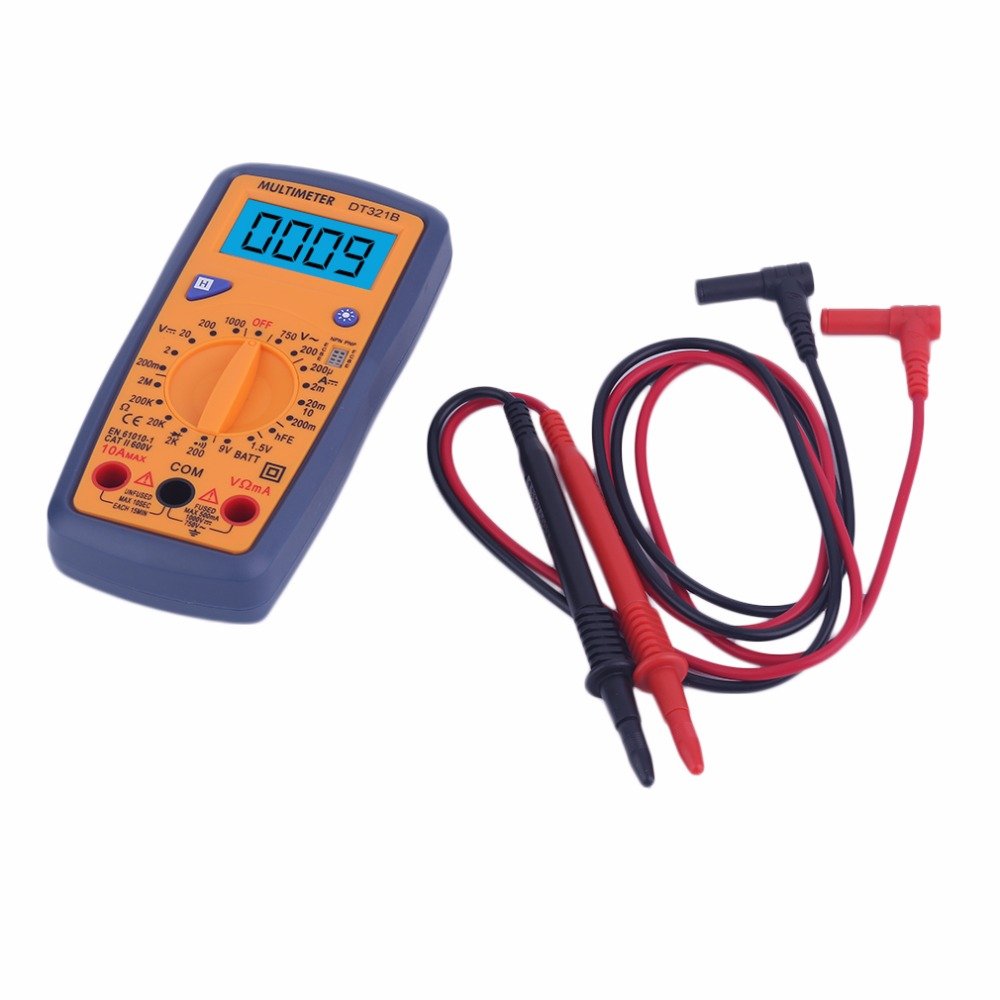
Figure 5.2: The DT321B Multimeter in use, with an inset showing a transistor being tested. The multimeter can measure the hFE (current gain) of NPN and PNP transistors.
- Isa switch inotenderera panzvimbo ye 'hFE'.
- Identify the NPN or PNP type of the transistor.
- Insert the transistor leads (Emitter, Base, Collector) into the corresponding sockets in the 'hFE' test socket on the multimeter.
- Verenga kukosha kwehFE pane LCD display.
5.9 Data Bata Basa
Press the 'Hold' button to freeze the current reading on the display. Press it again to release the hold function and resume live readings.
5.10 Basa reMarambi ekumashure
The multimeter features a blue backlight. Press the backlight button (often integrated with the 'Hold' button or a separate button with a light symbol) to turn the backlight on or off for improved visibility.
6. Kuchengeta
6.1 Kuchenesa
Pukuta nyaya yacho neadamp jira nesipo isina kusimba. Usashandise zvinogumbura kana zvinonyungudutsa. Iva nechokwadi chekuti multimeter yacho yakaoma zvachose usati washandisa.
6.2 Kutsiviwa kwebhatiri
When the low battery symbol appears on the display, replace the batteries as described in Section 4.1. Remove batteries if the multimeter is not used for extended periods to prevent leakage.
7. Kugadzirisa matambudziko
- Hapana kuratidzwa kana kuratidzwa kudiki: Tarisa kuiswa kwebhatiri uye kuchaja. Tsiva mabhatiri kana zvichidikanwa.
- Kuverenga kusina kururama: Ensure the rotary switch is set to the correct function and range. Check test lead connections. Verify the circuit under test is properly prepared (e.g., de-energized for resistance).
- 'OL' (Kuwedzera) kunoratidzwa: The measured value exceeds the selected range. Switch to a higher range or check for an open circuit.
- No continuity buzzer: Ensure the multimeter is in continuity mode and the circuit is closed.
8. Zvinotsanangurwa
| Kuyera | Range | Kururama |
|---|---|---|
| DC Voltage | 200mV, 2V, 20V, 200V, 1000V | ±0.5% |
| AC Voltage | 200V, 750V | ±1.0% |
| DC Nhasi | 200uA, 2mA, 20mA, 200mA, 10A | ±1.8% |
| Resistance | 200Ω, 2kΩ, 20kΩ, 200kΩ, 2MΩ | ±1.0% |
General Specifications:
- LCD Screen saizi: 45x23mm
- Kukura Kwechigadzirwa: 160x76x32mm
- Magetsi: 2 x 1.5V batteries (Type 7 / AAA)
- Yakadzika Voltage Symbol Display: Ehe
- Overload Protection: Ehe
- Diode Detection: Ehe
- On-off Detection & Buzzer: Ehe
- Battery Capacity Detection: 1.5V / 9V
- Transistor Detection (hFE): Ehe
- Kuchengeta Data: Ehe
- Backlight Display: Ehe
9. Warranty uye Tsigiro
Specific warranty and support information for the DT321B Digital Multimeter is not available in the provided product details. Please refer to the retailer or manufacturer's website for any applicable warranty terms or customer support contacts.