1. Nhanganyaya
Ndatenda nekutengaasing the NewRixing NR-4014 Portable Wireless Bluetooth Stereo Speaker. This device is a versatile sound system designed for portability and high-quality audio. It features Bluetooth connectivity, FM radio, and supports playback from TF cards, U-disks, and AUX input. The integrated microphone allows for hands-free calling, and its ergonomic design with a silicone handle ensures easy transport.
2. Zvigadzirwa zveChigadzirwa
- Advanced Bluetooth Connectivity: Easily connects to Bluetooth-enabled devices within a 10-meter range.
- Ruzha Rwakanyanya: Equipped with a 10W loudspeaker for clear and powerful sound.
- Multiple Playback Modes: Supports FM radio, TF card, U-disk, and AUX input.
- Kufona Kwemahara: Built-in microphone for convenient call management.
- Portable Design: Features a silicone handle for easy carrying.
- Hupenyu Hurefu Hwebhatiri: Integrated 1500mAh rechargeable battery provides up to 6 hours of music playback.
3. Package Zviri mukati
Ndokumbira utarise pasuru yezvinhu zvinotevera:
- 1 x NewRixing NR-4014 Speaker
- 1 x USB yekuchaja Cable
- 1 x AUX Audio Cable
- 1 x Chinyorwa cheMushandisi
4. Chigadzirwa Pamusoroview

Mufananidzo 1: Mberi view of the NewRixing NR-4014 speaker, showcasing its grille and control panel.
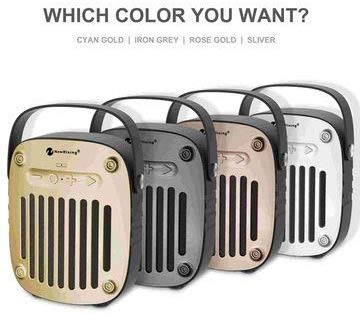
Mufananidzo 2: Side view of the NewRixing NR-4014 speaker, highlighting its portable handle and compact design.
The speaker features a control panel, input ports (AUX, TF card, U-disk, USB charging), and a power button. Specific button functions are detailed in the Operating Instructions section.
5. Setup
5.1 Kutanga Kuchaja
Before first use, fully charge the speaker. Connect the provided USB charging cable to the speaker's charging port and the other end to a 5V USB power adapter (not included) or a computer USB port. The charging indicator will illuminate during charging and turn off once fully charged. A full charge takes approximately 3 hours.
5.2 Kubatidza/Kudzima
- Kubatidza: Press and hold the Power button until you hear an audible indication.
- Kudzima: Press and hold the Power button again until the speaker powers down.
6. Operating Instructions
6.1 Bluetooth Pairing
- Ensure the speaker is powered on and in Bluetooth mode (indicated by a flashing LED, if present).
- Panharembozha yako (smartphone, piritsi, nezvimwewo), gonesa Bluetooth uye tsvaga zvishandiso zviripo.
- Select "NR-4014" from the list of found devices.
- Kana yabatanidzwa, mutauri achapa simbiso inonzwika, uye chiratidzo che LED chichamira kupenya.
- Iwe unogona ikozvino kuridza odhiyo kubva pane chako kifaa kuburikidza nemutauri.
6.2 FM Radio Modhi
- Press the Mode button (if available) to switch to FM radio mode.
- Press the Play/Pause button to automatically scan and save available FM stations.
- Use the Previous/Next track buttons to navigate between saved stations.
6.3 TF Card / U-Disk Playback
- Insert a TF card or U-disk (up to 32GB) with MP3 audio files muchikamu chakakodzera.
- Mutauri anoona otomatiki mudziyo wekuchengetera mashoko uye otanga kutamba.
- Use the Play/Pause, Previous/Next track buttons to control playback.
6.4 AUX Input Mode
- Connect one end of the provided AUX cable to the speaker's AUX input port.
- Connect the other end to the audio output jack of your external audio device (e.g., MP3 player, laptop).
- The speaker will automatically switch to AUX mode or require a press of the Mode button.
- Audio playback is controlled via your external device.
6.5 Kufona Kwemaoko Kwemahara
- When connected to a smartphone via Bluetooth, incoming calls will be routed to the speaker.
- Press the Play/Pause button (or Call button, if present) to answer an incoming call.
- Dzvanya bhatani rekuti Play/Misa zvakare kuti upedze kufona.
6.6 Kudzora Inzwi
Volume is typically controlled by long-pressing the Previous/Next track buttons or directly from the connected device.
7. Kuchengeta
- Chengetedza mukurukuri kure nemvura, mwando, uye tembiricha yakanyanyisa.
- Geza mutauri nejira rakapfava, rakaoma. Usashandise abrasive cleaners kana solvents.
- Dzivisa kudonhedza chitauri kana kuita kuti chinzwike zvakanyanya.
- Kana usingashandiswe kwenguva yakareba, chengeta sipika munzvimbo inotonhorera, yakaoma uye woichaja nguva nenguva kuti bhatiri rirambe rakanaka.
8. Kugadzirisa matambudziko
| Dambudziko | Zvinogona Kukonzera | Solution |
|---|---|---|
| Mutauri haabati simba. | Bhatiri rakaderera. | Chaja sipika kwemaawa gumi nemaviri. |
| Haikwanise kubatanidza kuburikidza neBluetooth. | Bluetooth not enabled on device; speaker too far; speaker not in pairing mode. | Ensure Bluetooth is on, speaker is in pairing mode, and within 10 meters. Try restarting both devices. |
| Hapana ruzha kubva kumutauri. | Volume too low; incorrect mode selected; cable not connected properly (AUX). | Increase volume on both speaker and connected device. Verify correct mode (BT, FM, AUX, TF/U-disk). Check cable connections. |
| Kugamuchirwa kweredhiyo yeFM kwakashata. | Weak signal; environmental interference. | Move the speaker to a location with better signal. Try rescanning stations. |
9. Zvinotsanangurwa
| Model Number | NR-4014 |
| Wireless Version | 4.2 + EDR |
| Wireless Streaming Range | Kusvika 10 metres |
| Output Power | 2 * 5W (Zvose 10W) |
| Frequency Response | 100MHz - 18KHz |
| Signal to Noise Ratio | ≥80dB |
| Radio Frequency | 87-108MHz |
| Power Input | DC 5V |
| Bhatiri | Built-in 1500mAh 3.7V rechargeable lithium battery |
| Kuchaja Nguva | Anenge maawa maviri |
| Play Time | Up to 6 hours (at maximum volume) |
| Mutauri Mutyairi | 4Ω 5W, 52mm |
| Impedance | 4 Ohms |
| Kudzora Nzira | Bata |
| Kuramba Mvura | Yes (as per specifications) |
| Zviyero zveChigadzirwa (L x W x H) | 17.8 x 15.3 x 5.7 cm |
| Product Weight | 720g |
| Inotsigirwa Storage | TF Card, U-Disk (up to 32GB) |
10. Warranty uye Tsigiro
This product is covered by a standard manufacturer's warranty. For specific warranty terms and conditions, please refer to the documentation provided at the time of purchase or contact your retailer. For technical support or service inquiries, please contact the vendor or retailer from whom you purchased the product.
Ndapota chengetedza humbowo hwako hwekutenga kwezvichemo zvewaranti.


