
Nhanganyaya
Congratulations on your purchase of the Absima Hurricane Brushed 1:18 4WD RC Truggy. This ready-to-run (RTR) model is designed for both indoor and outdoor use, offering an exciting remote-controlled driving experience. This manual provides essential information for the safe operation, setup, maintenance, and troubleshooting of your new RC Truggy. Please read it thoroughly before first use.
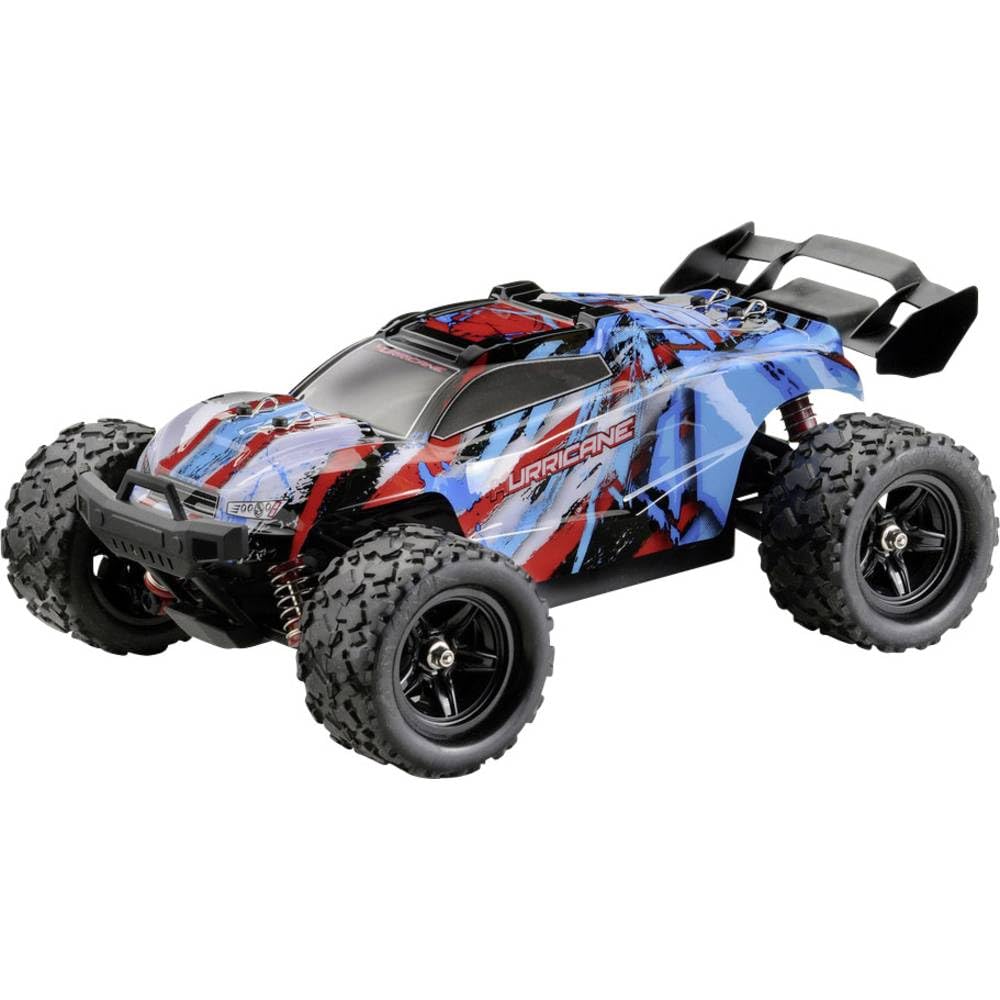
Image: The Absima Hurricane 1:18 4WD RC Truggy, showcasing its compact design and robust wheels.
Safety Information
- Always operate the RC Truggy in open areas, away from people, pets, and obstacles.
- Do not operate near public roads, water bodies, or high-voltage mitsetse.
- Chengetedza maoko, bvudzi, uye zvipfeko zvisina kusimba kure nezvikamu zvinofamba.
- Kutariswa kwevakuru kunokurudzirwa kune vashandisi vari pasi pemakore gumi nemasere.
- Ensure the battery is fully charged before use and disconnected after use.
- Usaisa bhatiri kune tembiricha yakanyanyisa kana zuva rakananga.
- Use only the provided charger and battery.
- The Truggy features splash protection, but it is not fully waterproof. Avoid submerging it in water.
Package Zviri mukati
The Absima Hurricane Brushed 1:18 4WD RC Truggy package includes the following items:
- Absima Hurricane 1:18 4WD RC Truggy (fully assembled)
- 2.4 GHz Anti-Interference Remote Control
- Li-ion 2S 7.4V 1200mAh Battery
- USB Charger
Gadzirira
1. Kuchaja Bhatiri
- Connect the USB charger to a compatible USB power source (e.g., computer USB port, USB wall adapter).
- Connect the Li-ion 2S 7.4V 1200mAh battery to the USB charger.
- Allow the battery to charge fully. The charging indicator on the USB charger will typically change color or turn off when charging is complete. Refer to the charger's specific instructions for details.
- Usasiye bhatiri risina kutarisirwa panguva yekuchaja.
2. Installing the Truggy Battery
- Locate the battery compartment on the Truggy.
- Nyatsovhura chivharo chebhatiri.
- Insert the fully charged Li-ion battery into the compartment, ensuring correct polarity.
- Connect the battery connector to the Truggy's power connector.
- Vhara chivharo chebhatiri zvakachengeteka.
3. Kuisa Remote Control Batteries
- Vhura bhatiri riri kumashure kwe 2.4 GHz remote control.
- Insert the required batteries (typically AA batteries, not included) according to the polarity markings.
- Vhara chivharo chebhatiri.
4. Kutanga Kuongorora
Before first use, visually inspect the Truggy for any loose parts, damaged components, or obstructions in the wheels or drivetrain. Ensure all screws are tightened and the suspension moves freely.
Kushanda
1. Kuvhura / Kudzima
- Turn on the remote control first. The indicator light should illuminate.
- Turn on the Truggy by pressing its power switch. The Truggy's indicator light should illuminate and then pair with the remote control.
- To turn off, first turn off the Truggy, then the remote control.
2. Kudzora Kutyaira
- Chidhiraivho: Rotate the steering wheel on the remote control left or right to steer the Truggy.
- Throttle Trigger: Pull the trigger towards you to accelerate forward. Push the trigger away from you to brake or reverse.
3. Mazano Ekutyaira
- Start with gentle throttle inputs to get a feel for the Truggy's speed and handling.
- Practice steering in open spaces before attempting more complex maneuvers.
- The 4WD system provides excellent traction on various terrains.
- The Truggy is equipped with splash protection, allowing operation on damp surfaces, but avoid deep puddles or submersion.
- If the Truggy loses range or control, immediately stop operation and check battery levels or interference.
Maintenance
1. Kuchenesa
- After each use, especially in dirty or dusty conditions, clean the Truggy.
- Use a soft brush or compressed air to remove dirt and debris from the chassis, wheels, and suspension components.
- Pukuta muviri ne adamp jira. Usashandise makemikari ane hasha kana zvinonyungudutsa.
2. Battery Care
- Always disconnect the battery from the Truggy after use.
- Chengeta bhatiri munzvimbo inotonhorera, yakaoma, kure nezuva rakananga uye nzvimbo dzinopisa.
- For long-term storage, charge the Li-ion battery to approximately 50% capacity.
- Never overcharge or completely discharge the battery.
3. Kuchengeta
- Store the Truggy and remote control in a dry, cool environment.
- Remove batteries from the remote control if storing for extended periods.
4. General Inspection
- Regularly check for loose screws, worn tires, or damaged suspension parts.
- Ensure the steering mechanism operates smoothly.
Kugadzirisa matambudziko
| Dambudziko | Zvinogona Kukonzera | Solution |
|---|---|---|
| Truggy does not respond to remote control. | Low battery in Truggy or remote control; Truggy and remote not paired; Interference. | Charge Truggy battery; Replace remote control batteries; Re-pair Truggy and remote; Move to an area with less interference. |
| Truggy runs slowly or lacks power. | Low Truggy battery; Motor or drivetrain obstruction. | Charge Truggy battery fully; Check for debris in wheels or gears and remove. |
| Kutungamira hakuchinji kana kuti kunodhonzwa kudivi rimwe chete. | Steering trim not adjusted; Damaged steering servo or linkage. | Adjust steering trim on the remote control; Inspect steering components for damage. |
| Mitsindo isina kujairika panguva yekushanda. | Debris in gears; Damaged motor or drivetrain component. | Inspect and clean gears; Discontinue use and contact support if noise persists. |
Zvinotsanangurwa
| Feature | Detail |
|---|---|
| Model Name | Hurricane |
| Model Number | 18001 |
| Scale | 1:18 |
| Drive Type | 4WD (Four-Wheel Drive) |
| Motor Type | Yakaraswa 380 |
| Yemagetsi Yekumhanyisa Controller (ESC) | 30A |
| Bhatiri | Li-ion 2S 7.4V 1200mAh |
| Remote Control Frequency | 2.4 GHz (Anti-interference) |
| Maximum Speed | Over 35 km/h |
| Urefu | 255 mm |
| Upamhi | 180 mm |
| Urefu | 110 mm |
| Kurema | 616 g |
| Special Features | Splash protection, Planetary differential, Aluminum cardan shaft drive |
| Yakakurudzirwa Zera | 14+ makore |
Warranty uye Support
For warranty information and technical support, please refer to the official Absima website or contact your local dealer. Keep your purchase receipt as proof of purchase for any warranty claims.