
1. Nhanganyaya
This manual provides essential information for the installation, operation, maintenance, and troubleshooting of your Chieftec Polaris 650W 80Plus Certified Power Supply Unit (PSU). Please read this manual thoroughly before installing and using the product to ensure proper function and safety. The Chieftec Polaris 650W PSU is designed to provide stable and efficient power to your personal computer system.
2. Safety Information
Nguva dzose cherechedza matanho ekuchengetedza anotevera kudzivirira kukuvara kana kukuvara kwemidziyo yako:
- Usa open the PSU casing. Voliyumu yepamusorotages inside can cause electric shock. There are no user-serviceable parts inside.
- Usa insert any objects into the PSU's ventilation openings.
- Usa expose the PSU to water, moisture, or high humidity.
- Ensure the PSU is installed in a well-ventilated area, free from obstructions to airflow.
- Always disconnect the AC power cord from the wall outlet before installing, removing, or cleaning the PSU.
- Use only the modular cables provided with your Chieftec Polaris 650W PSU. Using incompatible cables may damage the PSU or connected components.
- Ensure all cable connections are secure before powering on the system.
3. Package Zviri mukati
Ona kuti zvinhu zvese zviripo mupasuru yako:
- Chieftec Polaris 650W Power Supply Unit
- Modular Cable Set (e.g., 24-pin ATX, 8-pin EPS/CPU, PCIe, SATA, Molex)
- AC Power Cord
- Mounting Screws
- Mushandisi Chinyorwa (gwaro iri)
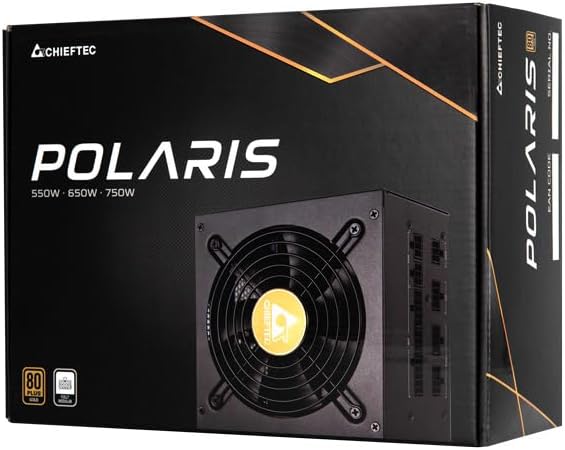
Image: The Chieftec Polaris 650W Power Supply Unit and its retail packaging.
4. Setup uye Kuiswa
Follow these steps to install your Chieftec Polaris 650W PSU into your personal computer system:
- Gadzirira Sistimu Yako: Ensure your computer is completely powered off and unplugged from the wall outlet. Open your computer case to access the PSU mounting area.
- Bvisa PSU Yekare (kana zvichibvira): If replacing an existing PSU, disconnect all cables from the components and motherboard, then unscrew and remove the old PSU.
- Mount the New PSU: Carefully slide the Chieftec Polaris 650W PSU into the designated PSU bay in your computer case. Ensure the fan faces the correct direction (typically downwards for bottom-mounted PSUs, or as per case design for optimal airflow). Secure the PSU with the provided mounting screws.
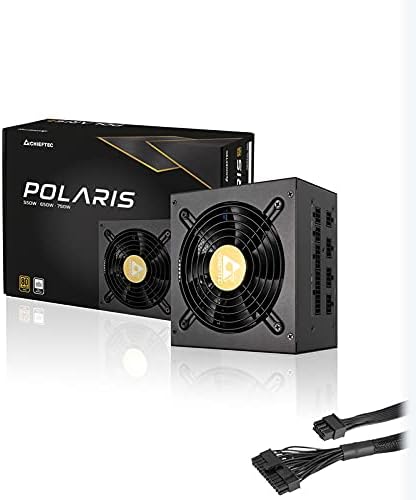
- Batanidza Matambo eModular: Identify the necessary modular cables for your system components (motherboard, CPU, graphics card, storage drives). Connect these cables to the corresponding ports on the back of the PSU. Refer to the image below for connector identification.
- Batanidza kuComponents: Connect the other end of the modular cables to your motherboard (24-pin ATX and 8-pin EPS/CPU), graphics card(s) (PCIe), and storage devices (SATA/Molex). Ensure all connections are firm and fully seated.
- Cable Management: Tungamira waya zvakanaka kuti uvandudze kufamba kwemhepo uye runako rwekesi rako.
- Macheki ekupedzisira: Double-check all connections. Ensure no loose cables are obstructing fans. Close your computer case.
- Batanidza AC Power: Plug the AC power cord into the PSU's power inlet and then into a wall outlet.

Mufananidzo: Rear view of the Chieftec Polaris 650W PSU showing modular cable connection ports for M/B, SATA, PCIe, and CPU.

Image: The Chieftec Polaris 650W Power Supply Unit with its modular cables connected, ready for installation.
5. Operating Instructions
Once the Chieftec Polaris 650W PSU is correctly installed and all connections are secure:
- Power On: Locate the power switch on the back of the PSU (next to the AC power inlet). Ensure it is in the 'I' (On) position.
- Kutanga Sistimu: Press the power button on your computer case. The system should power on, and the PSU fan will begin to spin, indicating normal operation.
- Feni Kushanda: The PSU features an air cooling method. The fan will operate to dissipate heat generated by the power supply components. Its speed may vary depending on the load and temperature to maintain optimal cooling and noise levels.
- Power Off: To shut down your system, use the operating system's shutdown procedure. For a complete power cut, switch the PSU's power switch to the 'O' (Off) position and unplug the AC power cord.
Mufananidzo: Pamusoro-pasi view of the Chieftec Polaris 650W Power Supply, highlighting the cooling fan and protective grille.
6. Kuchengeta
Proper maintenance ensures the longevity and optimal performance of your PSU:
- Kuchenesa Hupfu: Periodically (e.g., every 3-6 months), power off your computer, unplug the AC cord, and open the case. Use compressed air to gently blow dust out of the PSU's fan and ventilation grilles. Usa use a vacuum cleaner directly on the PSU as it can generate static electricity.
- Environmental Conditions: Ensure the computer operates in a clean, dry, and well-ventilated environment. Avoid extreme temperatures and direct sunlight.
- Cable Integrity: Occasionally check that all modular cables are securely connected and not frayed or damaged.
7. Kugadzirisa matambudziko
If you encounter issues with your Chieftec Polaris 650W PSU, consider the following troubleshooting steps:
- Hapana Simba:
- Iva nechokwadi chekuti tambo yemagetsi yeAC yakabatanidzwa zvakanaka muPSU nepamadziro.
- Check that the PSU's power switch on the back is in the 'I' (On) position.
- Tarisa kuti madziro emadziro ari kushanda nekuisa pane imwe mudziyo.
- Confirm all internal power cables (24-pin ATX, 8-pin EPS/CPU) are firmly connected to the motherboard.
- Kusagadzikana kweSisitimu/Kudzima Zvisina Kurongeka:
- Iva nechokwadi chekuti PSU ine mhepo yakakwana uye haina kupisa zvakanyanya.
- Check all power connections to components (graphics card, storage) for looseness.
- If possible, test the PSU with a different set of components or in another system to rule out other hardware issues.
- Ruzha rusina kujairika:
- A rattling or grinding noise may indicate a fan issue. Power off the system and inspect the PSU fan for obstructions (e.g., loose cables).
- If the noise persists and is not due to an obstruction, contact support.
Kana matanho aya asingagadzirise dambudziko racho, ndapota tarisa chikamu cheWaranti neRutsigiro.
8. Zvinotsanangurwa
| Feature | Tsanangudzo |
|---|---|
| Brand | Chieftec |
| Model Name | Polaris |
| Item Model Number | IN-ACT-ZDLCHFOBU0087 |
| Output Wattage | 650 Watts |
| Fomu Factor | ATX |
| Kutonhodza Nzira | Air |
| Connector Type | ATX |
| Inowirirana Devices | Personal Computer |
| Zviyero zveChigadzirwa (L x W x H) | 8.66 x 3.15 x 1.18 inches (22 x 8 x 3 cm) |
| Item Weight | 4.4 pounds (2 Makirogiramu) |
| Certification | 80Plus Certified |
9. Warranty uye Tsigiro
Chieftec products are manufactured to high-quality standards. For specific warranty terms and conditions, please refer to the warranty card included with your product or visit the official Chieftec website. Warranty periods and coverage may vary by region and product.
For technical support, product inquiries, or warranty claims, please contact Chieftec customer service through their official website or the contact information provided in your product documentation. When contacting support, please have your product model number (IN-ACT-ZDLCHFOBU0087) and proof of purchase readily available.