1. Nhanganyaya
Ndatenda nekutengaasing the Sky-Watcher AZ-GTe 70SS Refractor Telescope. This instrument is designed for observing celestial objects with clarity and ease. It features multi-coated achromatic lenses for high-contrast images and comes with an AZ-GTe alt-azimuth mount for automated tracking and navigation via a smartphone application. This manual provides essential information for the proper setup, operation, and maintenance of your telescope.

Figure 1: The Sky-Watcher AZ-GTe 70SS Refractor Telescope fully assembled on its tripod. This image shows the complete system, including the optical tube, AZ-GTe mount, and tripod, ready for observation.
2. Safety Information
- Never look directly at the sun through the telescope or its finder scope without a professionally manufactured solar filter. Kukuvara kwemaziso zvachose uye kusingadzoreki, kusanganisira upofu, kunogona kuitika.
- Do not leave the telescope unattended in direct sunlight. Sunlight concentrated through the telescope can cause damage to objects or ignite flammable materials.
- Bata optical components nekuchenjerera kudzivirira kukwenya kana kukuvara.
- Chengetedza teresikopu kure nehunyoro uye tembiricha yakanyanyisa.
- Ensure all components are securely fastened during assembly and use to prevent accidental falls or damage.
3. Package Zviri mukati
Wona kuti zvinhu zvese zvinotevera zvakaverengerwa mupasuru yako:
- Sky-Watcher 70SS Refractor Optical Tube
- AZ-GTe Alt-Azimuth Mount
- Adjustable Tripod
- Red Dot Finder
- 10mm Eyepiece (Super Plossl)
- 25mm Eyepiece (Super Plossl)
- 90-degree Diagonal Mirror
- Control Cable (for mount connection)
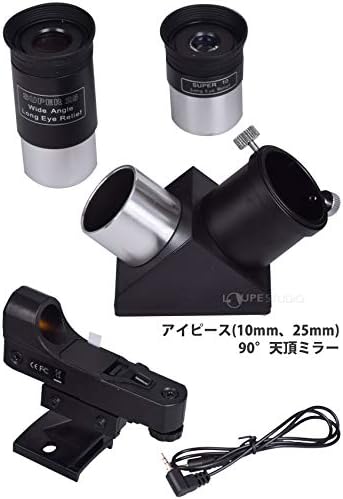
Figure 2: Included accessories. This image displays the 10mm and 25mm eyepieces, the 90-degree diagonal mirror, the red dot finder, and a control cable, which are essential components for observation.
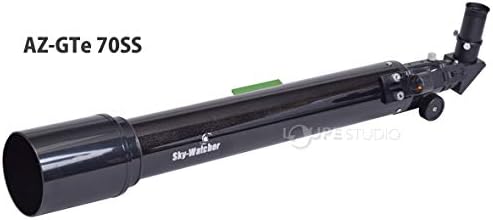
Figure 3: The Sky-Watcher AZ-GTe 70SS optical tube. This close-up shows the main telescope tube, highlighting its design and the Sky-Watcher branding.
4. Setup
4.1 Assembling the Tripod and Mount
- Extend the tripod legs to a suitable height and secure them.
- Attach the AZ-GTe mount head to the tripod. Ensure it is firmly screwed into place.

Figure 4: The AZ-GTe mount head attached to the tripod. This image focuses on the mount, showing how it connects to the tripod base.
4.2 Attaching the Optical Tube
- Locate the Ariga plate on the 70SS optical tube.
- Slide the Ariga plate into the dovetail saddle on the AZ-GTe mount. Tighten the locking screw to secure the optical tube.
4.3 Installing the Red Dot Finder
- Slide the red dot finder into its bracket on the optical tube.
- Tighten the small screw on the bracket to hold the finder securely.
4.4 Installing the Diagonal Mirror and Eyepiece
- Insert the 90-degree diagonal mirror into the focuser of the optical tube. Secure it with the thumbscrew.
- Insert either the 10mm or 25mm eyepiece into the diagonal mirror. Secure it with the thumbscrew.
5. Kushandisa Telescope
5.1 Powering On and App Connection
- Install the dedicated Sky-Watcher SynScan Pro app on your smartphone or tablet.
- Power on the AZ-GTe mount.
- Open the SynScan Pro app and connect to the AZ-GTe mount via Wi-Fi.
5.2 Initial Alignment
Follow the on-screen instructions in the SynScan Pro app to perform a star alignment. This process is crucial for accurate tracking and Go-To functionality.
5.3 Observing Celestial Objects
- Use the app's interface to select a celestial object from the database (e.g., planets, stars, deep-sky objects).
- The mount will automatically slew (move) the telescope to the selected object.
- Look through the eyepiece and adjust the focuser knob until the image is sharp.
- The app also provides manual control buttons for fine adjustments.

Figure 5: Smartphone app interface for object selection and control. This image shows the SynScan Pro app displaying a list of celestial objects and directional control buttons for precise telescope movement.
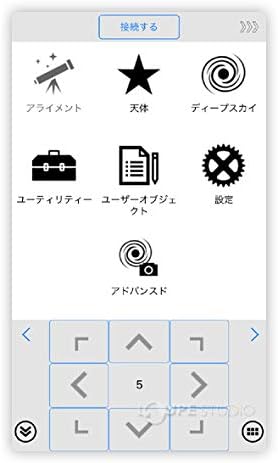
Figure 6: Main menu of the SynScan Pro app. This image illustrates the various functions available in the app, including alignment, celestial object selection, deep sky objects, utilities, user objects, settings, and advanced options.
6. Kuchengeta
6.1 Kuchenesa maLens
- Use a soft, lint-free cloth or a specialized optical cleaning brush to gently remove dust from the objective lens and eyepieces.
- For stubborn smudges, use a small amount of optical cleaning fluid applied to a clean optical cloth. Avoid touching the lens surfaces directly with your fingers.
6.2 Kuchengeta
- When not in use, store the telescope in a dry, dust-free environment.
- Replace all lens caps to protect the optics from dust and damage.
- If storing for extended periods, consider disassembling the telescope and storing components in their original packaging or a padded case.
7. Kugadzirisa matambudziko
7.1 Mifananidzo Isina Kujeka
- Tarisa Kutarisa: Adjust the focuser knob slowly until the image is sharp.
- Eyepiece Choice: Ensure you are using an appropriate eyepiece for the object and viewmamiriro.
- Atmospheric Conditions: Turbulence in the atmosphere can cause images to appear blurry. Wait for more stable conditions.
7.2 Mount Not Tracking or Slew Errors
- Alignment: Re-perform the star alignment procedure in the SynScan Pro app. Accurate alignment is critical for tracking.
- Magetsi: Ensure the mount has sufficient power. Low battery can affect motor performance.
- Kubatanidza Wi-Fi: Verify that your smartphone/tablet is properly connected to the mount's Wi-Fi network.
7.3 Red Dot Finder Misaligned
- Align Finder: Point the main telescope at a distant, stationary object (e.g., a distant tree or street light) during daylight hours. Adjust the red dot finder's alignment screws until the red dot is centered on the same object seen through the telescope's eyepiece.
8. Zvinotsanangurwa
| Feature | Tsanangudzo |
|---|---|
| Brand | Sky-Watcher |
| Model Number | SW1410040003 |
| Telescope Type | Refractor |
| Chinangwa Lens Diameter | 70 mm |
| Focal Length | 700 mm |
| Mount Type | AZ-GTe Alt-Azimuth |
| Eyepiece Description | Super Plossl |
| Focus Type | Manual Focus |
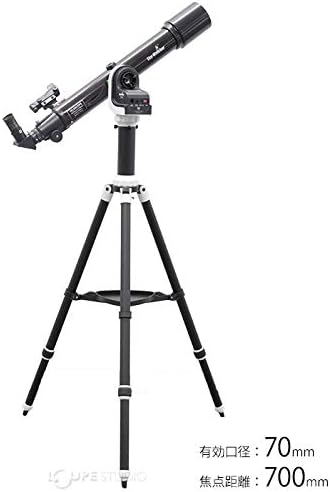
Figure 7: The Sky-Watcher AZ-GTe 70SS telescope with its effective aperture of 70mm and focal length of 700mm indicated. This image visually confirms the primary optical specifications of the telescope.
9. Warranty uye Tsigiro
For warranty information and technical support, please refer to the official Sky-Watcher website or contact your local Sky-Watcher distributor. Keep your purchase receipt as proof of purchase for any warranty claims.