
1. Nhanganyaya
This manual provides detailed instructions for the proper use and maintenance of your LEAP PC3860 Stopwatch. Please read this manual thoroughly before operating the device to ensure optimal performance and longevity. This stopwatch is designed for accurate timekeeping in various activities, including sports, laboratory work, and other events requiring precise timing.
2. Chigadzirwa Pamusoroview
The LEAP PC3860 Stopwatch features a clear digital display and multiple functions for versatile time measurement. It is equipped with a durable casing and a lanyard for convenient portability.

Mufananidzo 1: Mberi view of the LEAP PC3860 Stopwatch, showing the digital display and control buttons. A black lanyard is attached to the bottom.
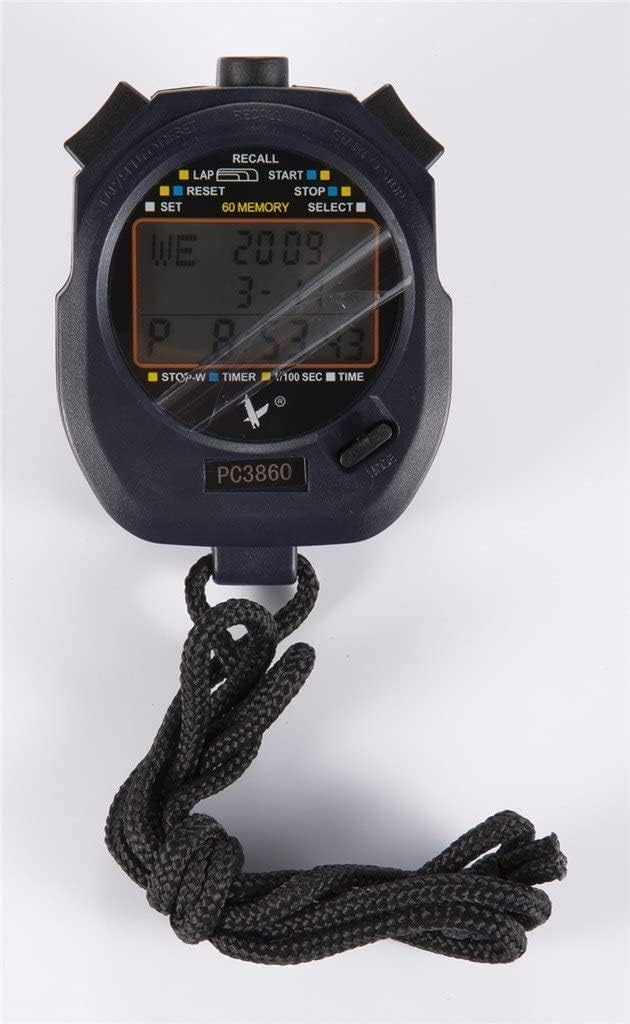
Mufananidzo 2: Pedyo-up view of the LEAP PC3860 Stopwatch display, highlighting the various indicators for LAP, START, STOP, RESET, SELECT, SET, and 60 MEMORY functions.
Zvikamu Zvikuru:
- Ratidza: Digital screen showing time, lap, split, and other mode information.
- Tanga/Mmisa Bhatani: Initiates and pauses timing.
- LAP/RESET Button: Records lap times and resets the stopwatch.
- MODE/SELECT Button: Switches between different operating modes and selects settings.
- SET Bhatani: Used for adjusting time and date in Nguva Mode.
- RECALL Bhatani: Accesses stored memory records.
- Lanyard: Kutakura zvakachengeteka.
3. Setup
3.1 Kutanga Simba-Kubatidza
Upon first use, or after a battery replacement, the stopwatch may require initial setup. Remove any protective film from the display.
3.2 Kuisa Nguva neDate
- Press the MODE/SARUDZA button repeatedly until the stopwatch is in Nguva Mode (displaying the current time).
- Dzvanya uye ubate iyo SET bhatani kusvika nhamba dzenguva dzatanga kupenya.
- Shandisa iyo TANGA/MIRA bhatani rekugadzirisa bhaisikopo rinopenya (maawa, maminitsi, masekondi).
- Shandisa iyo Pamakumbo / Reset button to move to the next digit or setting (e.g., month, day, year).
- Dzokorora matanho 3 ne4 kusvika marongero ese aunoda agadziriswa.
- Press the SET bhatani zvakare kuti ubude musetting mode.
4. Operating Instructions
4.1 Kuchinja Mamodhi
Press the MODE/SARUDZA bhatani rekutenderera kuburikidza nemamodhi anowanikwa: Nguva Mode, Stopwatch Mode,uye Timer Mode.
4.2 Stopwatch Mode (Timing Events)
- Ensure the stopwatch is in Stopwatch Mode. The display will typically show '00:00:00'.
- Press the TANGA/MIRA bhatani kuti utange nguva.
- To pause the timing, press the TANGA/MIRA button again. The time will freeze on the display.
- To resume timing from the paused point, press the TANGA/MIRA bhatani zvakare.
- To stop and finalize the timing, press the TANGA/MIRA bhatani.
- Kuti udzorere stopwatch kusvika pazero, tinya bhatani rekuti Pamakumbo / Reset bhatani apo stopwatch yakamira.
4.3 Lap and Split Timing
The PC3860 stopwatch supports lap and split timing, allowing you to record intermediate times during an event.
- In Stopwatch Mode, dzvanya iyo TANGA/MIRA bhatani kuti utange nguva.
- To record a lap time, press the Pamakumbo / Reset button while the stopwatch is running. The lap time will be displayed briefly, and the main timer will continue running in the background.
- Repeat step 2 for subsequent laps. The stopwatch can store up to 60 lap/split records.
- To stop the overall timing, press the TANGA/MIRA bhatani.
- To view recorded lap and split times, press the CHENJERA bhatani. Shandisa iyo TANGA/MIRA uye Pamakumbo / Reset buttons to navigate through the stored records.
- Press the CHENJERA button again to exit memory recall mode.
- To clear all stored memory, ensure the stopwatch is stopped and not in recall mode, then press and hold the Pamakumbo / Reset bhatani.
4.4 Timer Mode (Countdown)
- Press the MODE/SARUDZA button until you reach Timer Mode. The display will show a countdown time, or '00:00:00' if not set.
- Kuti uise nguva yekuverengera pasi, tinya wobata bhatani rekuti SET bhatani kusvika manhamba apenya.
- Shandisa iyo TANGA/MIRA bhatani rekugadzirisa bhaisikopo rinopenya (maawa, maminitsi, masekondi).
- Shandisa iyo Pamakumbo / Reset bhatani kuti uende kunhamba inotevera.
- Press the SET button again to confirm the countdown time.
- Press the TANGA/MIRA bhatani rekutanga kuverenga pasi.
- Kuti umbomira kuverenga pasi, tinya TANGA/MIRA bhatani. Dzvanya zvakare kuti utangezve.
- When the countdown reaches zero, an alarm will sound (if enabled).
- To reset the timer to the preset time, press the Pamakumbo / Reset button while the timer is stopped.
5. Kuchengeta
5.1 Kuchenesa
To clean the stopwatch, use a soft, dry cloth. For stubborn dirt, a slightly damp cloth with mild soap can be used, followed by immediate drying. Avoid using abrasive cleaners, solvents, or harsh chemicals, as these can damage the display or casing.
5.2 Kuchengeta
Store the stopwatch in a cool, dry place away from direct sunlight and extreme temperatures. If storing for an extended period, consider removing the battery to prevent leakage, although specific battery type information is not provided.
5.3 Kutsiviwa kwebhatiri
When the display becomes dim or unresponsive, the battery may need replacement. This typically requires opening the back casing of the stopwatch. It is recommended to have battery replacement performed by a qualified technician to avoid damaging the internal components or compromising water resistance (if applicable).
6. Kugadzirisa matambudziko
- Kuratidzwa hakuna chinhu kana kuderera:
Check the battery. If the battery is low, replace it. Ensure the stopwatch is not exposed to extreme cold, which can temporarily affect LCD performance. - Mabhatani haapindure:
Try resetting the stopwatch by removing and reinserting the battery (if accessible). Ensure no debris is lodged around the buttons. - Nguva/zuva risiri iro:
Follow the instructions in Section 3.2 to reset the time and date. - Stopwatch not timing accurately:
Ensure the stopwatch is in Stopwatch Mode and has been reset before starting a new timing session. If issues persist, contact customer support.
7. Zvinotsanangurwa
| Feature | Detail |
|---|---|
| Brand | LEAP |
| Model Number | PC3860 (19280086-101) |
| Display Type | Digital |
| Material | Fiber, Metal |
| Kurema | 0.09 makirogiramu |
| Package Dimensions | 17.78 x 10.16 x 3.05 cm |
| Special Feature | Stopwatch, 60 Memory |
| UPC | 748079196933 |
8. Warranty uye Tsigiro
LEAP products are manufactured to high-quality standards. For information regarding warranty coverage, please refer to the warranty card included with your purchase or contact the retailer where the product was acquired. For technical support or further assistance, please reach out to the official LEAP customer service channels, typically found on the product packaging or the brand's official website.