
1. Nhanganyaya
Thank you for choosing the Inscabin P2 Portable DAB/DAB+FM Digital Radio and Bluetooth Speaker. This device combines multiple audio functionalities, including DAB/DAB+ digital radio, FM radio, Bluetooth connectivity, and playback from USB drives and TF cards. It also features a dual alarm clock, sleep timer, and snooze function. This manual provides detailed instructions to help you set up, operate, and maintain your device.
Ndapota verenga bhuku rino zvakakwana usati washandisa chigadzirwa uye chengetedza kuitira ramangwana.
2. Safety Information
- Kunobva Simba: Use only the specified power adapter or USB charging cable. Ensure the voltage inoenderana nedunhu rako.
- Mvura uye Unyoro: Do not expose the device to rain, moisture, or immerse it in water. Avoid placing liquid-filled objects on the device.
- Kupisa: Keep the device away from heat sources such as radiators, heat registers, stoves, or other heat-producing appliances.
- Kufefetedza Iva nechokwadi chekufema zvakanaka. Usavhare chero mazaru emhepo.
- Kuchenesa: Disconnect the power before cleaning. Use a soft, dry cloth. Do not use liquid cleaners or aerosol cleaners.
- Sevhisi: Usaedze kushandira chigadzirwa ichi iwe pachako. Tumira masevhisi ese kuvashandi vanokwanisa.
- Bhatiri: The device contains a built-in rechargeable battery. Do not expose it to excessive heat or direct sunlight. Dispose of batteries responsibly according to local regulations.
3. Chigadzirwa Pamusoroview
Familiarize yourself with the various parts and controls of your Inscabin P2 radio.
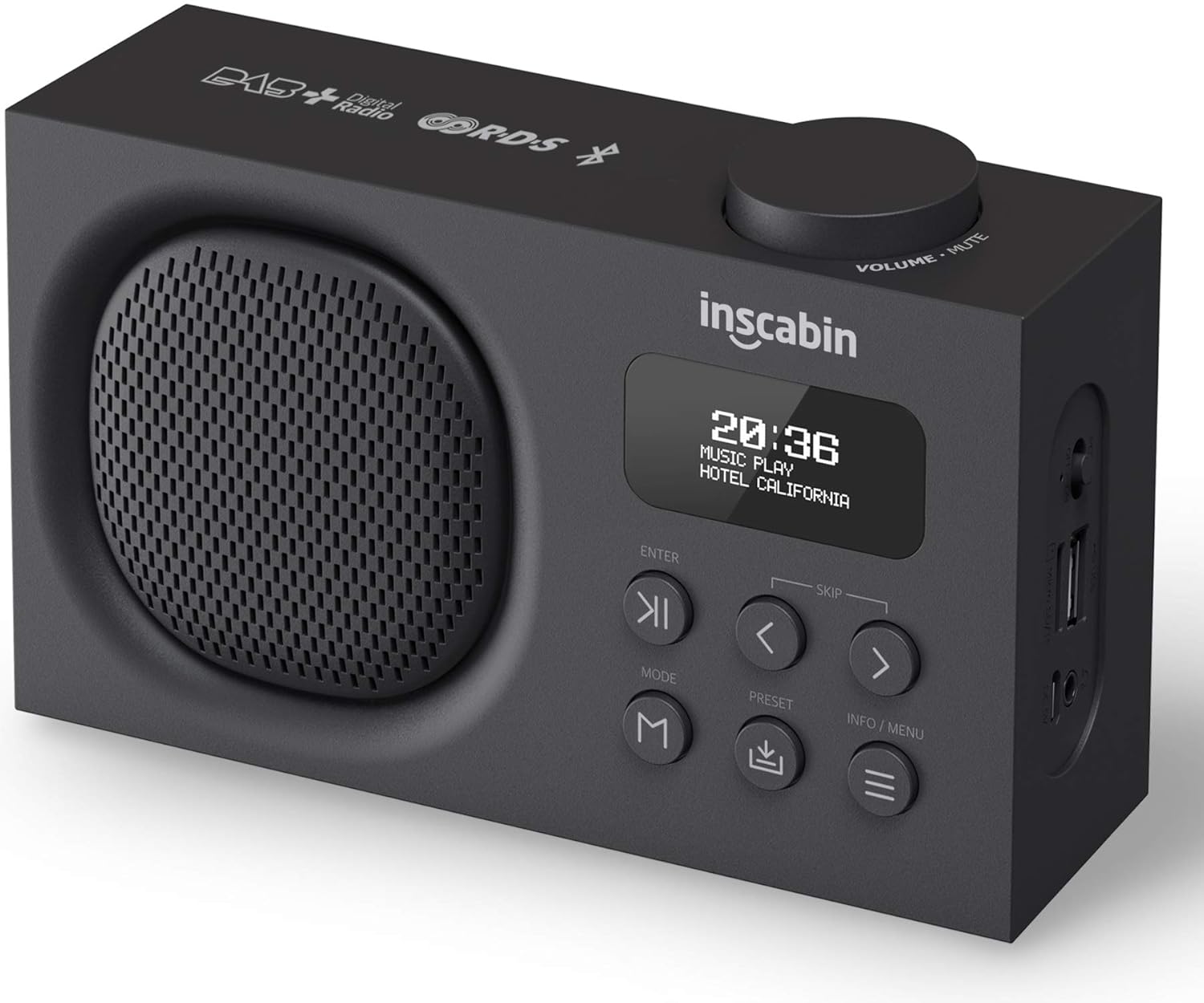
This image displays the front of the Inscabin P2 radio, highlighting its speaker grille, LCD display, control buttons, and the volume knob on top. It provides a clear view of the device's compact design.

This detailed side view of the Inscabin P2 radio clearly labels its various ports: Power Switch, Micro SD/TF card slot, USB input port, Headphone insert slot, and Micro USB charging slot. This helps users identify connection points.
Zvinodzora uye Zviteshi:
- Volume/Mute Knob: Tenderedza kuti ugadzirise vhoriyamu, dzvanya kuti unyarare/kuregedza.
- Chiratidziro cheLCD: Shows time, station information, mode, and menu options.
- ENTER Bhatani: Inosimbisa sarudzo.
- SKIP Buttons (< / >): Navigate menus, skip tracks, or tune stations.
- Bhotani reMODE: Switches between DAB, FM, Bluetooth, USB, and TF card modes.
- Bhatani rePRESET: Accesses or saves preset stations.
- Bhatani reMAZIVO/MENYU: Displays information or accesses the system menu.
- Simba Chinja: Inobatidza kana kudzima mudziyo.
- Nzvimbo yeMicro SD/TF Card: Yekuridza odhiyo files kubva pakadhi reTF.
- USB Input Port: Yekuridza odhiyo files kubva pa USB drive.
- Headphone Insert Slot: Zvekuterera wega.
- Micro USB Kuchaja Slot: Yekuchaja bhatiri remukati.
4. Setup
4.1 Kuchaja Bhatiri
- Connect the provided Micro USB cable to the Micro USB charging slot on the side of the radio.
- Connect the other end of the USB cable to a USB power adapter (not included) or a powered USB port.
- Chiratidzo chekuchaja chiri pachiratidziro chicharatidza mamiriro ekuchaja. Kuchaja kwakazara kunowanzotora maawa akati wandei.
- Once fully charged, disconnect the charging cable. The built-in 1800mAh battery provides over 10 hours of playback.
4.2 Simba rekutanga Rakabatidzwa
- Ensure the radio is charged or connected to power.
- Slide the Power Switch to the 'ON' position.
- The display will light up, and the device will typically start in DAB mode or the last used mode.
4.3 Antenna Positioning
For optimal reception in DAB and FM modes, extend the telescopic antenna fully and adjust its position. Experiment with different angles to find the best signal strength.
5. Operating Instructions
5.1 Simba On/Kudzima
- To turn on, slide the Power Switch to 'ON'.
- To turn off, slide the Power Switch to 'OFF'.
5.2 Mode Sarudzo
Press the MODE button repeatedly to cycle through the available modes: DAB, FM, Bluetooth, USB, and TF Card.
5.3 DAB/DAB+ Radio Mode
- Switch to DAB mode using the MODE bhatani.
- Upon first use or if no stations are found, the radio will automatically perform a full scan for available DAB/DAB+ stations. This may take a few minutes.
- Once the scan is complete, the first available station will begin playing.
- Shandisa iyo SKIP (< / >) buttons to navigate through the list of available stations. Press PINDA kusarudza chiteshi.
- Kuchengeta Presets: To save a station, tune to the desired station, then press and hold the PRESET bhatani. Shandisa iyo SKIP (< / >) buttons to select a preset number (1-10), then press PINDA kusimbisa.
- Kuyeuka Presets: Muchidimbu dzvanya iyo PRESET bhatani, wobva washandisa iyo SKIP (< / >) buttons to select your desired preset, and press PINDA.
- DAB Information: Press the INFO / MENU button to cycle through various information displays such as program type, signal strength, bit rate, and date/time.
5.4 FM Radio Modhi
- Chinja kuenda kuFM mode uchishandisa MODE bhatani.
- Auto Ongororo: To automatically scan and save FM stations, press and hold the INFO / MENU button. The radio will scan and store stations with strong signals.
- Chinyorwa Kugadziridza: Muchidimbu dzvanya iyo SKIP (< / >) buttons to fine-tune the frequency in small increments. Press and hold the SKIP (< / >) mabhatani ekuti utarise otomatiki kune inotevera chiteshi chiteshi.
- Kuchengeta Presets: Similar to DAB mode, tune to the desired FM station, then press and hold the PRESET bhatani. Shandisa iyo SKIP (< / >) mabhatani ekusarudza nhamba yagara yaiswa, wobva wadzvanya PINDA.
- Kuyeuka Presets: Muchidimbu dzvanya iyo PRESET bhatani, wobva washandisa iyo SKIP (< / >) buttons to select your desired preset, and press PINDA.
5.5 Makaralı Mode
- Chinja kuenda kuBluetooth mode uchishandisa MODE button. The display will show "Bluetooth Pairing" or similar, indicating it's ready to connect.
- Pamudziyo wako unogoneswa neBluetooth (smartphone, piritsi), gonesa Bluetooth uye tsvaga zvishandiso zviripo.
- Select "Inscabin P2" from the list of devices.
- Once paired, the radio will confirm the connection, and you can now stream audio from your device to the Inscabin P2.
- Use your connected device or the radio's SKIP (< / >) buttons to control playback (play/pause, next/previous track).
5.6 USB/TF Card Playback Mode
- Insert a USB drive into the USB input port or a TF card into the Micro SD/TF card slot.
- Switch to USB or TF Card mode using the MODE button. The radio will automatically detect and begin playing compatible audio files.
- Shandisa iyo SKIP (< / >) buttons to navigate between tracks. Press PINDA kutamba/kumbomira.
5.7 Alarm Clock, Sleep Timer, and Snooze
The Inscabin P2 features two independent alarms, a sleep timer, and a snooze function.
- Kuseta maAlarms: Wana marongero eararm uchishandisa INFO / MENU button. You can set two separate alarms with options for alarm source (DAB, FM, or Buzzer) and volume.
- Kurara Nguva: Set a duration after which the radio will automatically turn off. This is typically found in the system settings menu.
- Snooze Basa: Kana alarm yarira, tinya iyo PINDA button (or another designated button) to activate snooze, which will temporarily silence the alarm for a short period before it sounds again.
5.8 System Settings
Dzvanya uye ubate iyo INFO / MENU button to access the system settings. Here you can adjust:
- Nguva/Date: Manually set or synchronize with DAB/FM broadcast.
- Mutauro: Select from nine supported languages.
- Backlight: Adjust brightness and timeout.
- Kudzosera zvazvanga zviri kubva kufakitori: Reset ese masettings kuti ave default.
6. Kuchengeta
6.1 Kuchenesa
- Gara uchibvisa waya yemagetsi usati waichenesa.
- Use a soft, dry, lint-free cloth to wipe the exterior surfaces of the radio.
- Usashandise abrasive cleaners, wax, kana zvinonyungudutsa sezvo zvinogona kukanganisa kupera.
6.2 Kuchengeta Battery
- Kurebesa bhatiri, dzivisa kuburitsa bhatiri zvakazara nguva zhinji.
- If storing the device for an extended period, charge it to approximately 50% and recharge every few months.
- Usaisa bhatiri kune tembiricha yakanyanyisa.
6.3 Kuchengeta
When not in use, store the radio in a cool, dry place, away from direct sunlight and excessive dust.
7. Kugadzirisa matambudziko
If you encounter issues with your Inscabin P2 radio, please refer to the following common problems and solutions:
| Dambudziko | Zvinogona Kukonzera | Solution |
|---|---|---|
| No power/Device won't turn on | Battery is depleted; Power switch is off; Faulty charging cable/adapter. | Charge the battery; Ensure power switch is 'ON'; Try a different charging cable/adapter. |
| Kusagamuchirwa zvakanaka kweDAB/FM | Antena haina kuwedzerwa; Nzvimbo isina kusimba yechiratidzo; Kupindira. | Fully extend and adjust the telescopic antenna; Move the radio to a location with better signal; Avoid placing near other electronic devices. |
| Bluetooth won't connect | Radio not in Bluetooth mode; Device not discoverable; Already connected to another device. | Ensure radio is in Bluetooth mode; Make sure your device's Bluetooth is on and searching; Disconnect from other devices; Try restarting both devices. |
| No sound from USB/TF card | Incorrect mode; Incompatible file format; Corrupted media. | Ensure radio is in USB/TF mode; Check if audio files are in a supported format (e.g., MP3); Try a different USB drive/TF card. |
| Alarm haisi kurira | Alarm not set correctly; Alarm volume too low; Device powered off. | Verify alarm settings (time, source, volume); Ensure the device is on or in standby mode. |
8. Zvinotsanangurwa
Detailed technical specifications for the Inscabin P2 Portable DAB/DAB+FM Digital Radio and Bluetooth Speaker.
| Feature | Tsanangudzo |
|---|---|
| Brand | Inscabin |
| Model Number | 054114293711 |
| Product Dimensions | 16 x 9 x 5 cm |
| Item Weight | 540 g |
| Sravana Sameeralu Serial XNUMXth Tuner Technology | DAB Plus, FM |
| DAB/DAB+ Frequency | Band III 174.928-239.20MHz |
| FM Frequency | Band II 87.5-108MHz |
| Bluetooth Version | Bluetooth 5.0 |
| Kubatana Technology | Zvekubatsira, Bluetooth, USB |
| Display Type | LCD |
| Mutauriri Wekubuda Simba | 7 Watt RMS |
| Simba Source | Battery Powered |
| Bhatiri Type | 1 Lithium Polymer (inosanganisirwa) |
| Battery Capacity | 1800mAh (approx. 10+ hours playback) |
| Special Features | Lightweight, Portable, Rechargeable, Dual Alarm Clock, Sleep/Snooze Function, USB/TF Card Playback |
| Mitauro Inotsigirwa | Nine languages for system operation |
9. Warranty uye Tsigiro
The Inscabin P2 Portable DAB/DAB+FM Digital Radio and Bluetooth Speaker comes with a standard manufacturer's warranty. Please refer to the warranty card included in your product packaging for specific terms and conditions, including warranty duration and coverage details.
For technical support, troubleshooting assistance, or warranty claims, please contact Inscabin customer service through the contact information provided on your purchase receipt or the official Inscabin website. When contacting support, please have your model number (P2) and purchase date ready.