1. Nhanganyaya
Thank you for choosing the R-MUSIC Booster S High Power Wireless Bluetooth Speaker. This manual provides important information regarding the setup, operation, and maintenance of your new speaker. Please read this manual thoroughly before using the product to ensure proper function and to prevent damage.
2. Package Zviri mukati
Ndapota tarisa zviri mupakeji kana wabvisa zvinhu mubhokisi. Kana paine zvinhu zvisipo kana kuti zvakakuvara, taura nemutengesi wako.
- R-MUSIC Booster S Speaker Unit
- Power Adapter/Charging Cable
- Wired Microphone (if included with your model)
- User Manual

Image: Wired Microphone. This microphone is typically included for karaoke or public address functions.
3. Zvigadzirwa zveChigadzirwa
The R-MUSIC Booster S speaker is designed for powerful and versatile audio playback. Key features include:
- High Power Audio Output (40 Watts Max)
- Wireless Bluetooth Kubatana
- USB Port for MP3 Playback
- MicroSD Card Reader for MP3 Playback
- 3.5mm AUX Input for Wired Connections
- Microphone Input with Echo Control
- Integrated LED Display
- Dynamic LED Chiedza Chiratidzo
- Portable Design with Integrated Handle

Mufananidzo: Mberi view of the R-MUSIC Booster S speaker, highlighting the speaker grille and LED lighting.

Mufananidzo: Angled view yemutauri, kuratidzwaasing its compact yet powerful design.
4. Kudzora uye Kubatana
Familiarize yourself with the control panel located on the rear of the speaker.
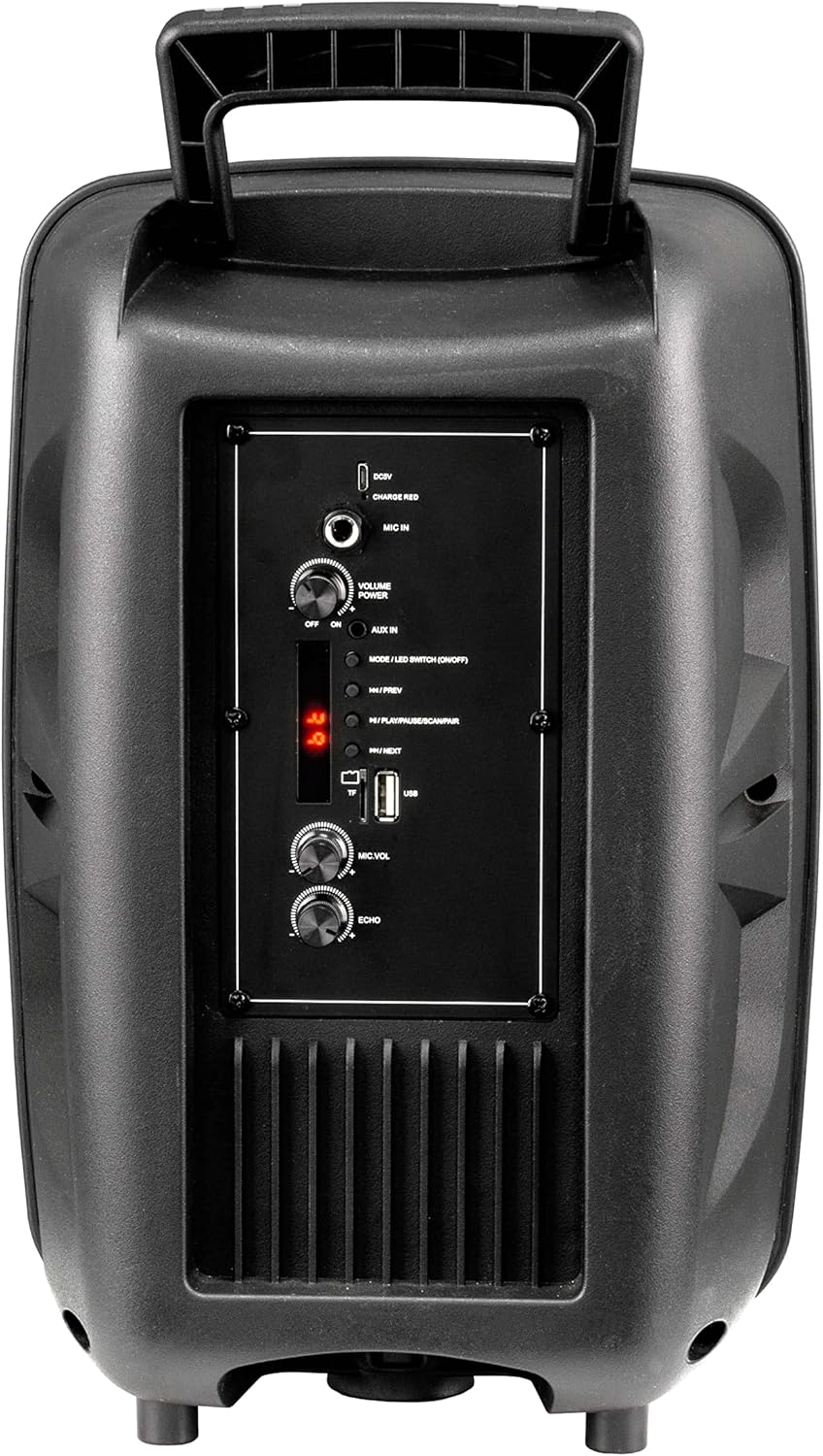
Image: Rear Control Panel Overview.
- DC 5V Kupinza: Simba rekuisa paspika.
- CHARGE RED Indicator: Lights up red when charging.
- MIC IN: 6.35mm jack for connecting a wired microphone.
- VOLUME POWER (OFF/ON): Rotary knob to turn the speaker ON/OFF and adjust the master volume.
- AUX IN: 3.5mm audio input for connecting external audio devices.
- MODE / LED SWITCH (ON/OFF): Press to switch between input modes (Bluetooth, USB, MicroSD, AUX). Press and hold to turn the LED light show ON/OFF.
- |<< / PREV: Dhinda kuenda kunzira yapfuura.
- >>| / NEXT: Dhinda kuenda kunzira inotevera.
- >|| / PLAY/PAUSE / SCAN/PAIR: Press to play or pause audio. In FM mode, press and hold to scan for stations. In Bluetooth mode, press and hold to initiate pairing.
- TF (MicroSD) Card Slot: Insert a MicroSD card for MP3 playback.
- USB Port: Insert a USB flash drive for MP3 playback.
- MIC.VOL: Rotary knob to adjust the microphone volume.
- ECHO: Rotary knob to adjust the microphone echo effect.
5. Setup
5.1. Kubhadharisa Mutauri
Before first use, fully charge the speaker. Connect the provided charging cable to the DC 5V input on the rear panel and plug the other end into a suitable USB power source (e.g., USB wall adapter, computer USB port). The "CHARGE RED" indicator will light up during charging and turn off when fully charged.
5.2. Powering On / Off
Rotate the "VOLUME POWER" knob clockwise to turn the speaker ON. Rotate it counter-clockwise until it clicks to turn the speaker OFF.
6. Operating Instructions
6.1. Makaralı Mode
- Turn on the speaker. It will automatically enter Bluetooth pairing mode, indicated by a flashing "BLUE" on the LED display.
- Gonesa Bluetooth pane nharembozha yako (smartphone, piritsi, komputa).
- Tsvaga "R-MUSIC BOOSTER S" (or similar name) in your device's Bluetooth list and select it to pair.
- Once successfully paired, the speaker will emit a confirmation tone, and the "BLUE" indicator will stop flashing.
- You can now play audio from your device through the speaker. Use the speaker's control buttons or your device to control playback.
6.2. USB / MicroSD Card Playback
- Insert a USB flash drive or MicroSD card (pre-loaded with MP3 audio files) into the respective port.
- The speaker will automatically switch to USB or TF (MicroSD) mode and begin playing the first compatible audio file.
- Use the "|<<" and ">>|" buttons to navigate between tracks. Use the ">||" button to play or pause.
6.3. AUX Input Mode
- Batanidza mugumo mumwe wetambo ye3.5mm audio (isina kubatanidzwa) kune AUX IN port iri paspika.
- Connect the other end to the headphone jack or audio output of your external device (e.g., MP3 player, laptop).
- Press the "MODE" button until "AUX" is displayed on the LED screen.
- Play audio from your external device. Volume can be controlled via the speaker's master volume knob or your external device.
6.4. Maikorofoni Kushandiswa
- Connect a wired microphone to the "MIC IN" jack.
- Adjust the microphone volume using the "MIC.VOL" knob.
- Adjust the echo effect using the "ECHO" knob.
6.5. LED Light Show
Press and hold the "MODE / LED SWITCH" button to toggle the dynamic LED light show ON or OFF.
7. Kuchengeta
- Geza mutauri nejira rakapfava, rakaoma. Usashandise abrasive cleaners kana solvents.
- Chengetedza mukurukuri kure nemvura, mwando, uye tembiricha yakanyanyisa.
- Usavhare mazaru emhepo.
- Chengeta mukurukuri munzvimbo inotonhorera, yakaoma asi isingashandiswi kwenguva yakareba.
8. Kugadzirisa matambudziko
| Dambudziko | Zvinogona Kukonzera | Solution |
|---|---|---|
| Hapana simba | Battery is depleted; Power knob is off. | Charge the speaker; Rotate the VOLUME POWER knob clockwise to turn on. |
| Hapana ruzha | Volume too low; Incorrect mode selected; Device not paired (Bluetooth); Cable not connected (AUX). | Increase volume; Press MODE button to select correct input; Re-pair Bluetooth device; Check AUX cable connection. |
| Bluetooth pairing yakundikana | Mutauri asiri mukuita pairing; Mudziyo wakanyanya kureba; Kupindira. | Ensure speaker is in Bluetooth mode (flashing BLUE); Move device closer; Turn off other Bluetooth devices. |
| USB/MicroSD not playing | Haisi kutsigirwa file format; Corrupted files; Kadhi/motokari haina kuiswa zvakanaka. | Iva nechokwadi files are MP3 format; Try another USB/MicroSD; Re-insert card/drive. |
9. Zvinotsanangurwa
- Muenzaniso: RM301891 (Booster S)
- Brand: R-MUSIC
- Kubatana: Bluetooth, USB, MicroSD, 3.5mm AUX
- Maximum Output Power: 40 Watts
- Rudzi rweMutauriri: Subwoofer (as per product data, likely refers to bass capability)
- Mounting Type: Floor Yakamira
- Zviyero (Kurongedza): 44.4 x 30.1 x 22.6 masendimita (inenge 17.5 x 11.8 x 8.9 inches)
- Kurema (Kurongedza): 1.9 Kilogram (approx. 4.2 lbs)
- Power Input: DC 5V
10. Safety Information
- Do not disassemble or modify the speaker. This may cause electric shock, fire, or product damage.
- Do not expose the speaker to rain, moisture, or extreme temperatures.
- Dzivisa kudonhedza kana kuita kuti mukurukuri apedzisire akasimba.
- Chengetedza pasingasvikirwi nevana.
- Shandisa chete tambo yekuchaja yakatarwa uye adapta yemagetsi.
- Kuteerera kwenguva refu kwepamusoro-soro kunogona kukonzera kukuvara kwekunzwa.
11. Warranty uye Tsigiro
R-MUSIC products are designed and manufactured to the highest quality standards. For warranty information and technical support, please refer to the warranty card included with your product or contact your local retailer. Keep your purchase receipt as proof of purchase.
For further assistance, you may visit the official R-MUSIC websaiti kana kubata dhipatimendi ravo rebasa revatengi.