
White Shark GH-2044 Wolf
White Shark GH-2044 Wolf Gaming Headset User Manual
Nhanganyaya
This manual provides essential instructions for the proper setup, operation, and maintenance of your White Shark GH-2044 Wolf Gaming Headset. Please read this guide thoroughly before using the product to ensure optimal performance and longevity. Keep this manual for future reference.
Product Overview
The White Shark GH-2044 Wolf is a wired over-ear gaming headset designed for immersive audio experiences. It features a built-in microphone for communication and a USB connection for compatibility with multiple devices.
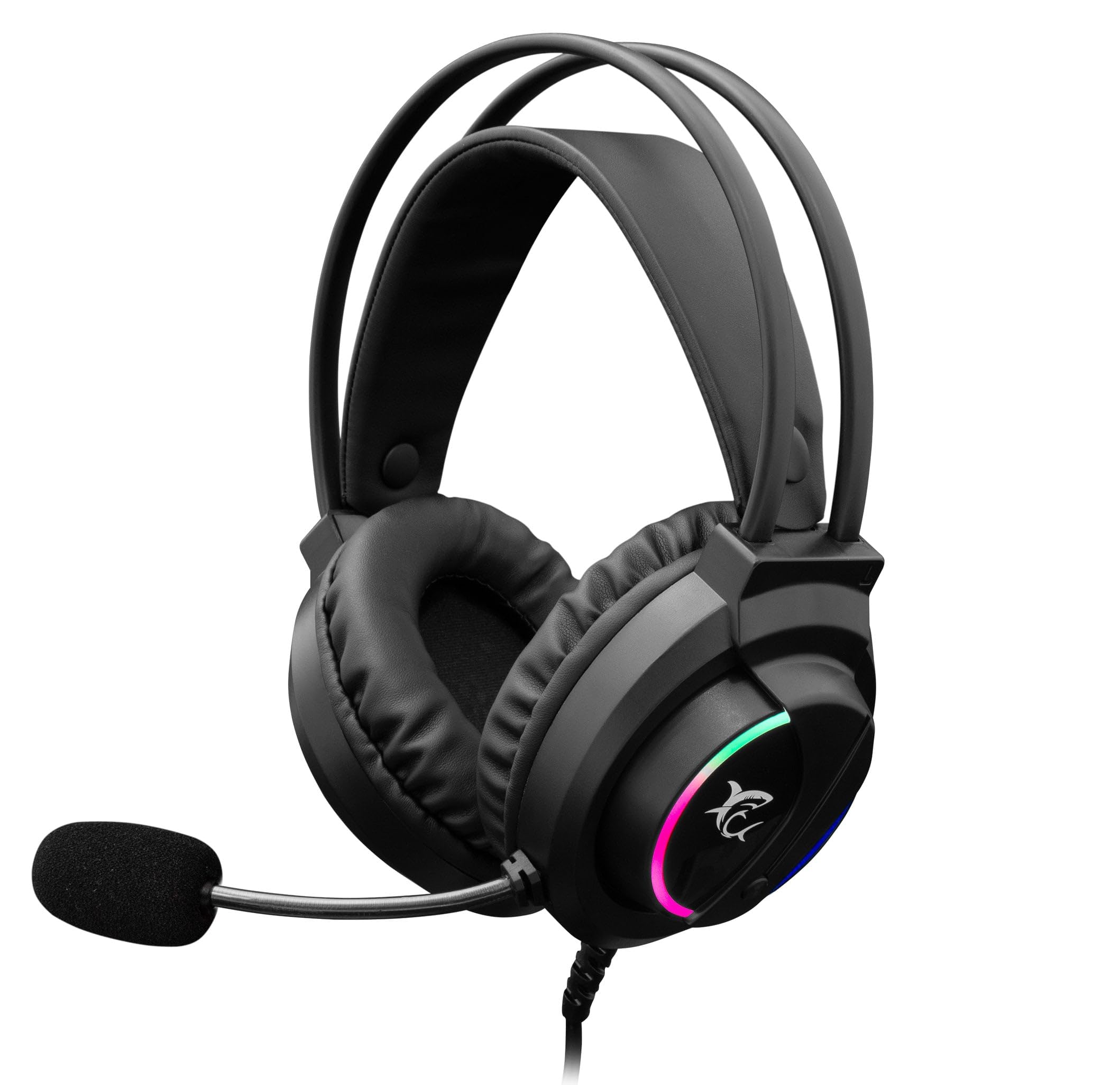
Image: The White Shark GH-2044 Wolf Gaming Headset packaging box, displaying the headset and key features.

Image: The White Shark GH-2044 Wolf Gaming Headset, showcasing its illuminated earcups and flexible microphone.

Mufananidzo: Kuvhara view of the earcup on the White Shark GH-2044 Wolf Gaming Headset, highlighting the integrated volume control wheel.

Image: A detailed close-up of the flexible microphone, showing its foam cover for clear voice capture.
Setup Instructions
- Batanidza Headset: Plug the USB connector of the GH-2044 Wolf Gaming Headset into an available USB port on your computer, gaming console, or other compatible device.
- Kuiswa kwemutyairi (kana zvichidikanwa): For most operating systems, the headset will be recognized automatically, and standard drivers will be installed. If prompted, follow the on-screen instructions to complete any driver installation.
- Audio Output/Input Selection: Navigate to your device's sound settings. Select the White Shark GH-2044 Wolf as your primary audio output device (for sound) and as your primary audio input device (for the microphone).
- Gadzirisa Inzwi: Use the volume control wheel located on the headset's earcup to adjust the audio level to your preference.
Operating Instruction
- Kudzora inzwi: The headset features an integrated volume control wheel on the left earcup. Rotate the wheel up to increase volume and down to decrease volume.
- Kushandisa Maikorofoni: The flexible microphone can be adjusted to your desired position for optimal voice pickup. Ensure the microphone is positioned close to your mouth for clear communication.
- Maikorofoni Kunyarara: (Information not explicitly provided in product data, assume software control or inline control if present.) If an inline mute button is present on the cable, press it to mute/unmute the microphone. Otherwise, use your device's software settings to control microphone mute.
- Mwenje ye LED: The earcups feature spectrum LED lighting. This lighting is typically powered by the USB connection and operates automatically.
Maintenance
- Kuchenesa: Use a soft, dry cloth to clean the headset. Do not use liquid cleaners or abrasive materials, as these can damage the finish and internal components.
- Kuchengeta: Chengetedza mahedhifoni munzvimbo inotonhorera, yakaoma kure nechiedza chezuva uye tembiricha yakanyanyisa. Dzivisa kuisa zvinhu zvinorema pamahedhifoni.
- Cable Care: Dzivisa kukotama kwakasimba kana kudhonza zvakanyanya tambo yeUSB kudzivirira kukuvara kwemukati.
- Ear Cushions: Nguva nenguva tarisai machira enzeve kuti aone kana akasakara. Machira ekugadzirisa anogona kuwanikwa kubva kumugadziri kana kuvatengesi vane mvumo.
Kugadzirisa matambudziko
- Hapana Inzwi:
- Iva nechokwadi chekuti USB connector yaiswa zvizere muchiteshi.
- Check your device's sound settings to confirm the White Shark GH-2044 Wolf is selected as the output device.
- Verify the volume control wheel on the headset is turned up.
- Edza headset pane imwe mudziyo kuti uone kana paine dambudziko rakanangana nemudziyo wacho.
- Maikorofoni Haisi Kushanda:
- Ensure the microphone is not muted (check inline control or software settings).
- Confirm the White Shark GH-2044 Wolf is selected as the input device in your device's sound settings.
- Adjust microphone sensitivity in your device's sound settings.
- Edza maikorofoni neimwe application kana mudziyo.
- Yakakanganiswa Audio:
- Lower the volume on both the headset and your device.
- Ita shuwa kuti audio source haina kukanganisa.
- Edza kubatanidza kune imwe chiteshi che USB chakasiyana.
Zvinotsanangurwa
| Feature | Tsanangudzo |
|---|---|
| Brand | White Shark |
| Model Number | GH-2044 Wolf |
| Kubatana Technology | Wired USB |
| Musoro weheadset | Over-Nzeve |
| Maikorofoni Inosanganisirwa | Ehe |
| Noise Control | Hapana |
| Inowirirana Devices | Multiple |
| Control Type | Volume Control |
| Material | Dehwe (makusheni enzeve) |
| Inokurudzirwa Zvishandiso | Mutambo |
| Product Dimensions | 20 x 10 x 24.5 cm |
| Kurema | 300 magiramu |
| Color | Nhema |
| Inosanganisirwa Zvikamu | Headband, Ear Cushions |
Warranty uye Support
For warranty information and technical support, please refer to the documentation provided with your purchase or contact your retailer. Specific warranty terms may vary by region and retailer.