
FLEXISPOT E4 Classic
FLEXISPOT E4 Classic Electric Standing Desk User Manual
Model: E4 Classic | Brand: FLEXISPOT
Nhanganyaya
This manual provides detailed instructions for the assembly, operation, and maintenance of your FLEXISPOT E4 Classic Electric Standing Desk. Please read this manual thoroughly before use to ensure proper function and longevity of your product.

Figure 1: The FLEXISPOT E4 Classic Electric Standing Desk, featuring a bamboo contour desktop and silver frame, set up with dual monitors in an office environment.
Safety Information
- Ita shuwa kuti zvikamu zvese zvakasungirirwa zvakachengeteka zvisati zvashandiswa.
- Chengeta vana nezvipfuyo kure nedhesiki panguva yekushanda.
- Do not overload the desk beyond its specified weight capacity (220 lbs).
- Dzivisa kuisa mvura zvakananga pa control panel kana zvikamu zvemota.
- Bvisa simba usati wachenesa kana kugadzirisa.
- Shandisa chete adapta yemagetsi yakapihwa.
Package Zviri mukati
Ndapota tarisai kuti zvikamu zvese zviripo musati matanga kugadzira. Kana paine zvikamu zvisipo kana kuti zvakakuvara, taurai nerutsigiro rwevatengi.
- Bamboo Contour Whole-Piece Desktop (55"x28")
- Silver Frame Legs (Dual Motor)
- Control Panel
- Power Adapter uye Cable
- Assembly Hardware (screws, tools, etc.)
- Chinyorwa Chirairo (gwaro iri)
Setup uye Assembly
Kubatanidzwa kwechigadzirwa ichi kunodiwa. Ndokumbirawo mutevedzere matanho aya nokungwarira.
- Unpack Components: Nyatsobvisa zvikamu zvese kubva pakurongedzerwa uye wozviisa panzvimbo yakachena, yakapfava kudzivirira makwara.
- Batanidza Makumbo paDesktop: Position the desktop upside down. Align the leg frames with the pre-drilled holes on the underside of the desktop. Secure them using the provided screws and tools.
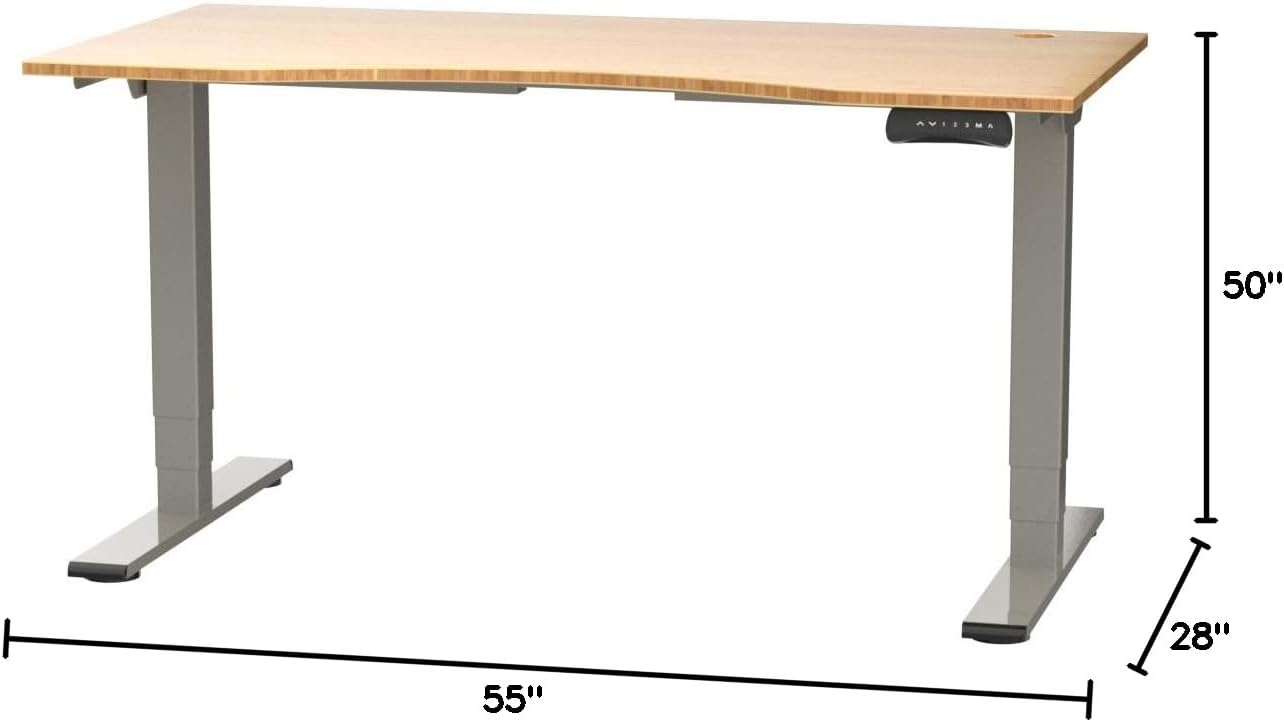
Figure 2: Desk dimensions indicating 55 inches width, 28 inches depth, and adjustable height up to 50 inches.
- Isa Control Panel: Mount the control panel to the desired location on the underside of the desktop, typically on the front edge for easy access. Connect the control panel cable to the motor control box.

Figure 3: The programmable control panel with LED display, up/down buttons, and memory presets (1, 2, 3, M, A).
- Batanidza Simba: Plug the power adapter into the control box, and then plug the power cable into a standard electrical outlet.
- Cable Management: Utilize the two cable management holes on the desktop to route and organize your cables, preventing clutter.

Figure 4: Detail showing the integrated cable management holes and the water-resistant surface of the bamboo desktop.
- Chekutanga Calibration: After assembly and power connection, the desk may require an initial calibration. Refer to the "Operating Instructions" section for details on resetting or calibrating the desk.
Operating Instruction
Height Adjustment
The FLEXISPOT E4 Classic desk features a dual-motor lift system for smooth and quiet height adjustments.
- Dhesiki Rekusimudzira: Dzvanya uye ubate iyo Museve Wekumusoro button (▲) on the control panel. The desk will move upwards.
- Desiki rePasi: Dzvanya uye ubate iyo Museve Wepasi button (▼) on the control panel. The desk will move downwards.
- Release the button at your desired height. The desk can adjust from 24.4 inches to 50 inches.
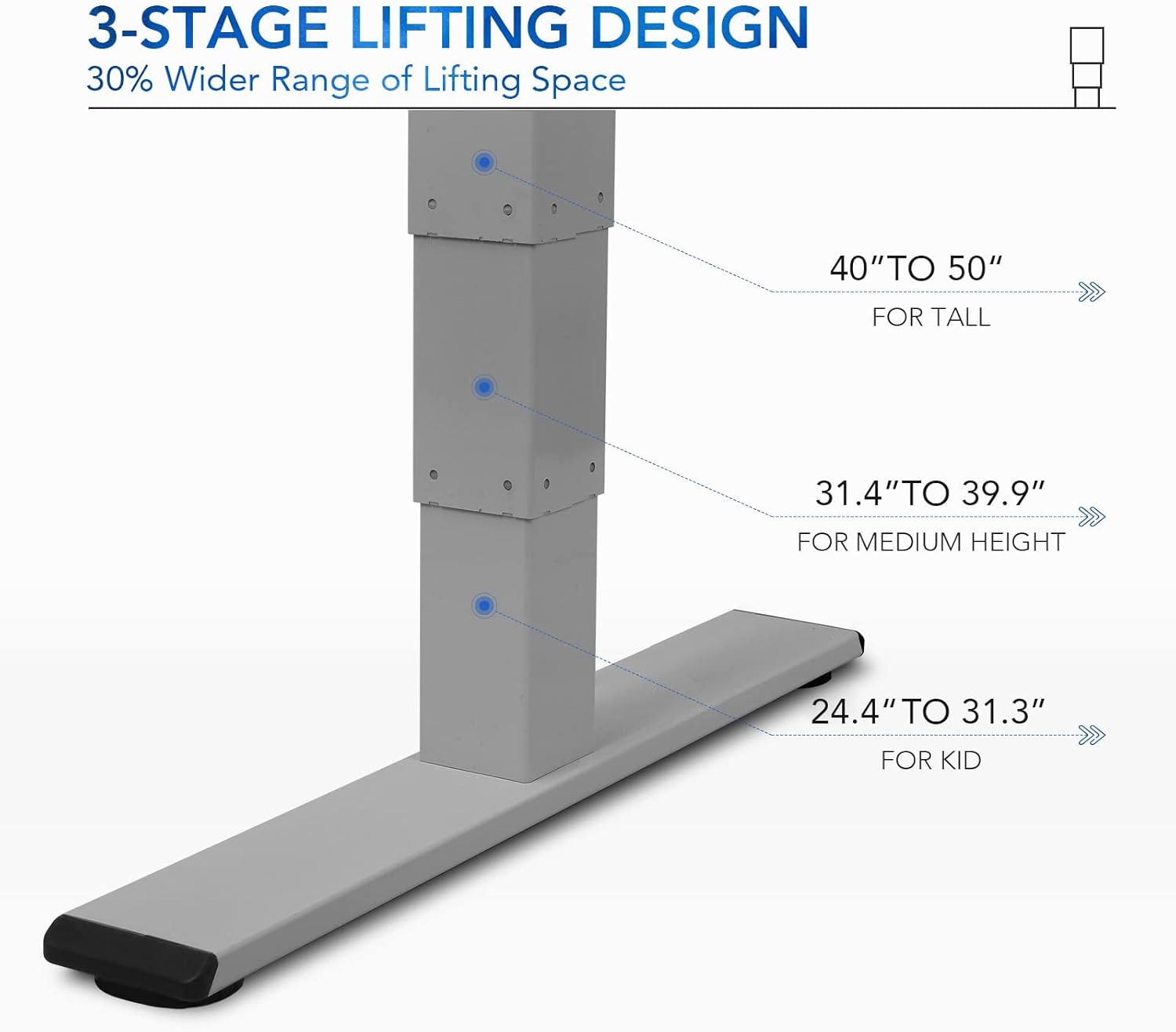
Mufananidzo 5: Ma 3-stage lifting design provides a wide range of height adjustments, suitable for various user heights, from 24.4" (kid) to 50" (tall).
Programmable Memory Presets
Panel yekudzora inokutendera kuti uchengetedze kusvika kumagadzirirwo matatu ekukwirira aunoda kuti ugadzirise nekukurumidza.
- Isa Nzvimbo Yekurangarira:
- Gadzirisa dhesiki kune yako yaunoda kureba uchishandisa Up / Down mabhatani.
- Press the "M" button. The LED display will show "S-".
- Within 3 seconds, press one of the number buttons ("1", "2", kana "3") to save the current height to that preset. The display will show "S-1", "S-2", or "S-3" to confirm.
- Yeuka Nzvimbo Yekurangarira: Simply press the corresponding number button ("1", "2", kana "3"). The desk will automatically move to the saved height.
Sit/Stand Reminder
The "A" button can be used to set a reminder to switch between sitting and standing positions.
- Consult the full manual for detailed instructions on setting and customizing the sit/stand reminder function.
Ergonomic Curved Design
The 55"x28" desktop features an ergonomic curved design for enhanced comfort and efficiency during work or study.

Figure 6: The ergonomic curved edge of the desktop, designed to provide a more comfortable and natural working posture.
Maintenance
- Kuchenesa: Pukuta pamusoro pedhesiki uye furemu nekanyoro, damp cloth. Avoid abrasive cleaners or harsh chemicals. The bamboo surface is designed to be water-resistant, making it easy to clean.
- Motor Care: The dual-motor system is designed for low noise and durability. No specific user maintenance is required for the motors.
- Cable Management: Periodically check that all cables are neatly routed through the cable management holes and are not pinched or tangled.
- Fastener Check: Occasionally check all screws and fasteners to ensure they remain tight. Retighten if necessary.
Kugadzirisa matambudziko
| Dambudziko | Zvinogona Kukonzera | Solution |
|---|---|---|
| Desiki harifambi. | Power cable disconnected; overload protection activated; motor error. | Check power connections. Reduce weight on desk. Unplug and replug power after 10 minutes. Perform a reset (see below). |
| Desiki rinofamba zvisina kuenzana kana kuti rinoita ruzha rusingawanzoitiki. | Loose fasteners; obstruction; motor synchronization issue. | Check and tighten all assembly screws. Ensure no obstructions under the desk. Perform a reset. |
| LED display shows an error code (e.g., "E01", "RST"). | System error; need for reset. | Reset Maitirwo: Press and hold the Down Arrow button until the desk reaches its lowest position and then slightly rises. Release the button. If the error persists, unplug the desk for 10 minutes and try again. |
| Memory presets not working. | Magadzirirwo ekare haana kuchengetwa nemazvo. | Re-save your desired memory positions following the "Programmable Memory Presets" instructions. |
If the issue persists after attempting these solutions, please contact FLEXISPOT customer support.
Zvinotsanangurwa
| Feature | Detail |
|---|---|
| Model | E4 Classic |
| Brand | FLEXISPOT |
| Desktop Material | Bamboo Contour Whole-Piece Board |
| Frame Material | Alloy Steel (Silver Frame) |
| Zviyero zveChigadzirwa (D x W x H) | 28"D x 55"W x 50"H (Kureba Kwakanyanya) |
| Height Adjustment Range | 24.4" kusvika 50" |
| Kusimudza System | Dual Motor, 3-Stage Lifting |
| Weight Capacity | Kusvika ku220 lbs |
| Special Features | Electric Height Adjustment, Programmable Memory Presets, Sit/Stand Reminder, Curved Ergonomic Design, Cable Management Holes, Waterproof Surface |
| Gungano Rinodiwa | Ehe |
Warranty uye Support
FLEXISPOT products are designed for durability and performance. For specific warranty details regarding your E4 Classic Electric Standing Desk, please refer to the warranty card included with your purchase or visit the official FLEXISPOT website.
For technical support, troubleshooting assistance, or to inquire about replacement parts, please contact FLEXISPOT customer service:
- Websaiti: www.flexispot.com
- Email: support@flexispot.com
- Runhare: Tarisa kune mukuru websaiti yenhamba dzedunhu.
When contacting support, please have your product model (E4 Classic) and purchase information ready.
Related Documents - E4 Classic
 |
Bhuku rekushandisa reFlexiSpot EH1-EU Electric Standing Desk Frame Bhuku rekushandisa rakakwana reFlexiSpot EH1-EU frame yedhesiki remagetsi rakamira, rinotsanangura zvakadzama, mirairo yekuunganidzira, waya dzemagetsi, mashandiro, uye kugadzirisa matambudziko kuti zvishandiswe zvakanaka. |
 |
FlexiSpot EC1 Electric Height Adjustable Standing Desk Assembly Guide This assembly guide provides step-by-step instructions for setting up the FlexiSpot EC1 electric height-adjustable standing desk. It includes specifications, parts list, assembly procedures, keypad operation, troubleshooting tips, and warranty information. |
 |
ERGOLUX Electric Dual Motor Standing Desk User Guide User guide for the ERGOLUX Electric Dual Motor Standing Desk (180 x 80cm), covering safety, components, assembly, operation, and troubleshooting. Model numbers: EL180SDDBBA, EL180SDDOWA, EL180SDDWWA. |
 |
Inbox Zero NAAC1571 Dual Motor Standing Desk Operation Guide Operation guide for the Inbox Zero Jey Dual Motor Electric Height Adjustable Standing Desk Frame (model naac1571), detailing parts, safety instructions, and assembly components. |
 |
Inbox Zero L-Shaped Electric Standing Desk Assembly & User Manual (160cm-180cm) Comprehensive assembly instructions and user guide for the Inbox Zero L-Shaped Electric Height Adjustable Standing Desk (160cm-180cm). This guide provides detailed steps for assembly, operation of the controller, and safety information. |
 |
FlexiSpot EG1B Electric Standing Desk Assembly Instructions Detailed assembly instructions for the FlexiSpot EG1B electric standing desk, covering all steps from unboxing to final setup. Includes technical specifications, parts list, and troubleshooting tips. |
Ask a question about this manual
Ask about setup, troubleshooting, compatibility, parts, safety, or missing instructions. Manuals+ will review the question and use this page’s manual context to help answer it.