
1. Safety Information
Ndapota verengai mirairo yese zvakanaka musati mashandisa mudziyo uyu uye chengetai kuti muzoshandisa mune ramangwana. Kukundikana kutevedzera mirairo iyi kunogona kukonzera kuvhunduka kwemagetsi, moto, kana kukuvara kwakanyanya.
- Gara uchibvisa feni kubva panzvimbo yemagetsi usati waichenesa, kuigadzirisa, kana kuifambisa.
- Do not operate the fan with a damaged cord or plug. If the cord or plug is damaged, contact customer service for repair or replacement.
- This fan is intended for indoor use only. Do not use outdoors or in wet locations.
- Keep the fan away from water and other liquids. Do not immerse the fan in water.
- Iva nechokwadi chekuti feni yakaiswa panzvimbo yakatsiga, yakati sandara kudzivirira kuti isatsvedzerere.
- Chengetedza vana uye mhuka dzinovaraidza kure nefani panguva yekushanda.
- Usaise minwe kana chero chinhu mugrille kana feni ichishanda.
- Do not block air openings or operate near curtains, drapes, or other objects that could block airflow.
- Do not use the fan in areas where flammable liquids or gases are stored.
2. Chigadzirwa Pamusoroview
The Amazon Basics 40" 70-Degree Oscillating Digital Tower Fan is designed to provide efficient and customizable cooling for various indoor spaces. It features a sleek, compact design and user-friendly controls.
Zvikamu
- Tower Fan Unit
- Hwaro (hunoda kuunganidzwa)
- Remote Control
Key Features
- Kutonhodza Kunoshanda: Delivers powerful airflow for effective cooling in enclosed spaces.
- Customizable Speeds: Four intuitive speed settings to adjust airflow.
- Multiple Modes: Includes Standard, Breeze, and Nature modes for varied airflow patterns.
- Oscillation: 70-degree oscillation for wide-range air flow coverage.
- Basa renguva: Programmable timer up to 15 hours for energy saving and convenience.
- Remote Control: Convenient remote for adjusting settings from a distance.
- Digital Controls: Easy-to-use digital control panel located on the top of the fan.
- Compact Design: Slim tower design (11.4"D x 11.4"W x 39.3"H) fits easily into any room.

Mufananidzo 2.1: The Amazon Basics 40-inch Digital Tower Fan shown with its remote control. The fan is black with a sleek, tall design, and the remote is compact with clearly labeled buttons for power, speed, mode, oscillation, and timer.

Mufananidzo 2.2: A diagram illustrating the key features of the tower fan, including its 40-inch height, 4 customizable airflow speed settings, timer with auto shutoff (1h, 2h, 4h, 8h options), and convenient remote control for adjusting speed, oscillation, and timer. The diagram highlights the digital display and control panel on top of the fan.
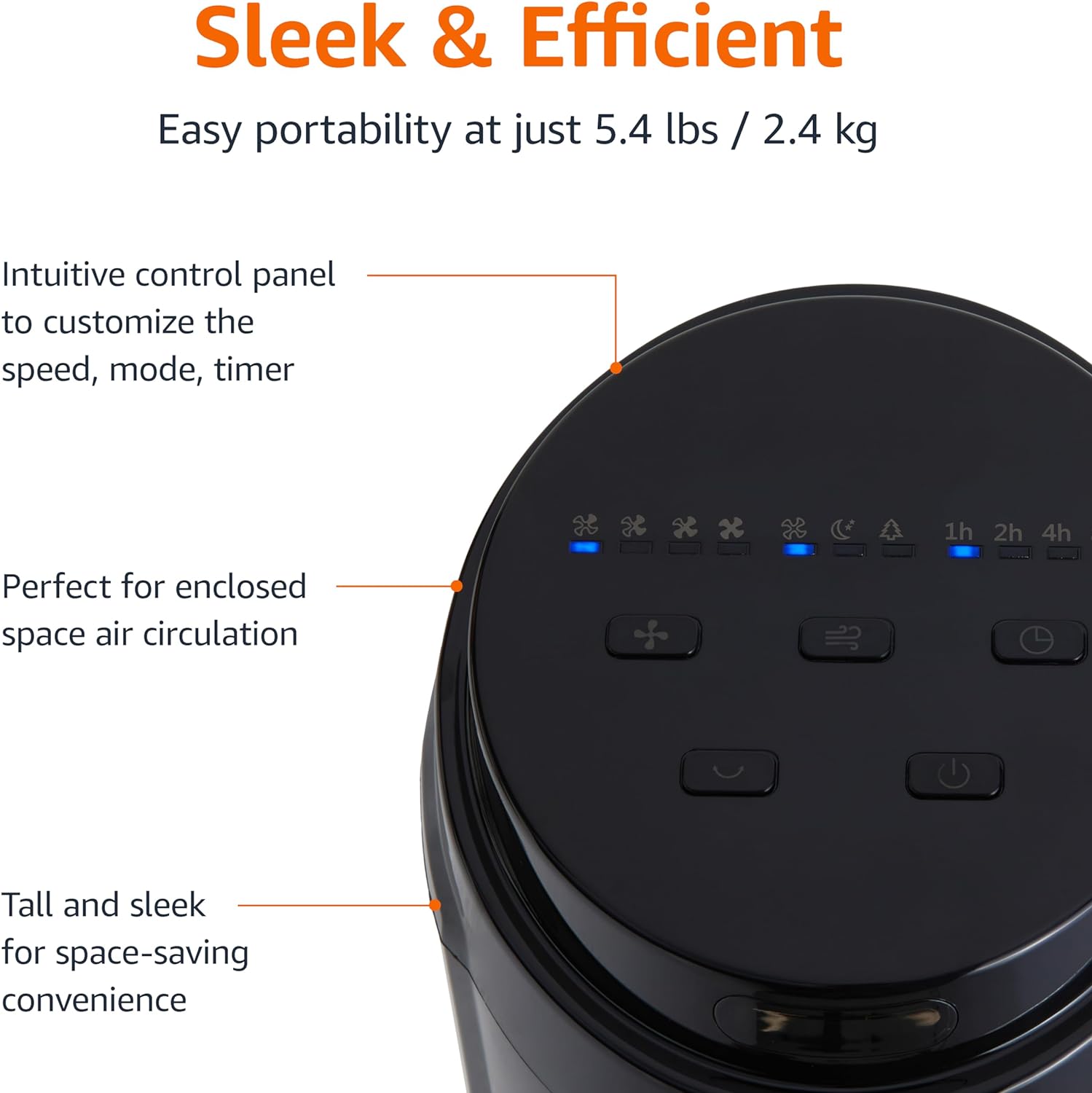
Mufananidzo 2.3: A pedyo-up view of the intuitive control panel located on the top of the Amazon Basics Tower Fan. The panel features buttons for speed, mode, power, oscillation, and timer, along with LED indicators for selected settings. This design allows for easy customization of fan operation.
3. Setup
3.1 Gungano
- Nyatsobvisa zvese zvikamu kubva pakurongedza.
- Attach the fan base to the main tower unit. Align the slots on the base with the corresponding tabs on the bottom of the fan.
- Secure the base using the provided screws, if any, ensuring it is firmly attached.
3.2 Kuiswa
- Isa feni panzvimbo yakasimba, yakaenzana.
- Ensure there is adequate space around the fan for proper air circulation, especially for the oscillation feature.
- Keep the fan at least 1 foot (30 cm) away from walls, furniture, and other objects.
- Plug the power cord into a standard NEMA 5-15 (US Standard Wall Outlet) electrical outlet.
4. Operating Instructions
The fan can be operated using either the control panel on top of the unit or the included remote control.
4.1 Control Panel & Remote Control Functions
| Bhatani/Basa | Tsanangudzo |
|---|---|
| Simba (Kubatidzwa/Kudzima) | Inobatidza kana kudzima feni. |
| Speed | Cycles through 4 fan speed settings (Low, Medium, High, Max). |
| Mode | Selects between 3 operating modes:
|
| Kudzingwa | Activates or deactivates the 70-degree oscillation feature, allowing the fan to sweep air across a wider area. |
| Timer | Sets the fan to automatically turn off after a specified period (up to 15 hours in 1-hour increments). |
4.2 Remote Control Kushandisa
The remote control allows for convenient operation of all fan functions from a distance. Ensure the remote is pointed towards the fan's control panel for optimal response.
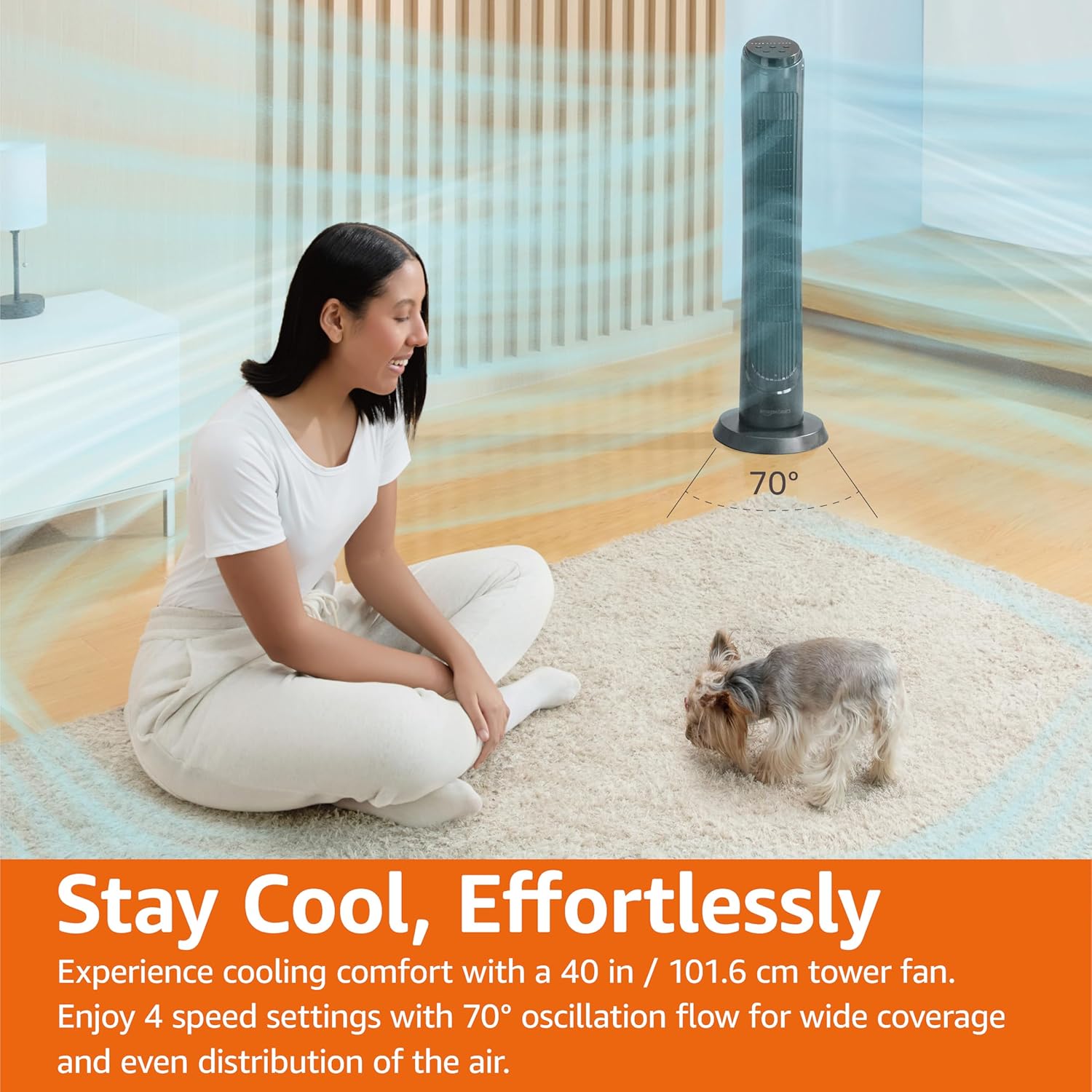
Mufananidzo 4.1: The Amazon Basics Tower Fan oscillating 70 degrees, providing wide coverage and even air distribution in a room. A person and a small dog are comfortably seated on a rug, benefiting from the airflow.

Mufananidzo 4.2: The Amazon Basics Tower Fan positioned in a modern living space, demonstrating its effective airflow. The image visually represents the air movement from the fan, highlighting its ability to circulate air throughout the room.
5. Kuchengeta
5.1 Kuchenesa
- Gara uchisunungura fan usati wachenesa.
- Shandisa nyoro, damp jira rekupukuta pamusoro pefeni.
- Do not use abrasive cleaners or harsh chemicals, as these may damage the fan's finish.
- For dust accumulation on the air intake or output grilles, use a vacuum cleaner with a brush attachment to gently remove dust.
- Ita shuwa kuti fan yaoma zvachose usati waibatanidza zvakare.
5.2 Kuchengeta
- Kana ukachengeta feni kwenguva yakareba, ichenese sezvakatsanangurwa pamusoro.
- Store the fan in its original packaging or a suitable box to protect it from dust and damage.
- Chengetedza munzvimbo inotonhorera, yakaoma.
6. Kugadzirisa matambudziko
Kana mukasangana nematambudziko nefeni yenyu, ndapota tarisai matambudziko nemhinduro dzinotevera:
| Dambudziko | Zvinogona Kukonzera | Solution |
|---|---|---|
| Fani haibatike. | Hapana magetsi; Simba bhatani harina kudzvanywa. | Ensure the power cord is securely plugged into a working outlet. Press the Power button on the control panel or remote. |
| Kuyerera kwemhepo kusina simba kana kusina. | Air intake/output blocked; Fan speed too low. | Check for any obstructions around the fan grilles. Increase the fan speed setting. |
| Oscillation haisi kushanda. | Chinhu chekufamba-famba hachina kushanda. | Press the Oscillation button on the control panel or remote. Ensure the fan is on a flat surface. |
| Remote control haisi kushanda. | Batteries are dead; Remote not pointed correctly. | Replace the remote control batteries. Ensure the remote is pointed directly at the fan's control panel. |
| Ruzha rusina kujairika. | Feni isiri panzvimbo yakati sandara; Kuvharika kwemukati. | Place the fan on a stable, level surface. Unplug the fan and check for any foreign objects inside the grilles (do not attempt to disassemble). |
Kana dambudziko rikaramba riripo mushure mekuyedza mhinduro idzi, ndapota taura nerutsigiro rwevatengi.
7. Zvinotsanangurwa
| Attribute | Detail |
|---|---|
| Brand | Amazon Basics |
| Model Name | DC2021 |
| Color | Nhema |
| Electric Fan Design | Uriri Fan |
| Simba Source | AC Simba |
| Style | 40" - Digital |
| Product Dimensions | 11.4"D x 11.4"W x 39.3"H |
| Room Type | Imba yekurara, Imba yekutandarira, Hofisi |
| Special Feature | Oscillating, 4 Speeds, 3 Modes, Timer, Remote Control |
| Inokurudzirwa Zvishandiso | Cooling and Air Circulation for Indoor Spaces |
| Noise Level | 60 dB |
| Wattage | 50 watts |
| Item Weight | 7.5 Pounds (approx. 3.4 kg) |
| Inosanganisirwa Zvikamu | Remote |
| Indoor / Outdoor Kushandiswa | Indoor |
| Kudzora Nzira | Remote |
| Blade Material | Plastiki |
| Nhamba yeMasimba Masimba | 4 |
| Main Power Connector Type | NEMA 5-15 (US Standard Wall Outlet) |
| Mugadziri | Amazon |
| UPC | 840095880428 |
| Nyika Yekwakabva | China |
8. Warranty uye Tsigiro
For detailed warranty information, please refer to the official Warranty PDF document provided by Amazon Basics. This document outlines the terms and conditions of your product's warranty.
For further assistance, troubleshooting not covered in this manual, or to inquire about replacement parts, please contact Amazon Basics customer support.
- Official User Manual (PDF): Dhaunirodha PDF
- Waranti Yepamutemo (PDF): Dhaunirodha PDF
- Amazon Basics Store: Shanyira Chitoro