
Gofunly C3
Gofunly Kids Digital Camera C3 Instruction Manual
Model: C3 | Brand: Gofunly
Nhanganyaya
Thank you for choosing the Gofunly C3 Kids Digital Camera. This camera is designed to provide children aged 3-12 with a fun and engaging way to explore photography and videography. Featuring a 20MP dual lens, 1080P HD video recording, a 2.0-inch IPS screen, and a durable silicone case, it's perfect for capturing precious moments. Please read this manual carefully to ensure proper use and maintenance of your camera.
Product Overview
Key Features
- 20MP Dual Lens: High-resolution front and rear cameras for photos and selfies.
- Vhidhiyo yeHD ye1080P: Record clear and vibrant videos.
- 2.0-inch IPS Screen: Bright and clear display for viewkutarisa mafoto nemavhidhiyo.
- 32GB Micro SD Card Included: Ample kuchengetedza zviuru zvemifananidzo nemavhidhiyo.
- Multifunctional: Supports original photo capture, video recording, playback, time-lapse, 8x zoom, 28 cartoon photo frames, 6 photo filters, and 5 mirror effects.
- Mitambo Yakavakwa: Includes 3 classic puzzle games (Snake, Tetris, Sokoban) for entertainment.
- Durable Design: Cute, eco-friendly, soft silicone shockproof case for protection.
- Inotakurika: Compact and lightweight, with two lanyards for easy carrying.
- Rechargeable Battery: Built-in 1000mAh lithium battery for extended use.
Chii chiri muBhokisi
- 1 x Gofunly Kids Digital Camera (Green Dinosaur)
- 1 x 32GB Micro SD Kadhi
- 1 x USB Cable
- 1 x Kadhi muverengi
- 2 x Lanyards
- 1 x Dzorerazve Pin
- 1 x Chinyorwa cheMushandisi

Image: The Gofunly C3 Kids Digital Camera, green dinosaur model, displayed with its accessories: a 32GB memory card and a USB card reader.

Image: A visual representation of all items included in the camera package: the green dinosaur camera, a 32GB SD card, a USB cable, a card reader, and two lanyards.
Gadzirira
1. Kuchaja Kamera
Before first use, fully charge the camera battery. Use the included USB cable to connect the camera to a computer's USB port or a standard USB wall adapter (not included).
- Chiedza chechiratidzo chekuchaja chichavhenekera panguva yekuchaja.
- The light will turn off or change color once charging is complete.
- Kuchaja kwakazara kunotora maawa 2-3.

Image: The side of the camera illustrating the USB port for charging and the slot for the 32GB SD card.
2. Kuisa Micro SD Card
The camera requires a Micro SD card to save photos and videos. A 32GB card is included in the package.
- Tsvaga nzvimbo yekadhi reMicro SD parutivi rwekamera.
- Isa kadhi reMicro SD nemakona egoridhe akatarisa pasi, uchidzvanya zvinyoro-nyoro kusvika radzvanya panzvimbo yaro.
- Kuti ubvise kadhi, riise mukati zvakare kusvika radzvanya, uye richabuda.
Operating Instruction
Basic Mabasa
- Batidza/Kudzima: Press and hold the power button (usually marked with a circle and line) for a few seconds.
- Tora mufananidzo: In photo mode, press the shutter button (usually a large button on top or side) to capture an image.
- Rekodha Vhidhiyo: Switch to video mode (if applicable, via a mode button), then press the shutter button to start/stop recording.
- Kutamba Press the playback button (often an arrow icon) to view saved photos and videos. Use the navigation buttons to browse.
- Menu Navigation: Use the up/down/left/right buttons to navigate through menus and select options with the OK/shutter button.
Special Features
- Selfie Mode: The camera features a dual lens. Switch to selfie mode (check camera interface for icon) to use the front-facing camera.

Image: A child and an adult smiling while taking a selfie with the green dinosaur camera, highlighting its selfie capability.
- Nguva Yapfuura: Set the camera to time-lapse mode (2s/5s/10s options) to capture a series of photos at set intervals, creating a time-lapse video.

Image: The camera screen showing a time-lapse sequence, alongside examples of photos captured with 2x, 4x, 6x, and 8x digital zoom.
- 8x Digital Zoom: Use the zoom buttons (often up/down navigation) to digitally zoom in on your subject.

Image: A visual sequence demonstrating the camera's 8x digital zoom, showing how the image becomes progressively closer to the subject.
- Photo Frames & Filters: Enhance your photos with 28 cartoon photo frames, 6 photo filters, and 5 mirror effects. Access these options through the camera's menu.

Mufananidzo: Collage showcasing different photo frames and effects that can be applied to pictures taken with the camera, including various cartoon borders and mirror effects.

Image: A comprehensive display of the camera's creative options, including six distinct photo filters and a wide selection of 28 cartoon frames and fun stickers.
- Mitambo: The camera includes 3 classic puzzle games: Snake, Tetris, and Sokoban. Access them through the main menu for entertainment.

Image: The camera screen displaying one of the built-in puzzle games, with icons representing the three classic games: Snake, Tetris, and Sokoban.
Maintenance
Kuchenesa
- Pukuta muviri wekamera nejira rakapfava, rakaoma.
- Patsvina yakasindimara, zvishoma dampen jira nemvura. Usashandise makemikari ane hasha kana abrasive cleaners.
- Clean the lens gently with a microfiber cloth specifically designed for camera lenses.
Battery Care
- Dzivisa kuburitsa bhatiri zvakazara nguva zhinji.
- Chaja kamera nguva dzose, kunyangwe isiri kushandiswa, kuti bhatiri rirambe rakanaka.
- Do not expose the camera to extreme temperatures, as this can affect battery life.
Storage
- Chengeta kamera munzvimbo inotonhorera, yakaoma kure nezuva rakananga.
- When storing for extended periods, ensure the battery is partially charged (around 50%).
Kugadzirisa matambudziko
| Dambudziko | Zvinogona Kukonzera | Solution |
|---|---|---|
| Kamera haibatike. | Bhatiri rapera kana kuti rapera. | Chaja kamera kwemaminitsi makumi matatu. |
| Haikwanise kutora mafoto/mavhidhiyo. | No SD card inserted or card is full/corrupted. | Insert a Micro SD card. If already inserted, check if it's full and delete some files, or try formatting the card (this will erase all data). |
| Sikirini yakaomeswa nechando. | Software glitch. | Use the included reset pin to press the reset button (usually a small hole near the charging port). This will restart the camera without losing data. |
| Yakashata mhando yemhando. | Dirty lens or low light conditions. | Clean the camera lens with a soft, clean cloth. Ensure adequate lighting when taking photos. |
| Haikwanisi kubatana nekombuta. | Faulty USB cable or driver issue. | Try a different USB cable or USB port on your computer. Ensure the camera is powered on when connecting. |
Zvinotsanangurwa
| Feature | Detail |
|---|---|
| Model | C3 |
| Ratidza Sikirini | 2.0-inch IPS Screen |
| Mufananidzo Resolution | Kusvika ku20MP |
| Vhidhiyo Resolution | 1080P HD |
| Battery Capacity | 1000mAh Lithium Polymer |
| Storage | Supports Micro SD Card (32GB included) |
| Optical Zoom | 8x (Digital) |
| Product Dimensions | 4.9 x 8.86 x 7.04 masendimita (1.93 x 3.49 x 2.77 inches) |
| Kurema | 105 magiramu (0.23 lbs) |
| Material | Eco-friendly Soft Silicone Case |
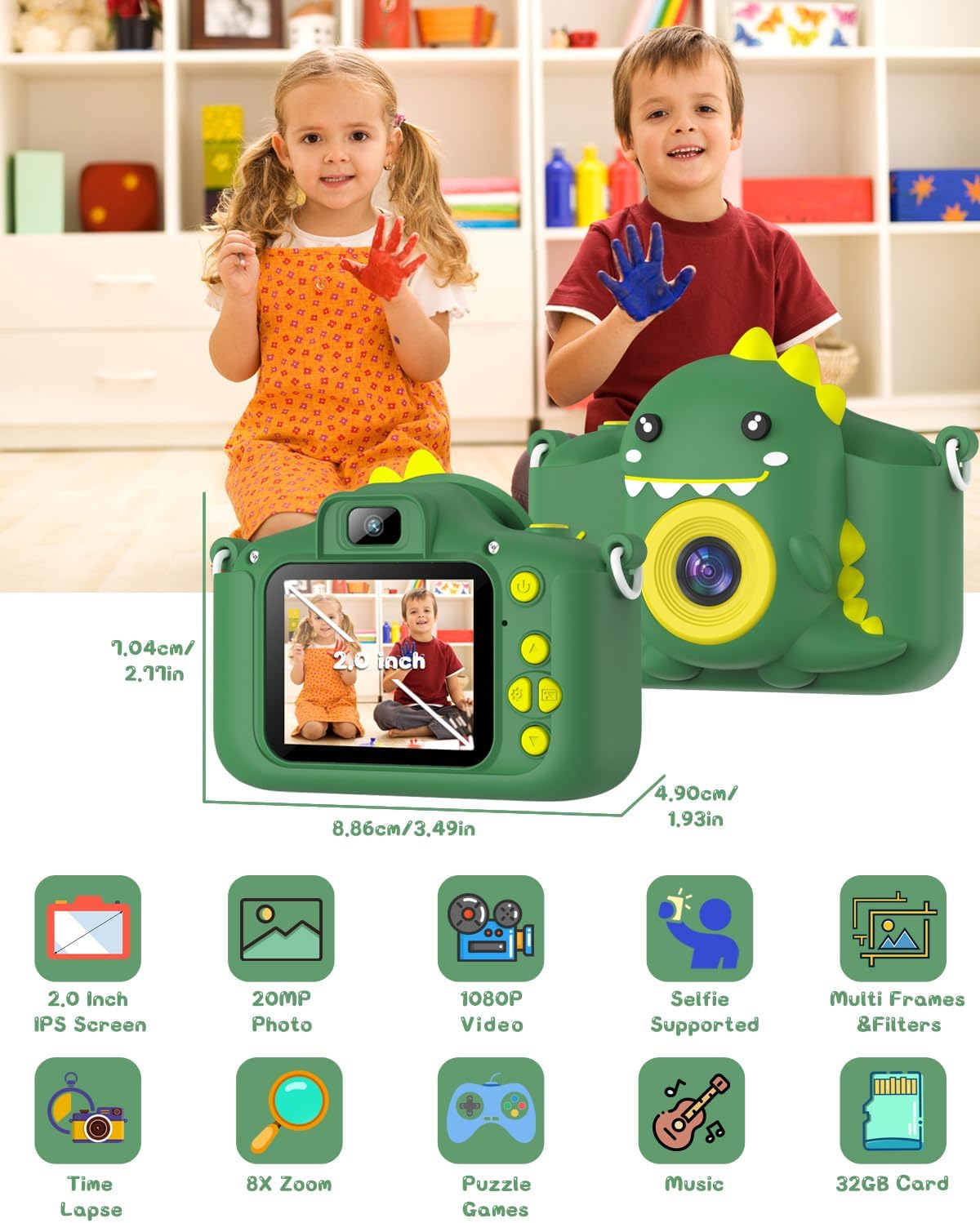
Image: The camera shown with its physical dimensions and a grid of icons highlighting its main features: 2.0-inch IPS screen, 20MP photo, 1080P video, selfie support, multiple frames and filters, time-lapse, 8x zoom, puzzle games, music playback, and included 32GB card.
Warranty uye Support
Gofunly provides customer support for its products. If you encounter any issues or have questions regarding your Gofunly C3 Kids Digital Camera, please refer to the contact information provided with your purchase or visit the official Gofunly store on Amazon:
A satisfactory solution will be offered in accordance with the warranty policy.