
OTL Technologies PK0980
OTL Technologies Pokemon Pikachu Wireless Bluetooth Kids Headphones PK0980 Instruction Manual
Muenzaniso: PK0980
1. Nhanganyaya
This manual provides essential information for the safe and effective use of your OTL Technologies Pokemon Pikachu Wireless Bluetooth Kids Headphones, model PK0980. Please read this manual thoroughly before using the product and retain it for future reference.
2. Safety Information
Kuti uve nechokwadi chekushanda kwakachengeteka uye kudzivirira kukuvadzwa, chengeta zvinotevera zvekudzivirira:
- Zera Kukodzera: These headphones are suitable for children aged 3 years and above.
- Kudzora inzwi: The headphones feature two safe volume settings: 85 dB and 95 dB. Always select the appropriate volume level for the listening environment to protect hearing. Prolonged exposure to loud noise may cause hearing damage.
- Kuramba Mvura: Ichi chigadzirwa isingadziviri mvura. Avoid exposure to water or moisture to prevent damage.
- Kuchenesa: Do not use harsh chemicals or strong detergents to clean the headphones. Use a soft, dry cloth.
- Kubvarura: Do not attempt to disassemble, repair, or modify the headphones. This will void the warranty and may cause damage or injury.
- Environmental Awareness: Do not use headphones in situations where an inability to hear surrounding noise may present a danger (e.g., while cycling, driving, or near operating machinery).
- Kuchengetedzwa kweBhatiri: The headphones contain a Lithium-ion battery. Do not expose to extreme temperatures or dispose of in fire.
3. Package Zviri mukati
Tarisa uone kuti zvinhu zvese zviripo mupakeji:
- 1x OTL Technologies Pokemon Pikachu Wireless Bluetooth Kids Headphones
- 1x USB Type-C yekuchaja Cable
- 1x 3.5mm Audio Sharing Cable
- 1x Instruction Leaflet (this manual)

Image: Headphones and accessories neatly packaged in the box.
4. Chigadzirwa Pamusoroview
Familiarize yourself with the components and controls of your headphones.
4.1 Headphone Structure

Mufananidzo: Mberi view of the headphones, showcasing the Pikachu design on the earcups and the adjustable headband.

Mufananidzo: Pamusoro view of the headphones, showing the foldable design and the headband's cushioning.
4.2 Kudzora uye Maports

Image: Close-up of the right earcup, displaying the power button, volume controls, and charging port.

Mufananidzo: Zvakadzama view of the volume limit switch, allowing selection between 85 dB and 95 dB.
- Bhatani reSimba: Inoshandiswa kubatidza/kudzima mahedhifoni uye pakubatanidza Bluetooth.
- Mabhatani eVolume: Rongedza inzwi rokuteerera.
- Volume Limit Switch: Toggle between 85 dB and 95 dB maximum volume levels.
- USB Type-C Port: Zvekuchaja mahedhifoni.
- 3.5mm Audio Jack: Kuti ubatanidze waya uchishandisa waya yeaudio iri mukati.
- Maikorofoni: Yakabatanidzwa kune maoko-emahara mafoni.
4.3 Adjustable Headband

Image: Close-up of the extendable headband, showing numbered adjustment points for a customized fit.
The headband is extendable to provide a flexible and customized fit for various head sizes. Adjust both sides evenly for optimal comfort.
5. Setup
5.1 Kuchaja mahedhifoni
Before first use, fully charge the headphones.
- Batanidza tambo yekuchaja yeUSB Type-C kune chinongedzo chekuchaja chiri pamahedhifoni.
- Batanidza rimwe divi retambo yeUSB kune sosi yemagetsi yeUSB inoenderana nayo (semuenzaniso, doko reUSB rekombuta, adapta yemadziro eUSB).
- Chiratidzo che LED chicharatidza mamiriro ekuchaja. Kuchaja kwakazara kunotora maawa maviri.
- Once fully charged, the LED indicator will change (refer to the instruction leaflet for specific LED behavior) and the headphones will provide up to 24 hours of playback time.
5.2 Bluetooth Pairing
Kuti ubatanidze mahedhifoni ako pasina waya kune mudziyo:
- Ita shuwa kuti mahedhifoni akachajwa.
- Dzvanya uye ubate bhatani reSimba kusvika chiratidzo che LED chapenya, chichiratidza pairing mode.
- On your device (e.g., smartphone, tablet, laptop), enable Bluetooth and search for available devices.
- Select "OTL Pikachu" or a similar name from the list of found devices.
- Once connected, the LED indicator will change (e.g., solid blue) and a confirmation tone may sound.
- The headphones have a working distance of up to 10 meters from the paired device.
5.3 Wired Connection (Sarudzo)
You can use the headphones with the included 3.5mm audio cable for devices without Bluetooth or when the battery is depleted.
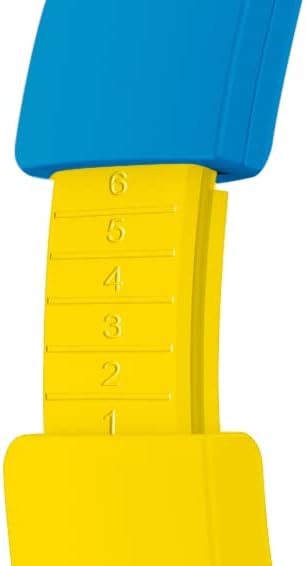
Image: The included 3.5mm audio cable for direct connection to devices.
- Batanidza mugumo mumwe wetambo yekuteerera ye3.5mm mujeki yekuteerera iri pamahedhifoni.
- Batanidza imwe magumo mune 3.5mm odhiyo inobuda yemudziyo wako.
- Mahedhifoni achashanda mu passive mode, uye mashandiro eBluetooth achadzimwa.
6. Kushandisa mahedhifoni
6.1 Simba On/Kudzima
- Kubatidza: Press and hold the Power button for approximately 3 seconds. The LED indicator will light up.
- Kudzima: Press and hold the Power button for approximately 3 seconds. The LED indicator will turn off.
6.2 Kugadzirisa Vhoriyamu
- Vhoriyamu Kumusoro: Dzvanya bhatani re'+'.
- Vhoriyamu Pasi: Dzvanya bhatani '-'.
- Setting Maximum Volume: Use the volume limit switch (85 dB / 95 dB) located on the earcup to set the desired maximum safe listening level.
6.3 Kuridza Mumhanzi uye Kufona
- Tamba/Kumbomira: Press the Power button once during music playback.
- Next Track: Dzvanya uye bata bhatani re'+'.
- Previous Track: Dzvanya uye bata bhatani re'-'.
- Pindura/Pedzisa Kufona: Press the Power button once during an incoming call or to end an active call.
- Ramba Kufona: Dzvanya wobata bhatani rePower panguva yekufona kuri kuuya.
6.4 Using the Sharing Cable
The included sharing cable allows two pairs of headphones to listen to the same audio source simultaneously.
- Connect the main 3.5mm audio cable from your audio source to the first pair of headphones.
- Connect one end of the sharing cable to the available 3.5mm audio jack on the first pair of headphones.
- Connect the other end of the sharing cable to the 3.5mm audio jack on the second pair of headphones.
- Mahedhifoni ese ari maviri achagamuchira odhiyo kubva kunzvimbo imwe chete.
7. Kuchengeta
- Kuchenesa: Wipe the headphones with a soft, dry, lint-free cloth. Do not use liquid cleaners or aerosols.
- Kuchengeta: Kana isiri kushandiswa, chengeta mahedhifoni munzvimbo inotonhorera, yakaoma, kure nechiedza chezuva uye tembiricha yakanyanyisa. Iyo foldable dhizaini inobvumira kuchengetedza compact.
- Battery Care: Kuti bhatiri rirambe richishanda kwenguva refu, dzivisa kuburitsa bhatiri rakazara nguva nenguva. Chaja mahedhifoni nguva dzose, kunyangwe usingashandise nguva dzose.
8. Kugadzirisa matambudziko
| Dambudziko | Zvinogona Kukonzera | Solution |
|---|---|---|
| Mahedhifoni haabatike. | Bhatiri rapera. | Charge the headphones using the provided USB Type-C cable. |
| Haikwanise kubatanidza kuburikidza neBluetooth. | Mahedhifoni asiri mukuita pairing mode; mudziyo Bluetooth wadzima; kure kwazvo kubva mudziyo. | Ensure headphones are in pairing mode (flashing LED). Turn Bluetooth on your device. Move headphones closer to the device (within 10 meters). Try restarting both devices. |
| Hapana ruzha kana yakabatana. | Volume too low; incorrect audio source selected; wired cable not fully inserted. | Increase headphone and device volume. Check if the correct audio output is selected on your device. Ensure the 3.5mm cable is fully inserted if using wired mode. Check the volume limit switch. |
| Ruzha runokanganiswa kana kuti runobviswa. | Low battery; interference; too far from device. | Charge the headphones. Move away from other wireless devices. Reduce distance to the paired device. |
9. Zvinotsanangurwa
| Model Number | PK0980 |
| Kubatana Technology | Wireless (Bluetooth) |
| Wireless Communication Technology | Bluetooth |
| Age Range (Tsanangudzo) | Children (3+ years) |
| Material | Plastiki |
| Kuchaja Nguva | Anenge 2 Maawa |
| Yakakurudzirwa Kushandisa | Personal Audio |
| Inowirirana Devices | Laptop, Smartphones, Tablets (Bluetooth enabled) |
| Control Type | Kudzora Vhoriyamu, Kure kure |
| Item Weight | 160 magiramu |
| Mvura Resistance Level | Kwete Kudzivirira Mvura |
| Zvimwe Zvimiro | Microphone included, Foldable design |
| Avhareji Hupenyu hweBhatiri | 24 Maawa |
| Battery Cell Kuumbwa | Lithium-ion |
| Color | Yero |
| Kuiswa Nzeve | Nzeve |
| Fomu Factor | Pamusoro-nzeve |
| Impedance | 32 Ohms |
| Noise Control | Noise Isolation |
| Frequency Response | 20000 Hz |
| Sensitivity | 85 dB |
| Headphone Jack | 3.5mm Jack |
| Product Dimensions | 16 x 7 x 17 cm |