
1. Nhanganyaya
This manual provides essential instructions for the setup, operation, maintenance, and troubleshooting of your White Shark GK-2102 LEGIONNAIRE-X RGB USB Keyboard. Please read this manual thoroughly before using the product to ensure proper functionality and longevity.

Mufananidzo 1.1: Pamusoro view of the White Shark GK-2102 LEGIONNAIRE-X RGB USB Keyboard, showcasing its full layout and RGB lighting.
2. Setup
Follow these steps to connect your White Shark GK-2102 LEGIONNAIRE-X RGB USB Keyboard to your computer.
- Bvisa kiyibhodhi: Nyatsobvisa kiibhodhi netambo yayo ye USB kubva pakurongedzerwa.
- Batanidza USB Cable: Isa chinobatanidza che USB chekhibhodi muchiteshi che USB chiripo pakombuta yako.

Image 2.1: Close-up of the USB connector, which is used to connect the keyboard to a computer.
- Kuiswa kwemutyairi: Kiyibhodhi inongoshanda chete. Sisitimu yako yekushandisa inofanira kuona otomatiki uye kuisa madhiraivha anodiwa. Hapana imwe software inowanzo dikanwa.
- Gadzirisa Makumbo eKiibhodhi: For ergonomic comfort, you may extend the adjustable feet located on the underside of the keyboard.

Mufananidzo 2.2: View of the adjustable feet on the keyboard's underside, allowing users to modify the typing angle.
3. Operating Instructions
The White Shark GK-2102 LEGIONNAIRE-X is a standard USB keyboard with RGB lighting features. Below are general operating guidelines.
3.1 Mabasa Ekutanga Ekhibhodi
The keyboard functions as a standard QWERTY layout device. All keys perform their indicated character or function when pressed. Special function keys (F1-F12) may require the 'Fn' key to be held down simultaneously for their secondary functions, depending on your operating system and specific keyboard model configuration.
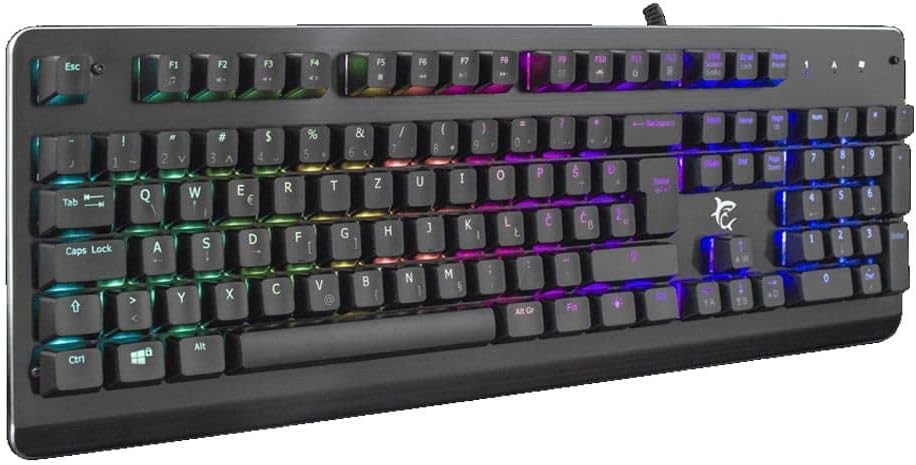
Mufananidzo 3.1: Angled view of the keyboard, highlighting the key layout and illuminated RGB backlighting.
3.2 Kudzora Mwenje weRGB
This keyboard features RGB lighting. Specific key combinations, often involving the 'Fn' key and other designated keys (e.g., arrow keys, Ins, Home, PgUp, Del, End, PgDn), are typically used to cycle through lighting modes, adjust brightness, or change colors. Refer to the quick start guide or manufacturer's website for detailed RGB control commands specific to this model.
4. Kuchengeta
Kugadzirisa kwakaringana kunovimbisa hupenyu hurefu uye kuita kwekhibhodi yako.
- Kuchenesa: Disconnect the keyboard from your computer before cleaning. Use a soft, dry cloth to wipe the surface. For stubborn dirt, a slightly damp jira rine sipo isina kusimba rinogona kushandiswa, zvichiita kuti pasave nemvura inopinda mukhibhodi. Mhepo yakamanikidzwa inogona kushandiswa kubvisa guruva nemarara pakati pemakiyi.
- Dzivisa Zvinwiwa: Do not spill liquids on the keyboard. Liquid damage can cause permanent malfunction.
- Kuchengeta: Chengetedza keyboard munzvimbo inotonhorera, yakaoma kure nechiedza chezuva uye tembiricha yakanyanyisa kana isiri kushandiswa kwenguva yakareba.
5. Kugadzirisa matambudziko
If you encounter issues with your keyboard, try the following solutions:
- Kiyibhodhi Haisi Kupindura:
- Ita shuwa kuti tambo ye USB yakabatana zvakachengeteka kune zvese keyboard uye komputa.
- Edza kubatanidza kiibhodhi kune imwe nzvimbo ye USB pakombiyuta yako.
- Edza kiyibhodhi pane imwe komputa kuti uone kana dambudziko riri pakiyibhodhi kana kuti pachiteshi/madhiraivha ekombiyuta.
- Tangazve komputa yako.
- Makiyi Haashande:
- Check for any physical obstructions under the keycaps.
- Chenesa kiibhodhi sezvakatsanangurwa muchikamu cheMaintenance.
- Mwenje weRGB Hausi Kushanda/Hausina Kururama:
- Iva nechokwadi chekuti kiyibhodhi yakabatana zvakanaka uye kuti inogamuchira simba.
- Refer to the manufacturer's specific instructions for RGB control key combinations.
6. Zvinotsanangurwa
Below are the technical specifications for the White Shark GK-2102 LEGIONNAIRE-X RGB USB Keyboard:

Mufananidzo 6.1: Side profile of the keyboard, illustrating its physical dimensions and keycap height.
| Feature | Detail |
|---|---|
| Brand | White Shark |
| Model | GK-2102 LEGIONNAIRE-X |
| Kubatana | USB |
| Product Dimensions | 50 x 50 x 28 cm |
| Kurema | 1.06 kg |
| Material | Plastiki |
| Special Features | RGB Lighting |
| Mabhatiri Anodiwa | Aihwa |
7. Ruzivo rweWaranti
For detailed warranty information regarding your White Shark GK-2102 LEGIONNAIRE-X RGB USB Keyboard, please refer to the warranty card included with your product or visit the official White Shark website. Warranty mazwi uye mamiriro anogona kusiyana nedunhu uye mutengesi.
8. Tsigiro
If you require further assistance or have questions not covered in this manual, please contact White Shark customer support through their official website or the contact information provided with your purchase. Please have your product model (GK-2102 LEGIONNAIRE-X) and purchase details ready when contacting support.