
1. Nhanganyaya
Ndatenda nekutengaasing the LFF LDR113-EU Kitchen Radio. This manual provides essential information for the safe and efficient operation of your device. Please read it thoroughly before use and retain it for future reference.
The LFF LDR113-EU is a versatile kitchen radio featuring DAB+, FM, and Bluetooth connectivity. It includes dual alarms, a sleep timer, and 60 station presets, designed for both tabletop use and under-cabinet mounting.
2. Safety Information
- Kunobva Simba: Shandisa adapta yemagetsi yakapihwa chete. Iva nechokwadi chekuti volttage inofanana nemagetsi emunharaunda yako.
- Mvura uye Unyoro: Do not expose the device to water, rain, or excessive moisture. Avoid placing liquids near the radio.
- Kufefetedza Ensure adequate ventilation around the device. Do not block ventilation openings.
- Kupisa: Keep the device away from heat sources such as radiators, heat registers, stoves, or other heat-producing appliances.
- Kuchenesa: Disconnect from power before cleaning. Use a soft, dry cloth. Do not use liquid cleaners or aerosol cleaners.
- Sevhisi: Usaedze kushandira chigadzirwa ichi iwe pachako. Tumira masevhisi ese kuvashandi vanokwanisa.
- Kuiswa: Place the radio on a stable, level surface or mount it securely according to the instructions.
3. Package Zviri mukati
Ndapota tarisai kuti zvinhu zvese zviripo mupakeji:
- LFF LDR113-EU Kitchen Radio
- Power Adapter
- Mounting Kit (screws, spacers, mounting template)
- Mushandisi Chinyorwa (gwaro iri)
4. Chigadzirwa Pamusoroview
Familiarize yourself with the radio's components and controls.

Mufananidzo 4.1: Mberi view of the LFF LDR113-EU Kitchen Radio, showing the LCD display on the left, control buttons in the center, and a large rotary knob on the right. The buttons include power, mode, menu, info, preset, timer/sleep, and navigation arrows. The rotary knob is for volume and selection.

Mufananidzo 4.2: Diagram illustrating the key features of the LFF Kitchen Radio, including DAB/DAB+ radio, FM radio, two alarms, sleep timer, Bluetooth connectivity, and 60 station presets.
4.1. Kudzora uye Kuratidza
- LCD Ruvara Ratidza: Shows current mode, station information, time, and settings.
- Bhatani reSimba: Inobatidza/kudzima redhiyo.
- Bhatani reModhi: Switches between DAB+, FM, and Bluetooth modes.
- Bhatani reMenyu/Ruzivo: Accesses menu options or displays station information.
- Mabhatani Akagadziriswa (1-5): Quick access to saved stations.
- Timer/Sleep Button: Sets sleep timer or alarm functions.
- Mabhatani Ekufambisa (Kumusoro/Kudzika/Kuruboshwe/Kurudyi): Navigates through menus and station lists.
- Rotary Knob (Volume/Enter): Adjusts volume, scrolls through options, and confirms selections.
5. Setup
5.1. Simba Connection
- Connect the power adapter to the DC IN port on the back of the radio.
- Batanidza adapta yemagetsi mudura repamadziro.
- The radio will power on or enter standby mode.
5.2. Initial Scan (DAB+ and FM)
Upon first power-on, the radio will typically perform an automatic scan for DAB+ and FM stations. If not, follow these steps:
- Press the Mode button to select DAB+ or FM mode.
- For DAB+, the radio will usually initiate a full scan automatically. If not, navigate to the 'Full Scan' option in the DAB+ menu and press the rotary knob to confirm.
- For FM, navigate to the 'Auto Scan' option in the FM menu and press the rotary knob to confirm.
- The radio will search for available stations and store them.

Mufananidzo 5.1: The LFF Kitchen Radio's LCD color screen displaying the main menu with icons for Digital Radio (DAB+), FM Radio, and Bluetooth, indicating available modes.
6. Operating Instructions
6.1. Simba On / Off
Press the Simba button to turn the radio on or off (standby mode).
6.2. Mode Selection
Press the Mode button repeatedly to cycle through DAB+, FM, and Bluetooth modes.
6.3. DAB+ Radio Operation
- In DAB+ mode, use the Kumusoro/Kudzika navigation buttons or the rotary knob to browse available stations.
- Press the rotary knob to select a station.
- Press Menyu/Info ku view ruzivo rwechiteshi (semuenzaniso, rudzi rwechirongwa, simba rechiratidzo).
6.4. FM Radio Kushanda
- Mu FM mode, shandisa Kumusoro/Kudzika navigation buttons to tune to stations manually.
- Dzvanya uye ubate iyo Kumusoro/Kudzika mabhatani ekutsvaga otomatiki chiteshi.
- Press Menyu/Info ku view chiteshi ruzivo.
6.5. Kubatana kweBluetooth
Connect your smartphone or other Bluetooth-enabled device to the radio.
- Press the Mode button to select Bluetooth mode. The display will show 'Bluetooth Pairing'.
- Panharembozha yako, shandisa Bluetooth uye tsvaga zvishandiso zviripo.
- Select 'LFF LDR113-EU' from the list of devices.
- Once connected, the radio display will show 'Bluetooth Connected'. You can now play audio from your device through the radio.
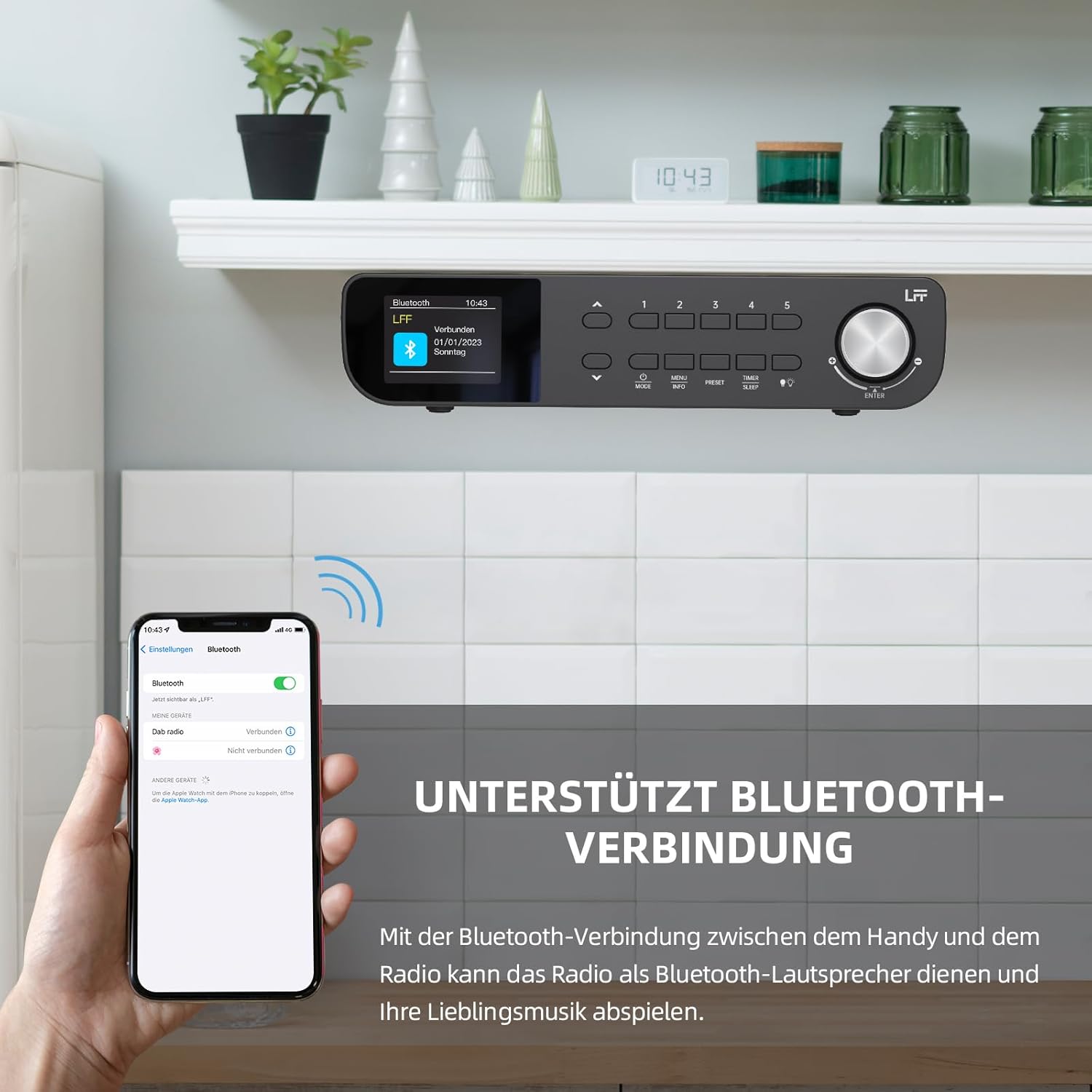
Mufananidzo 6.1: The LFF Kitchen Radio displaying a successful Bluetooth connection, with a smartphone screen showing the radio as a connected device.

Mufananidzo 6.2: Pedyo-up view of the radio's display indicating 'LFF' and 'Connected' under the Bluetooth menu, confirming a successful pairing.
6.6. Kuisa maaramu
The radio features two independent alarms.
- Press the Nguva/Kurara button repeatedly until 'Alarm 1' or 'Alarm 2' appears.
- Use the navigation buttons and rotary knob to set the alarm time, source (DAB+, FM, or Buzzer), and frequency (daily, weekdays, weekends, once).
- Confirm settings by pressing the rotary knob.

Mufananidzo 6.3: Close-up of the radio's display showing the current time and options to activate or deactivate Alarm 1 and Alarm 2.
6.7. Kurara Nguva
The sleep timer allows the radio to turn off automatically after a set period.
- Press the Nguva/Kurara button repeatedly until 'Sleep Timer' appears.
- Use the navigation buttons or rotary knob to select the desired sleep duration (e.g., 15, 30, 60 minutes).
- Simbisa nekudzvanya knob inotenderera.

Mufananidzo 6.4: Close-up of the radio's display showing the 'Sleep Timer' setting, with an option to set the duration, for example, to 30 minutes.
6.8. Presets
Save up to 60 favorite stations for quick access.
- Kuchengetedza Preset: Teerera chiteshi chaunoda. Dzvanya wobata chimwe chezviziviso zvacho. Zvakagadziriswa kare (1-5) buttons until 'Preset Saved' appears. For additional presets, use the 'Preset Store' option in the menu.
- Kuyeuka Preset: Muchidimbu dzvanya imwe yeiyo Zvakagadziriswa kare (1-5) buttons. For other presets, navigate to 'Preset Recall' in the menu.
6.9.Chiedza che LED
The radio includes an integrated LED light, useful for illuminating the area below if mounted under a cabinet.
- Press the Chiedza button (if available, or navigate through menu) to turn the LED light on or off.

Mufananidzo 6.5: The LFF Kitchen Radio mounted under a kitchen cabinet, with its integrated LED light providing illumination to the countertop below.
6.10. Ratidza Kupenya
Adjust the display backlight brightness to suit your environment.
- Access the 'Display' or 'Settings' menu.
- Select 'Brightness' and choose from High, Medium, or Low settings.

Mufananidzo 6.6: A visual comparison of the LFF Kitchen Radio's display at three different backlight brightness levels: High, Medium, and Low, demonstrating the adjustable visibility.
7. Kuisa Mirayiridzo
The LFF LDR113-EU Kitchen Radio offers flexible placement options: tabletop or under-cabinet mounting.
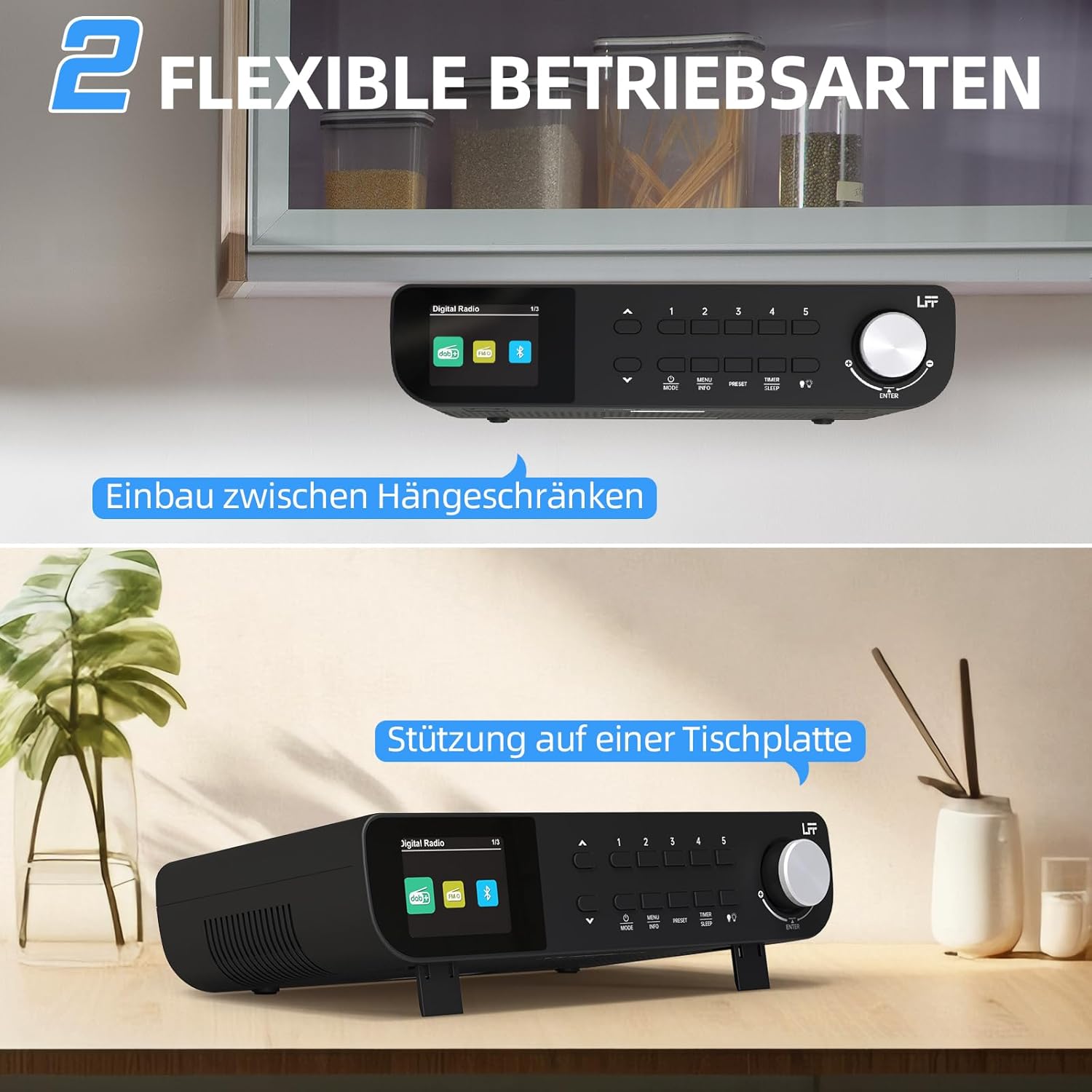
Mufananidzo 7.1: The LFF Kitchen Radio displayed in two common installation scenarios: mounted underneath a kitchen cabinet and placed freestanding on a tabletop.
7.1. Tabletop Placement
Simply place the radio on a stable, flat surface. Ensure it is not near the edge to prevent accidental falls.
7.2. Under-Cabinet Mounting
For under-cabinet installation, use the provided mounting kit.
- Gadzirira Nzvimbo: Choose a suitable location under a kitchen cabinet, ensuring there is enough space and access to a power outlet.
- Mark Drill Holes: Use the provided mounting template to mark the drill holes on the underside of the cabinet.
- Drill Pilot Holes: Dhonza maburi panzvimbo dzakatarwa.
- Attach Mounting Plate (if applicable): Some models may include a separate mounting plate. Attach this to the cabinet using the screws.
- Secure the Radio: Align the radio with the mounting holes or plate and secure it using the provided screws. Ensure it is firmly attached.
- Batanidza Simba: Batanidza adapta yemagetsi.

Mufananidzo 7.2: Detailed diagram showing the steps for under-cabinet mounting, including measuring distances (e.g., 58mm) and securing the radio with screws.
8. Kuchengeta
- Kuchenesa: To clean the radio, disconnect it from the power supply. Use a soft, dry, lint-free cloth. Do not use abrasive cleaners, waxes, or solvents.
- Antenna: Ensure the antenna is extended for optimal reception in DAB+ and FM modes. Handle it gently to avoid damage.
- Kuchengeta: Kana ukachengeta redhiyo kwenguva yakareba, ibvise pamagetsi woichengeta munzvimbo inotonhorera, yakaoma.
9. Kugadzirisa matambudziko
| Dambudziko | Zvinogona Kukonzera | Solution |
|---|---|---|
| Hapana simba | Power adapta haina kubatana kana kukanganisa kubuda. | Tarisa simba rekubatanidza. Edza imwe nzira. |
| Kusagamuchirwa zvakanaka kweDAB+/FM | Antena haina kurebeswa, chiratidzo chisina simba, kana kupindira. | Fully extend the antenna. Reposition the radio. Perform a full scan. |
| Bluetooth haina kubatana | Radio not in pairing mode, device too far, or already connected to another device. | Ensure radio is in Bluetooth mode. Move device closer. Disconnect from other devices. |
| Hapana ruzha | Vhoriyamu yakaderera zvakanyanya, haishande zvakanaka, kana kuti haisiyo nzira. | Increase volume. Check if mute is active. Ensure correct mode (DAB+, FM, Bluetooth). |
| Ratidza kusashanda | Brightness too low or device malfunction. | Adjust display brightness. If problem persists, contact support. |
10. Zvinotsanangurwa

Mufananidzo 10.1: Diagram showing the dimensions of the LFF Kitchen Radio: 250mm length, 146mm width, and 55mm height.
| Feature | Detail |
|---|---|
| Brand | LFF |
| Model Number | LDR113-EU |
| Color | Nhema |
| Kubatana | Bluetooth |
| Tekinoroji Yekugadzirisa | DAB Plus, FM |
| Simba Source | Electric Cable |
| Frequency | 108 MHz (FM yakanyanya) |
| Dimensions (L x W x H) | 250mm x 146mm x 55mm |
| Presets | 60 |
| Display | LCD Color Screen |
| Special Features | Dual Alarms, Sleep Timer, Under-cabinet mounting option, LED Light |
11. Warranty uye Tsigiro
This product comes with a standard manufacturer's warranty. Please refer to the warranty card included in your package for specific terms and conditions. For technical support, troubleshooting assistance, or warranty claims, please contact your retailer or the LFF customer service department.