Nhanganyaya
This manual provides detailed instructions for the safe and proper installation, operation, and maintenance of your Atlantic Full-Motion Wall Mount. Please read all instructions carefully before beginning installation and retain this manual for future reference.
The Atlantic Full-Motion Wall Mount is designed to securely hold televisions ranging from 47 to 86 inches, with a maximum weight capacity of 121 lbs (55 kg). It offers versatile viewing options including tilt, swivel, and extension capabilities to optimize your viewing experience.
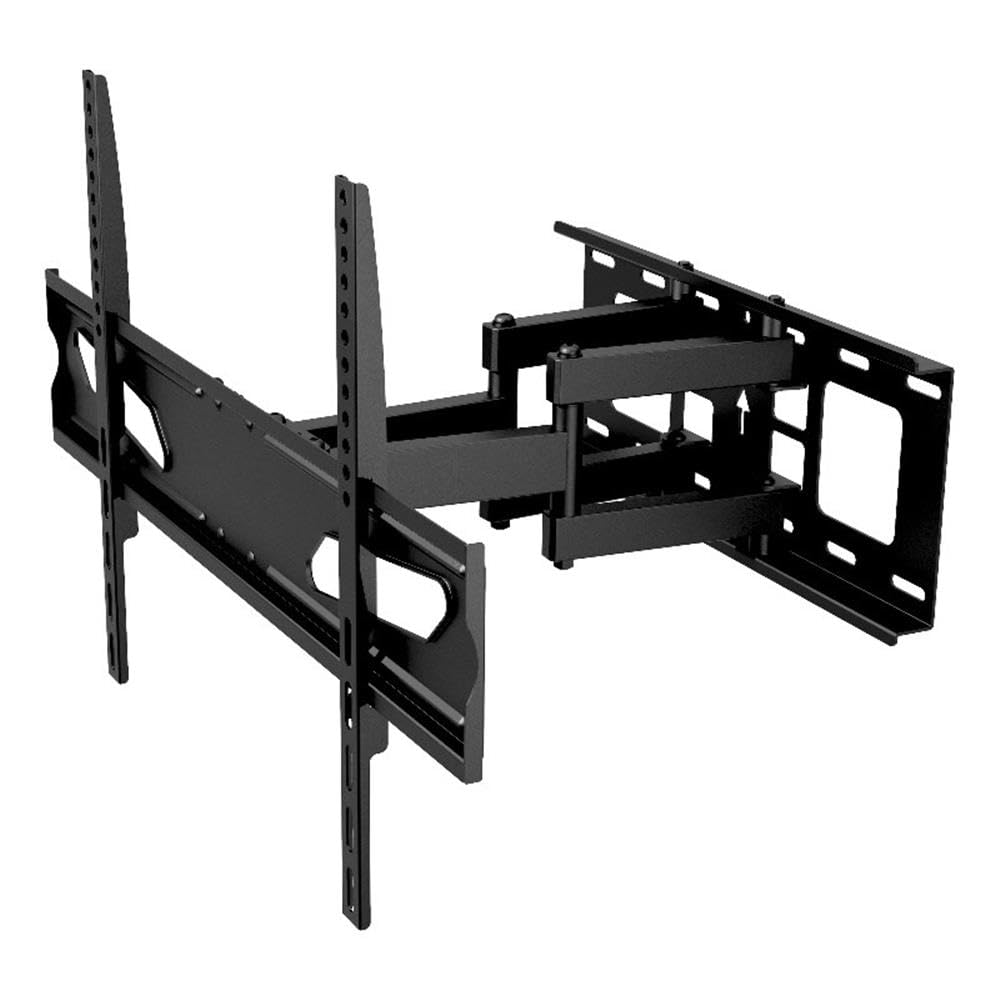
Image: The Atlantic Full-Motion TV Wall Mount, highlighting its ability to tilt ±20°, swivel ±45°, and extend up to 15.5 inches from the wall. It is suitable for TVs from 47 to 86 inches, supporting up to 121 lbs (55 kg).
Safety Information
WARNING: Failure to read and follow these instructions can result in serious personal injury, property damage, or voiding of your warranty.
- Weight Capacity: Usapfuure huremu hwepamusoro hwe 121 lbs (55 kg). Chigadziko ichi chakagadzirirwa kushandiswa chete nehuremu hwepamusoro hwakaratidzwa. Kushandiswa nezvinhu zvinorema kupfuura huremu hwepamusoro hwakaratidzwa kunogona kukonzera kusagadzikana zvichikonzera kukuvara.
- Kukura kweTV: Chigadziko ichi chakagadzirirwa maTV ari pakati pemainchi 47 ne86. Ita shuwa kuti TV yako iri mukati meiyi nzvimbo.
- Maumbirwo eMadziro: The wall mount must be securely fastened to a solid wall stud (wood or metal) or concrete/brick wall. Do not install on drywall alone. If unsure about your wall structure, consult a qualified professional.
- Zvishandiso: Use appropriate tools for installation. Ensure all screws are tightened securely but do not overtighten.
- Vana: Keep children away during installation. Small parts may be a choking hazard.
- Professional Installation: If you have any doubts about installing this product, please contact a professional installer.
Package Zviri mukati
Please verify that all components are present and undamaged before installation. Refer to the parts list included in your product packaging for a complete inventory. If any parts are missing or damaged, do not proceed with installation and contact customer support.
Setup uye Installation
Proper installation is critical for the safety and stability of your TV. Follow these steps carefully.
1. Prepare the Wall and Locate Studs
Identify the exact location on your wall where you intend to mount the TV. Use a stud finder to locate the center of the wall studs. Mark these locations clearly. For concrete or brick walls, use a masonry drill bit and appropriate anchors (not always included, check your package).
2. Attach Wall Plate to Wall
Position the wall plate against the wall, aligning the mounting holes with the marked stud centers. Use a level to ensure the plate is perfectly horizontal. Drill pilot holes as recommended in your specific hardware kit, then secure the wall plate using the provided lag bolts and washers. Ensure it is firmly attached.
3. Attach TV Brackets to TV
Lay your TV face down on a soft, clean surface to prevent scratches. Identify the VESA mounting holes on the back of your TV. Select the appropriate screws, washers, and spacers from the hardware kit that fit your TV's VESA pattern. Attach the two vertical TV brackets to the back of your TV. Ensure they are securely fastened and evenly spaced.

Image: A diagram illustrating the TV mounting pattern (VESA compatibility) ranging from minimum 75mm/3 inches to maximum 600mm/23.6 inches horizontally and 410mm/16.1 inches vertically. Also shows overall mount dimensions.
4. Hang TV on Wall Plate
With assistance, carefully lift the TV and hook the attached TV brackets onto the wall plate. Ensure the brackets are properly seated and locked into place. Most mounts include safety screws or locking mechanisms to prevent accidental dislodgement. Secure these as per the instructions in your hardware kit.

Mufananidzo: A divi view of the wall mount, illustrating its extension capabilities. The mount can extend from 2.7 inches (profile from wall) to 15.5 inches from the wall.
Operating Instruction
Once installed, your full-motion mount allows for flexible TV positioning.
- Kuwedzera: Gently pull the TV away from the wall to extend the arm. The mount can extend up to 15.5 inches from the wall.
- Swivel: Carefully push or pull the TV horizontally to swivel it left or right. The mount offers a ±45° swivel range.
- Tilt: Adjust the vertical angle of the TV by gently pushing the top or bottom of the TV. The mount allows for a ±20° tilt (20° downward and upward). This can help reduce glare.
- Screen Level Adjustment: The mounting plate allows for a ±3° rotation for last-minute level adjustments after installation.

Image: An illustration demonstrating the ±45° swivel range of the TV wall mount, allowing for flexible viewing angles.

Image: A living room setting demonstrating the full-motion capability, specifically the swivel range, to find the perfect vieweng angle

Image: A living room scene showing a TV mounted on the wall, tilted ±20° to avoid unwanted glare and improve viewing comfort.

Image: This image indicates the mount fits TVs up to a maximum of 86 inches (47-86 inches) and highlights the ±3° screen level adjustment feature.
Maintenance
Kugadziriswa nguva dzose kunovimbisa kugara kwenguva refu uye kushanda kwakachengeteka kweTV yako.
- Kuchenesa: Pukuta chigadziko nejira rakapfava, rakaoma. Dzivisa zvinochenesa zvinogumbura kana zvinonyungudutsa zvinogona kukuvadza magumo acho.
- Tarisa Makabatana: Periodically check all screws and bolts to ensure they remain tight. Over time, vibrations or adjustments can cause them to loosen. Do not overtighten.
- Ongorora Wear: Inspect the mount for any signs of wear, damage, or corrosion. If any issues are found, discontinue use and contact customer support.
Kugadzirisa matambudziko
If you encounter issues with your TV mount, refer to the following common solutions.
- TV haina kuenzana: Use the ±3° screen level adjustment feature to fine-tune the horizontal alignment. If this does not resolve the issue, re-check the wall plate installation to ensure it was level.
- Difficulty moving the TV (tilt/swivel/extend): Ensure no cables are snagged or obstructing movement. Check if any adjustment knobs or bolts are overtightened. Loosen slightly if necessary, but ensure the TV remains secure.
- Gomo rinonzwa kusagadzikana: Immediately remove the TV from the mount. Re-check all wall plate and TV bracket connections. Ensure the mount is securely fastened to wall studs or appropriate concrete/brick anchors. Verify that your TV's weight and size are within the mount's specifications. If instability persists, contact a professional installer.
Zvinotsanangurwa
| Feature | Tsanangudzo |
|---|---|
| Model Number | 63607415 |
| Kukura kweTV kukura | 47" – 86" |
| Weight Capacity | 121 lbs (55 kg) |
| Profile from Wall | 2.7" |
| Kuwedzera kubva pamadziro | Kusvika 15.5" |
| Tilt Range | ±20° (20° downward and upward) |
| Swivel Range | ±45° |
| Kugadziriswa Kwemazinga Echidzitiro | ±3° |
| VESA kuenderana | 200x100 to 600x400 mm |
| Material | Yakasimba Simbi Kuvaka |
| Item Weight | 10.8 makirogiramu |
| Product Dimensions | 15.43 x 25.98 x 16.93 inches |
| UPC | 031742074158 |
Warranty Information
This Atlantic Full-Motion Wall Mount comes with a 1-Yegore Yakaganhurirwa Warranty yeMugadziri. This warranty covers defects in materials and workmanship under normal use. It does not cover damage resulting from improper installation, misuse, abuse, accident, or unauthorized modifications. Please retain your proof of purchase for warranty claims.
Mutengi Support
For technical assistance, missing parts, or warranty inquiries, please contact Atlantic customer support. You can typically find contact information on the manufacturer's official websaiti kana pane yako chigadzirwa kurongedza.
Websaiti: www.atlantic-inc.com (Ndokumbira utarise mukuru websaiti yeruzivo rwazvino.)