
1. Nhanganyaya
This manual provides essential information for the safe and efficient use of your FLEXISPOT 42-inch Sit-to-Stand Desk Riser. This height-adjustable computer workstation is designed to promote a healthy balance between sitting and standing throughout your workday. Please read these instructions thoroughly before assembly and operation.
2. Safety Information
- Ita shuwa kuti zvikamu zvese zvakasungirirwa zvakachengeteka zvisati zvashandiswa.
- Do not exceed the maximum weight capacity of 33 lbs for the desktop and 4.4 lbs for the keyboard tray.
- Keep hands and fingers clear of moving parts during height adjustment to prevent injury.
- Place the desk riser on a stable, level surface.
- Distribute weight evenly on the desktop to maintain stability.
- Chengetedza vana uye mhuka dzinovaraidza kure neyuniti panguva yekushanda.
3. Package Zviri mukati
Iva nechokwadi chekuti zvikamu zvese zviripo usati watanga kugadzira. Kana paine zvikamu zvisipo kana kuti zvakakuvara, taura nerutsigiro rwevatengi.
- Main Desk Riser Unit
- Removable Keyboard Tray
- Assembly Hardware (screws for keyboard tray)
- Bhuku reMirayiridzo
4. Setup Instructions
The FLEXISPOT Sit-to-Stand Desk Riser is designed for quick and straightforward assembly. Two people are recommended for easier setup.
- Bvisa iyo Unit: Nyatsobvisa zvese zvikamu kubva pakurongedza.
- Nzvimbo yeChikamu Chikuru: Place the main desk riser unit on your existing desk or workstation. Ensure it is centered and stable.
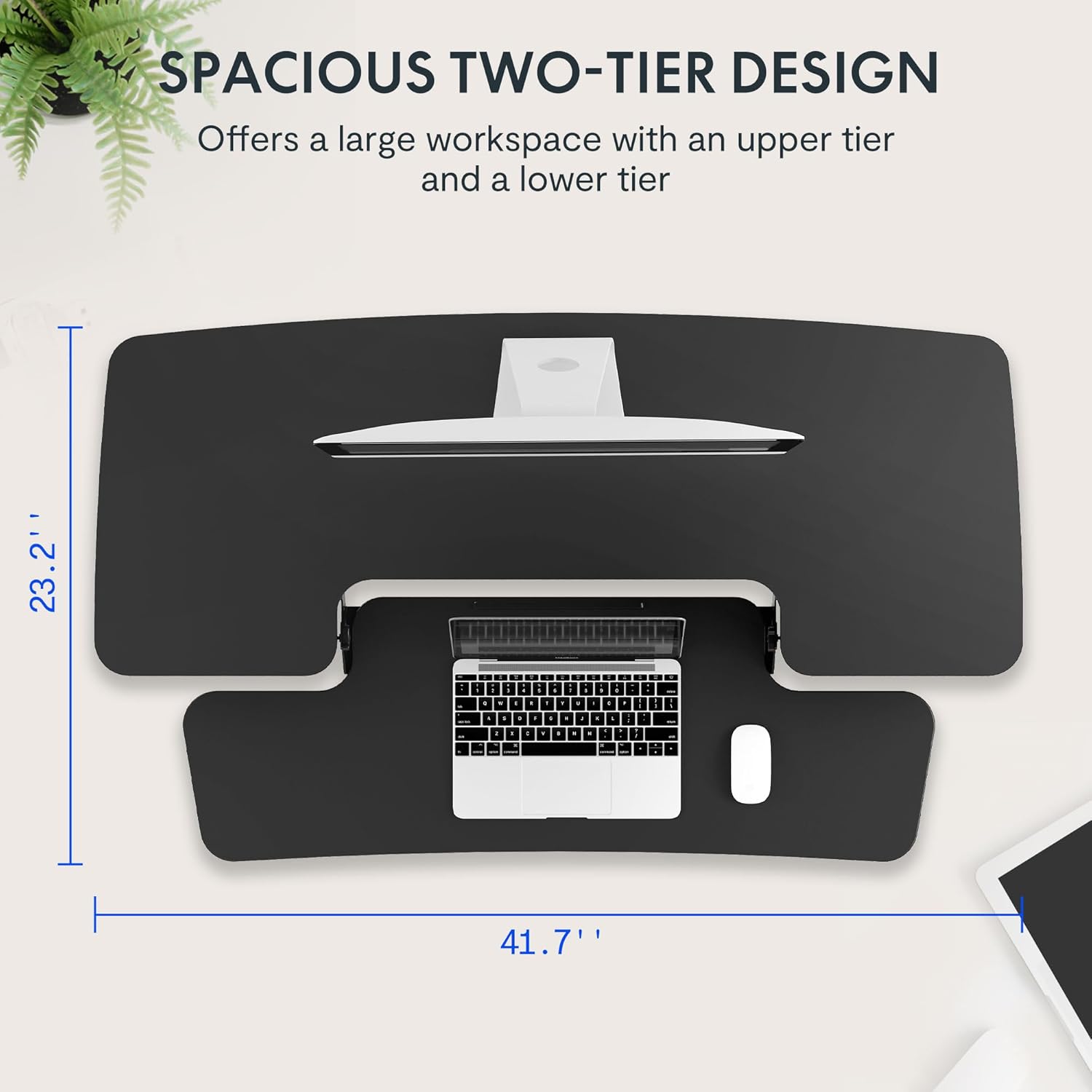
- Attach the Keyboard Tray: Align the removable keyboard tray with the designated slots on the underside of the main unit. Slide the tray into place until it clicks securely. Use a Phillips screwdriver (not included) to fasten any provided screws for additional stability.
- Ronga maCables: Utilize the included cable management loops to organize your monitor, keyboard, and mouse cables. Ensure cables have enough slack to accommodate the full range of height adjustment.


5. Operating Instructions
The desk riser features a spring-assisted lifting mechanism for smooth and effortless height adjustments.
- Kugadzirisa Kureba: To raise or lower the desk, locate the lever on the right side of the main unit. Squeeze the lever firmly.
- Raising the Desk: While squeezing the lever, gently lift the desktop to your desired standing height. The spring-assisted mechanism will help elevate the unit. Release the lever to lock the desk in place.
- Lowering the Desk: While squeezing the lever, gently push down on the desktop to lower it to your desired sitting height. Release the lever to lock the desk in place.
- Vertical Movement: The desk riser moves straight up and down within its own footprint, requiring no additional spatial accommodations. The height can be adjusted between 4.7 inches (minimum) and 19.7 inches (maximum).


6. Kuchengeta
Regular maintenance ensures the longevity and optimal performance of your desk riser.
- Kuchenesa: Pukuta nzvimbo nekanyoro, damp jira. Dzivisa abrasive cleaners kana makemikari ane hasha anogona kukuvadza kupera.
- Kuongorora: Nguva nenguva tarisa masikuruu ese nezvinobatidzwa kuti uve nechokwadi chekuti zvinoramba zvakabatirira. Simbisa kana zvichidikanwa.
- Zvikamu Zvinofamba: The lifting mechanism is designed to be maintenance-free. Do not attempt to lubricate or disassemble it.
7. Kugadzirisa matambudziko
If you encounter any issues with your desk riser, refer to the following common solutions:
- Desk is difficult to adjust: Ensure no objects are obstructing the lifting mechanism. Verify that the weight on the desktop does not exceed the maximum capacity.
- Desk feels unstable: Check that the unit is placed on a flat, stable surface. Ensure all components, especially the keyboard tray, are securely attached. Redistribute weight evenly on the desktop.
- Keyboard tray is loose: Re-check the connection points of the keyboard tray and ensure any fastening screws are tightened.
If problems persist, please contact FLEXISPOT customer support for assistance.
8. Zvinotsanangurwa
| Feature | Tsanangudzo |
|---|---|
| Brand | FLEXISPOT |
| Model | B0CDWSPYKQ |
| Zviyero zveChigadzirwa (D x W x H) | 24"D x 42"W x 19.7"H |
| Color | Nhema |
| Top Material Type | Engineered Wood |
| Item Weight | 52 Pondo |
| Minimum Height | 4.7 inches |
| Maximum Height | 19.7 inches |
| Kukwanisa Kutakura Desktop | 33 lbs |
| Keyboard Tray Load Capacity | 4.4 lbs |
| Gungano Rinodiwa | Yes (Keyboard Tray) |
| Inokurudzirwa Nhamba Yevanhu veGungano | 2 |

9. Warranty uye Tsigiro
Your FLEXISPOT Sit-to-Stand Desk Riser comes with a limited warranty. For specific details regarding warranty coverage, please refer to the warranty documentation included with your purchase or visit the official FLEXISPOT website.
For technical support, troubleshooting assistance, or warranty claims, please contact FLEXISPOT customer service. You can typically find contact information on the manufacturer's websaiti kana kuburikidza nepuratifomu yako yekutenga.
Rutsigiro rwepamhepo: Visit the FLEXISPOT Store on Amazon kuti uwane ruzivo nezvechigadzirwa uye zviwanikwa zvekutsigira.