
1. Nhanganyaya
This manual provides detailed instructions for the operation and maintenance of your Smile S666 Multimedia Speaker. Please read this manual thoroughly before using the product to ensure proper functionality and to prevent damage.
2. Safety Information
To ensure safe operation and prolong the lifespan of your speaker, please observe the following precautions:
- Do not expose the speaker to water or excessive moisture. This product is kwete inodzivirira mvura.
- Dzivisa kuisa sipika pachiedza chezuva chakananga kana pedyo nekupisa.
- Do not disassemble or attempt to repair the speaker yourself. Refer all servicing to qualified personnel.
- Shandisa chete adapta yemagetsi uye tambo dzakapihwa kana kukurudzirwa nemugadziri.
- Chengetedza pasingasvikirwi nevana.
3. Package Zviri mukati
Ndokumbira utarise pasuru yezvinhu zvinotevera:
- Smile S666 Multimedia Speaker
- USB Simba Cable
- Audio Cable (3.5mm Jack)
- User Manual

Figure 3.1: The Smile S666 Multimedia Speaker as packaged in its retail box.
4. Chigadzirwa Pamusoroview
The Smile S666 is a compact multimedia speaker designed for desktop use, offering clear audio output for your computer or other compatible devices.
4.1 Zvikamu
- Main Speaker Unit: Houses the audio drivers and control circuitry.
- Vhoriyamu Knob: Located on the top surface, used to adjust audio output level.
- USB Power Port: For connecting the speaker to a power source.
- Audio Input Port (3.5mm): For connecting to audio sources like computers, phones, etc.

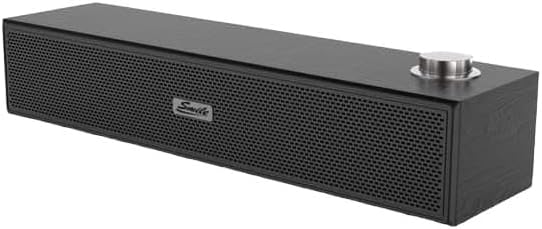
Mufananidzo 4.1: Kumberi nepamusoro view of the Smile S666 Multimedia Speaker, showing the speaker grille and volume knob. The speaker is available in different finishes, including wood grain and black.
5. Setup
Follow these steps to set up your Smile S666 Multimedia Speaker:
- Kuiswa: Place the speaker on a stable, flat surface near your computer or audio source. Ensure there is adequate ventilation around the speaker.
- Batanidza Simba: Insert the USB power cable into the speaker's USB power port. Connect the other end of the USB cable to a powered USB port on your computer or a USB wall adapter (5V/1A recommended).
- Batanidza Audio: Insert one end of the 3.5mm audio cable into the audio input port on the speaker. Connect the other end of the 3.5mm audio cable to the headphone jack or audio output port of your computer, laptop, or other audio device.
- Power On: The speaker will typically power on automatically once connected to a power source. Some models may have a power switch integrated with the volume knob; turn the knob clockwise until you hear a click to power on.
6. Operating Instructions
6.1 Kugadzirisa Vhoriyamu
Rotate the volume knob on the top of the speaker clockwise to increase the volume and counter-clockwise to decrease it. You can also adjust the volume from your connected device.
6.2 Audio Playback
Once connected, play audio from your computer or device. The sound will be output through the Smile S666 speaker.
7. Kuchengeta
Kuti mutauri wako agare ari mumamiriro akanaka:
- Kuchenesa: Use a soft, dry cloth to wipe the exterior of the speaker. Do not use liquid cleaners or abrasive chemicals.
- Kuchengeta: Kana isingashandiswi kwenguva yakareba, chengeta mukurukuri munzvimbo inotonhorera, yakaoma, kure nechiedza chezuva uye tembiricha yakanyanyisa.
- Cable Care: Avoid bending or crimping the power and audio cables excessively.
8. Kugadzirisa matambudziko
| Dambudziko | Zvinogona Kukonzera | Solution |
|---|---|---|
| Hapana ruzha | Speaker not powered on; Cables not connected properly; Volume too low; Incorrect audio output selected on device. | Ensure speaker is powered on; Check all cable connections; Increase speaker and device volume; Select the correct audio output on your computer/device. |
| Inzwi rakakanganiswa | Volume too high; Poor audio source quality; Damaged cable. | Lower the volume; Try a different audio source; Replace the audio cable. |
| Speaker not recognized by computer | Driver issue (rare for plug-and-play speakers); USB port issue. | Try a different USB port; Restart your computer. |
9. Zvinotsanangurwa
| Feature | Detail |
|---|---|
| Product Dimensions | 40 x 5 x 5 cm |
| Kutanga Kuwanikwa Zuva | Nyamavhuvhu 7, 2023 |
| Mugadziri | smail |
| ASIN | B0CDZBFRQ5 |
| Brand Name (as listed) | General |
| Kubatana Technology | Wired (3.5mm Audio Jack), Bluetooth |
| Mounting Type | Tabletop Mount |
| Model Name | S666 |
| Mutauri Rudzi | Multimedia |
| Inowirirana Devices | Personal Computer |
| Subwoofer Dhayamita | 12 inches |
| Color | Vibrant Color |
| Kuramba Mvura | Aihwa |
10. Warranty uye Tsigiro
This product comes with a standard manufacturer's warranty. For specific warranty terms and conditions, please refer to the warranty card included in the package or contact your point of purchase. For technical support or service inquiries, please contact the retailer or manufacturer directly.
For further assistance, you may visit the manufacturer's websaiti kana kubata dhipatimendi ravo rebasa revatengi. Chengetedza risiti yako yekutenga sehumbowo hwekutenga kwezvichemo zvewaranti.