
BOXPUT X98H PRO
X98H PRO Android 12 Smart TV Box User Manual
Model: X98H PRO
Nhanganyaya
This manual provides comprehensive instructions for setting up, operating, and maintaining your BOXPUT X98H PRO Android 12 Smart TV Box. Please read this manual thoroughly before using the device to ensure proper functionality and to maximize your user experience.

Image: The X98H PRO Android 12 Smart TV Box, a black rectangular device with a hexagonal pattern on top and a digital display on the front showing time and Wi-Fi status.
Package Zviri mukati
Tarisa kuti zvinhu zvese zvakanyorwa pazasi zvinosanganisirwa mupakeji yako:
- X98H PRO Smart TV Box
- Remote Control
- HDMI External Cable
- Power Adapter
- Mushandisi Chinyorwa (gwaro iri)

Image: A visual representation of the X98H PRO TV Box package contents, including the TV box, remote control, HDMI cable, power adapter, and user manual.
Product Overview
The X98H PRO is a high-performance smart TV box designed for home entertainment. It features the Android 12.0 operating system and is powered by the Allwinner H618 Quad-Core Cortex-A53 CPU and Mali G31 MP2 GPU, ensuring smooth operation and excellent multimedia capabilities.
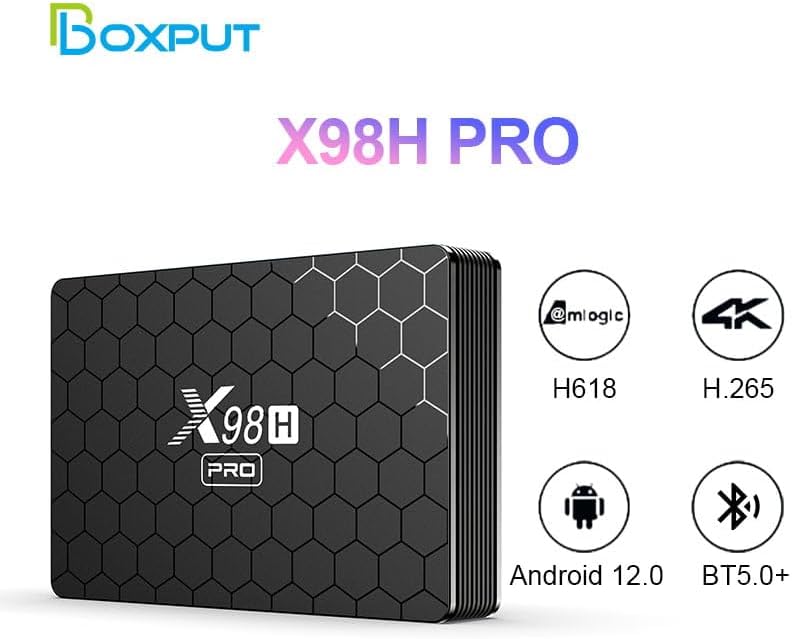
Image: The X98H PRO TV Box alongside icons highlighting its key features: Allwinner H618 chipset, H.265 decoding, Android 12.0 OS, and Bluetooth 5.0+ connectivity.
Ports uye Interfaces
Familiarize yourself with the various ports on your X98H PRO device:

Mufananidzo: Zvakadzama views of the X98H PRO TV Box showing its various ports. The rear panel includes DC power input, Optical audio output, HDMI In, HDMI Out, Ethernet, AV, and USB. The side panel shows two additional USB ports and a TF/MicroSD card slot.
- DC Connector (5V 2A): Zvekupinza simba.
- HDMI Out (2.0a): Connects to your TV or display for video and audio output (up to 4K@60fps).
- HDMI In (2.0): Allows input from another HDMI source (supports 4K@60fps).
- Ethernet (LAN): For wired network connection (1000Mbps).
- USB 2.0 Zvidhori (x3): For connecting external storage devices, keyboards, mice, or other USB peripherals.
- TF/MicroSD Card Slot: For expandable storage (up to 128GB).
- Chiteshi cheAV: For older analog video and audio connections (supports PAL/NTSC).
- Optical Audio Output: Kuti mubudise odhiyo yedhijitari.
Setup Guide
1. Kubatanidza Chishandiso
- Batanidza mugumo mumwe wetambo yeHDMI kune HDMI Kunze port on the X98H PRO and the other end to an HDMI input port on your television or display.
- Unganidza adapta yemagetsi kune iyo DC 5V port on the X98H PRO and then plug the adapter into a power outlet.
- Turn on your television and select the correct HDMI input source.
2. Network Connection
The X98H PRO supports both Wi-Fi and wired Ethernet connections.
Kubatanidza Wi-Fi:
- From the main screen, navigate to Settings.
- Sarudza Network & Internet.
- Batidza Wi-Fi uye sarudza network yako yaunoda kubva pane iyo rondedzero.
- Isa password yeWi-Fi kana ukakumbirwa wobva wasarudza Connect.
Ethernet Connection:
- Batanidza tambo yeEthernet kubva kurouter yako kana modem kuenda ku Ethernet (LAN) port on the X98H PRO.
- The device will automatically detect and connect to the wired network.
3. Kubatanidza Peripherals
You can connect various peripherals to your TV box:
- USB Zvishandiso: Plug USB flash drives, external hard drives, keyboards, or mice into the USB 2.0 ports.
- Zvishandiso zveBluetooth:
- Enda ku Settings > Zvishandiso zvakabatana > Pair mudziyo mutsva.
- Isa yako kifaa cheBluetooth mune pairing mode.
- Sarudza mudziyo wako kubva pakurongwa kuti uwirirane.
Operating Instruction
Navigating the Android 12 OS
The X98H PRO runs on Android 12, providing a user-friendly interface. Use the included remote control to navigate through menus and applications.
- Arrow Keys: Navigate up, down, left, and right.
- Bhatani RAKANAKA: Sarudza chinhu kana simbisa chiito.
- Back Button: Dzokera kune yakapfuura skrini.
- Bhatani Repamba: Dzokera kuchiratidziro chikuru chekumba.
- Bhatani reMenu: Access context-sensitive options (if available).
Media Playback
The device supports various multimedia formats:
- Vhidhiyo H265 Main10@L5.1 (up to 4K@60fps or 6K@30fps), VP9 Profile 2 (up to 4K@60fps), AVS2 Jizhun 10bit (up to 4K@60fps), H.264 BP/MP/HP@L4.2 (up to 4K@30fps).
- Audio: MP3, AAC, WMA, FLAC, Ogg.
- Mufananidzo: HD JPEG, BMP, GIF, PNG, TIF.
You can play media from connected USB storage devices or through installed streaming applications.
Application Management
Install new applications from the Google Play Store or other trusted sources. You can manage installed apps through the Android settings.
HDMI Input Switching
The X98H PRO features an HDMI input port, allowing you to connect another HDMI source (e.g., a game console or Blu-ray player) and switch between the TV box's output and the external HDMI input.

Image: A diagram illustrating the HDMI input and output functionality. The X98H PRO can display its own content or switch to an external HDMI source connected to its HDMI In port, controlled by a switch button on the device.
Maintenance
- Kuchenesa: Shandisa jira rakapfava, rakaoma kuchenesa mudziyo. Usashandise mvura yekuchenesa kana aerosols.
- Kufefetedza Ensure the device is placed in a well-ventilated area to prevent overheating. Do not block ventilation openings.
- Power Off: When not in use for extended periods, it is recommended to unplug the power adapter.
- Zvigadziriso zveSoftware: Periodically check for system updates in the device settings to ensure optimal performance and security.
Kugadzirisa matambudziko
| Dambudziko | Possible Solution |
|---|---|
| Hapana simba |
|
| Hapana kuratidzwa paTV |
|
| Wi-Fi nyaya dzekubatanidza |
|
| Remote control isiri kudaira |
|
| Applications freezing or crashing |
|
Zvinotsanangurwa
| Feature | Detail |
|---|---|
| Model | X98H PRO |
| Operating System | Android 12.0 |
| CPU | Allwinner H618 Quad-core ARM Cortex A53 |
| GPU | Mali G31 MP2 |
| RAM Kukwanisa | 2GB / 4GB (Optional) |
| ROM Capacity | 16GB / 32GB / 64GB (Optional) |
| Kuchengetera Kwekunze | USB Storage Devices, MicroSD (up to 128GB) |
| Wi-Fi | IEEE 802.11 a/b/g/n/ac (2.4G & 5G Dual Band) |
| Bluetooth | BT5.0+ |
| Video Output | HDMI 2.0a (up to 4K@60fps), CVBS (PAL/NTSC) |
| Vhidhiyo Input | HDMI 2.0 (supports 4K@60fps) |
| USB Ports | 3 x USB 2.0 |
| Dimensions | 135 x 90 x 23 mm (5.31 x 3.54 x 0.91 inches) |
| Kurema | 0.15 Kg (0.33 lbs) |
| Color | Nhema |
Warranty uye Support
Warranty Information
This product comes with a standard manufacturer's warranty. Please refer to the warranty card included in your package or contact the seller for specific warranty terms and conditions.
Mutengi Support
For technical assistance, troubleshooting, or any inquiries regarding your X98H PRO Smart TV Box, please contact BOXPUT customer support or visit the official BOXPUT store on Amazon:
Visit the BOXPUT Store on Amazon

Image: A person using a computer, symbolizing customer support and online resources available for BOXPUT products.
Ask a question about this manual
Ask about setup, troubleshooting, compatibility, parts, safety, or missing instructions. Manuals+ will review the question and use this page’s manual context to help answer it.