
1. Nhanganyaya
Thank you for choosing the TIETI K01R Wireless Keyboard. This slim and compact keyboard is designed for efficiency and comfort, featuring a numeric keypad, long battery life, and lag-free 2.4G wireless connectivity. This manual provides essential information for setting up, operating, and maintaining your new keyboard to ensure optimal performance.
Ndapota verenga bhuku rino zvakakwana usati washandisa chigadzirwa uye chengetedza kuitira ramangwana.
2. Package Zviri mukati
Ona kuti zvinhu zvese zviripo mupasuru yako:
- TIETI K01R Wireless Keyboard
- USB Receiver (2.4G)
- USB Kuchaja Cable
- Mushandisi Chinyorwa (gwaro iri)
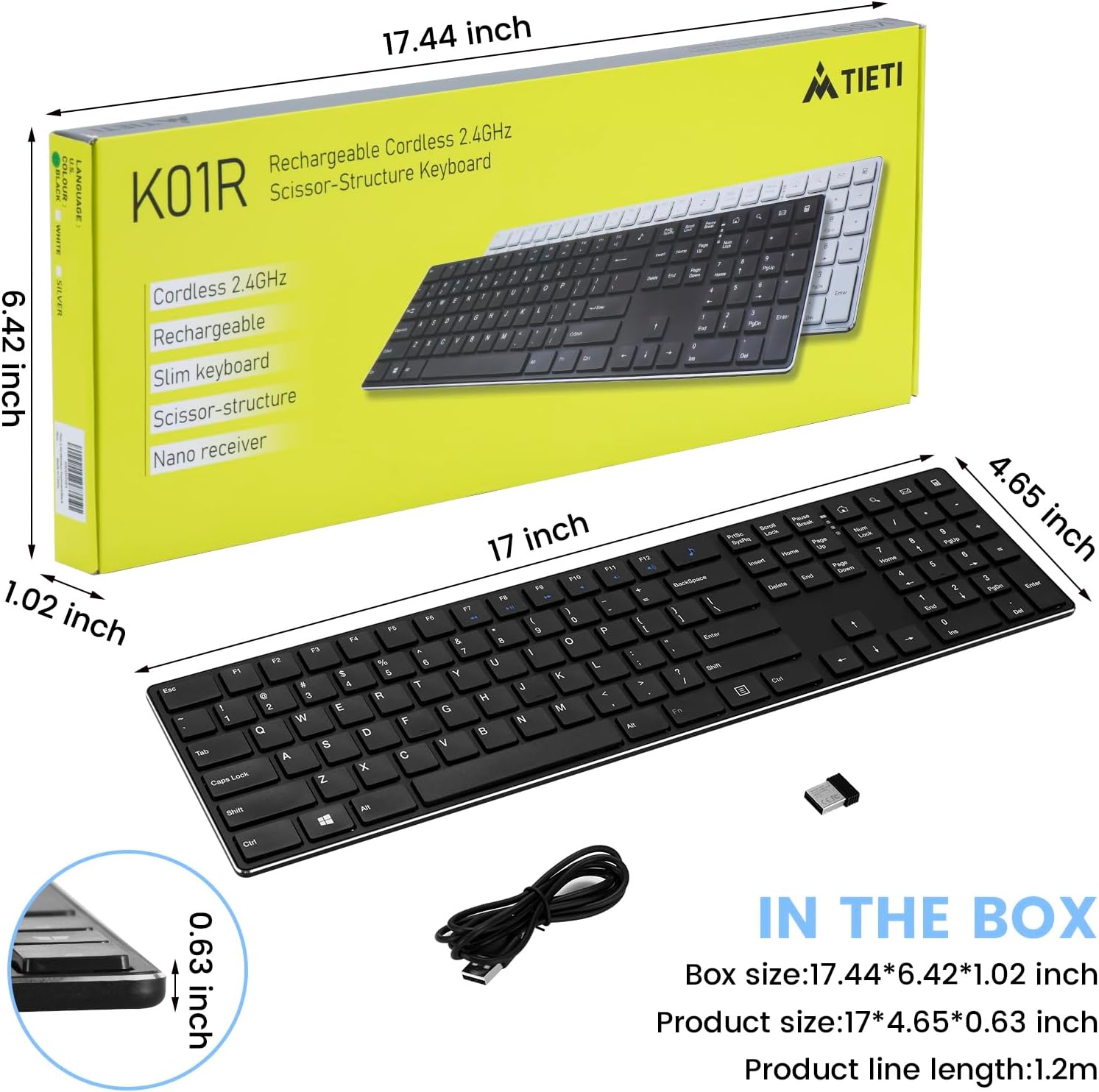
Image: Contents of the TIETI K01R Wireless Keyboard package, including the keyboard, USB receiver, and USB charging cable, alongside the product box with dimensions.
3. Chigadzirwa Pamusoroview
Zvinokosha:
- 2.4G Wireless Technology: Provides a stable and lag-free connection up to 10 meters (33 feet).
- Responsive Scissor Switch Keys: Offers a quiet, soft, and precise typing experience.
- Rechargeable Battery: Built-in 500mAh Li-ion battery provides up to 180 days of continuous use on a single charge.
- Maitiro Ekuchengetedza Simba: Automatically enters sleep mode after 3 minutes of inactivity to conserve power.
- Yakazara Saizi Magadzirirwo: Includes a numeric keypad, arrow keys, and 12 multimedia shortcuts for enhanced productivity.
- Wide Compatibility: Compatible with Windows, Mac, PC, Laptops, Desktops, Chromebooks, and Notebooks.
- Slim uye Lightweight Dhizaini: Ergonomic and portable for comfortable use in various environments.
Zvigadzirwa Zvikamu:

Image: The TIETI K01R Wireless Keyboard, showcasing its full-size layout and the compact USB receiver.
- Kurongwa kwekhibhodi: Standard QWERTY layout with a dedicated numeric keypad.
- Makiyi Ekushanda (F1-F12): Provide access to multimedia controls and system functions when used with the Fn key.
- USB Receiver: Small dongle for wireless connection to your device.
- Kuchaja Port: USB-C port for recharging the keyboard's internal battery.
4. Setup Guide
4.1 Kutanga Kuchaja
Before first use, it is recommended to fully charge the keyboard. Connect the provided USB charging cable to the keyboard's charging port and the other end to a USB power source (e.g., computer USB port, USB wall adapter).

Image: The keyboard connected to its USB-C charging cable, illustrating the power saving and fast charging capabilities.
The charging indicator light will typically show charging status and turn off or change color when fully charged.
4.2 Connecting the Keyboard (Plug & Play)
- Locate the USB receiver. It is usually stored in a compartment on the keyboard or included separately in the packaging.
- Plug the USB receiver into an available USB port on your desktop, laptop, or compatible device.
- Turn on the keyboard using the power switch (if present). The keyboard should automatically connect to the receiver within a few seconds.
- Your operating system will typically install the necessary drivers automatically. No additional software or drivers are usually required.

Image: The TIETI K01R Wireless Keyboard in use with a laptop, demonstrating its easy plug-and-play 2.4G wireless connection.

Mufananidzo: Yakadzama view of the keyboard and its USB receiver, emphasizing the stable 2.4G wireless connection with a range of up to 10 meters.
5. Operating Instructions
5.1 Basic Kushandisa
Once connected, the keyboard functions like a standard full-size keyboard. You can begin typing immediately.

Image: A close-up of the numeric keypad, demonstrating the ultra-thin profile and responsive keys.
5.2 Multimedia Shortcuts (Fn Lock and Hotkeys)
The keyboard features 12 multimedia shortcuts accessible via the Function (Fn) key. Press and hold the Fn key, then press the corresponding F-key to activate the shortcut.

Image: A visual guide to the multimedia function keys (hotkeys) on the keyboard, indicating their respective actions when used with the Fn key.
| Key Combination | Function |
|---|---|
| Fn + F7 | Previous Track |
| Fn + F8 | Tamba/Misa |
| Fn + F9 | Next Track |
| Fn + F10 | Mute |
| Fn + F11 | Volume Down |
| Fn + F12 | Volume Up |
| Fn + Home Icon | Vhura Browser |
| Fn + Magnifying Glass Icon | Search Application (OS dependent) |
| Fn + Envelope Icon | Open Email Application |
| Fn + Calculator Icon | Vhura Calculator |
5.3 Simba Saving Mode
To conserve battery life, the keyboard will automatically enter sleep mode after approximately 3 minutes of inactivity. To wake it up, simply press any key. The keyboard will reconnect instantly.
6. Kuchengeta
Kugadzirisa kwakaringana kunovimbisa hupenyu hurefu uye kuita kwakakwana kwekhibhodi yako.
- Kuchenesa: Shandisa jira rakapfava, rakaoma, risina ruvara kupukuta pamusoro pekhibhodi. Kana wakaita tsvina yakaoma, pukuta zvishomaampen the cloth with water or a mild cleaning solution. Avoid excessive moisture. Do not spray cleaners directly onto the keyboard.
- Battery Care:
- Recharge the keyboard when the battery indicator (if present) signals low power.
- Dzivisa kuburitsa bhatiri zvakazara nguva zhinji.
- If storing the keyboard for an extended period, charge it to about 50% before storage and recharge every few months to prevent deep discharge.
- Kuchengeta: Chengetedza kiibhodhi munzvimbo inotonhorera, yakaoma kure nechiedza chezuva uye tembiricha yakanyanyisa.
- Kubata: Avoid dropping the keyboard or exposing it to strong impacts. Do not attempt to disassemble the keyboard.

Mufananidzo: Yakadzama view of the scissor switch mechanism beneath a keycap, illustrating the design that contributes to quiet and comfortable typing.
7. Kugadzirisa matambudziko
If you encounter issues with your TIETI K01R Wireless Keyboard, please refer to the following common solutions:
| Dambudziko | Zvinogoneka Chikonzero / Mhinduro |
|---|---|
| Keyboard not responding / No connection |
|
| Makiyi anonamira kana kuti haapindure |
|
| Lag or delayed input |
|
| Keyboard frequently enters sleep mode |
|
8. Zvinotsanangurwa
| Feature | Detail |
|---|---|
| Model Number | K01R (741421623088) |
| Kubatana Technology | 2.4G Wireless (USB Receiver) |
| Wireless Range | Kusvika kumamita gumi (10 tsoka) |
| Keyboard Type | Slim, Full-Size with Numeric Keypad |
| Chinja Chinja Rudzi | Scissor Switch |
| Simba Source | Rechargeable 500mAh Li-ion Battery |
| Hupenyu hwebhatiri | Up to 180 days (continuous use on single charge) |
| Kuchaja Port | USB-C |
| Inowirirana Devices | Laptop, Desktop, PC, Chromebook, Notebook |
| Operating Systems | Windows, Mac, and other operating systems |
| Color | Wireless Keyboard-Black |
| Item Weight | 1.57 pounds (approx. 0.71 kg) |
| Package Dimensions | 17.63 x 6.46 x 1.14 inches |
9. Ruzivo rweWaranti
TIETI products are designed and manufactured to the highest quality standards. For specific warranty terms and conditions, please refer to the warranty card included with your product or contact TIETI customer support. Keep your purchase receipt as proof of purchase for warranty claims.
10. Mutengi Tsigiro
If you have any questions, require technical assistance, or need further support regarding your TIETI K01R Wireless Keyboard, please contact our customer service team. You can typically find contact information on the product packaging, the official TIETI websaiti, kana kuburikidza nemutengesi wako.
For the most up-to-date support information, please visit the official TIETI store page on Amazon: TIETI Store