
SPI 31-040-9
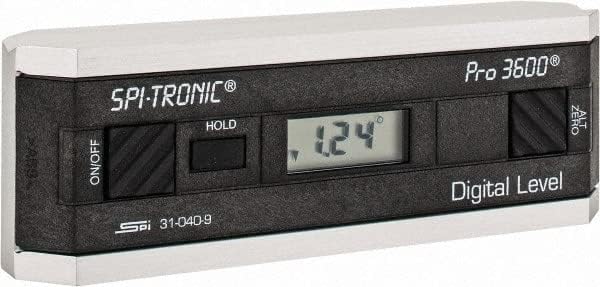
Bhuku rekushandisa reSPI 31-040-9 Digital Protractor PRO3600
Model: 31-040-9 | Brand: SPI
1. Nhanganyaya
The SPI 31-040-9 Digital Protractor PRO3600 is a revolutionary tool designed to provide immediate digital indications of level, plumb, and angles. It features a light, rigid, and ultra-precise platform, utilizing a state-of-the-art sensor and microprocessor circuit for accurate readings. This instrument is built for durability, precision, and reliability, making it an essential tool for various metalworking and laboratory applications.
Zvinokosha:
- Floating zero provides zero selection anywhere within its 360° range.
- PRO 3600 features SPC output and excellent accuracy.
- Instant LCD Display with resolution of 0.1° up to +/-10°.
- Deviation from the true plane is measurable through full 360° (4x90°).
- Supplied in a protective plastic case.
- Top plate has a V-groove for accurate registration on curved or cylindrical surfaces.

2. Chigadzirwa Pamusoroview
Familiarize yourself with the main components and controls of your SPI PRO3600 Digital Protractor.


3. Setup
3.1 Kuiswa kwebhatiri
The SPI PRO3600 is battery powered. To install or replace batteries:
- Locate the battery compartment cover, typically on the underside or side of the unit.
- Open the cover using a small screwdriver or coin if necessary.
- Insert the required batteries (refer to the battery type indicated inside the compartment, usually AAA or button cell) ensuring correct polarity (+/-).
- Vhara chivharo chebhatiri zvakachengeteka.
3.2 Simba rekutanga Rakabatidzwa
After battery installation, press the ON/OFF button to power on the device. The LCD display should illuminate and show a reading.
4. Operating Instructions
4.1 Simba On/Kudzima
- Kushandura chikwata ON, dzvanya iyo ON/OFF bhatani.
- Kushandura chikwata DZIMA, dzvanya iyo ON/OFF bhatani zvakare.
- The unit will automatically shut off after 6 minutes of non-use to conserve battery life.
4.2 Zeroing (ALT ZERO)
The floating zero feature allows you to set a reference point anywhere within the 360° range.
- Place the unit on your chosen reference surface.
- Wait approximately 5 seconds for the reading to stabilize.
- Press the ALT ZERO button. The display will reset to 0.0°, establishing this as your new reference.
- To return to the original absolute reference (factory zero), press the ALT ZERO bhatani zvakare.
4.3 Holding a Reading
Kuti uomese kuverenga kuripo pa display:
- Press the BATA button. The displayed reading will be frozen.
- To unfreeze the display and resume live readings, press the BATA bhatani zvakare.
4.4 SPC Output
The PRO3600 features an SPC (Statistical Process Control) output port. This allows for data transfer to external devices for analysis. Refer to the manual for your specific SPC data collection system for connection and usage instructions.
4.5 Makona ekuyera
Place the base of the protractor firmly on the surface you wish to measure. The digital display will show the angle relative to the last set zero point. For absolute measurements, ensure the unit is zeroed on a true horizontal surface.
4.6 Using the V-Groove
The top plate of the protractor features a V-groove. This design allows for accurate registration and measurement on curved or cylindrical surfaces, such as pipes or shafts. Simply align the V-groove with the cylindrical object to obtain a stable and accurate reading.
5. Kuchengeta
5.1 Kuchenesa
- Pukuta chikwata nemucheka wakapfava, wakaoma.
- Patsvina yakasindimara, zvishoma damp jira rine sipo yakapfava rinogona kushandiswa, richiteverwa nekuomeswa nekukasira.
- Usashandise zvinochenesa zvinogumbura, zvinonyungudutsa, kana kunyudza mudziyo mumvura.
5.2 Kuchengeta
- Store the protractor in its supplied plastic case when not in use to protect it from dust, dirt, and physical damage.
- Store in a dry environment, away from extreme temperatures and direct sunlight.
- Kana ukachengeta kwenguva yakareba, bvisa mabhatiri kudzivirira kubuda kwemvura.
6. Kugadzirisa matambudziko
- Chikamu hachibatike: Tarisa kuiswa kwebhatiri uye ona kuti mabhatiri haana kupera. Dzorera kana zvakakodzera.
- Kurava kusina kururama: Ensure the measurement surface is clean and stable. Perform an ALT ZERO calibration on a known true reference surface.
- Unit shuts off unexpectedly: The unit has an automatic shut-off feature after 6 minutes of non-use. This is normal operation. If it shuts off during active use, check battery levels.
- Chiratidziro chakaderera kana kuti kupenya: Mabhatiri anogona kunge ari mashoma. Vatsive.
7. Zvinotsanangurwa
| Attribute | Value |
|---|---|
| Mugadziri | MSC Industrial |
| Chikamu Nhamba | 03883782 |
| Item Weight | 6.5 makirogiramu |
| Product Dimensions | 6 x 1.2 x 2.3 inches |
| Item Model Number | 31-040-9 |
| Size | One Size |
| Color | Nhema |
| Material | Composite |
| Simba Source | Battery Powered |
| Item Package Quantity | 1 |
| Inosanganisirwa Zvikamu | Fitted Case |
8. Warranty uye Tsigiro
8.1 Ruzivo rweWaranti
SPI measuring instruments are backed by an industry-leading 2-Year warranty, ensuring their durability, precision, and reliability. Please retain your proof of purchase for warranty claims.
8.2 Mutengi Tsigiro
For technical assistance, warranty service, or inquiries regarding your SPI PRO3600 Digital Protractor, please contact SPI customer support through their official websaiti kana mutengesi wawakatenga kubva kwaari chigadzirwa.