1. Nhanganyaya
Thank you for choosing the Zeadio Gimbal Sling Handgrip Handle. This accessory is designed to enhance the versatility and comfort of your DJI RS series gimbal, particularly for achieving stable low-angle shots. This manual provides essential information for the proper setup, operation, and maintenance of your handgrip.
2. Chigadzirwa Pamusoroview uye Zvikamu
The Zeadio Gimbal Sling Handgrip Handle is constructed from a durable combination of silicone and aluminum alloy, offering both strength and a comfortable, non-slip grip. It features multiple mounting points for accessories and a robust attachment mechanism for your gimbal.

Mufananidzo: Pamusoroview of the Zeadio Gimbal Sling Handgrip Handle, highlighting key components such as the NATO clamp, locking knob, silicone-coated handgrip, 1/4" threaded holes, and 3/8" threaded holes with ARRI locating holes.
- NATO Clamp: Securely attaches the handgrip to your gimbal. Features a locking knob and an anti-removal stud for quick and safe operation.
- Rosette Joint: A built-in stainless steel rosette joint allows for 360-degree fine-tuning of the handgrip angle, providing flexibility for various shot angles.
- Mounging Points: Equipped with multiple 1/4" and 3/8" threaded holes, ARRI locating holes, and two cold shoe mounts for attaching accessories like LED lights, sound receivers, or monitors.
- Silicone Grip: The non-slip soft silicone grip ensures a comfortable and secure hold during operation.
3. Kugarisana
This Zeadio Gimbal Sling Handgrip Handle is ONLY compatible with DJI RS 2, DJI RSC 2, DJI RS 3, and DJI RS 3 Pro stabilizers.

Image: The Zeadio handgrip shown attached to different DJI RS series gimbals, including RS 2, RSC 2, RS 3, and RS 3 Pro, illustrating its compatibility.
4. Setup Instructions
- Ziva Nzvimbo Yekubatanidza: Locate a NATO rail on your compatible DJI RS series gimbal.
- Attach Handgrip: Align the NATO clamp of the Zeadio handgrip with the NATO rail on your gimbal. Slide the clamp panjanji.
- Secure Handgrip: Tighten the locking knob on the NATO clamp until the handgrip is firmly secured to the gimbal. Ensure the anti-removal stud is engaged for added safety.
- Verify Stability: Gently test the attachment to ensure there is no wobble or looseness before operating your equipment.
5. Operating Instructions
5.1. Angle Kugadziriswa
The integrated rosette joint allows for quick and precise angle adjustments to achieve desired shooting positions, especially for low-angle shots.
- Loosen Adjustment Knob: Locate the adjustment knob on the rosette joint. Loosen it counter-clockwise.
- Gadzirisa kona: Rotate the handgrip to your desired angle. The rosette joint allows for 360-degree adjustment.
- Secure Angle: Tighten the adjustment knob clockwise until the handgrip is securely fixed in the new position.

Image: The handgrip shown adjusting its angle by 180 degrees, illustrating the flexibility provided by the rosette joint for quick angle changes.
5.2. Kubatanidza Zvishandiso
Utilize the various mounting points to expand your setup with additional accessories.
- 1/4" and 3/8" Threaded Holes: Use these standard threads to attach monitors, microphones, or other compatible accessories.
- ARRI Locating Holes: For accessories with ARRI-style anti-twist pins, ensuring a secure, rotation-free attachment.
- Cold Shoe Mounts: Ideal for attaching LED lights, wireless receivers, or other cold shoe compatible devices.
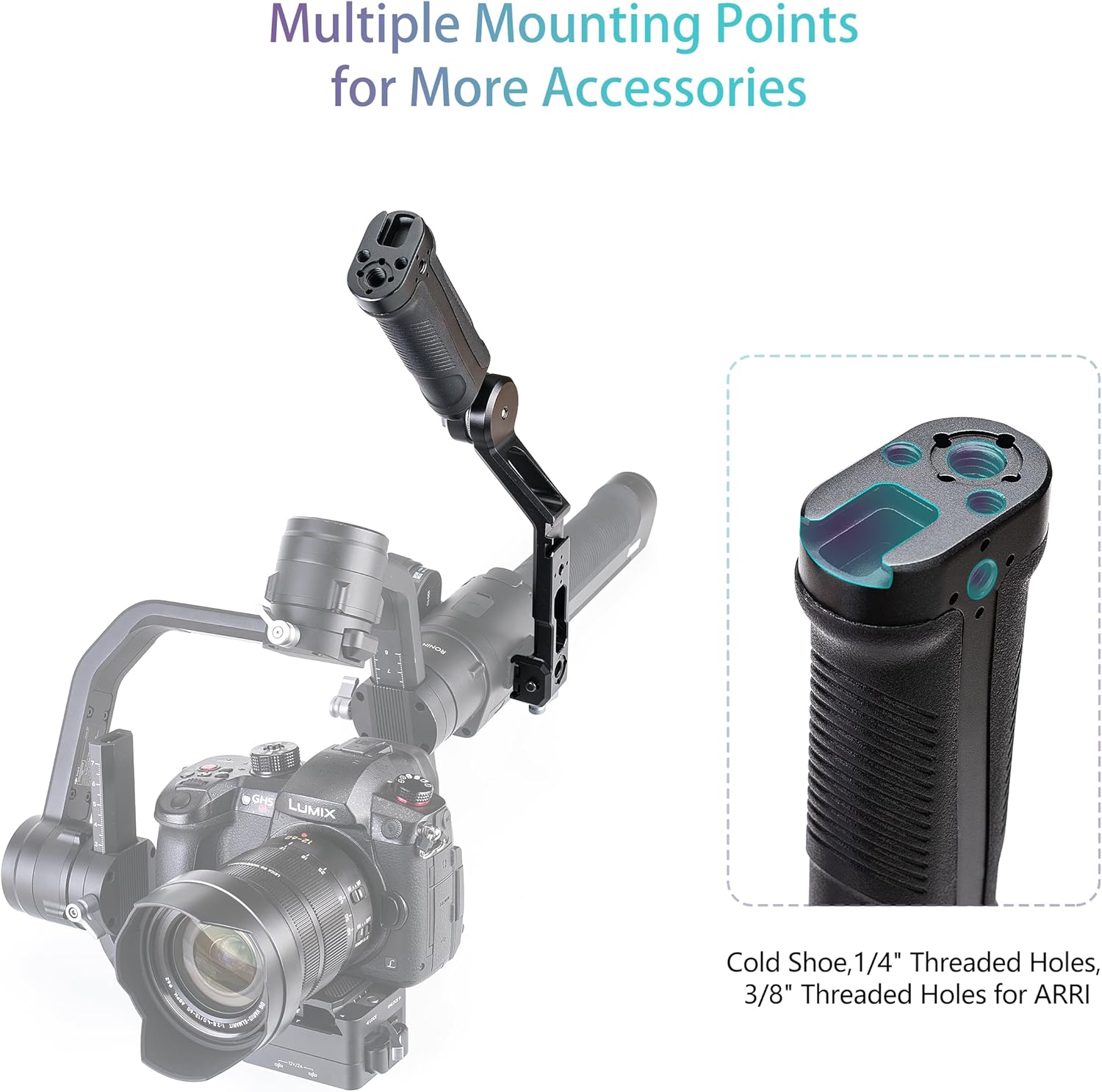
Image: The handgrip demonstrating its multiple mounting points, including cold shoe, 1/4" threaded holes, and 3/8" threaded holes for ARRI pins, with an example of an attached accessory.
6. Kuchengeta
- Kuchenesa: Wipe the handgrip with a soft, dry cloth to remove dust and debris. For stubborn dirt, a slightly damp jira rinogona kushandiswa, rinoteverwa nekuomeswa nekukasira. Dzivisa makemikari ane hasha kana abrasive cleaners.
- Kuchengeta: Store the handgrip in a cool, dry place away from direct sunlight and extreme temperatures.
- Kuongorora: Nguva nenguva tarisa ese screws uye zvinongedzo kuti uone kuti dzakasimba uye dzakachengeteka.
7. Kugadzirisa matambudziko
- Handgrip feels loose after attachment: Ita shuwa kuti NATO clamp's locking knob is fully tightened. Check that the NATO rail on your gimbal is clean and free of obstructions.
- Angle adjustment is difficult or slips: Loosen the rosette joint adjustment knob slightly, reposition, and then tighten firmly. Ensure no debris is caught in the joint mechanism.
- Accessories not attaching securely: Verify that the accessory's screw or mount type matches the handgrip's mounting points (e.g., 1/4" screw for 1/4" hole, cold shoe for cold shoe mount). Ensure screws are tightened appropriately.
8. Zvinotsanangurwa

Image: Diagram illustrating the dimensions of the Zeadio Gimbal Sling Handgrip Handle, showing its length, width, and height.
| Feature | Detail |
|---|---|
| Kugarisana | DJI RS 2, RSC 2, RS 3, RS 3 Pro |
| Load Capacity | Kusvika ku8 kg / 17.6 lbs |
| Material | Aluminium Alloy, Silicone |
| Kurema | 300 magiramu |
| Color | Nhema |
| Dimensions | 6.89 x 2.36 x 1.89 inches (175mm x 60mm x 48mm) |
| Mounting Points | 1/4" threaded holes, 3/8" threaded holes with ARRI locating holes, Cold Shoe mounts |
9. Warranty uye Tsigiro
For warranty information and customer support, please refer to the Zeadio official websaiti kana kubata mutengesi wako. Chengeta risiti yako yekutenga yezvichemo zvewaranti.