1. Yakakosha Mirayiridzo Yekuchengetedza
Ndapota verenga uye unzwisise mirairo yese yekuchengetedza usati washandisa chigadzirwa ichi. Chengeta bhuku rino kuti ugozorishandisa mune ramangwana.
- Usaise mudziyo wacho pamvura, hunyoro, kana tembiricha yakanyanya.
- Dzivisa kuisa mudziyo uyu pedyo nezvinhu zvinopisa zvakaita sema radiator, ma heat registers, mastove, kana zvimwe zvinhu zvinopisa.
- Shandisa zvinonamirwa/zvishandiso zvinotsanangurwa nemugadziri chete.
- Bvisa iyi unit panguva yemadutu emheni kana isina kushandiswa kwenguva yakareba.
- Tarisa ese servicing kune vanokwanisa basa revashandi. Kushanda kunodiwa kana midziyo yacho yakanganisa chero nzira.
- Iva nechokwadi chekuti mhepo inofema zvakanaka yakatenderedza mudziyo. Usavhare chero nzvimbo dzinofema.
- Chengetedza tambo yemagetsi kubva pakufamba kana kudzvanywa.
2. Package Zviri mukati
Tarisa kuti zvinhu zvese zvakanyorwa pazasi zvinosanganisirwa mupakeji yako:
- 1x syitren PARON II Record Player
- 1x Chinyorwa cheMushandisi
- 1x Dust Cover
- 1x 12V AC Power Adapter

3. Chigadzirwa Pamusoroview
Familiarize yourself with the main components of your syitren PARON II Record Player.


4. Setup
- Bvisa iyo Unit: Carefully remove the record player and all accessories from the packaging.
- Place the Dust Cover: Position the dust cover onto the hinges at the back of the unit.
- Batanidza Simba: Plug the 12V AC power adapter into the DC IN port on the back of the record player, then plug the adapter into a wall outlet.
- Adjust Counterweight: The tonearm features an adjustable counterweight. Carefully balance the tonearm so it floats horizontally. Then, rotate the counterweight to the recommended tracking force (refer to cartridge specifications, typically around 2.5g for the AT3600L). This ensures optimal sound quality and prevents record damage.
- Anti-Skating Adjustment: The anti-skating system helps prevent the stylus from skipping. Adjust this setting according to the instructions provided with the cartridge or by testing with a blank record.

5. Operating Instructions
5.1 Kutamba rekodhi yeVinyl
- Power On: Turn the power knob to switch on the unit.
- Sarudza Speed: Choose the appropriate speed (33 or 45 RPM) for your vinyl record using the speed selector switch.
- Rekodhi yeNzvimbo: Carefully place your vinyl record on the platter. If playing a 45 RPM single, use the included adapter.
- Simudza Tonearm: Shandisa tonearm lift lever kusimudza tonearm.
- Chinyoreso Chenzvimbo: Gently move the tonearm over the desired starting groove of the record.
- Tonearm Yepasi: Slowly lower the tonearm using the lift lever. The stylus will make contact with the record and playback will begin.
- Gadzirisa Inzwi: Use the volume knob to set the desired listening level.
The record player features an auto-stop function that will stop the platter approximately three minutes after the record ends. The tonearm will not auto-return.

5.2 Kubatana kweBluetooth
The syitren PARON II Record Player can receive audio wirelessly from Bluetooth-enabled devices.
- Vhura Bluetooth: Switch the function selector to Bluetooth mode. The indicator light will flash, indicating it's in pairing mode.
- Paya Chishandiso: On your smartphone, tablet, or other Bluetooth device, enable Bluetooth and search for available devices. Select "syitren PARON II" (or similar name) from the list.
- Simbiso Once paired, the indicator light on the record player will stop flashing and remain solid. You can now stream audio from your device to the record player's built-in speakers.
5.3 External Audio Connections
The unit supports both Aux-in and RCA output for versatile audio connections.
- Aux-in: Connect an external audio source (e.g., MP3 player, CD player) to the AUX IN port using a 3.5mm audio cable. Select AUX mode on the record player to play audio from the connected device.
- RCA Kubuda: Connect the RCA output jacks on the back of the record player to an external amplifier or powered speakers using RCA cables. This allows you to use the record player as a source for a larger audio system.
6. Kuchengeta
6.1 Kuchenesa Chinyoreso
A clean stylus ensures optimal sound quality and extends the life of your records. Use a soft brush designed for stylus cleaning, brushing gently from back to front.
6.2 Kuchenesa Chikamu
Wipe the unit with a soft, dry cloth. For stubborn marks, a slightly damp jira rinogona kushandiswa, rinoteverwa nemucheka wakaoma. Dzivisa abrasive cleaners kana solvents.
6.3 Kuchengetedza Guruva Rinofukidza Guruva
The dust cover protects your turntable. Clean it with a soft, lint-free cloth. Avoid harsh chemicals that may scratch or cloud the plastic.
7. Kugadzirisa matambudziko
Kana ukasangana nematambudziko, tarisa kune anotevera akajairika matambudziko uye mhinduro:
| Dambudziko | Possible Solution |
|---|---|
| Hapana simba | Iva nechokwadi chekuti adapta yemagetsi yakabatana zvakachengeteka neyuniti uye nzvimbo yemagetsi inoshanda. |
| Hapana ruzha kubva kumatauri | Check volume level. Ensure correct input mode (Phono, Aux, Bluetooth) is selected. |
| Ruzha runosvetuka kana rwakakanganiswa | Clean the record and stylus. Re-adjust the tonearm counterweight and anti-skating. Ensure the record player is on a stable, level surface. |
| Bluetooth haina kubatanidza | Ensure the record player is in Bluetooth pairing mode. Disable and re-enable Bluetooth on your device. Move closer to the record player. |
Kana matambudziko akaramba aripo, ndapota taura nerutsigiro rwevatengi kuti uwane rubatsiro.
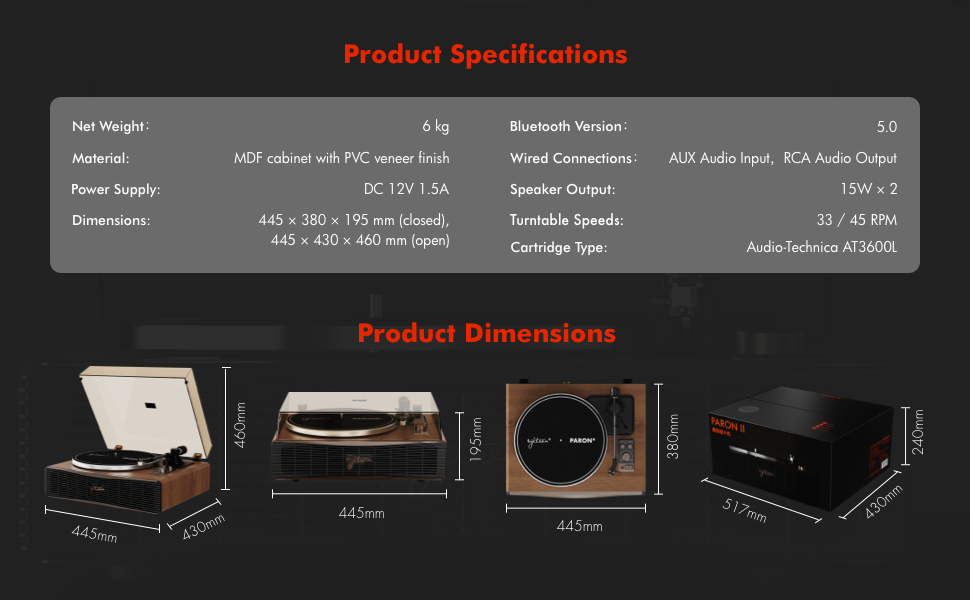
8. Zvinotsanangurwa
| Feature | Detail |
|---|---|
| Model Name | PARON II |
| Item Model Number | SN13 |
| Product Dimensions | 17.4 x 14.96 x 7.48 inches (445 x 380 x 195 mm closed) |
| Item Weight | 16 makirogiramu (6 kg) |
| Material | MDF cabinet with PVC veneer finish (Wood, Metal, Plastic) |
| Turntable Speeds | 33 1/3, 45 RPM |
| Cartridge Rudzi | Audio-Technica AT3600L (Magnet-type) |
| Bluetooth Version | 5.0 |
| Wired Connections | AUX Audio Input, RCA Audio Output |
| Mutauriri Kubuda | 15W x 2 (Built-in 2.5" woofer and 2" tweeter) |
| Magetsi | DC 12V 1.5A |
| Special Features | Adjustable Counterweight, Built-In Speaker, Built-In Bluetooth Receiver, RCA Output, Suspension Shock Absorption System, S5 Motor System |
9. Warranty uye Tsigiro
The syitren PARON II Record Player is designed for reliable performance. For warranty information or technical support, please refer to the contact details provided with your purchase documentation or visit the official syitren website.
Ndapota chengetedza humbowo hwako hwekutenga kune chero vimbiso yewaranti.