
SuperFire X60-T
SuperFire X60-T Flashlight User Manual
Model: X60-T | Brand: SuperFire
1. Nhanganyaya
This manual provides comprehensive instructions for the safe and effective use of your SuperFire X60-T High Lumens Rechargeable LED Flashlight. Please read this manual thoroughly before operating the device and retain it for future reference.
2. Zvigadzirwa zveChigadzirwa
- High Powered Illumination: Equipped with upgraded super bright LED chips (36W), delivering a maximum of 10000 lumens in turbo mode with a maximum beam distance of 350 meters (1148 feet).
- Akasiyana-siyana Mwenje Modes: Features 5 distinct lighting modes: High, Medium, Strobe, SOS, and Turbo, allowing adaptation to various lighting requirements.
- Zoomable Focus: The flashlight offers a telescopic focusing design; zoom in for a wide floodlight covering 56 square meters, or zoom out for a narrow spotlight capable of illuminating over 350 meters.
- Durable & Waterproof Construction: Constructed from aviation-grade aluminum, ensuring heavy-duty performance and resistance to extreme conditions. It boasts an IP44 waterproof rating, suitable for use in heavy rain and snow.
- Type-C Rechargeable: Utilizes an upgraded high-capacity battery, providing approximately 6 hours of operation in high mode and 15 hours in low mode. Fast-charging via a Type-C port takes 4-6 hours for a full charge, compatible with laptops, power banks, and adapters.
- Portable Design: Compact size (15.8 cm / 6.22 in L x 4.1 cm / 1.61 in W) with an integrated clip for easy storage and carrying in pockets or backpacks.
- Power Bank Basa: Can function as a portable power bank to charge smartphones or tablets in emergency situations.
3. Package Zviri mukati
Ndokumbira utarise kuti zvinhu zvese zviripo uye zviri muchimiro chakanaka pakuvhura package:
- SuperFire X60-T Flashlight
- USB-C Kuchaja Cable
- Belt Clip (pre-attached or included separately)
- Mushandisi Chinyorwa (gwaro iri)
4. Setup
4.1 Kutanga Kuchaja
Before first use, fully charge the flashlight. The charging port is a Type-C port located on the side of the flashlight, typically protected by a rubber cover.
- Tsvaga nzvimbo yekuchaja yeType-C patochi.
- Gently lift the rubber cover to expose the port.
- Connect the provided USB-C charging cable to the flashlight's port.
- Batanidza rimwe divi retambo yeUSB-C kune sosi yemagetsi yeUSB inoenderana nayo (semuenzaniso, adapta yemadziro, chiteshi cheUSB chekombuta, bhangi remagetsi).
- The indicator light on the flashlight will show charging status. It typically glows red while charging and turns blue when fully charged.
- Charging usually takes 4-6 hours for a full charge.
- Kana yangochajwa zvizere, bvisa waya wovhara chifukidziro cherabha zvakasimba kuti mvura isapinda.
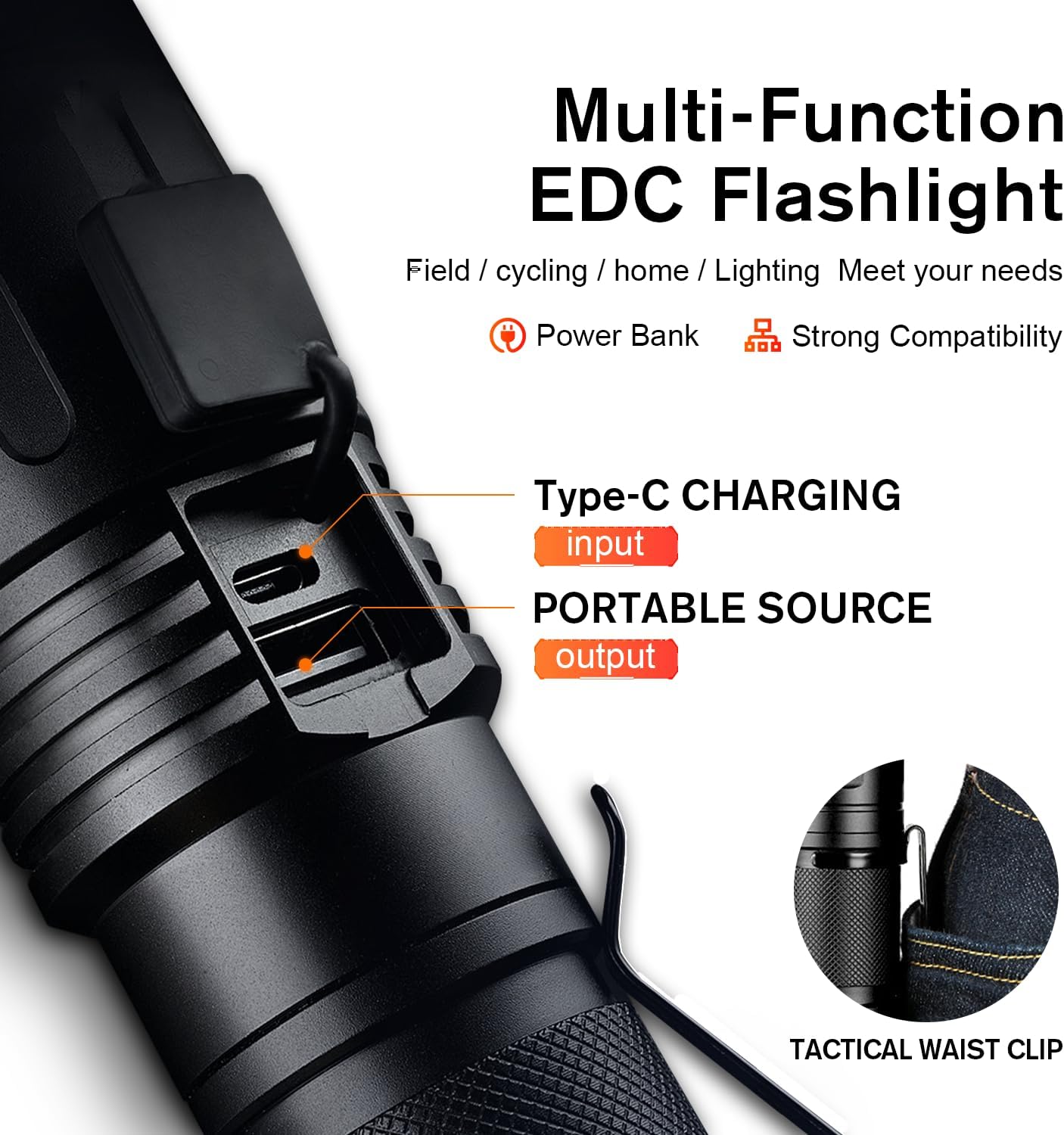
Figure 1: Type-C Charging Port and Tactical Waist Clip. The image displays a close-up of the flashlight's body, highlighting the Type-C input and USB output ports, along with a visual of the tactical waist clip.
5. Operating Instructions
5.1 Simba On/Kudzima
Dzvanya bhatani remagetsi riri padivi petochi kuti ibatike kana kudzima.
5.2 Kuchinja Maitiro Emwenje
With the flashlight powered on, short press the power button repeatedly to cycle through the 5 lighting modes:
- High: Maximum brightness for general illumination.
- Pakati: Moderate brightness for extended battery life.
- Pazasi: Minimal brightness for close-range tasks or preserving night vision.
- Strobe: Rapid flashing light for signaling or disorientation.
- SOS: International Morse code signal for emergencies (three short, three long, three short flashes).
- Turbo: (If applicable, usually a double-click from off or on) Provides the absolute maximum lumen output for a short burst. Refer to product specifications for activation.

Figure 2: Five Lighting Modes. This image illustrates the different light output levels and special modes (Strobe, SOS) of the flashlight in various outdoor scenarios.
5.3 Kushanda kweZoom
The SuperFire X60-T features a telescopic focusing design to adjust the beam from a wide floodlight to a narrow spotlight.
- To adjust the beam, gently slide the head of the flashlight forward or backward.
- Sliding the head forward will narrow the beam, creating a focused spotlight for long-distance illumination.
- Sliding the head backward will widen the beam, creating a broad floodlight for illuminating a larger area.

Figure 3: Telescopic Focusing. The image shows the flashlight's zoomable design, illustrating the wide beam (floodlight) and narrow beam (spotlight) capabilities.
5.4 Kushandisa sePower Bank
The flashlight can serve as a portable power bank to charge other devices.
- Locate the USB output port, usually next to the Type-C input port, under the same rubber cover.
- Connect your device's charging cable (e.g., smartphone, tablet) to the USB output port on the flashlight.
- The flashlight will begin charging your device. Monitor your device's charging indicator.
- Disconnect when charging is complete or when the flashlight's battery is low.
6. Kuchengeta
- Kuchenesa: Pukuta tochi nekanyoro, damp jira. Usashandise abrasive cleaners kana solvents.
- Kuchengeta: Store the flashlight in a cool, dry place away from direct sunlight and extreme temperatures. If storing for extended periods, charge the battery every 3-6 months to maintain its lifespan.
- Kuramba Mvura: Ensure the rubber cover for the charging ports is always securely closed to maintain the IP44 water resistance rating. Avoid submerging the flashlight in water.
- Battery Care: Use only the provided charging cable or a compatible Type-C cable. Do not attempt to replace the internal battery.
7. Kugadzirisa matambudziko
| Dambudziko | Zvinogona Kukonzera | Solution |
|---|---|---|
| Tochi haibatike. | Bhatiri rapera. | Charge the flashlight fully using the provided Type-C cable. |
| Kubuda kwechiedza kwakadzikira. | Low battery or incorrect mode. | Charge the battery. Cycle through modes to ensure High or Turbo mode is selected. |
| Tochi haisi kuchaja. | Cable or adapter issue; port not connected properly. | Ensure the Type-C cable is securely connected to both the flashlight and the power source. Try a different USB port or adapter. |
| Zoom function is stiff. | Guruva kana marara ari muchina wacho. | Gently clean the sliding mechanism. Avoid forcing the zoom. |
8. Zvinotsanangurwa
| Feature | Detail |
|---|---|
| Model | X60-T |
| Brand | SuperFire |
| Chiedza Chinyorwa Type | LED |
| Kupenya (Max) | 10000 Lumens (Turbo Mode) / 2100 Lumens (Standard) |
| Beam Distance (Max) | 350 metres (1148 tsoka) |
| Simba Source | Battery Powered (1 Lithium Ion bhatiri inosanganisirwa) |
| Kuchaja Port | Type-C |
| Kuchaja Nguva | 4-6 maawa |
| Nguva Yekushanda (High Mode) | 6 maawa |
| Nguva Yokushanda (Mode Yakaderera) | 15 maawa |
| Material | Aviation-giredhi Aluminium |
| Mvura Resistance Level | IP44 (isina mvura) |
| Product Dimensions | 2.1"D x 2.1"W x 6.7"H (15.8 cm L x 4.1 cm W) |
| Item Weight | 1.01 makirogiramu |
| Special Features | Adjustable Focus, Durable, High Power, Portable, Weatherproof, Power Bank Functionality |

Figure 4: Size and Performance Comparison. This image provides a visual comparison of the X60-T's size relative to a smartphone and another model (X60), along with a table detailing their respective runtimes and lumen outputs.
9. Warranty & Tsigiro
For warranty information, technical support, or any inquiries regarding your SuperFire X60-T flashlight, please refer to the contact information provided on the product packaging or visit the official SuperFire website. Chengetedza risiti yako yekutenga sehumbowo hwekutenga kwezvichemo zvewaranti.