
1. Nhanganyaya
This manual provides instructions for the Varmilo Koi 73 JIS Keyboard with Sakura Switches (Model: VMMA73A039SAKURA). This keyboard features a unique design inspired by traditional Chinese Koi fish and water elements, combined with a modern aesthetic. It is a compact 65% size keyboard with a Japanese Industrial Standard (JIS) layout, designed for both functionality and portability. The keyboard is equipped with Cherry-style stabilizers for a stable typing experience.
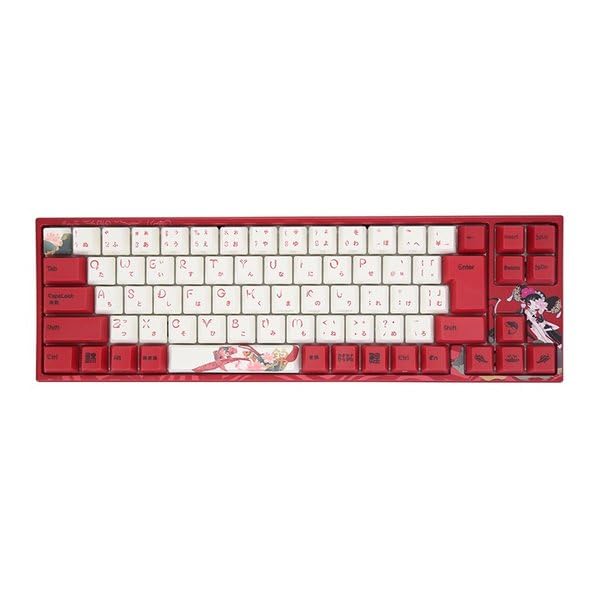
Image: Varmilo Koi 73 JIS Keyboard overview.
2. Key Features
- Unique Koi Design: Features vibrant koi fish illustrations and a red aesthetic, developed in collaboration with illustrator Li Huan.
- JIS Layout: 73-key Japanese Industrial Standard layout for specific regional input needs.
- Compact 65% Size: Optimizes desk space while retaining essential function and arrow keys.
- Customizable Switches: Offers a choice of Varmilo mechanical electrostatic capacity switches to suit individual typing preferences.
- Cherry-Style Stabilizers: Ensures consistent and stable key presses, especially for larger keys.
- USB Kubatana: Reliable wired connection for stable performance.
3. Setup Guide
3.1 Package Zviri mukati
Usati watanga, ndapota ita shuwa kuti zvinhu zvese zviripo mupakeji:
- Varmilo Koi 73 JIS Keyboard
- USB Cable
- Mushandisi Chinyorwa (gwaro iri)
3.2 Kubatanidza Kiyibhodhi
To connect your Varmilo Koi 73 keyboard to your computer, follow these steps:
- Tsvaga iyo USB-C port kuseri kwekhibhodi.
- Connect one end of the provided USB cable to the keyboard's USB-C port.
- Batanidza imwe magumo e USB tambo kune inowanikwa USB port pakombuta yako.
- Kiibhodhi inofanira kuzivikanwa otomatiki nesystem yako yekushandisa.
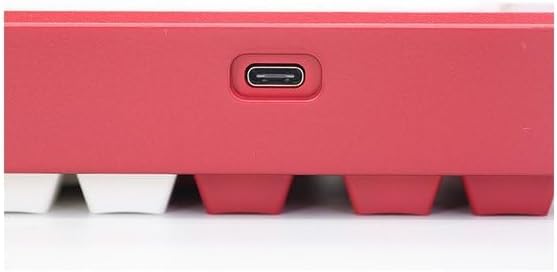
Image: USB-C port for keyboard connection.
3.3 Driver Installation (Optional)
For advanced customization and optimal performance, it is recommended to install the Varmilo driver software. This software allows you to remap keys, adjust performance settings, and customize lighting effects.
Video: This video demonstrates the driver installation process and software usage for Varmilo keyboards. While it features the Muse65 model, the steps for driver installation and basic software navigation are generally applicable to other Varmilo keyboards like the Koi 73.
Please visit the official Varmilo website for the latest driver downloads specific to your keyboard model. Follow the on-screen instructions during installation.
4. Operating Instructions
4.1 Mabasa Akakosha Ekutanga
The Varmilo Koi 73 keyboard features a standard JIS layout. Most keys function as labeled. For special functions, refer to the combination keys below.
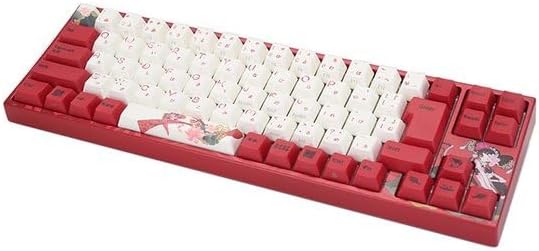
Mufananidzo: Pamusoroview of the Varmilo Koi 73 JIS Keyboard layout.
4.2 Kusanganiswa kweMakiyi eBasa (Fn)
Since this is a 73-key layout, some functions are accessed via the Fn key. Hold down the Fn key and press the corresponding key to activate its secondary function. Common Fn combinations include:
- Fn + F1-F12: Multimedia controls (e.g., volume, play/pause).
- Makiyi eFn + Arrow: Page Up/Down, Home/End (specific to model, refer to keycap legends).
- Fn + Kiyi Yekuhwina: Locks/unlocks the Windows key.

Image: Left side keys, often used with Fn for additional functions.
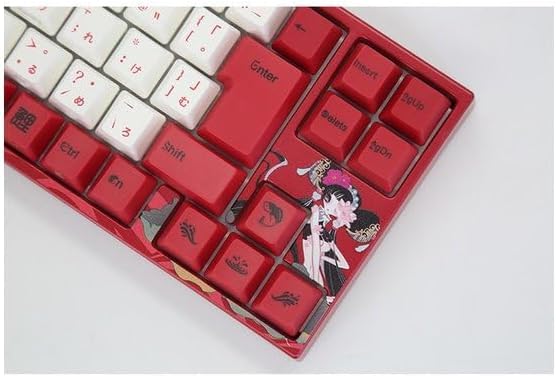
Image: Right side keys, including navigation and utility keys.
4.3 Mwenje Migumisiro
The Varmilo Koi 73 keyboard supports various RGB lighting effects. You can cycle through different modes and adjust brightness using specific key combinations. Refer to your keyboard's specific keycap legends or the driver software for detailed lighting controls.
Video: This video showcases various RGB lighting effects on a Varmilo keyboard. While the model shown is Muse65, it provides a general idea of the dynamic lighting capabilities available on Varmilo keyboards, including the Koi 73.
5. Kuchengeta uye Kuchengeta
Proper maintenance ensures the longevity and optimal performance of your Varmilo Koi 73 keyboard.
- Kuchenesa Keycaps: Gently remove keycaps using a keycap puller. Clean the keycaps with a soft cloth dampIsa sipo isina kunyorova nemvura. Iva nechokwadi chekuti yakaoma zvachose usati waisa zvakare.
- Kuchenesa Muviri weKiibhodhi: Use a soft, dry cloth to wipe down the keyboard body. For stubborn dirt, a slightly damp cloth with a small amount of isopropyl alcohol can be used. Avoid excessive moisture.
- Kubvisa Dust: Shandisa mweya wakamanikidzwa kubvisa huruva nemarara kubva pakati pemakiyi.
- Dzivisa Zvinwiwa: Keep liquids away from the keyboard to prevent damage.
- Cable Care: Do not bend or crimp the USB cable excessively.
6. Kugadzirisa matambudziko
If you encounter issues with your Varmilo Koi 73 keyboard, try the following solutions:
- Kiyibhodhi Haisi Kupindura:
- Ita shuwa kuti tambo ye USB yakabatana zvakachengeteka kune zvese keyboard uye komputa.
- Edza kubatanidza kiibhodhi kune imwe nzvimbo ye USB pakombiyuta yako.
- Tangazve komputa yako.
- Kana uchishandisa USB hub, edza kubatanidza zvakananga pakombuta.
- Makiyi asiri Kunyoresa:
- Check for any debris or foreign objects under the keycaps.
- If specific keys are not working, consider reinstalling the keyboard driver.
- Matambudziko Emwenje:
- Ensure the keyboard driver is installed and up to date.
- Use the Fn key combinations or driver software to adjust lighting modes and brightness.
- Kiyi yeMahwindo Yakakiyiwa:
- Press Fn + Win Key kuchinja Windows key lock.
If the problem persists, please contact Varmilo customer support for further assistance.
7. Zvinotsanangurwa
| Brand | Varmilo |
| Model Number | VMMA73A039SAKURA |
| Keyboard Layout | 73-key JIS (Japanese Industrial Standard) |
| Kubatana | USB Wired |
| Chinja Type | Mechanical (Linear) |
| Inowirirana Devices | Laptop |
| Product Dimensions | 34.2 masendimita (L) x 34.2 masendimita (W) x 5.1 masendimita (H) |
| Inosanganisirwa Zvikamu | USB Cable |
8. Warranty uye Tsigiro
Varmilo products typically come with a manufacturer's warranty. Please refer to the warranty card included with your product or visit the official Varmilo websaiti kune yakadzama waranti mazwi uye mamiriro.
For technical support, driver downloads, or further inquiries, please visit the official Varmilo support page or contact their customer service.
Official Varmilo Websaiti: www.varmilo.com