1. Nhanganyaya
Welcome to the user manual for your new ZTE nubia V60 smartphone. This guide provides essential information to help you set up, operate, maintain, and troubleshoot your device. Please read this manual thoroughly to ensure optimal performance and longevity of your smartphone.
The nubia V60 features a 6.72-inch FHD+ display, a powerful 50MP AI rear camera, a 32MP front camera, 8GB RAM (expandable with 12GB Dynamic RAM), 256GB ROM, a 5000mAh battery with 22.5W fast charging, NFC, fingerprint recognition, and DTS sound effects.
2. Kutanga Setup
2.1. Unboxing uye Package Zviri mukati
Usati watanga, ita shuwa kuti zvinhu zvese zviripo mupakeji:
- ZTE nubia V60 Smartphone
- Power Adapter
- USB Cable
- Chishandiso cheSIM Ejector (chinogona kusiyana zvichienderana nedunhu)
- Gwaro Rekutanga Nekukurumidza (gwaro iri rinoshanda segwaro rakakwana)
2.2. Kuisa iyo SIM Kadhi uye microSD Kadhi
- Tsvaga iyo SIM kadhi tireyi padivi pechishandiso chako.
- Isa iyo SIM ejector chishandiso mugomba diki padivi petireyi uye wodzvanya zvakasimba kusvika tireyi yabuda.
- Isa kadhi rako reNano-SIM uye/kana kadhi remicroSD (kana zvichibvira) mutireyi, matinji egoridhe akatarisa pasi, uchiita shuwa kuti akanyatsorongeka.
- Sunda tireyi zvinyoro nyoro kumashure muslot kusvika yadzvanya panzvimbo.

Mufananidzo: Side view of the nubia V60, illustrating the location of the SIM card tray and physical buttons.
2.3. Kuchaja Bhatiri
Before first use, fully charge your device. Connect the USB cable to the power adapter and then to the phone's charging port. Plug the power adapter into a wall outlet. The device supports 22.5W fast charging.
2.4. Powering On uye Initial Configuration
- Press and hold the Power button (located on the right side) until the screen lights up.
- Follow the on-screen instructions to select your language, connect to Wi-Fi, set up your Google account, and configure security features like fingerprint recognition.
3. Kushandisa mudziyo wako
3.1. Basic Navigation
The nubia V60 operates on Android 13.0. Use touch gestures such as tap, swipe, pinch-to-zoom, and long-press to navigate the interface. The power button and volume buttons are located on the right side of the device.

Mufananidzo: Mberi view of the nubia V60, showcasing its 6.72-inch FHD+ display.
3.2. Camera Features
Your device is equipped with a 50MP AI Rear Camera and a 32MP Front Camera.
- Kutanga Kamera: Tap the Camera icon on your home screen or lock screen.
- Kutora Mafoto/Vhidhiyo: Tap the shutter button to capture an image or switch to video mode to record.
- AI Enhancements: The AI features automatically optimize settings for various scenes and subjects.
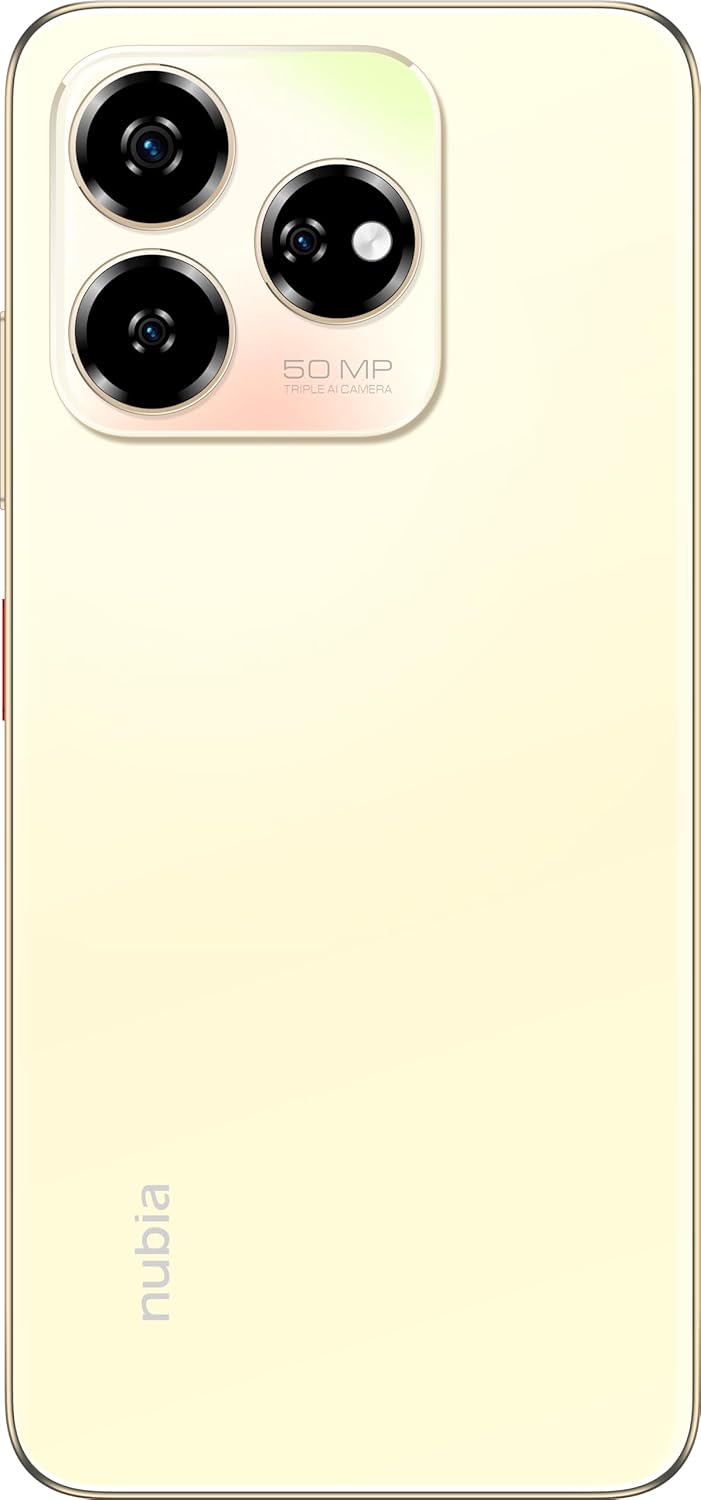
Mufananidzo: Rear view of the nubia V60, highlighting the 50MP triple AI camera module.
3.3. Kuzivikanwa kweFingerprint
The device features a side-mounted fingerprint sensor for secure and quick unlocking. To set up:
- Enda ku Settings> Chengetedzo> Fingerprint.
- Follow the on-screen prompts to register your fingerprint(s).
3.4. Kushanda kweNFC
NFC (Near Field Communication) allows for quick data exchange and contactless payments. To use NFC:
- Ensure NFC is enabled in Magadzirirwo > Midziyo yakabatana > Zvaunofarira pakubatanidza > NFC.
- Tap your phone to another NFC-enabled device or payment terminal to initiate a connection or transaction.
3.5. DTS Sound Effect
Experience enhanced audio quality with DTS sound effects. This feature can be configured in your device's sound settings to optimize audio for various media types.
3.6. Live Island
The Live Island feature provides dynamic notifications and quick access to certain functions around the front camera cutout. Explore its functionalities through your device's display settings or by interacting with notifications.
4. Kuchengeta uye Kuchengeta
4.1. Kuchenesa Mudziyo Wako
Use a soft, lint-free cloth to clean the screen and body of your phone. Avoid using harsh chemicals or abrasive materials that could damage the finish or screen coating.
4.2. Software Updates
Gara uchitarisa uye kuisa zvigadziriso zvesoftware kuti uone kuti mudziyo wako une zvichangobva kuitika, zvigamba zvekuchengetedza, uye kuvandudzwa kwekuita. Enda ku Settings> System> System update.
4.3. Battery Care
- Dzivisa tembiricha yakanyanyisa, sezvo inogona kukanganisa hupenyu hwebhatiri.
- Shandisa chete yekutanga kana yakasimbiswa yekuchaja accessories.
- Kuti bhatiri rive rakanaka, dzivisa kuburitsa bhatiri rose nguva nenguva kana kurichengeta riri pa100% kwenguva yakareba.
4.4. Kuchengetedza Kuchengetedza
Nguva nenguva review your device's storage (256GB ROM) and clear unnecessary files, apps, or media to maintain optimal performance. You can check storage usage in Zvirongwa > Kuchengeta.
5. Kugadzirisa matambudziko
This section addresses common issues you might encounter with your nubia V60.
5.1. Chishandiso Chisingabatike
- Ita shuwa kuti bhatiri rachajwa. Batanidza charger womira maminetsi mashoma usati waedza kubatidza.
- Dzvanya uye bata bhatani reSimba kweinenge 10-15 masekonzi kumanikidza kutangazve.
5.2. Nyaya dzekuchaja
- Verify that the charging cable and adapter are securely connected and undamaged.
- Try using a different power outlet or charging accessory.
- Chenesa pokuchaja zvinyoro-nyoro nebhurashi rakapfava, rakaoma kuti ubvise marara.
5.3. Matambudziko Ekubatanidza Network
- Tarisa kana SIM card yako yakaiswa zvakanaka uye yakashanda.
- Toggle Airplane Mode kubatidza nekudzima.
- Tangazve mudziyo wako.
- Enda ku Zvirongwa> Network & internet> Mobile network and ensure your preferred network type is selected.
5.4. Mapurogiramu Anoputsika kana Kutonhora
- Vhara uye vhura zvakare app.
- Bvisa cache yeapp uye data mukati Zvirongwa> Zvishandiso> [Zita reApp]> Chengetedza & cache.
- Ita shuwa kuti app yakagadziridzwa kune yazvino vhezheni.
- Tangazve mudziyo wako.
5.5. Kugadziriswazve Kwefekitori (Nzvimbo Yekupedzisira Yekuzorora)
Warning: A factory reset will erase all data on your phone. Back up important data before proceeding.
Kuti ugadzirise fekitori, enda ku Settings> System> Reset sarudzo> Bvisa data rese (factory reset) uye tevera mirairo.
6. Zvinyorwa zveUnyanzvi
| Feature | Tsanangudzo |
|---|---|
| Model Name | V60 |
| Item Model Number | 123439101056 |
| Brand | nubia |
| Operating System | Android 13.0 |
| Screen Size | 6.72 inches |
| Saizi Yekurangarira yeRAM Yakaiswa | 8 GB (Additional 12GB Dynamic RAM) |
| Memory Storage Capacity | 256 GB |
| CPU Speed | 1.8 GHz |
| Rear Camera | 50MP AI Kamera |
| Front Camera | 32MP |
| Battery Power Rating | 5000 mAh |
| Fast Charging | 22.5W |
| Wireless Communication Technologies | NFC |
| Connectivity Technologies | NFC |
| Nhoroondo ye Cellular Technology | 4G |
| GPS | GLONASS |
| Sravana Sameeralu Serial 4th Audio Jack | Hapana headphone jack |
| Fomu Factor | Bar |
| Color | Sunlit Gold |
| Item Weight | 510 g |
| Package Dimensions | 18 x 8.6 x 5.6 cm |
| Chii chiri mubhokisi | Adapta yemagetsi, Cable yeUSB |
7. Ruzivo rweWaranti
Your ZTE nubia V60 smartphone comes with a standard manufacturer's warranty, covering defects in materials and workmanship under normal use. The duration and terms of this warranty may vary by region. Please refer to the warranty card included in your product packaging for specific details.
Additionally, extended warranty and accidental damage protection plans may be available for purchase. For example, options such as a 1-Year Extended Warranty Plan, 2-Years Extended Warranty Plan, and 1-Year Accidental Damage Protection Plan might be offered by authorized retailers.
Chengetedza humbowo hwako hwekutenga kune chero vimbiso yewaranti.
8. Mutengi Tsigiro
For further assistance, technical support, or service inquiries regarding your ZTE nubia V60, please contact nubia customer service through their official websaiti kana ruzivo rwekusangana rwunopihwa mune yako chigadzirwa zvinyorwa.
You can often find FAQs, troubleshooting guides, and software downloads on the official nubia support website. When contacting support, please have your device model number (V60) and item model number (123439101056) ready.