1. Chigadzirwa Pamusoroview
The Generic M11 is a 4G Push-to-Talk (PTT) walkie talkie designed for global communication with unlimited range, leveraging 4G network technology. It features a robust design, clear audio, and a built-in flashlight, suitable for various professional and outdoor environments.

Mufananidzo 1: Generic M11 Walkie Talkie Components. This image displays the front and top view of the walkie talkie, highlighting key components such as the antenna, screen, PTT button, power button, speaker, flashlight, indicator light, earphone port, and Type-C charging port.
Package Zviri mukati:
- Walkie Talkie Unit
- User Manual
- Charger
- Battery Pack / Back Clip
- Chaja Cable (Type-C)
- SIM Card (2 pieces, if included in package)
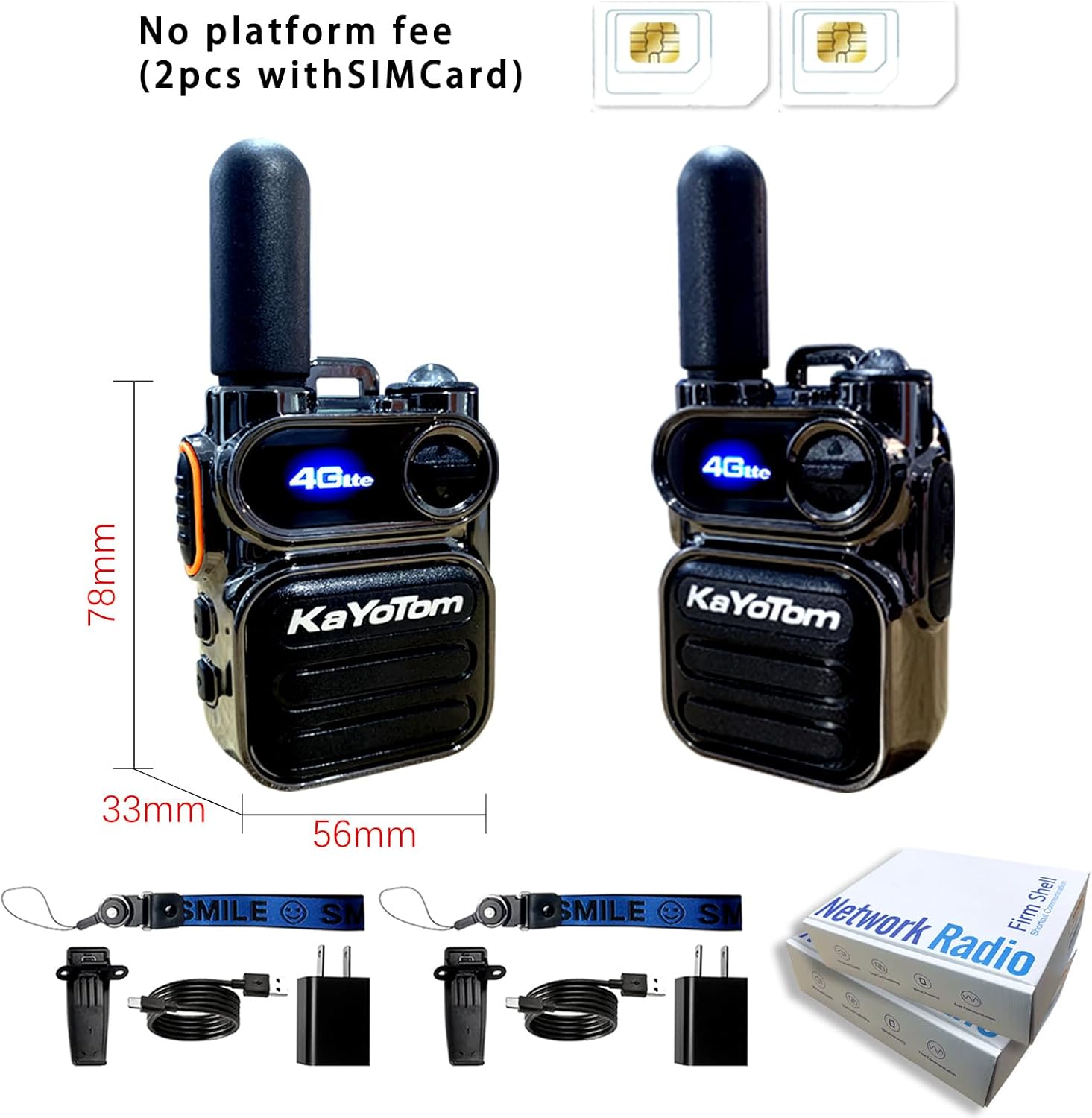
Mufananidzo 2: Included Accessories. This image illustrates the two walkie talkie units, two SIM cards, and the standard accessories provided in the package, including the charger, charging cable, and back clip.
2. Setup uye Kuiswa
2.1. Kuiswa kweSIM Card
- Ensure the walkie talkie is powered off.
- Locate the SIM card slot, typically under the battery cover or on the side of the device.
- Insert a valid 4G SIM card into the designated slot. Ensure correct orientation as indicated on the device.
- Vhara SIM card slot cover zvakachengeteka.
Note: A valid SIM card is required for the 4G PTT functionality and unlimited range communication.
2.2. Kuiswa kweBattery uye Kuchaja
- If the battery is not pre-installed, open the battery compartment cover on the back of the device.
- Insert the 2500mAh battery pack, ensuring the contacts align correctly.
- Tsiva chivharo chebhatiri.
- Connect the Type-C charging cable to the charging port on the walkie talkie and plug the charger into a power outlet.
- The indicator light will show charging status. Charge the device fully before first use.
The device supports fast charging via its Type-C port. A full charge provides approximately 7 days of standby time.
2.3. Attaching the Back Clip and Antenna
- Attach the back clip to the designated slot on the rear of the walkie talkie for convenient carrying.
- Screw the antenna clockwise onto the antenna connector at the top of the device until it is finger-tight. Do not overtighten.
3. Operating Instructions
3.1. Simba On / Off
- Kubatidza: Press and hold the Power button (refer to Figure 1) until the screen illuminates.
- Kudzima: Dzvanya wobata bhatani rePower kusvika mudziyo wadzima.
3.2. Basic Communication (PTT)
- Ensure the device is powered on and connected to the 4G network (indicated on the screen).
- Select the desired contact or group using the Menu/OK button and navigation controls.
- To transmit, press and hold the PTT (Push-to-Talk) button on the side of the device. Speak clearly into the microphone.
- Sunungura bhatani rePTT kuti uteerere mhinduro.

Mufananidzo 3: Single and Group Call Functionality. This image illustrates the device's capability for both individual and group communications over the network.
The M11 supports both single calls and group calls, providing flexible communication options.
3.3. Kushandisa Tochi
- To turn on the flashlight, locate the flashlight button (refer to Figure 1) and press it.
- Dzvanya bhatani zvakare kuti udzime tochi.
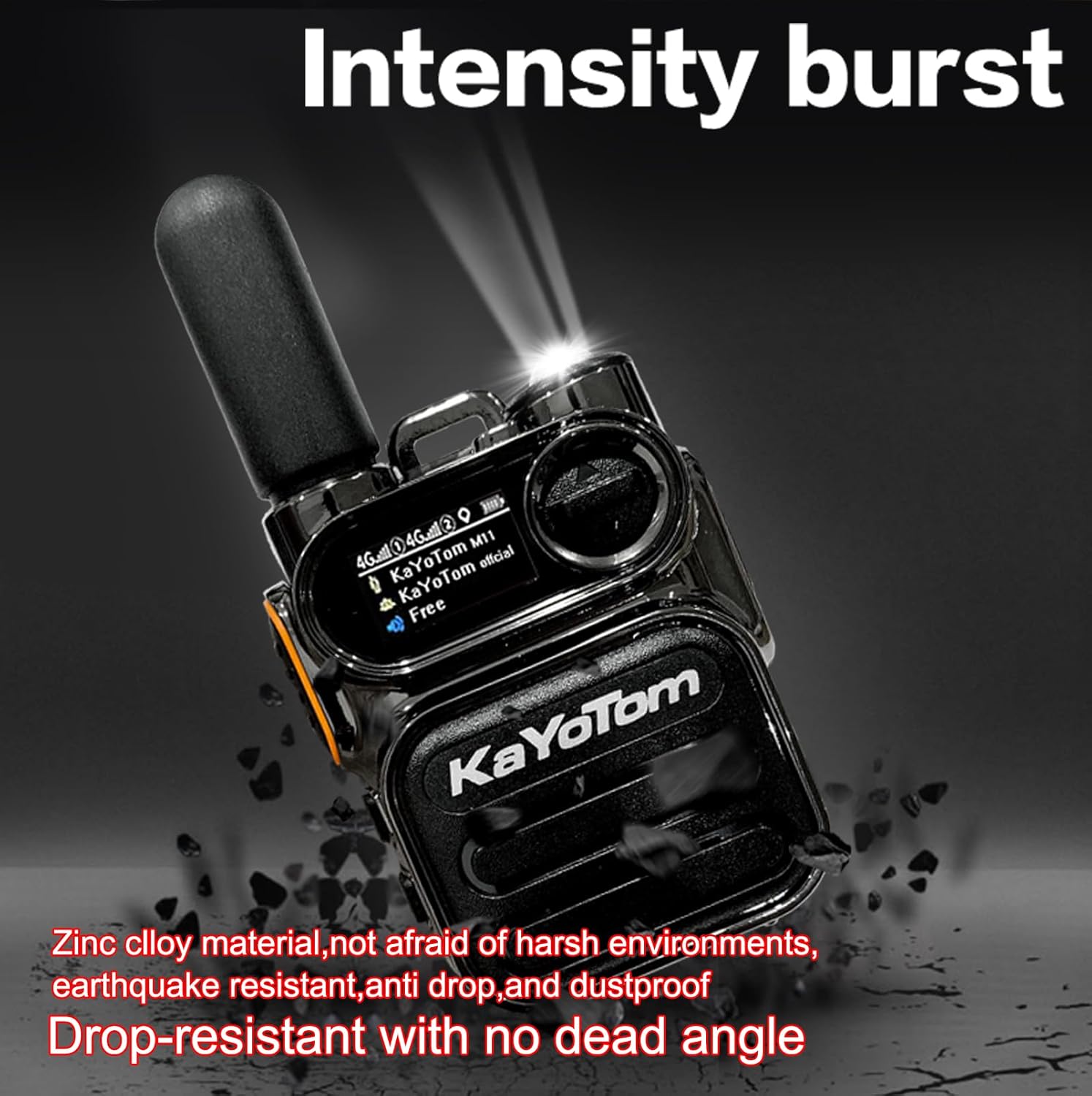
Mufananidzo 4: Powerful LED Flashlight. This image demonstrates the integrated LED flashlight, providing illumination in low-light conditions.
3.4. Audio Quality and Noise Reduction
The M11 is equipped with a bright three-dimensional anti-vibration diaphragm for noise reduction, ensuring clear and loud sound quality even in noisy environments.

Mufananidzo 5: Clear Sound Technology. This diagram highlights the internal design features that contribute to the device's clear audio output and noise reduction capabilities.
4. Kuchengeta uye Kuchengeta
4.1. Battery Care
- Kurebesa bhatiri, dzivisa kuburitsa bhatiri zvakazara nguva zhinji.
- Charge the battery using only the provided charger and Type-C cable.
- Chengetedza mudziyo munzvimbo inotonhorera, yakaoma kana isiri kushandiswa kwenguva yakareba.
4.2. Kuchenesa
- Pukuta mudziyo nekanyoro, damp jira. Usashandise makemikari ane hasha kana abrasive cleaners.
- Iva nechokwadi chekuti maport ese akaoma usati wachaja.
4.3. Mafungiro Ezvakatipoteredza
- The M11 walkie talkie is kwete kudzivirira mvuraDzivisa kubatwa nemvura kana hunyoro hwakawanda.
- The device is designed with zinc alloy material for durability, offering earthquake resistance, anti-drop protection, and dustproof properties.
5. Kugadzirisa matambudziko
5.1. Mudziyo Haubatiki
- Ita shuwa kuti bhatiri rakaiswa zvakanaka uye rakazara.
- Tarisa kuti tambo yekuchaja neadapta zviri kushanda nemazvo.
- Try pressing and holding the Power button for a longer duration (5-10 seconds).
5.2. No Network Connectivity / Cannot Communicate
- Tarisa kana SIM kadhi yakanyatsoiswa uye yakagadziriswa.
- Ensure you are in an area with 4G network coverage.
- Restart the device to re-establish network connection.
- Verify that your subscription for airtime is active.
5.3. Poor Audio Quality
- Ensure the microphone and speaker are not obstructed.
- Tarisa marongero evhoriyamu.
- Move to an area with better network signal strength.
5.4. Flashlight Not Working
- Ita shuwa kuti mudziyo une bhatiri rakakwana.
- Press the flashlight button firmly.
6. Zvinotsanangurwa
| Feature | Detail |
|---|---|
| Model Number | M11 |
| Item Weight | 7 ounces (inenge 198 gramu) |
| Zviyero zveChigadzirwa (L x W x H) | 3.07 x 2.2 x 1.29 inches (approx. 78 x 56 x 33 mm) |
| Battery Capacity | 2500mAh |
| Standby Time | Kusvikira kumazuva makumi manomwe |
| Kuchaja Port | Type-C |
| Frequency Range | 2.4 GHz (for 4G connectivity) |
| Talking Range Maximum | 5000 miles (network dependent) |
| Nhamba yeChannels | 200 |
| Special Features | Long Range, Noise Reduction, Rechargeable, Shockproof, Built-in Flashlight, 4G PTT |
| Mvura Resistance Level | Kwete Kudzivirira Mvura |
| Material | Zinc Alloy (for durability) |
| FCC ID | 2BK6D-K300S |
7. Ruzivo rweWaranti
This Generic M11 Global PTT Walkie Talkie comes with a One Year Warranty from the date of purchase. This warranty covers manufacturing defects and malfunctions under normal use. It does not cover damage caused by misuse, accidents, unauthorized modifications, or exposure to water.
Ndapota chengetedza humbowo hwako hwekutenga kwezvichemo zvewaranti.
8. Mutengi Tsigiro
If you encounter any issues or have questions regarding your Generic M11 Global PTT Walkie Talkie that are not addressed in this manual, please contact our customer support team.
Refer to the contact information provided with your purchase or on the product packaging for assistance.
We are committed to resolving your troubles and ensuring your satisfaction.


