
1. Nhanganyaya
The IMIKI FRAME LITE ST2 is a versatile smartwatch designed for daily use, offering a blend of style and functionality. It features a 1.96-inch IPS display, Bluetooth connectivity, and various health monitoring capabilities. This manual provides essential information for operating and maintaining your device.
2. Package Zviri mukati
Ndokumbira utarise kuti zvinhu zvese zvirimo mupasuru yako:
- IMIKI FRAME LITE ST2 Smartwatch
- Magnetic kuchaja Cable
- User Manual
3. Mudziyo Pamusoroview
Familiarize yourself with the main components of your smartwatch.
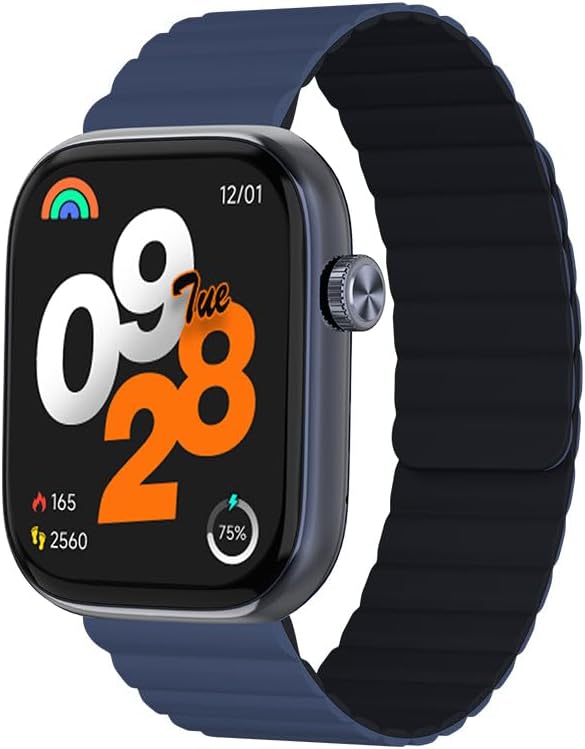
Mufananidzo 1: Mberi view of the IMIKI FRAME LITE ST2 Smartwatch, displaying the time, date, and activity metrics on its 1.96-inch IPS screen. The watch features a blue case and a blue magnetic strap.

Mufananidzo 2: Side view of the IMIKI FRAME LITE ST2 Smartwatch, highlighting its slim profile and the integrated crown button for navigation and control.
4. Setup
4.1 Kuchaja Smartwatch
Before initial use, fully charge your IMIKI FRAME LITE ST2 Smartwatch.
- Connect the magnetic charging cable to the charging points on the back of the smartwatch.
- Plug the USB end of the cable into a standard USB power adapter (not included) or a computer's USB port.
- The watch display will indicate charging status. A full charge takes approximately 2 hours.
A fully charged 250 mAh battery provides up to 15 days of typical use or 5 days of intensive use.
4.2 Installing the Companion App
To unlock the full features of your smartwatch, download and install the companion application on your smartphone.
- Scan the QR code provided in the quick start guide or search for the official IMIKI app in the Apple App Store (for iOS) or Google Play Store (for Android).
- Isa iyo app pane yako smartphone.
- Tevedzera mirairo iri pachikirini kuti ugadzire account uye ugadzire nyanzvi yakofile.
4.3 Kubatanidza neSmartphone Yako
Ensure Bluetooth is enabled on your smartphone and the smartwatch is sufficiently charged.
- Open the IMIKI companion app on your smartphone.
- Enda kuchikamu che'Mudziyo' kana kuti 'Wedzera Mudziyo' mukati meapp.
- The app will search for available devices. Select 'IMIKI FRAME LITE ST2' from the list.
- Simbisa chikumbiro chekuparura pafoni yako newachi kana ukakumbirwa.
- Kana yabatanidzwa, wachi yekuchenjera ichabatanidza data nefoni yako.
5. Kushandisa Smartwatch
5.1 Basic Navigation
- Bata Sikirini: Svetera kuruboshwe, kurudyi, kumusoro, kana pasi kuti ufambe mumamenyu nezviziviso. Dzvanya kuti usarudze zvinhu.
- Side Button/Crown: Press to wake the screen, return to the home screen, or access the app list. Rotate (if applicable) to scroll through lists.
5.2 Call Management
With Bluetooth 5.3 connectivity, you can manage calls directly from your smartwatch when paired with your smartphone.
- Kupindura Nhare: Tap the green icon on the watch screen when an incoming call is displayed.
- Kuramba Kufona: Tap the red icon to reject an incoming call.
- Izwi Mubatsiri: Access your smartphone's voice assistant directly from the watch for hands-free commands.
5.3 Health and Fitness Monitoring
The IMIKI FRAME LITE ST2 is equipped with sensors to track your health and fitness activities.
- YeMoyo Rate Kuongorora: The optical sensor continuously monitors your heart rate. View real-time data on the watch or in the app.
- Kuyerwa kweOkisijeni yeRopa (SpO2): Measure your blood oxygen saturation levels. Ensure the watch is worn snugly on your wrist for accurate readings.
- Workout Modes: Choose from 105 supported workout modes to track specific activities. The watch records statistics such as duration, calories burned, and heart rate during exercise.
- Kutsvaga Kurara: Monitor your sleep patterns, including deep sleep, light sleep, and wake times.
5.4 Kugadzirisa
Personalize your smartwatch experience through the companion app.
- Zviso zvekutarisa: Select from a variety of watch faces or create custom ones using the app.
- Zviziviso Settings: Manage which app notifications appear on your smartwatch.
6. Kuchengeta
6.1 Kuchenesa
Regular cleaning helps maintain the smartwatch's appearance and functionality.
- Pukuta sikirini wobva watarisa muviri nejira rakapfava, risina jira.
- Patsvina yakasindimara, zvishoma dampen jira nemvura. Dzivisa kushandisa makemikari ane hasha kana abrasive zvinhu.
- Chenesa nzvimbo dzekuchaja nguva nenguva kuti uve nechokwadi chekuti dzinochaja zvakanaka.
6.2 Kuramba Mvura
The IMIKI FRAME LITE ST2 has an IP68 water resistance rating, meaning it is protected against dust ingress and can withstand immersion in water up to 1.5 meters for 30 minutes. It is suitable for daily use, such as hand washing or light rain. However, it is not recommended for swimming, diving, or exposure to high-pressure water.
6.3 Kuchengeta
When not in use for extended periods, store the smartwatch in a cool, dry place. Ensure it has some charge to prevent deep discharge of the battery.
7. Kugadzirisa matambudziko
If you encounter issues with your smartwatch, refer to the following common solutions:
- Watch not kubatidza: Ita shuwa kuti wachi yachajiwa zvizere. Isungirire pachaja kweinenge maminitsi makumi matatu.
- Haikwanise kubatana ne smartphone:
- Ita shuwa kuti Bluetooth yakabatidzwa pafoni yako.
- Ita shuwa kuti wachi iri mukati menharembozha yako.
- Tangazve zvese smartwatch uye yako smartphone.
- Bvisa Bluetooth cache pafoni yako (kana zvichibvira).
- Mashoko ehutano asina kururama: Ita shuwa kuti wachi yakapfekwa zvakanaka paruoko rwako, kwete yakanyanya kusimba kana kuregedzera. Chenesa sensor kuseri kwewachi.
- Zviziviso hazvisi kuoneka: Check notification settings in the companion app and on your smartphone. Ensure the app is running in the background.
- Sikirini haina kupindura: Try restarting the smartwatch by pressing and holding the side button for several seconds.
8. Zvinotsanangurwa
| Feature | Tsanangudzo |
|---|---|
| Brand | IMIKI |
| Model Name | IMIKI FRAME LITE ST2 |
| Screen Size | 1.96 inches |
| Display Type | IPS |
| Kubatana Technology | Bluetooth 5.3 |
| Inowirirana Devices | Smartphone (Android & iOS) |
| Battery Capacity | 250 mAh |
| Yakajairika Kushandisa Bhatiri Hupenyu | Kusvikira kumazuva makumi manomwe |
| Intensive Usage Battery Life | Kusvikira kumazuva makumi manomwe |
| Kuchaja Nguva | Anenge maawa maviri |
| Water Resistance Rating | IP68 |
| Health Monitoring | Blood Oxygen, Heart Rate |
| Workout Modes | 105 |
| Strap Type | Magnetic |
9. Warranty uye Tsigiro
For warranty information and customer support, please refer to the warranty card included in your product packaging or visit the official IMIKI website. Chengeta risiti rako rekutenga seumboo hwekutenga.
If you require further assistance or have questions not covered in this manual, please contact IMIKI customer service through their official channels.