
1. Nhanganyaya
Ndatenda nekutengaasing the ELECOM LBT-ECOWS01MBK Open-Ear Bluetooth 5.4 Wireless Headphones. These headphones are designed to allow you to enjoy audio content while remaining aware of your surroundings. This manual provides essential information for the safe and effective use of your new device.

Image: The ELECOM LBT-ECOWS01MBK open-ear wireless headphones and their transparent charging case.
2. Package Zviri mukati
- ELECOM LBT-ECOWS01MBK Open-Ear Wireless Headphones (Left and Right)
- Kuchaja Case
- USB Charging Cable (USB-A to USB Type-C™)
- Quick Start Guide
3. Zvigadzirwa zveChigadzirwa
- Dhizaini Yenzeve Yakavhurika: Listen to music or videos while simultaneously hearing ambient sounds, ensuring awareness of your surroundings.
- Lightweight Comfort: Each earbud weighs approximately 9.8g, providing a comfortable fit for extended wear without pressure or stuffiness.
- Yepamusoro-soro Audio: Equipped with a large 16mm diameter driver for clear sound and supports AAC codec for high-quality audio on compatible devices like iPhones.
- Voice Mode: Optimizes audio frequencies to make human voices clearer, ideal for radio, audiobooks, and conversations.
- Low Latency Mode: Reduces audio-visual delay, enhancing the experience for videos and games.
- Kutamba Kwakawedzerwa: Up to 10 hours of continuous playback on a single charge, and up to 25 hours with the charging case.
- Bata Sensor Controls: Conveniently manage music playback, volume, and calls directly from the earbuds.
- Voice Assistant Support: Compatible with Siri and Google Assistant for hands-free control.
- Kushandisa Earbud Imwechete: Chero earbud inogona kushandiswa yakazvimiririra.
- USB Type-C™ Charging: The charging case features a USB Type-C™ port for convenient charging.

Image: A man wearing the open-ear headphones, demonstrating the ability to hear ambient sounds while enjoying media.
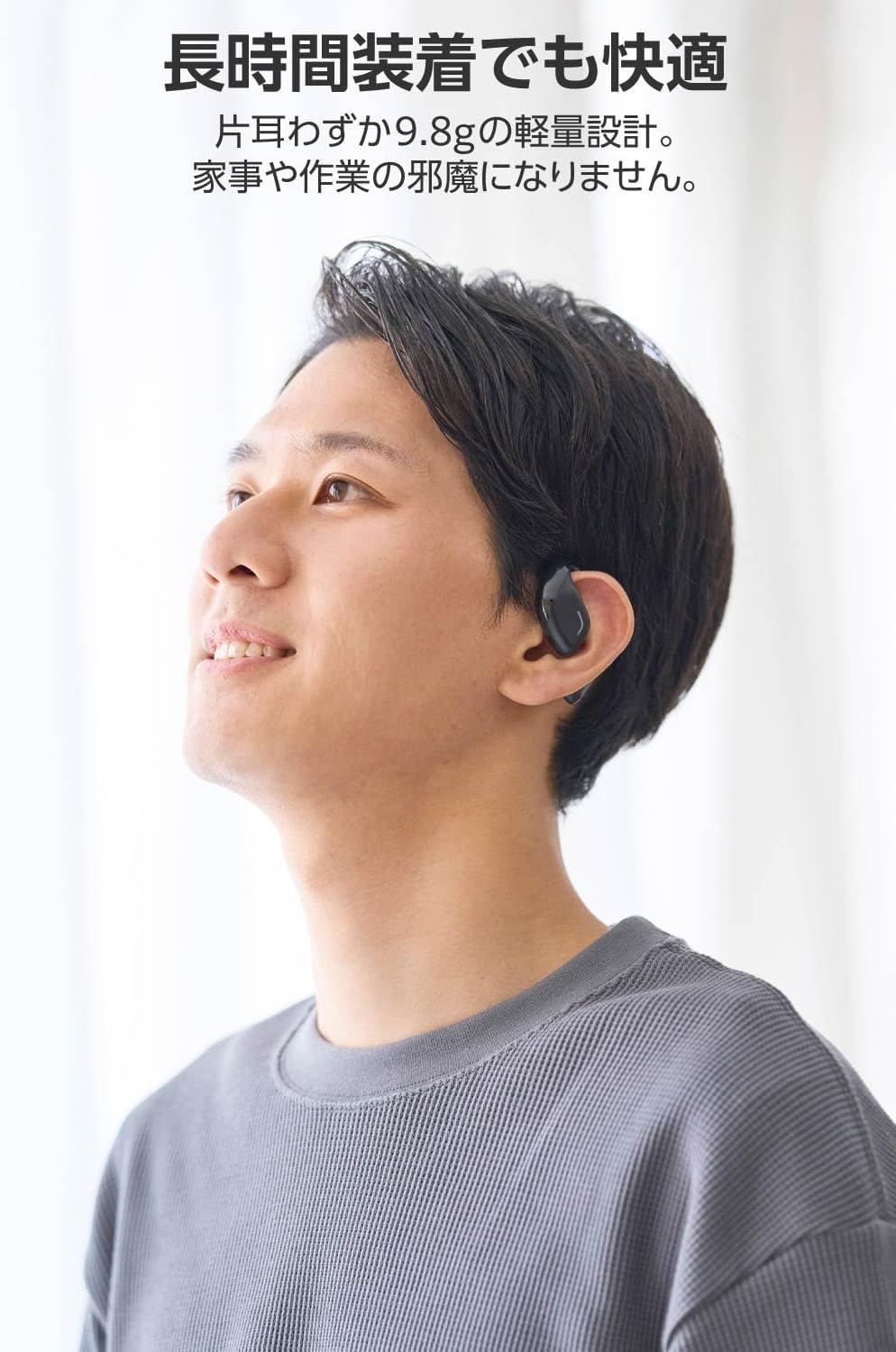
Image: A man wearing the lightweight open-ear headphones, highlighting their comfortable design for long-term use.
4. Setup
4.1. Kuchaja mahedhifoni nekesi
Usati washandisa kekutanga, chaja mahedhifoni zvizere nebhokisi rekuchaja.
- Isa ese maarbuds mune yekuchaja kesi.
- Connect the supplied USB Type-C™ cable to the charging port on the case and a USB power adapter (not included).
- Chiratidzo che LED chiri pabhokisi rekuchaja chicharatidza mamiriro ekuchaja.
Nguva yekuchaja:
- Headphones: Approximately 1.5 hours
- Kuchaja Nyaya: Inenge maawa 1.5

Image: Illustration of the charging process for the headphones and case, showing the USB-C port and LED indicators.
4.2. Kubatanidza neBluetooth Device
- Ita shuwa kuti mahedhifoni akachajwa.
- Open the charging case. The headphones will automatically enter pairing mode. The LED indicator on the earbuds will flash.
- On your device (smartphone, PC, tablet), enable Bluetooth and search for available devices.
- Select "LBT-ECOWS01MBK" from the list of found devices.
- Kana yabatanidzwa, chiratidzo che LED chiri pama earbuds chinomira kupenya.
- After initial pairing, the headphones will automatically connect to the last paired device when removed from the case.
4.3. Kupfeka maHeadphone
The headphones are designed to hook over your ears.
- Ziva Kuruboshwe (L) uye Kurudyi (R) mahedhifoni.
- With the LED facing outwards, hook the earbud over the top of your ear.
- Adjust the earbud for a comfortable and secure fit.

Image: Step-by-step guide on correctly wearing the open-ear headphones.
5. Operating Instructions
5.1. Touch Sensor Controls
The headphones feature touch sensors on each earbud for various functions.
| Function | Chiito | Earbud |
|---|---|---|
| Tamba/Misa | Single tap | L kana R |
| Next Track | Top kaviri | R |
| Previous Track | Top kaviri | L |
| Volume Up | Kudzvanya kwenguva refu (approx. 2 seconds) | R |
| Volume Down | Kudzvanya kwenguva refu (approx. 2 seconds) | L |
| Pindura/Pedzisa Kufona | Single tap | L kana R |
| Ramba Kufona | Kudzvanya kwenguva refu | L kana R |
| Activate Voice Assistant | Katatu pombi | L kana R |

Image: Visual representation of the touch sensor areas and corresponding music and volume controls.
5.2. Switching Audio Modes
The headphones offer three distinct audio modes:
- Normal Mode: Standard audio playback.
- Low Latency Mode: Reduces audio-visual delay, suitable for watching videos or playing games.
- Voice Mode: Enhances human voice frequencies for clearer dialogue, ideal for audiobooks, podcasts, or calls.
To switch between modes, refer to the quick start guide or the official product page for specific touch gestures, as these can sometimes be customized.

Mufananidzo: Kupfuuraview of the three available audio modes and their recommended uses.
5.3. Single Earbud Use
You can use either the left or right earbud independently. When using only one earbud, ensure the other earbud is powered off or stored in the charging case.
6. Kuchengeta
Kuti uve nechokwadi chekuti mahedhifoni ako anogara kwenguva refu uye anoshanda zvakanaka:
- Geza maearbuds nebhokisi rekuchaja nguva dzose nejira rakapfava, rakaoma.
- Usashandise abrasive cleaners kana solvents.
- Dzivisa kuisa mahedhifoni kune tembiricha yakanyanyisa, humidity, kana zuva rakananga.
- Chengetedza zvinobatika zvekuchaja pamaearbud uye mukati mekesi yakachena uye isina tsvina.
- Chengeta mahedhifoni mubhokisi rawo rekuchaja kana asiri kushandiswa kuti adzidzivirire uye agare akachajiwa.
7. Kugadzirisa matambudziko
Kana ukasangana nematambudziko nemahedhifoni ako, tarisa kune anotevera akajairika mhinduro:
- Hapana Inzwi:
- Ita shuwa kuti mahedhifoni akachajwa.
- Tarisa kuti mahedhifoni akanyatsopetwa here uye akabatana nemudziyo wako.
- Rongedza huwandu hwemahedhifoni uye mudziyo wako wakabatana.
- Haikwanise Kubatanidza:
- Iva nechokwadi chekuti mahedhifoni ari mu pairing mode (LED flashing).
- Turn off Bluetooth on other nearby devices that may have previously connected.
- Tangazve mudziyo wako uye edza kubatanidza zvakare.
- Kubatana Kwenguva:
- Ensure there are no obstacles between the headphones and your device.
- Move closer to your device (maximum communication distance is approximately 10m).
- Dzivisa nharaunda dzine simba remagetsi kukanganiswa.
- Kubata Kudzora Kwete Kupindura:
- Ita shuwa kuti minwe yako yakachena uye yakaoma.
- Try restarting the headphones by placing them in the case and then taking them out again.
- Low Battery Voice Prompt: If you hear a repeated "Low Battery, please charge" prompt, place the earbuds in the charging case immediately.
If the issue persists, please refer to the official ELECOM support website kuti uwane rumwe rubatsiro.
8. Zvinotsanangurwa
| Feature | Tsanangudzo |
|---|---|
| Model Name | LBT-ECOWS01MBK |
| Kubatana Technology | Wireless (Bluetooth® Version 5.4) |
| Makaralı Profiles | A2DP, AVRCP, HFP |
| Inotsigirwa Codecs | AAC, SBC |
| Max Communication Distance | Approx. 10m (without obstacles) |
| Frequency Response (A2DP) | 20-20,000Hz |
| Inoenderera Kutamba Nguva | Approx. 10 hours (Approx. 25 hours with charging case) |
| Nguva yekuchaja (Mahedhifoni) | Approx. 1.5 maawa |
| Nguva yekuchaja (Nyaya) | Approx. 1.5 maawa |
| Maikorofoni Type | MEMS mhando |
| Mutyairi Unit | φ16mm Full Range |
| Huremu (pamunzeve) | Approx. 9.8g |
| Huremu (Nyaya yekuchaja) | Approx. 59.0g |
| Color | Matte Black |
| Kuramba Mvura | Kwete-mvura |
| Operating Temperature | 5 ℃ kusvika 35 ℃ |
| Kushanda Humidity | 20% kusvika 80% (isina-condensing) |
9. Warranty uye Tsigiro
9.1. Ruzivo rweWaranti
Ichi chigadzirwa chinouya ne 1-makore waranti from the date of purchase. Please retain your proof of purchase for warranty claims. The warranty covers manufacturing defects but does not cover damage caused by misuse, accidents, unauthorized modifications, or normal wear and tear.
9.2. Mutengi Tsigiro
For further assistance, technical support, or detailed product information, please visit the official ELECOM websaiti:
You may also find additional FAQs and troubleshooting tips on the product support pages.