
1. Nhanganyaya
Thank you for choosing the FLEXISPOT L-Shaped Electric Standing Desk. This manual provides essential information for the safe assembly, operation, and maintenance of your new desk. Please read it thoroughly before use and retain it for future reference.
The FLEXISPOT L-Shaped Electric Standing Desk offers a spacious 63.0" x 55.1" work surface with electric height adjustment, allowing seamless transitions between sitting and standing positions. It features a robust 3-legged frame, a preset controller for personalized height settings, and a versatile orientation to fit various office layouts.
2. Safety Information
Always ensure the desk is properly assembled and anchored to the floor to prevent tipping. Do not exceed the maximum weight capacity of 220 lbs (100 kg) to maintain stability. Be cautious when adjusting the desk height to avoid injury. Keep children and pets away from the desk during operation. Ensure all cables are managed to prevent tripping hazards or damage during height adjustments.
3. Package Zviri mukati
Your FLEXISPOT L-Shaped Electric Standing Desk ships in two separate packages, which may arrive on different days. Please verify all components against the included packing list before beginning assembly. If any parts are missing or damaged, contact FLEXISPOT customer support immediately.
4. Setup uye Gungano
Assembly of the FLEXISPOT L-Shaped Electric Standing Desk requires careful attention to detail. It is recommended to have two people for certain steps, especially when handling the desktop and flipping the assembled unit. The desk features a flexible design, allowing the wider desktop section to be positioned on either the left or right side to best suit your workspace.
4.1 Kusunungura uye Kugadzirira
- Carefully unpack all components from both boxes.
- Lay out all parts on a clean, soft surface (e.g., a blanket or carpet) to prevent scratches.
- Ziva zvikamu zvese uchishandisa runyorwa rwezvikamu zvapihwa.
4.2 Frame Assembly
Follow the detailed instructions in the separate assembly guide provided with your desk. Ensure all screws are tightened securely. The robust industrial-grade steel frame provides stability for your workstation.
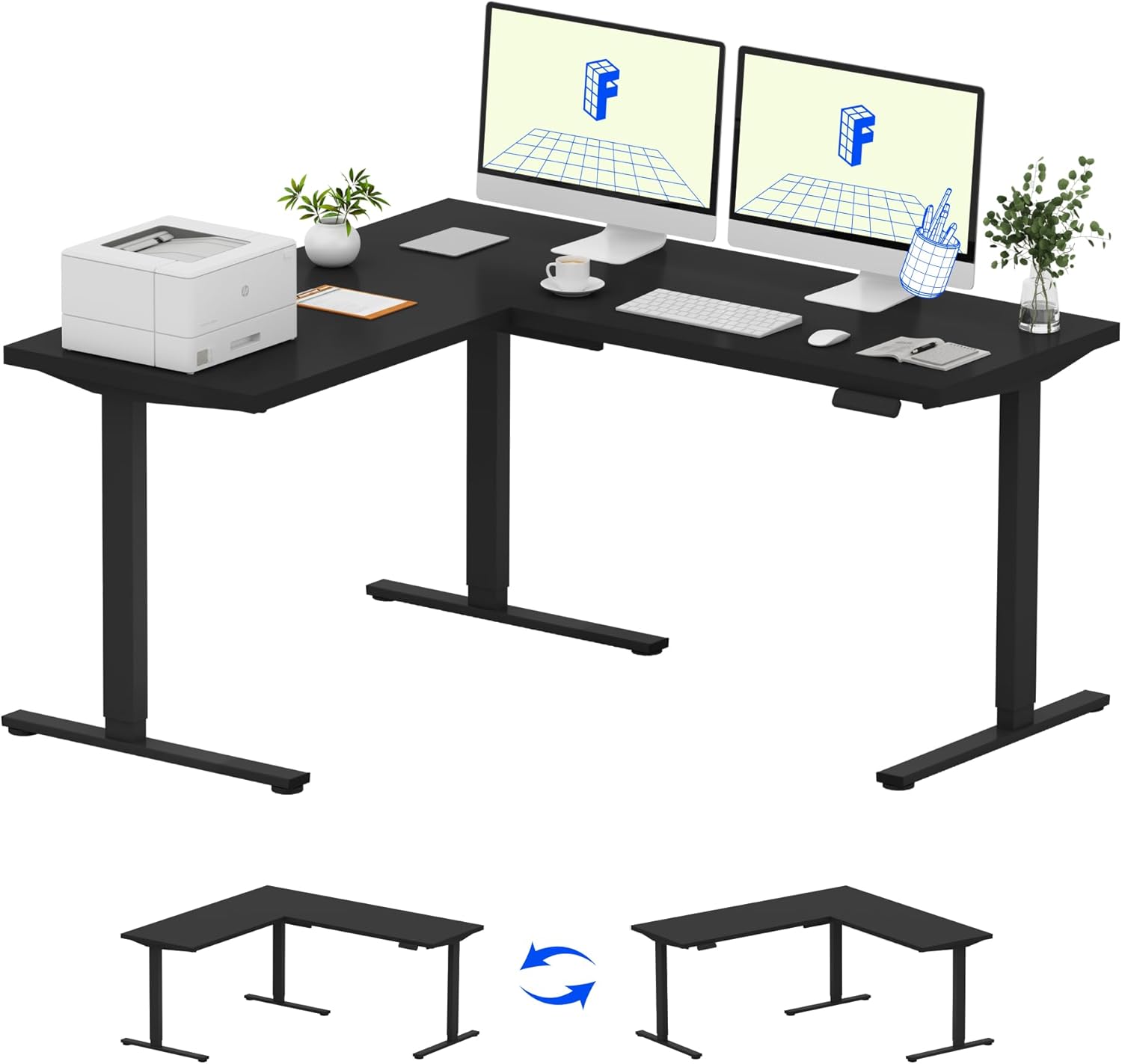
Image: Assembled FLEXISPOT L-Shaped Electric Standing Desk.
4.3 Desktop Attachment and Orientation
The expansive L-shaped desktop can be configured for either a left-hand or right-hand setup. Decide on your preferred orientation before attaching the desktop to the frame. The desktop is crafted from environmentally sourced splice board, measuring 63.0" x 55.1".

Image: Flexible right/left orientation options for the L-shaped desk.
4.4 Cable Management
Utilize the included cable management tools to keep your workspace tidy and prevent cables from interfering with the desk's movement.

Image: The desk ships in two packages and has a 220 lbs weight capacity.
5. Operating Instructions
Your FLEXISPOT L-Shaped Electric Standing Desk is equipped with an intuitive LED control panel for easy height adjustments and memory presets.
5.1 Kugadzirisa Hurefu hweDesk
- Shandisa iyo kumusoro (▲) uye Pasi (▼) buttons on the control panel to manually adjust the desk to your desired height.
- The desk offers a large adjustable range, from a minimum height of 28.3 inches to a maximum height of 45.9 inches.

Image: Large adjustable height range of the desk.
5.2 Using Memory Presets
The LED control panel allows you to save up to four preferred height settings for quick transitions.
- Gadzirisa dhesiki kune yako yaunoda kureba uchishandisa Up / Down mabhatani.
- Press the M button (Memory) followed by one of the numbered preset buttons (1, 2, 3, kana 4) kuchengetedza kukwirira kwazvino.
- Kuti udzorere urefu hwakachengetwa, ingodzvanya bhatani rakagadziriswa rine nhamba rinoenderana naro.

Image: Smart LED control panel with memory presets.
5.3 Anti-Collision Feature
The desk is equipped with an anti-collision system. If the desk encounters an obstacle during height adjustment, it will automatically stop and rebound slightly to prevent damage or injury.

Image: Anti-collision feature in action.
6. Kuchengeta
Regular maintenance ensures the longevity and optimal performance of your standing desk.
- Kuchenesa: Pukuta desktop uye furemu nenyoro, damp jira. Dzivisa makemikari ane hasha kana abrasive cleaners anogona kukanganisa kupera.
- Kuongorora: Nguva nenguva tarisa masikuruu nemabhoti ese kuti uve nechokwadi chekuti akasimba. Simbisa zvakare kana zvichidikanwa.
- Cable Management: Ensure power cords and other cables are not pinched or tangled, especially during height adjustments.
- Weight Capacity: Do not exceed the maximum weight capacity of 220 lbs to prevent strain on the motor and frame.
7. Kugadzirisa matambudziko
If you encounter issues with your FLEXISPOT L-Shaped Electric Standing Desk, refer to the following common troubleshooting steps:
- Desk Kwete Kufamba:
- Tarisa kana tambo yemagetsi yakabatanidzwa zvakanaka padhesiki nepachinoburitsa magetsi chiri kushanda.
- Ensure no objects are obstructing the desk's movement.
- Try resetting the desk by unplugging it for 30 seconds and then plugging it back in.
- Uneven Movement/Wobbling:
- Iva nechokwadi chekuti screws dzese dzegungano dzakasimbiswa.
- Ensure the desk is on a level surface. Adjust the leveling feet if necessary.
- Confirm that the weight distribution on the desktop is balanced and within the maximum capacity.
- Control Panel Haisi Kupindura:
- Perform a power cycle (unplug and replug).
- Check for any visible damage to the control panel or its cable.
If these steps do not resolve the issue, please contact FLEXISPOT customer support.
8. Zvinotsanangurwa
| Brand | FLEXISPOT |
| Model | B0DV54QLX4 |
| Product Dimensions | 55.1"D x 63"W x 45.9"H |
| Color | Black Frame + Black Top |
| Style | Mazuvano |
| Base Material | Alloy Steel |
| Top Material Type | Wood |
| Tabletop Kukora | 1 inch |
| Minimum Height | 28 inches |
| Maximum Height | 45.9 inches |
| Maximum Weight Recommendation | 220 Pondo |
| Special Feature | Corded, Preset Controller, Anti-collision |
| Gungano Rinodiwa | Ehe |
| UPC | 840460438384 |
9. Warranty uye Tsigiro
9.1 Ruzivo rweWaranti
FLEXISPOT provides the following warranty coverage for your L-Shaped Electric Standing Desk:
- 5-Year Coverage: Applies to the desk frame and motor.
- 2-Year Protection: Applies to the control panel and electronics.
Please retain your proof of purchase for warranty claims. The warranty covers manufacturing defects under normal use.
9.2 Mutengi Tsigiro
For any questions, assistance with assembly, troubleshooting, or warranty inquiries, please contact FLEXISPOT customer support. You can find contact information on the official FLEXISPOT websaiti kana kuburikidza nepuratifomu yako yekutenga.