
1. Nhanganyaya
The Wingtech Celero 5G smartphone is designed to provide reliable performance and connectivity. This manual offers comprehensive guidance on its features, setup, operation, and maintenance to ensure optimal use of your device.
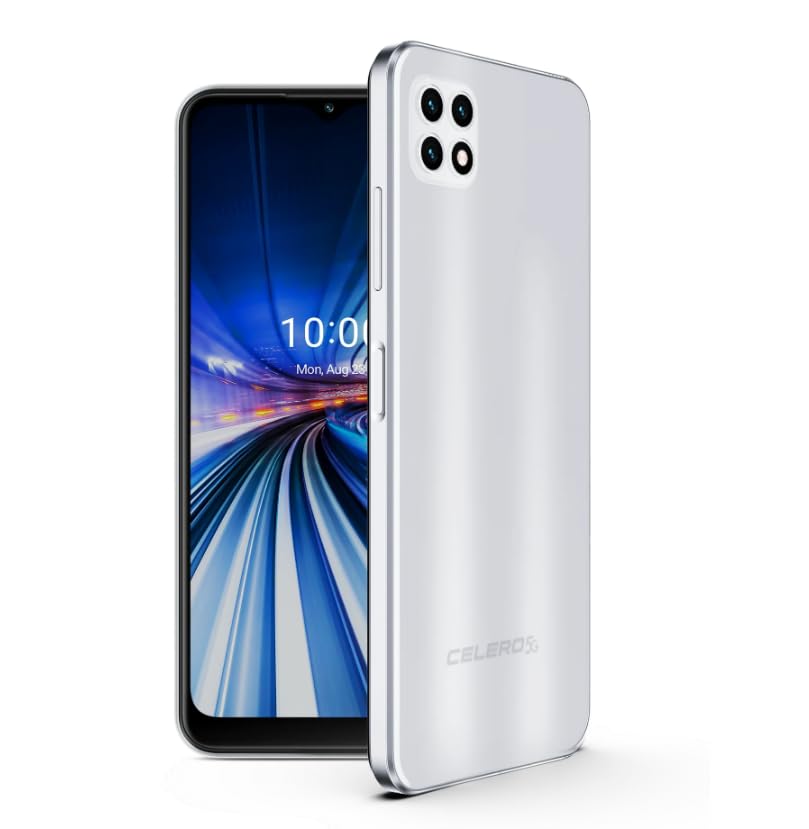
Figure 1: Wingtech Celero 5G Smartphone (Silver)
2. Chii chiri muBhokisi
Iva nechokwadi chekuti zvinhu zvese zviripo mupakeji yechigadzirwa:
- Wingtech Celero 5G Smartphone
- USB Cable
- SIM Tray Ejector
- Quick Start Guide (inogona kuverengerwa zvakasiyana)
3. Setup
3.1. Kuisa SIM Card
- Tsvaga iyo SIM kadhi tireyi padivi pechishandiso chako.
- Isa SIM tray ejector tool mugomba diki padivi petireyi wosundidzira zvinyoro nyoro kusvika tireyi yabuda.
- Isa Nano-SIM kadhi yako (s) uye/kana microSD kadhi mutireyi ine macontacts egoridhe akatarisa pasi.
- Nyatsodzorera tireyi mumudziyo.
3.2. Yekutanga Power On uye Setup
- Dzvanya wobata bhatani rePower kusvika mudziyo wadedera uye skrini yatanga kushanda.
- Tevedzera zviri pa-skrini kuti usarudze mutauro wako, batanidza kunetiweki yeWi-Fi, uye gadzira yako Google account.
- Zadzisa iyo wizard yekuseta kuti ugadzirise zvigadziriso zvechishandiso chako.
4. Kushanda
4.1. Basic Navigation
- Sikirini Yemba: Swipe kuruboshwe kana kurudyi kuti uwane akasiyana sikirini epamba mapaneru.
- App Drawer: Swipe kumusoro kubva pachiratidziro chekumba kuenda view ese akaiswa application.
- Notifications Panel: Swipe uchidzika kubva pamusoro pechidzitiro kuti uwane zviziviso uye nekukurumidza marongero.
4.2. Kuita Kufona uye Kutumira Mharidzo
- Tap the Phone icon to open the dialer and make calls.
- Tap the Mharidzo icon to send and receive text messages.
4.3. Kushandiswa kwekamera
- Tap the Kamera icon to launch the camera application.
- Select different modes (Photo, Video, Portrait, etc.) by swiping across the screen.
- Dzvanya bhatani rekuvhara kuti utore mifananidzo kana kutanga/kumisa kurekodha vhidhiyo.
5. Zvinotsanangurwa
| Feature | Detail |
|---|---|
| Model Name | Celero 5G |
| Item Model Number | DSH98123 |
| Operating System | Android 11.0 |
| Screen Size | 6.52 inches |
| Resolution | 1920 x 1080 |
| Memory Storage Capacity | 4 GB (RAM) |
| Kuchengeta Kwemukati | 64GB (as per product title, though description mentions 64GB built-in memory) |
| Battery Capacity | 4000 mamiriyoniamp Maawa |
| Kubatana Technology | 5G |
| Color | Sirivha |
| Mugadziri | Wingtech |
6. Kuchengeta
- Chengeta mudziyo wako wakachena uchishandisa jira rakapfava, rakaoma.
- Dzivisa kuisa mudziyo pakupisa kwakanyanya, zuva rakananga, kana mvura.
- Gara uchitsigira data rako kudzivirira kurasikirwa.
- Install software updates as they become available to ensure optimal performance and security.
7. Kugadzirisa matambudziko
7.1. Chishandiso Chisingabatike
- Ita shuwa kuti bhatiri rachajwa. Batanidza mudziyo kuchaja womira maminetsi mashoma usati waedza kubatidza.
- Dzvanya uye bata bhatani reSimba kweinenge 10-15 masekonzi kuti uite yekumanikidza kutangazve.
7.2. Kubatana Kusina Kunaka kweNetiweki
- Tarisa kana SIM kadhi rako rakaiswa zvakanaka.
- Iva nechokwadi chekuti data refoni rinogoneswa mumasetingi emudziyo wako.
- Restart your device or toggle Airplane Mode on and off.
- Contact your wireless carrier to confirm service availability in your area.
7.3. Mapurogiramu Anoputsika kana Kutonhora
- Clear the cache and data for the problematic app via Settings > Apps.
- Uninstall uye dzorera iyo app.
- Ita shuwa kuti software yemudziyo wako ndeyemazuva ano.
8. Warranty uye Tsigiro
This product is offered as an Amazon Renewed device. Amazon Renewed products are inspected, tested, and refurbished as necessary to be fully functional. Your purchase is eligible for Amazon Renewed coverage in conjunction with Amazon's Return Policy and the A-to-z Guarantee.
For specific warranty details, return policies, or technical support, please refer to the documentation provided with your purchase or visit the Amazon Renewed support page.