1. Nhanganyaya
Thank you for choosing the Pureatic V3 Robot Vacuum and Mop Combo. This device is designed to provide efficient and convenient cleaning for your home, combining vacuuming, sweeping, and mopping functionalities. With 5000Pa suction power, smart navigation, and multiple control options, the V3 ensures a thorough clean on various floor types, including hard floors and carpets.
This manual provides essential information for the safe operation, setup, maintenance, and troubleshooting of your Pureatic V3 robot vacuum. Please read it carefully before use and retain it for future reference.
2. Mirayiridzo Yekuchengetedza
To reduce the risk of injury or damage, read these safety instructions carefully and keep them accessible during the product's lifespan.
- Mudziyo uyu unogona kushandiswa nevana vane makore masere zvichikwira uye vanhu vane simba rakadzikira mumuviri, pfungwa kana pfungwa kana kushaya ruzivo neruzivo kana vakatariswa kana kurairwa nezvekushandisa mudziyo nenzira isina njodzi uye vanonzwisisa njodzi dziripo. .
- Vana vanofanira kutariswa kuti vaone kuti havasi kutamba nemudziyo wacho.
- Kucheneswa nekuchengetedzwa kwevashandisi hakuitwe nevana pasina vatariri.
- Shandisa chete chigadziriso chemagetsi chepakutanga chakapihwa nemugadziri.
- Do not operate the robot in areas with standing water or excessive moisture.
- Chengeta robhoti kure nemoto wakavhurika kana zvinhu zvinopisa.
- Ensure all cables, curtains, and small objects are cleared from the floor before operation to prevent entanglement.
- Usashandise robhoti kutora marara makuru, zvinhu zvakapinza, kana mvura.
- The robot contains a battery. Do not expose it to high temperatures or direct sunlight.
3. Package Zviri mukati
Tarisa kuti zvese zvirimo zviripo mupakeji:
- Pureatic V3 Robot Vacuum
- Kuchaja Dock
- Power Adapter
- Remote Control (mabhatiri haana kuisirwa)
- Side Brushes (2 pairs)
- HEPA Sefa (yakafanoiswa)
- Yekuchenesa Tool
- Tangi Yemvura
- Mop Pad
- User Manual
4. Chigadzirwa Pamusoroview
Familiarize yourself with the main components of your Pureatic V3 robot vacuum.
Top View
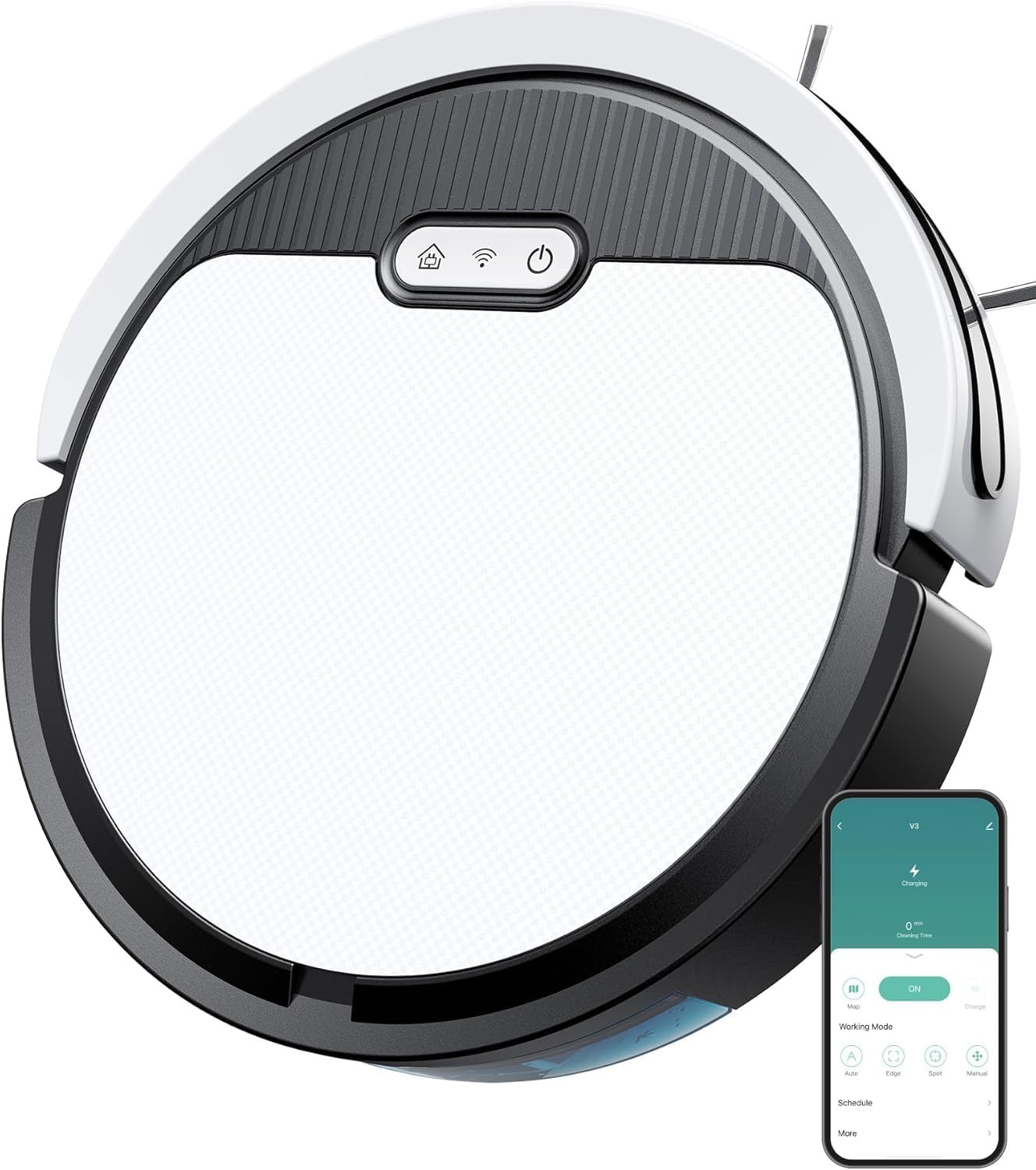
Mufananidzo: Pamusoro view of the Pureatic V3 robot vacuum, showing the power button, Wi-Fi indicator, and dustbin access panel.
Pasi View uye Zvikamu

Mufananidzo: Pazasi view of the Pureatic V3 robot vacuum, highlighting the powerful suction inlet and side brushes.

Mufananidzo: Yakaputika view of the Pureatic V3 showing the 650ml hair collection box (dustbin), 100ml water tank, and mop plate with mop pad.
- Main Unit: Contains the motor, battery, and control systems.
- Dustbin: Collects dry debris. Capacity: 650ml.
- Tangi Yemvura: Holds water for mopping. Capacity: 100ml.
- Side Brushes: Tsvaira marara munzira yekukweva.
- Main Wheels: Bvumira robhoti kuti ifambe munzvimbo dzakasiyana siyana.
- Kuchaja Mazita: Connect with the charging dock for power.
- Sensors: Infrared sensors for obstacle detection and cliff sensors to prevent falls.

Image: Diagram illustrating the anti-fall sensors on the underside of the robot vacuum, detecting edges and preventing drops.
5. Setup
5.1 Kuchaja Dock Kuiswa
Place the charging dock against a wall in an open area, ensuring there are no obstacles within 1 meter (3 feet) to the front and 0.5 meters (1.5 feet) to the sides. Connect the power adapter to the charging dock and plug it into a wall outlet.
5.2 Kutanga Kuchaja
Place the robot vacuum onto the charging dock, aligning its charging contacts with those on the dock. The robot will automatically begin charging. For first-time use, ensure the robot is fully charged (approximately 4-5 hours) before operation.

Image: The robot vacuum automatically returning to its charging dock for recharging, demonstrating intelligent route planning.
5.3 Kuisa Bhurashi Rekumativi
Dzvanya mabhurashi eparutivi pamatanda akaenzana ari pasi perobhoti kusvika adzvanya panzvimbo yawo.
5.4 App Connection (2.4G WiFi Only)
Download the Pureatic app from your smartphone's app store. Follow the in-app instructions to connect your robot vacuum to your home's 2.4GHz Wi-Fi network. Ensure your router is set to 2.4GHz or has a combined 2.4GHz/5GHz network.
6. Operating Instructions
6.1 Kudzora Nzira
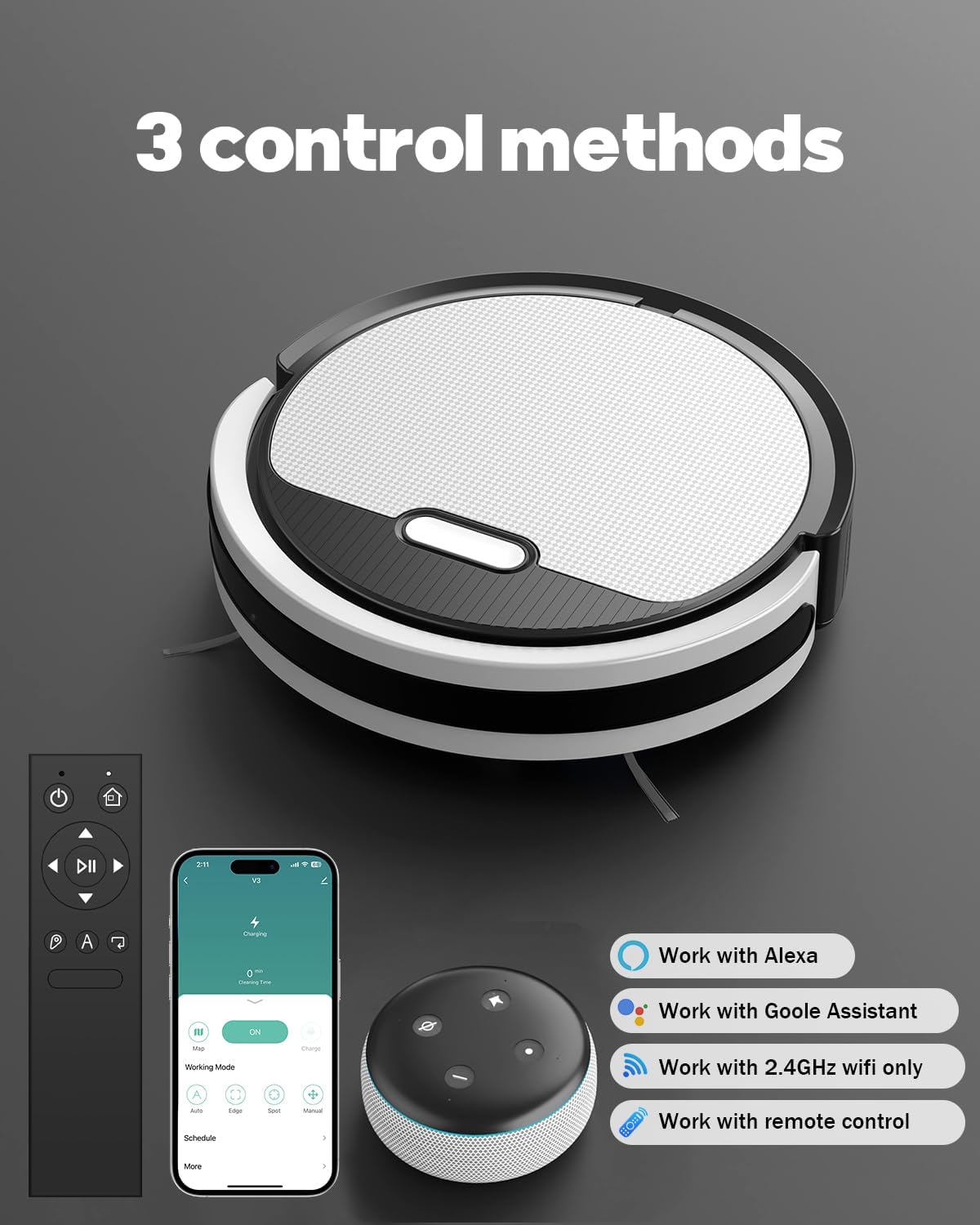
Image: The Pureatic V3 robot vacuum can be controlled via the mobile app, remote control, or voice assistants like Alexa and Google Assistant.
App Control
The Pureatic app allows for comprehensive control and monitoring of your robot vacuum. You can start/stop cleaning, select cleaning modes, adjust suction power and water flow, schedule cleaning times, and view cleaning status.

Image: Screenshot of the Pureatic app interface, displaying options for Zigzag Mode, Spot Mode, Edge Mode, and controls for suction power (Quiet, Standard, Strong) and water flow (Low, Medium, High).

Image: The robot vacuum operating under a sofa, controlled by the mobile app displayed on a smartphone.
Remote Control
Use the included remote control for basic functions such as starting/stopping cleaning, sending the robot back to the charging dock, and manually directing its movement.

Image: The remote control for the Pureatic V3 robot vacuum, showing buttons for power, home, directional control, play/pause, and cleaning modes.
Voice Control
Integrate your Pureatic V3 with Amazon Alexa or Google Home for convenient voice commands. Refer to the app for detailed instructions on connecting to voice assistants.

Image: The robot vacuum being controlled by voice command through an Amazon Alexa device, with the command "Alexa, Turn on the V3" displayed.
6.2 Kuchenesa Modes
The Pureatic V3 offers several cleaning modes to suit different needs:
- Auto Clean: The robot intelligently navigates and cleans the entire accessible area.
- Nzvimbo Yakachena: The robot cleans a specific area in a spiral pattern, ideal for concentrated dirt.
- Edge Clean: Robhoti rinochenesa nemadziro nemacheto efenicha.
- Zigzag Clean: The robot cleans in a systematic zigzag pattern, covering the area efficiently.
- Yakarongwa Yakachena: Seta nguva dzakatarwa dzekuti robhoti ritange kuchenesa.
- Manual Control: Use the app or remote to direct the robot's movement.

Image: Illustration of the 3-in-1 cleaning system, showing separate modes for Vacuum Only, Mop Only, and Vacuum & Mop.
6.3 Simba reKusveta uye Kugadziriswa kweKuyerera kweMvura
Adjust the suction power (Low, Medium, High) and water flow (Low, Medium, High) via the app to suit different cleaning needs and floor types.

Image: The robot vacuum cleaning a carpet, with icons indicating adjustable suction levels: Low, Medium, and High for 5000Pa strong suction.
6.4 Mopping Basa
To use the mopping function, fill the water tank with clean water (and a small amount of neutral floor cleaner if desired, following cleaner instructions). Attach the mop pad to the water tank and then insert the assembly into the robot. The robot will automatically dispense water as it cleans. Do not use the mopping function on carpets.
7. Kuchengeta
Kugara kugadziridza kunovimbisa kuita kwakaringana uye kunowedzera hupenyu hwerobhoti vacuum yako.
7.1 Emptying the Dustbin and Cleaning the Filter
- Dzvanya bhatani rekuburitsa dustbin wobva waburitsa dustbin.
- Open the dustbin cover and empty the contents into a trash can.
- Remove the HEPA filter and tap it gently to remove dust. Do not wash the HEPA filter with water.
- Rinse the dustbin with water if necessary, ensuring it is completely dry before reinstallation.
- Reinstall the HEPA filter and dustbin.
7.2 Kuchenesa Tangi reMvura neMop Pad
- Bvisa tangi remvura kubva parobhoti.
- Bvisa chero mvura yasara.
- Detach the mop pad and wash it by hand or machine. Allow it to air dry completely.
- Rinse the water tank and allow it to air dry.
7.3 Kuchenesa Side Brushes
Regularly check the side brushes for tangled hair or debris. Pull them off their posts and use the cleaning tool or scissors to remove any obstructions. Reinstall them securely.
7.4 Kuchenesa maSensors uye Kuchaja Mazita
Wipe the cliff sensors, infrared sensors, and charging contacts on both the robot and the charging dock with a clean, dry cloth to ensure proper function.
8. Kugadzirisa matambudziko
If you encounter issues with your Pureatic V3, refer to the following common problems and solutions:
| Dambudziko | Zvinogona Kukonzera | Solution |
|---|---|---|
| Robot haina kutanga | Bhatiri rakaderera; Kudzima kwemagetsi | Charge the robot; Turn on the power switch |
| Robhoti haikwanise kuchaja | Kuchaja mazita akasviba; Kuchaja chiteshi hachina simba | Clean charging contacts; Ensure dock is plugged in |
| Kusveta zvisina kunaka | Dustbin full; Filter clogged; Suction inlet blocked | Empty dustbin; Clean/replace filter; Clear suction inlet |
| Robhoti inonamira kazhinji | Zvipingamupinyi pasi; Masensa ane tsvina | Clear floor area; Clean sensors |
| Water not dispensing for mopping | Water tank empty; Water outlet clogged | Fill water tank; Clean water outlet |
| App connection failed | Incorrect Wi-Fi band (not 2.4GHz); Incorrect password | Ensure 2.4GHz Wi-Fi; Re-enter password; Restart router/robot |
Kana dambudziko rikaramba riripo, tapota taura nerutsigiro rwevatengi.
9. Zvinotsanangurwa
| Feature | Tsanangudzo |
|---|---|
| Brand | Pureatic |
| Model Name | Pureatic V3 |
| Product Dimensions | 12"L x 12"W x 2.99"H |
| Inosanganisirwa Zvikamu | Bhatiri |
| Rudzi rwesefa | HEPA |
| Hupenyu hwebhatiri | 120 kwemaminitsi |
| Voltage | 11.1 Volts |
| Dustbin Capacity | 650 mamiriyoni |
| Mvura Tangi Kugona | 100 mamiriyoni |
| Simba Source | Battery Powered |
| Mabhatiri Akabatanidzwa | Yes (1 12V battery) |
| Kudzora Nzira | App, Remote, Inzwi |
| Inowirirana Devices | Amazon Echo, Google Home, Mafoni Anoshandiswa |
| Fomu Factor | Cylindrical |
| Item Weight | 5.13 makirogiramu |
| Mugadziri | Pureatic |
10. Warranty uye Tsigiro
For warranty information, please refer to the documentation provided at the time of purchase or contact your retailer. Pureatic is committed to providing reliable customer service.
Our customer service team is available to assist with setup, troubleshooting, and ensuring the best performance of your robot vacuum. For support, please refer to the contact information provided in your product packaging or on the official Pureatic website.